
Excel and resource issues

BSeanD

New member
Member
VIP
Local time
6:00 PM
Messages
136
Hi Guys,

I have a staff member who is having Virtual memory issues when running Office 2007 Excel. She has a minimal amount of programs open and also has plenty of disk space and RAM available but at times she gets the following error.
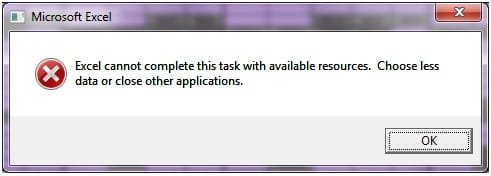
excelerror.jpg

This does not happen every time she opens excel or a particular spreadsheet but seems to be happening at random. The logs have the following entry;

[FONT=&quot]Faulting application name: EXCEL.EXE, version: 12.0.6654.5003, time stamp: 0x4ebd97cb[/FONT]
[FONT=&quot]Faulting module name: EXCEL.EXE, version: 12.0.6654.5003, time stamp: 0x4ebd97cb[/FONT]
[FONT=&quot]Exception code: 0xc0000005[/FONT]
[FONT=&quot]Fault offset: 0x0003a44c[/FONT]
[FONT=&quot]Faulting process id: 0x158[/FONT]
[FONT=&quot]Faulting application start time: 0x01cd061850b9a2c8[/FONT]
[FONT=&quot]Faulting application path: C:\Program Files (x86)\Microsoft Office\Office12\EXCEL.EXE[/FONT]
[FONT=&quot]Faulting module path: C:\Program Files (x86)\Microsoft Office\Office12\EXCEL.EXE[/FONT]
[FONT=&quot]Report Id: 1160bbed-7246-11e1-8e0b-002643fa484c[/FONT]
[/HTML]

A reboot fixes the problem but this isn't really solving much.

Can someone point me in the right direction on how I can solve this one.

Thanks,

Sean
 

My Computer

OS
Windows 7
Hi Sean,

Regardless of the amount of memory the host machine has, Excel 2007 as a memory limit of 2GB i believe.
Is excel using anywhere near that when getting this error?

How about trying this?
Frustrating Excel 2007 issue - Tech Support Forum
by chance is this an upgraded Office installation? Mine was. I deleted the contents of "c:\documents and settings\%username%\application data\microsoft\excel" and rebooted the computer. The folder contents were re-created the next time I opened Excel and I haven't had the problem return since then.

Path for Windows 7 is - C:\Users\<username>\AppData\Roaming\Microsoft\Excel

Regards,
JDobbsy1987
 

My Computer

Computer type
PC/Desktop
Computer Manufacturer/Model Number
Self Built
OS
Windows 8.1 Pro x64
CPU
Intel Core i5-2500K @ 3.30GHz - S1155
Motherboard
Asus P8P67 LE Rev3, Intel P67, S115
Memory
8GB Corsair DDR3 XMS3, PC3-12800
Graphics Card(s)
NVIDIA GeForce GTX 650
Sound Card
On-Board
Monitor(s) Displays
3 x 24" {Extended Display}
Screen Resolution
1920 x 1080
Hard Drives
300GB Seagate Barracuda 7200
PSU
550W Coolermaster GX550
Case
Silverstone Precision PS04B
Cooling
Stock
Keyboard
Logitech K120
Mouse
World of Warcraft Cataclysm MMO Gaming Mouse
Internet Speed
80 MB
Antivirus
MSE / Windows Defender
Browser
Chrome
Hey JDobbsy1987,

The files are no where near 2Gig in size at the time of the "crash" the two files open were 109kb and the other being opened was 34.3kb.
I'll have a read of the forum link you posted and see how I go there.

Thanks,

Sean
 

My Computer

OS
Windows 7
Hey JDobbsy1987,

The files are no where near 2Gig in size at the time of the "crash" the two files open were 109kb and the other being opened was 34.3kb.
I'll have a read of the forum link you posted and see how I go there.

Thanks,

Sean

I was referring to a 2gb RAM limit within Excel, when you get this error check task manager and see how much memory excel.exe is using up.

Regards,
JDobbsy1987
 

My Computer

Computer type
PC/Desktop
Computer Manufacturer/Model Number
Self Built
OS
Windows 8.1 Pro x64
CPU
Intel Core i5-2500K @ 3.30GHz - S1155
Motherboard
Asus P8P67 LE Rev3, Intel P67, S115
Memory
8GB Corsair DDR3 XMS3, PC3-12800
Graphics Card(s)
NVIDIA GeForce GTX 650
Sound Card
On-Board
Monitor(s) Displays
3 x 24" {Extended Display}
Screen Resolution
1920 x 1080
Hard Drives
300GB Seagate Barracuda 7200
PSU
550W Coolermaster GX550
Case
Silverstone Precision PS04B
Cooling
Stock
Keyboard
Logitech K120
Mouse
World of Warcraft Cataclysm MMO Gaming Mouse
Internet Speed
80 MB
Antivirus
MSE / Windows Defender
Browser
Chrome
You may find this Microsoft article of help: Excel 2010 error: Excel cannot complete this task with available resources.

You might also want to download Process Explorer to see how your RAM is being used. It may just be that Excel has run out of RAM because of other processes that may be running at the time.

http://technet.microsoft.com/en-us/sysinternals/bb896653

The 32-bit version of Excel has a 2GB memory limit so if you are running a lot of processes the message could then be triggered as you near that limit.

If you're using Excel as a database had you considered using Access instead?
 

My Computer

Computer Manufacturer/Model Number
HP Pavilion Elite 495UK
OS
Windows 7 Ultimate SP1 64-Bit
CPU
Intel Core i7 870 @ 2.93GHz
Motherboard
MSI 2A9C (CPU1)
Memory
8Gb Dual-Channel DDR3 @ 664MHz
Graphics Card(s)
nVidia GeForce GTX 460 1024MB dedicated RAM
Sound Card
Realtek HD Audio
Monitor(s) Displays
HP2310i
Screen Resolution
1920 x 1080
Hard Drives
1x1954GB Hitachi HDS22020ALA 330 (RAID), 1x1954GB Hitachi External for backup and storage
PSU
460W
Case
HP Elite
Cooling
Air cooled
Keyboard
Logitech K750 solar-powered keyboard
Mouse
Logitech Wireless M180 mouse
Internet Speed
2Mb
Other Info
Pure Avanti Flow Internet Radio with iPod Dock, 64Gb iPod, HP USB Speakers, Sony MDR-V500 Headphones, Sony Vaio F-Series Laptop

My Computer

Computer type
PC/Desktop
Computer Manufacturer/Model Number
Self Built
OS
Windows 8.1 Pro x64
CPU
Intel Core i5-2500K @ 3.30GHz - S1155
Motherboard
Asus P8P67 LE Rev3, Intel P67, S115
Memory
8GB Corsair DDR3 XMS3, PC3-12800
Graphics Card(s)
NVIDIA GeForce GTX 650
Sound Card
On-Board
Monitor(s) Displays
3 x 24" {Extended Display}
Screen Resolution
1920 x 1080
Hard Drives
300GB Seagate Barracuda 7200
PSU
550W Coolermaster GX550
Case
Silverstone Precision PS04B
Cooling
Stock
Keyboard
Logitech K120
Mouse
World of Warcraft Cataclysm MMO Gaming Mouse
Internet Speed
80 MB
Antivirus
MSE / Windows Defender
Browser
Chrome
I was referring to a 2gb RAM limit within Excel, when you get this error check task manager and see how much memory excel.exe is using up.

Regards,
JDobbsy1987
D'oh sorry, busy day not concentrating.
 

My Computer

OS
Windows 7
You may find this Microsoft article of help: Excel 2010 error: Excel cannot complete this task with available resources.

You might also want to download Process Explorer to see how your RAM is being used. It may just be that Excel has run out of RAM because of other processes that may be running at the time.

Process Explorer

The 32-bit version of Excel has a 2GB memory limit so if you are running a lot of processes the message could then be triggered as you near that limit.

If you're using Excel as a database had you considered using Access instead?

Hi Seavixen,

The files hold pretty minimal data and are not being used as a database.
So with the 2GB limit if she gets the error message again I need to check total memory usage on Excel and the overall memory usage?
 

My Computer

OS
Windows 7
I had a similar issue a while back with a client who had the same problem as yours. The relatively small excel file was originally created with office 2003. When they upgraded to office 2007 the problem started. I re-installed 2003 on the problem PC and the issue went away. The strange thing is that it only happens on one of the 4 identical upgraded machines. :confused:
 

My Computer

Computer type
PC/Desktop
Computer Manufacturer/Model Number
Self Built
OS
Windows 7 Ultimate 64bit
CPU
AMD Phenom Quad core 9950 black edition
Motherboard
Gigabyte
Memory
16Gb
Graphics Card(s)
2x XFX Radeon 5850
Sound Card
PCI Express X-Fi Titanium / Logitech G35
Monitor(s) Displays
2x HP 2410i
Screen Resolution
1920x1080
Hard Drives
2x 500Gb Seagate
1x 300Gb Seagate
1x 1Tb Seagate
2x 1Tb Hitatchi
PSU
Jean Tech Storm 700W
Case
Cooler Master COSMOS S
Cooling
Akasa Evo Blue Pro
Keyboard
Logitech G15
Mouse
Mad Catz M.M.O. 7
Internet Speed
12mb
I had a similar issue a while back with a client who had the same problem as yours. The relatively small excel file was originally created with office 2003. When they upgraded to office 2007 the problem started. I re-installed 2003 on the problem PC and the issue went away. The strange thing is that it only happens on one of the 4 identical upgraded machines. :confused:

Hey PMan,

This is not on an upgrade, our office has the 2007 version of Office.


Sean
 

My Computer

OS
Windows 7
Back
Top