Excel Formula Help please...

BomberAF

New member
Member
VIP
Local time
10:27 PM
Messages
491
Location
Liverpool
This is probably very simple and I have got it working but it isn't working how I want it to work.

I have created an Excel document to show my monthly payments of a bank loan. I have created 3 columns in the first column is the payment number, in the second column is the amount that the loan is after I have made a payment, and in the third column I want to know how much the loan has been reduced by after the bank has taken interest off.

I have just put this formula in the 3rd column, =SUM(D4-D5), and then dragged this formula down into all the other rows I want this to work in which it does. The problem I am having with this is that the number from the 2nd column get placed in the 3rd row, below the amount that has been reduced, and I would like it to stay at £0.00 as it looks better.

Here is what I mean

2wfk0vr.png


If you notice the number I enter in the balance column appears in the reduced by column, and I don't want it too because it looks very unprofessional.

Can someone please help me out with this please.
 

My Computer

Computer Manufacturer/Model Number
Dell Inspiron
OS
Windows 7
CPU
2.4 GHz Intel i3 cpu
Memory
8GB
Mouse
MS Explorer Mouse
Internet Speed
100 Mb/s
Try using IF ISBLANK.

So, the formula could be something like

=IF(ISBLANK(D5),"",SUM(D4-D5))
 

My Computer

Computer Manufacturer/Model Number
Too many to describe...
OS
Windows 7 x64 pro/ Windows 7 x86 Pro/ XP SP3 x86
Try using IF ISBLANK.

So, the formula could be something like

=IF(ISBLANK(D5),"",SUM(D4-D5))


Thanks for that it worked a treat, now I know I am being fussy, but all the cells that had £0.00 in the rest of the spreadsheet have just gone blank.

How can I get the cells to have £0.00 in them again, but keep the value from being carried?
 

My Computer

Computer Manufacturer/Model Number
Dell Inspiron
OS
Windows 7
CPU
2.4 GHz Intel i3 cpu
Memory
8GB
Mouse
MS Explorer Mouse
Internet Speed
100 Mb/s
Try this.

=IF(ISBLANK(D5),0,SUM(D4-D5))

Otherwise, you could insert a string

=IF(ISBLANK(D5),"£0.00",SUM(D4-D5))

You may need to adjust the formatting etc.
 

My Computer

Computer Manufacturer/Model Number
Too many to describe...
OS
Windows 7 x64 pro/ Windows 7 x86 Pro/ XP SP3 x86
Try this.

=IF(ISBLANK(D5),0,SUM(D4-D5))

Otherwise, you could insert a string

=IF(ISBLANK(D5),"£0.00",SUM(D4-D5))

You may need to adjust the formatting etc.


Once again many thanks that was very helpfull I have learned something today, just wish I could rep you more but alas I can only rep you once, if I see you around I will give you some more.
 

My Computer

Computer Manufacturer/Model Number
Dell Inspiron
OS
Windows 7
CPU
2.4 GHz Intel i3 cpu
Memory
8GB
Mouse
MS Explorer Mouse
Internet Speed
100 Mb/s
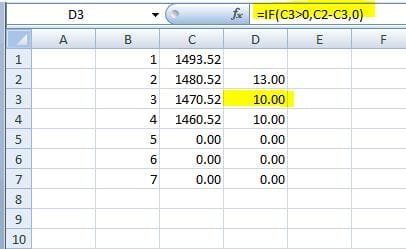
Another possible is...


You would of course need to drag the formula down through the rest of the column. :)
 

Attachments

  • Excel formula.JPG
    Excel formula.JPG
    21.8 KB · Views: 14

My Computer

Computer type
PC/Desktop
Computer Manufacturer/Model Number
Packard Bell
OS
Windows 7 Home Premium 64bit
CPU
Intel(R) Core(TM) i3-2120 CPU @ 3.30GHz
Motherboard
Packard Bell IPISB-AG
Memory
3.00 GB
Graphics Card(s)
(1) Intel(R) HD Graphics (2) VNC Mirror Driver
Sound Card
Realtek High Definition Audio
Monitor(s) Displays
AIO LCD
Screen Resolution
1920 x 1080
Hard Drives
WDC WD10EADX-22TDHB0 ATA Device
Fixed hard disk media
4 partitions
931.51 GB
Keyboard
Wireless
Mouse
Wireless
Antivirus
Microsoft Security Essentials
Browser
IE; Firefox
Other Info
Also:
Samsung N220 Plus Netbook - Windows 7 Home
HP laptop
iPad 5
Another possible is...


You would of course need to drag the formula down through the rest of the column.
This formula basically says:
If the number in column 'C' is more than zero, take C3 from C2, otherwise enter zero in the column 'D' cell. ;)
 

My Computer

Computer type
PC/Desktop
Computer Manufacturer/Model Number
Packard Bell
OS
Windows 7 Home Premium 64bit
CPU
Intel(R) Core(TM) i3-2120 CPU @ 3.30GHz
Motherboard
Packard Bell IPISB-AG
Memory
3.00 GB
Graphics Card(s)
(1) Intel(R) HD Graphics (2) VNC Mirror Driver
Sound Card
Realtek High Definition Audio
Monitor(s) Displays
AIO LCD
Screen Resolution
1920 x 1080
Hard Drives
WDC WD10EADX-22TDHB0 ATA Device
Fixed hard disk media
4 partitions
931.51 GB
Keyboard
Wireless
Mouse
Wireless
Antivirus
Microsoft Security Essentials
Browser
IE; Firefox
Other Info
Also:
Samsung N220 Plus Netbook - Windows 7 Home
HP laptop
iPad 5
Back
Top