
Excel not runnning all cores at 100%

Reubenb04

New member
Local time
8:57 AM
Messages
11
Hi all,

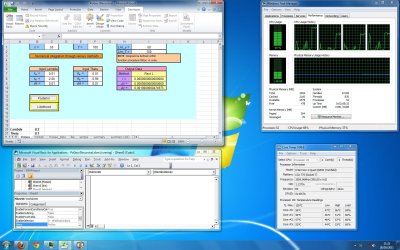
I run alot excel & visual basic simulations that normally take about 4-7hrs to calculate. i've noticed through task manager(performance) that all 4 cores are running but only 1 core is running at 90% and the other 3 running at about 60%.

Is it possible to have all 4 cores running at 100% My hope is that all cores maxmised will slash the proccessing time by atleast 20%.

Any help will be much appreciated.

my system:-
-Windows 7 Ultimate 64bit.
-Intel Q9650(3Ghz) overclocked to 3.5Ghz
-Gigabyte GA-P35-DS3
-4gb DDR2 800Mhz
-250gb WD Cavier Blue
-Freezer Pro rev2
 

Attachments
  • screen shot.jpg
    screen shot.jpg
    237.6 KB · Views: 102

My Computer My Computer

At a glance

Windows 7 Ultimate x64Intel Q9650DDR2 800Mhz 4gbATI RadeonHD 4550
Computer Manufacturer/Model Number
Personal Build
OS
Windows 7 Ultimate x64
CPU
Intel Q9650
Motherboard
Gigabyte GA-P35-DS3
Memory
DDR2 800Mhz 4gb
Graphics Card(s)
ATI RadeonHD 4550
Monitor(s) Displays
Asus 22"
Hard Drives
WD Cavier Blue 250GB
Cooling
Freezer Pro Rev2
Ram Disk

Would a ram disk be of help? I know that doesn't solve the cpu core issue.
 
Last edited:

My Computer My Computer

At a glance

win 7 X64 Ultimate SP1I3770KG Skill F3-14900CL9-4GBXL x 4NVIDIA GeForce GTX670 + Intel 4000
Computer Manufacturer/Model Number
BGC (Bob's Garage Crew)
OS
win 7 X64 Ultimate SP1
CPU
I3770K
Motherboard
Asus P8Z77-V Deluxe
Memory
G Skill F3-14900CL9-4GBXL x 4
Graphics Card(s)
NVIDIA GeForce GTX670 + Intel 4000
Sound Card
Realtek HD 5.1 (MOB)
Monitor(s) Displays
Asus VW224T (1)
Screen Resolution
1920 x 1080
Hard Drives
SATA Corsair Force GT 2.5" 180GB (System) Sata 3
OCZ Vertex3 120GB
OCZ Vertex 2 120GB 2.5" SATA II
ST31000524AS 1000.2GB
WD15EARS (External)
PSU
CoolerMaster 1000 Watt
Case
CoolerMaster HAF X
Cooling
CPU -- CoolerMaster 520N
Keyboard
MS Wireless 3000 V2
Mouse
MS Wireless 3000 V2
Internet Speed
Cable
Antivirus
Norton Internet Security
Browser
IE9
Other Info
AMI Bios 1805
OC'd 3%

My Computer My Computer

At a glance

Windows 7 Ultimate x64Intel Q9650DDR2 800Mhz 4gbATI RadeonHD 4550
Computer Manufacturer/Model Number
Personal Build
OS
Windows 7 Ultimate x64
CPU
Intel Q9650
Motherboard
Gigabyte GA-P35-DS3
Memory
DDR2 800Mhz 4gb
Graphics Card(s)
ATI RadeonHD 4550
Monitor(s) Displays
Asus 22"
Hard Drives
WD Cavier Blue 250GB
Cooling
Freezer Pro Rev2
Ram Disk

This can explain it better than I can.

RAM disk - Wikipedia, the free encyclopedia

There is software available to set up ram disks, some of it is free. IMO if you are not ram starved you might as well put it to work.
 

My Computer My Computer

At a glance

win 7 X64 Ultimate SP1I3770KG Skill F3-14900CL9-4GBXL x 4NVIDIA GeForce GTX670 + Intel 4000
Computer Manufacturer/Model Number
BGC (Bob's Garage Crew)
OS
win 7 X64 Ultimate SP1
CPU
I3770K
Motherboard
Asus P8Z77-V Deluxe
Memory
G Skill F3-14900CL9-4GBXL x 4
Graphics Card(s)
NVIDIA GeForce GTX670 + Intel 4000
Sound Card
Realtek HD 5.1 (MOB)
Monitor(s) Displays
Asus VW224T (1)
Screen Resolution
1920 x 1080
Hard Drives
SATA Corsair Force GT 2.5" 180GB (System) Sata 3
OCZ Vertex3 120GB
OCZ Vertex 2 120GB 2.5" SATA II
ST31000524AS 1000.2GB
WD15EARS (External)
PSU
CoolerMaster 1000 Watt
Case
CoolerMaster HAF X
Cooling
CPU -- CoolerMaster 520N
Keyboard
MS Wireless 3000 V2
Mouse
MS Wireless 3000 V2
Internet Speed
Cable
Antivirus
Norton Internet Security
Browser
IE9
Other Info
AMI Bios 1805
OC'd 3%
Thanks, will try that and see how much diiferent the performance will be.
 

My Computer My Computer

At a glance

Windows 7 Ultimate x64Intel Q9650DDR2 800Mhz 4gbATI RadeonHD 4550
Computer Manufacturer/Model Number
Personal Build
OS
Windows 7 Ultimate x64
CPU
Intel Q9650
Motherboard
Gigabyte GA-P35-DS3
Memory
DDR2 800Mhz 4gb
Graphics Card(s)
ATI RadeonHD 4550
Monitor(s) Displays
Asus 22"
Hard Drives
WD Cavier Blue 250GB
Cooling
Freezer Pro Rev2
Hi Reuben,

Unfortunately, I suspect the thread loading is controlled by the application - in your case Excel, so there may not be much you can do about it.

I have similar issues with a different set of software running, ironically also simulations, but using geological and mine planning software. I have used this counter-intuitive? technique to squeeze a little bit more out of the active CPU threads, but the gain is really quite minimal, but there is at least a little gain. With the software I use, the simulations are more RAM intensive, so I split my work into multiple copies and run several instances of the simulation since I have 24GB of RAM I can utilise, but I also try to maximise the CPU usage.

The trick in my case is to avoid spreading the work across all the cores if they aren't being used fully. For example, I only allow the executable to utilise for example core 1,2 and 3. That way, there isn't any overhead lost when the work swaps between cores as it requires, if that makes sense.

Try this:

1. Open Task Manager, under the Processes tab, find EXCEL.EXE *32 (assuming your are using 32 bit Office)
2. Right-click on EXCEL.EXE *32 and then select Set Affinity
3. By default <All Processors> will be ticked - try limiting Excel to only use 3 threads only, and see if that works for you.

As I said, it worked for me with some processes I run, but not all of them, so it may not work for Excel.

Let us know how you get on.

Regards,
Golden
 

Attachments

  • Capture.PNG
    Capture.PNG
    48 KB · Views: 175

My Computer My Computer

At a glance

Windows 10 Pro x64 ; Xubuntu x64Intel i7 860 @ 2.80 GHz O/C'ed to 4.0GHz16GB Corsair Vengance DDR3 @ 661 MHz Dual Cha...EVGA NVidia GTX 560 1024MB
Computer type
PC/Desktop
Computer Manufacturer/Model Number
Golden Mk. I.4
OS
Windows 10 Pro x64 ; Xubuntu x64
CPU
Intel i7 860 @ 2.80 GHz O/C'ed to 4.0GHz
Motherboard
Gigabyte P55A-UD3R Rev.1. Award BIOS F13
Memory
16GB Corsair Vengance DDR3 @ 661 MHz Dual Channel (9-9-9-24)
Graphics Card(s)
EVGA NVidia GTX 560 1024MB
Sound Card
Realtek Integrated
Monitor(s) Displays
Dual Samsung SyncMaster 2494HS
Screen Resolution
1920*1080 and 1920*1080
Hard Drives
1*Samsung 840 EVO 120GB SSD;
1*OCZ Vertex 2 60GB SSD;
2*Samsung F3 SpinPoint 1TB in RAID0;
1*Samsung F1 SpinPoint 1TB;
2*Western Digital 1TB External USB 3.0
1*Western Digital 500GB External USB 3.0
1*Seagate 500GB External USB 2.0
PSU
Thermaltake ToughPower QFan 750W
Case
Thermaltake Element S VK60001W2Z
Cooling
Corsair H60 Water Cooling, 2*230mm and 2*80mm case fans
Keyboard
Logitech G110
Mouse
Logitech MX518
Many thanks Golden, am currently running a simulation using Ram Disk. Still only one core is at 94% and the other 3 about 64%. Normal time is always about 7hrs and hoping to hit about 5hrs(an opportunistic 20% reduction in processing time with ram disk). Will definitely try your method afterwards.

cheers.
 

My Computer My Computer

At a glance

Windows 7 Ultimate x64Intel Q9650DDR2 800Mhz 4gbATI RadeonHD 4550
Computer Manufacturer/Model Number
Personal Build
OS
Windows 7 Ultimate x64
CPU
Intel Q9650
Motherboard
Gigabyte GA-P35-DS3
Memory
DDR2 800Mhz 4gb
Graphics Card(s)
ATI RadeonHD 4550
Monitor(s) Displays
Asus 22"
Hard Drives
WD Cavier Blue 250GB
Cooling
Freezer Pro Rev2
This all depends on what version of excel I believe that most office apps are built with a single core in mind to be able to work with older machines, your best bet is to set excel to one core VB to another core giving them full access to them and then leaving the other two cores for windows task so it doesnt lock up.
 

My Computer My Computer

At a glance

Windows 7 Ultimate x64 SP1AMD Phenom II 1090 3.2 six core16 gig DDR3MSI R6950 2gig
Computer Manufacturer/Model Number
Custom Build
OS
Windows 7 Ultimate x64 SP1
CPU
AMD Phenom II 1090 3.2 six core
Motherboard
MSI 890FXA-GD65
Memory
16 gig DDR3
Graphics Card(s)
MSI R6950 2gig
Sound Card
on board
Monitor(s) Displays
Acer 23inch led
Screen Resolution
1900x1080 widescreen
Hard Drives
Seagate 1tb SATA6
2x 1tb HITACHI Deskstar
PSU
CORSAIR Enthusiast Series TX750 V2 750W
Case
CoolMaster HAF 922
Cooling
Box AMD Heatsink/Fan
Internet Speed
Cable 12Mbps/3Mbps
Back
Top