Solved excel spreadsheet shorted column by mistake

messalion

New member
Local time
8:01 PM
Messages
9
Hello there !!!
I am in a bad situation having made this mistake.
I have a client list with names/dates/purchases/phone numbers etc,my nephew was fooling around and he shorted the phone number list and now ALL the numbers are shorted with the names still intact.

I cant undo that cause its been saved.....i have a backup but without the phone numbers (witch i want VERY MUCH).

Is there anyway i can find a previous version or any other suggestion would be perfect

Thnx a lot and please excuse my bad english
 

My Computer

Computer type
Tablet
Computer Manufacturer/Model Number
estar
OS
Windows 7 Ultimate x64

My Computer

Computer type
PC/Desktop
Computer Manufacturer/Model Number
Custom Build
OS
Windows 7 Ultimate x64 SP1
CPU
AMD Phenom 2 1090T
Motherboard
Gigabyte GA-890FXA-UD5
Memory
2x8GB Kingston HyperX Fury Black 1600Mhz Unganged
Graphics Card(s)
MSI GTX 970 Gaming 4G
Sound Card
Realtek On-Board HD 7.1 Audio / Logitech G35
Monitor(s) Displays
3xAcer GD245HQ
Screen Resolution
1920x1080
Hard Drives
Samsung 850 Pro 512GB SSD - OS /
WD Caviar Black SATA 3 - 1 TBx2 - Dynamic RAID 0 /
WD Caviar Green SATA 2 - 640GBx2 - Dynamic RAID 0 /
WD Caviar Green SATA 2 - 640GB - Internal Backup /
Seagate Barracude SATA 3 - 3TB - External Backup/ Sync
PSU
HighPower 1000W
Case
Cooler Master HAF 932
Cooling
Noctua NH-D14
Keyboard
Logitech G19
Mouse
Logitech G500
Internet Speed
100/4 Mbit Cable (100GB quota)
Antivirus
ZoneAlarm Extreme Security / MBAM Pro / MBAE Free / SAS Free
Browser
IE 11 - Firefox - Chrome
Other Info
Logitech F710/ G27/ G940/ Z5500 // TrackIR 5 // Nvidia 3D Surround Vision
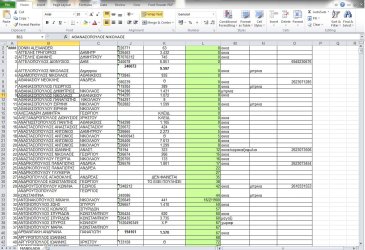
the column that is messed up is the green one......as you can see the numbers go from 0 to higher.Before the mistake all had the correct numbers inside the green column
 

Attachments

  • manolada.jpg
    manolada.jpg
    219 KB · Views: 4

My Computer

Computer type
Tablet
Computer Manufacturer/Model Number
estar
OS
Windows 7 Ultimate x64
I don't think there is much you can do about it. Once the spreadsheet has been changed & saved that is it. I know it's a bit late now but it explains how important having back ups is.
 

My Computer

Computer type
PC/Desktop
Computer Manufacturer/Model Number
Self built using existing case
OS
Windows 7 Home Premium 64 bit sp1
CPU
Intel i5 3570 3.4Ghz Ivy Bridge SKT 1155 quad core
Motherboard
Gigabyte Z77-HD3 SKT 1155 2xSata 3, 4x USB 3.0
Memory
G-Skill Rip Jaws 16Gb (8x2) DDR3 -1600 PC3 12800 CL 10 red
Graphics Card(s)
Gigabyte NVIDIA GT610 1Gb DDR3 810/1200 PCI-E 2.0 Silent
Sound Card
NVIDIA High Definition & Realtech High Definition Audio
Monitor(s) Displays
2 x Philips 226V4L 16:9 aspect ratio
Screen Resolution
1920 x 1080 HD
Hard Drives
Samsung 840 Pro 256gb SSD, SATA 3.
Hitachi Touro Portable 1tb, USB 3.0 HDD used for image b/ups.
PSU
Corsair VS450
Case
Codeng
Cooling
PSU fan & CPU fan
Keyboard
Logitech
Mouse
Logitech Wireless trackball M570
Internet Speed
Wireless 3G. 3mg down & 550kb up.
Antivirus
Bitdefender Internet Security 2020
Browser
Opera (Current Version) & Firefox
Other Info
MS Office 2013 Pro. Davis weather station software. MGE Nova 600 avr UPS.
i "almost" convinced theres no backing up to my problem...but...is there any other way to........."recover" a previous version of the same document ? lets say a save before that has happend ? i remember i have pressed the save button 30 minutes-+ before that happend......
1 more detail.Thats a file from my computer.The file iam managing all the time is from my android tablet (i use it cause of mobility).is there a way to get something out of it ?
 

My Computer

Computer type
Tablet
Computer Manufacturer/Model Number
estar
OS
Windows 7 Ultimate x64
If you have a duplicate spreadsheet on your Android Tablet you should be able to copy it back to your computer. I do not copy files from my computer to my phone so I don't know if the websites listed below will work in your case, but it has to be worth trying.

Transfer files, apps & media from Android phone or tablet to microSD - How-To - PC Advisor

https://motorola-global-portal.cust.../~/droid---transfer-files-to/from-my-computer

How To Transfer Files From Android To PC

Do you use a cloud service such as OneDrive to store some files so you can get access to them remotely, if so then there could be a copy stored there.
 

My Computer

Computer type
PC/Desktop
Computer Manufacturer/Model Number
Self built using existing case
OS
Windows 7 Home Premium 64 bit sp1
CPU
Intel i5 3570 3.4Ghz Ivy Bridge SKT 1155 quad core
Motherboard
Gigabyte Z77-HD3 SKT 1155 2xSata 3, 4x USB 3.0
Memory
G-Skill Rip Jaws 16Gb (8x2) DDR3 -1600 PC3 12800 CL 10 red
Graphics Card(s)
Gigabyte NVIDIA GT610 1Gb DDR3 810/1200 PCI-E 2.0 Silent
Sound Card
NVIDIA High Definition & Realtech High Definition Audio
Monitor(s) Displays
2 x Philips 226V4L 16:9 aspect ratio
Screen Resolution
1920 x 1080 HD
Hard Drives
Samsung 840 Pro 256gb SSD, SATA 3.
Hitachi Touro Portable 1tb, USB 3.0 HDD used for image b/ups.
PSU
Corsair VS450
Case
Codeng
Cooling
PSU fan & CPU fan
Keyboard
Logitech
Mouse
Logitech Wireless trackball M570
Internet Speed
Wireless 3G. 3mg down & 550kb up.
Antivirus
Bitdefender Internet Security 2020
Browser
Opera (Current Version) & Firefox
Other Info
MS Office 2013 Pro. Davis weather station software. MGE Nova 600 avr UPS.
Maybe Shadow copies have backed up that one. Try "shadow explorer" software.
 

My Computer

Computer type
PC/Desktop
Computer Manufacturer/Model Number
Custom Build
OS
Windows 7 Ultimate x64 SP1
CPU
AMD Phenom 2 1090T
Motherboard
Gigabyte GA-890FXA-UD5
Memory
2x8GB Kingston HyperX Fury Black 1600Mhz Unganged
Graphics Card(s)
MSI GTX 970 Gaming 4G
Sound Card
Realtek On-Board HD 7.1 Audio / Logitech G35
Monitor(s) Displays
3xAcer GD245HQ
Screen Resolution
1920x1080
Hard Drives
Samsung 850 Pro 512GB SSD - OS /
WD Caviar Black SATA 3 - 1 TBx2 - Dynamic RAID 0 /
WD Caviar Green SATA 2 - 640GBx2 - Dynamic RAID 0 /
WD Caviar Green SATA 2 - 640GB - Internal Backup /
Seagate Barracude SATA 3 - 3TB - External Backup/ Sync
PSU
HighPower 1000W
Case
Cooler Master HAF 932
Cooling
Noctua NH-D14
Keyboard
Logitech G19
Mouse
Logitech G500
Internet Speed
100/4 Mbit Cable (100GB quota)
Antivirus
ZoneAlarm Extreme Security / MBAM Pro / MBAE Free / SAS Free
Browser
IE 11 - Firefox - Chrome
Other Info
Logitech F710/ G27/ G940/ Z5500 // TrackIR 5 // Nvidia 3D Surround Vision
If you have a duplicate spreadsheet on your Android Tablet you should be able to copy it back to your computer.
how can i have a duplicate in my tablet ?
Do you use a cloud service such as OneDrive to store some files so you can get access to them remotely, if so then there could be a copy stored there.
No...unfortunately i copy my files using usb cable

Maybe Shadow copies have backed up that one. Try "shadow explorer" software.
i think your suggestion is my only option.....ill get back with more details after i used "shadow explorer"

Thnx
 

My Computer

Computer type
Tablet
Computer Manufacturer/Model Number
estar
OS
Windows 7 Ultimate x64
umm....a little help about "shadow explorer" ? Doesn't seems to find my tablet in its list of drives...it only sees my C drive
 

My Computer

Computer type
Tablet
Computer Manufacturer/Model Number
estar
OS
Windows 7 Ultimate x64
Eh, sorry I haven't followed this thread after I went to sleep last night and there was no mention of the file being on a tablet :)

Shadow Explorer is only good for files on the PC.

Can you try something? Check the fields in that green column, and see if the values have changed? Maybe it was only the formatting? Check those that are 0 and also ones which have a number showing.
 

My Computer

Computer type
PC/Desktop
Computer Manufacturer/Model Number
Custom Build
OS
Windows 7 Ultimate x64 SP1
CPU
AMD Phenom 2 1090T
Motherboard
Gigabyte GA-890FXA-UD5
Memory
2x8GB Kingston HyperX Fury Black 1600Mhz Unganged
Graphics Card(s)
MSI GTX 970 Gaming 4G
Sound Card
Realtek On-Board HD 7.1 Audio / Logitech G35
Monitor(s) Displays
3xAcer GD245HQ
Screen Resolution
1920x1080
Hard Drives
Samsung 850 Pro 512GB SSD - OS /
WD Caviar Black SATA 3 - 1 TBx2 - Dynamic RAID 0 /
WD Caviar Green SATA 2 - 640GBx2 - Dynamic RAID 0 /
WD Caviar Green SATA 2 - 640GB - Internal Backup /
Seagate Barracude SATA 3 - 3TB - External Backup/ Sync
PSU
HighPower 1000W
Case
Cooler Master HAF 932
Cooling
Noctua NH-D14
Keyboard
Logitech G19
Mouse
Logitech G500
Internet Speed
100/4 Mbit Cable (100GB quota)
Antivirus
ZoneAlarm Extreme Security / MBAM Pro / MBAE Free / SAS Free
Browser
IE 11 - Firefox - Chrome
Other Info
Logitech F710/ G27/ G940/ Z5500 // TrackIR 5 // Nvidia 3D Surround Vision
Eh, sorry I haven't followed this thread after I went to sleep last night and there was no mention of the file being on a tablet :)

Shadow Explorer is only good for files on the PC.
then shadow explorer cant help my situation
Can you try something? Check the fields in that green column, and see if the values have changed? Maybe it was only the formatting? Check those that are 0 and also ones which have a number showing.
I am sorry can u be more specific ?
 

My Computer

Computer type
Tablet
Computer Manufacturer/Model Number
estar
OS
Windows 7 Ultimate x64
Select L2 and look at the value field (right above column headers - C, L, K etc)
Then down arrow to see what other fields look like, check the ones that are not 0 as well)
Hope it is clearer, not on a PC at the moment so can't post a screenshot.
 

My Computer

Computer type
PC/Desktop
Computer Manufacturer/Model Number
Custom Build
OS
Windows 7 Ultimate x64 SP1
CPU
AMD Phenom 2 1090T
Motherboard
Gigabyte GA-890FXA-UD5
Memory
2x8GB Kingston HyperX Fury Black 1600Mhz Unganged
Graphics Card(s)
MSI GTX 970 Gaming 4G
Sound Card
Realtek On-Board HD 7.1 Audio / Logitech G35
Monitor(s) Displays
3xAcer GD245HQ
Screen Resolution
1920x1080
Hard Drives
Samsung 850 Pro 512GB SSD - OS /
WD Caviar Black SATA 3 - 1 TBx2 - Dynamic RAID 0 /
WD Caviar Green SATA 2 - 640GBx2 - Dynamic RAID 0 /
WD Caviar Green SATA 2 - 640GB - Internal Backup /
Seagate Barracude SATA 3 - 3TB - External Backup/ Sync
PSU
HighPower 1000W
Case
Cooler Master HAF 932
Cooling
Noctua NH-D14
Keyboard
Logitech G19
Mouse
Logitech G500
Internet Speed
100/4 Mbit Cable (100GB quota)
Antivirus
ZoneAlarm Extreme Security / MBAM Pro / MBAE Free / SAS Free
Browser
IE 11 - Firefox - Chrome
Other Info
Logitech F710/ G27/ G940/ Z5500 // TrackIR 5 // Nvidia 3D Surround Vision
Select L2 and look at the value field (right above column headers - C, L, K etc)
Then down arrow to see what other fields look like, check the ones that are not 0 as well)
Hope it is clearer, not on a PC at the moment so can't post a screenshot.
yah...it doesnt make it any clearer for me :(
 

My Computer

Computer type
Tablet
Computer Manufacturer/Model Number
estar
OS
Windows 7 Ultimate x64
ok ive done what you said.....and the fields change as the values on the green column too... e.g. L23 shows 12 on green column and 12 on the box above.....
 

My Computer

Computer type
Tablet
Computer Manufacturer/Model Number
estar
OS
Windows 7 Ultimate x64
:( It was worth to check. I will post if I come up with any more ideas.
 

My Computer

Computer type
PC/Desktop
Computer Manufacturer/Model Number
Custom Build
OS
Windows 7 Ultimate x64 SP1
CPU
AMD Phenom 2 1090T
Motherboard
Gigabyte GA-890FXA-UD5
Memory
2x8GB Kingston HyperX Fury Black 1600Mhz Unganged
Graphics Card(s)
MSI GTX 970 Gaming 4G
Sound Card
Realtek On-Board HD 7.1 Audio / Logitech G35
Monitor(s) Displays
3xAcer GD245HQ
Screen Resolution
1920x1080
Hard Drives
Samsung 850 Pro 512GB SSD - OS /
WD Caviar Black SATA 3 - 1 TBx2 - Dynamic RAID 0 /
WD Caviar Green SATA 2 - 640GBx2 - Dynamic RAID 0 /
WD Caviar Green SATA 2 - 640GB - Internal Backup /
Seagate Barracude SATA 3 - 3TB - External Backup/ Sync
PSU
HighPower 1000W
Case
Cooler Master HAF 932
Cooling
Noctua NH-D14
Keyboard
Logitech G19
Mouse
Logitech G500
Internet Speed
100/4 Mbit Cable (100GB quota)
Antivirus
ZoneAlarm Extreme Security / MBAM Pro / MBAE Free / SAS Free
Browser
IE 11 - Firefox - Chrome
Other Info
Logitech F710/ G27/ G940/ Z5500 // TrackIR 5 // Nvidia 3D Surround Vision
i can mark this thread as solved now cause.....iam gonna redo it :( 2 weeks of work :confused:

Thank you all for the kind answers and suggestions
 

My Computer

Computer type
Tablet
Computer Manufacturer/Model Number
estar
OS
Windows 7 Ultimate x64
Back
Top