Hello,
I hope this is the correct forum section.
So I have Windows 7 Professional x64 installed, all updates installed (including the ones that pester the user to upgrade to Windows 10. I have no intention of doing that though).
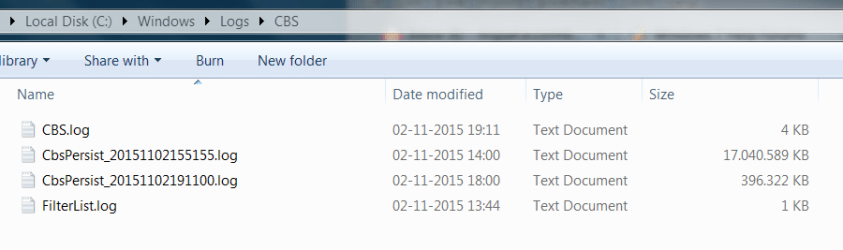
Frequently, my Windows Log files take up to 16 GBytes (current value) of space, which is rather annoying. If I run CCleaner or delete the files manually, they trigger two things:
1 - The next times I shut down Windows, the screen hangs with the message "Configuring Windows, please do not power off your computer" ad eternum. I believe that when this happens, it may internally be in a continuous loop polluting my log file.
2 - The log file shows up again, consuming obscene amounts of space (around 15 GBytes).
This attached image windows_fail.PNG shows the problem.
Is this a known issue? What steps may I take to permanently correct this?
EDIT: I removed some of the Microsoft spyware, mainly through this resource: https://github.com/WindowsLies/BlockWindows. This problem was already happening before I ran this software.
Thanks for your time,
My best regards,
- Kidon
I hope this is the correct forum section.
So I have Windows 7 Professional x64 installed, all updates installed (including the ones that pester the user to upgrade to Windows 10. I have no intention of doing that though).
Frequently, my Windows Log files take up to 16 GBytes (current value) of space, which is rather annoying. If I run CCleaner or delete the files manually, they trigger two things:
1 - The next times I shut down Windows, the screen hangs with the message "Configuring Windows, please do not power off your computer" ad eternum. I believe that when this happens, it may internally be in a continuous loop polluting my log file.
2 - The log file shows up again, consuming obscene amounts of space (around 15 GBytes).
This attached image windows_fail.PNG shows the problem.
Is this a known issue? What steps may I take to permanently correct this?
EDIT: I removed some of the Microsoft spyware, mainly through this resource: https://github.com/WindowsLies/BlockWindows. This problem was already happening before I ran this software.
Thanks for your time,
My best regards,
- Kidon
Attachments
Last edited:
My Computer
At a glance
Windows 7 Professional x64Intel Core i7 620M - Arrandale8 GBytes DDR3 - Dual Channel - DC Mode: Symme...Intel Graphics Media Accelerator HD/NVIDIA Ge...
- Computer type
- Laptop
- Computer Manufacturer/Model Number
- Sony VPCZ12Z9E
- OS
- Windows 7 Professional x64
- CPU
- Intel Core i7 620M - Arrandale
- Motherboard
- VAIO - Havendale/Clarkdale Host Bridge
- Memory
- 8 GBytes DDR3 - Dual Channel - DC Mode: Symmetric
- Graphics Card(s)
- Intel Graphics Media Accelerator HD/NVIDIA GeForceGT 330M
- Antivirus
- Microsoft Security Essentials
- Browser
- Firefox