Solved Excessive Memory usage than the process manager shows.

dxbladexd

New member
Local time
4:07 PM
Messages
23
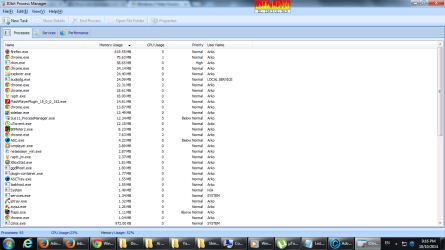
Need to deal with the excessive memory usage on my desktop. As you can see on the screenshots the total memory usage doesnt add up. What I dont understand is that is it being used as memory cache or is it cause of any adware or malware? The antivirus softwares and the protective softwares I have does not detect the fault. And I got advised that it might be RAM damping or something. So really need help on this.


WO7an8t,EahiaWJ

WO7an8t,EahiaWJ
 

My Computer

Computer type
PC/Desktop
OS
Windows 7 64 bit
CPU
Intel
Motherboard
Intel DH55TC
Memory
8GB
Have a look into Resource Monitor > Memory tab. That will tell you exactly which process uses what.

Btw: your snips do not show. Use the paperclip to attach them.
 

Attachments

  • 2014-10-10_1742.png
    2014-10-10_1742.png
    9.1 KB · Views: 4

My Computer

Computer Manufacturer/Model Number
HP, Dell, Gateway, Toshiba - 4 laptops and 2 desktops
OS
Vista, Windows7, Mint Mate, Zorin, Windows 8
CPU
from 1.6GHz Duo to i7
Monitor(s) Displays
2x HP w2207
Hard Drives
5x HDD, 7x SSD, 12x Externals
Keyboard
with trackball - no mices
Mouse
Trackball mice
Internet Speed
DSL 6000
The memory usage column shown in Task Manager will never add up to total usage. It was never intended that it would. The "Memory (Private Working Set)" column does not show full process usage which may be considerably higher. There are also major users of memory that are not processes, most of which Task Manager will tell you nothing about.

Adding up the memory usage column rarely provides meaningful results. This only leads to confusion unless you really understand what is going on and that is anything but simple. You can't account for memory usage in a modern OS with simple math.

Post a screenshot of Task manager - Performance tab so we can see what is happening.
 

My Computer

Computer type
PC/Desktop
Computer Manufacturer/Model Number
HP
OS
Windows 7 Pro 64 bit
CPU
Xeon W3520
Memory
8 GB
Graphics Card(s)
Nvidia Geforce 210
sorry for the screenshots here you go.
 

Attachments

  • EahiaWJ.png
    EahiaWJ.png
    50.3 KB · Views: 10
  • WO7an8t.png
    WO7an8t.png
    38.3 KB · Views: 8

My Computer

Computer type
PC/Desktop
OS
Windows 7 64 bit
CPU
Intel
Motherboard
Intel DH55TC
Memory
8GB
There is nothing unusual. No need to save the RAM for a rainy day. The more RAM the system uses, the faster it runs.
 

My Computer

Computer Manufacturer/Model Number
HP, Dell, Gateway, Toshiba - 4 laptops and 2 desktops
OS
Vista, Windows7, Mint Mate, Zorin, Windows 8
CPU
from 1.6GHz Duo to i7
Monitor(s) Displays
2x HP w2207
Hard Drives
5x HDD, 7x SSD, 12x Externals
Keyboard
with trackball - no mices
Mouse
Trackball mice
Internet Speed
DSL 6000
Then should I use the memory usage to what percentage? If I cross the 85% limit I experience a really bad case of FPS drops.
 

My Computer

Computer type
PC/Desktop
OS
Windows 7 64 bit
CPU
Intel
Motherboard
Intel DH55TC
Memory
8GB
There is no standard rule. All depends on what is running.
 

My Computer

Computer Manufacturer/Model Number
HP, Dell, Gateway, Toshiba - 4 laptops and 2 desktops
OS
Vista, Windows7, Mint Mate, Zorin, Windows 8
CPU
from 1.6GHz Duo to i7
Monitor(s) Displays
2x HP w2207
Hard Drives
5x HDD, 7x SSD, 12x Externals
Keyboard
with trackball - no mices
Mouse
Trackball mice
Internet Speed
DSL 6000
... and IOBit software really isn't the best to use for fault-finding. (in fact it's probably one of the worst, and more likely to create errors than fix them!)

Use the built-in Windows tools where possible.
 

My Computer

Computer type
Laptop
Computer Manufacturer/Model Number
Asus K52F or Lenovo B51-80
OS
Win 7 x64 Home Premium (and x86 VirtualBox VM)/Win10
CPU
i3 370M/i7 6500U
Motherboard
Asus/Lenovo
Memory
8GB - finally :)/8GB
Graphics Card(s)
it's an i3, dude!/dual Intel&nVidia
Sound Card
onboard
Monitor(s) Displays
15.6" built-in
Screen Resolution
1366x768/1920x1080
Hard Drives
750GB Seagate internal
Sundry external drives attached to other computers on the local network
1TB SSD on the Lenovo
PSU
n/a
Internet Speed
as much as I can get - usually on a dongle/phone, so <1MB/s
Antivirus
MSE/Defender
Browser
IE11/12/Edge/Chrome/FF(if I must)
... and IOBit software really isn't the best to use for fault-finding. (in fact it's probably one of the worst, and more likely to create errors than fix them!)

Use the built-in Windows tools where possible.


well I didnt find any difference between the task managers memory usage details and the Iobits one.
 

My Computer

Computer type
PC/Desktop
OS
Windows 7 64 bit
CPU
Intel
Motherboard
Intel DH55TC
Memory
8GB
That is no surprise, since as far as I am aware, the IOBits one is a pure ripoff of the Windows one.
PLEASE uninstall that POS!
 

My Computer

Computer type
Laptop
Computer Manufacturer/Model Number
Asus K52F or Lenovo B51-80
OS
Win 7 x64 Home Premium (and x86 VirtualBox VM)/Win10
CPU
i3 370M/i7 6500U
Motherboard
Asus/Lenovo
Memory
8GB - finally :)/8GB
Graphics Card(s)
it's an i3, dude!/dual Intel&nVidia
Sound Card
onboard
Monitor(s) Displays
15.6" built-in
Screen Resolution
1366x768/1920x1080
Hard Drives
750GB Seagate internal
Sundry external drives attached to other computers on the local network
1TB SSD on the Lenovo
PSU
n/a
Internet Speed
as much as I can get - usually on a dongle/phone, so <1MB/s
Antivirus
MSE/Defender
Browser
IE11/12/Edge/Chrome/FF(if I must)
NoelDP is correct. IOBits software is trouble.
 

My Computer

Computer type
Laptop
Computer Manufacturer/Model Number
Hewlett-Packard/G62-107SA Notebook
OS
Microsoft Windows 7 Home Premium 64-bit Service Pack 1
CPU
Intel(R) Core(TM) i3 CPU M 330 @ 2.13GHz
Motherboard
Hewlett-Packard 1425
Memory
8 GB DDR3
Graphics Card(s)
Intel(R) HD Graphics
Sound Card
Realtek High Definition Audio
Monitor(s) Displays
Builtin
Screen Resolution
1366 x 768 x 32 bits (4294967296 colors) @ 60 Hz
Hard Drives
250 GB SATA Hard Disk Drive 7200 rpm
2TB Seagate GoFlex USB 2 Drive
1TB Iomega Prestige USB 2 Drive
1.5TB Iomega Prestige USB 2 Drive (Samsung)
2TB WD MyBook Live NAS.
Mouse
Logitech Anywhere MX
Internet Speed
152 Mbs download 10 Mbs upload
Antivirus
Norton 360
Browser
Chrome
The IOBit website provides no contact information other than a web based form. That in itself is cause for concern. The company is based in China.

IOBit has been involved in some questionable business practices. There is strong evidence they stole the intellectual property of Malwarebytes, a highly respected security company:
https://forums.malwarebytes.org/index.php?/topic/29681-iobit-steals-malwarebytes-intellectual-property/

Most experienced members of this forum do not use or recommend IOBit software.
 

My Computer

Computer type
PC/Desktop
Computer Manufacturer/Model Number
HP
OS
Windows 7 Pro 64 bit
CPU
Xeon W3520
Memory
8 GB
Graphics Card(s)
Nvidia Geforce 210
That is no surprise, since as far as I am aware, the IOBits one is a pure ripoff of the Windows one.
PLEASE uninstall that POS!

Wow well do you have any other software recommendations?
 

My Computer

Computer type
PC/Desktop
OS
Windows 7 64 bit
CPU
Intel
Motherboard
Intel DH55TC
Memory
8GB
The IOBit website provides no contact information other than a web based form. That in itself is cause for concern. The company is based in China.

IOBit has been involved in some questionable business practices. There is strong evidence they stole the intellectual property of Malwarebytes, a highly respected security company:
https://forums.malwarebytes.org/ind...it-steals-malwarebytes-intellectual-property/

Most experienced members of this forum do not use or recommend IOBit software.

Well then I would really love a software recommendation similar to Advanced Systemcare. :)
 

My Computer

Computer type
PC/Desktop
OS
Windows 7 64 bit
CPU
Intel
Motherboard
Intel DH55TC
Memory
8GB
Basic piece of advice ...

Don't look for a "silver Bullet" solution to system monitoring on windows 7, whilst the design of older operating systems such as XP may have "needed" a bit of help in optimising it's operation Windows 7, and Later, does not - The built in automatic functionality will perform better when left alone, after all it was written by the same people who wrote the OS ;).

The Tweaks Industry that grew up around XP has a problem in that they are no longer needed for a modern OS - they will tell you that they are still required, but this is not so. leve windows to it's own resources and It will run fine.

If you do want to learn about the OS at a deeper level and maybe correct shortcomings in some older 3rd party software that is not designed as well as Windows 7 stake a look at the Sysinternals Suite from microsoft themselves, but be aware that this does not have a fancy "bells and Whistles Front end" designed to catch users. What it does have is a suite of applications and full documentation

Windows Sysinternals: Documentation, downloads and additional resources

   Warning
This suite can be potentially dangerous, if used without care, so always fully read the documentation

 

My Computers

System One System Two

  • Computer type
    PC/Desktop
    Computer Manufacturer/Model Number
    ChillBlast - Custom to my design
    OS
    Windows 11 Pro x64 [Latest Release and Release Preview]
    CPU
    Ryzen 9 5950X, 3.8 - 5.2 MHz
    Motherboard
    Asus Prime X570-Pro
    Memory
    64GB [2 x 32GB] DDR4 3200MHz
    Graphics Card(s)
    4GB NVIDIA GEFORCE GTX 1650 Ti
    Sound Card
    On-board SPDIF to 5.1 System + HDMI [5.1 system]
    Monitor(s) Displays
    32" UHD 32 Bit HDR Monitor + 43" UHD 4K 32Bit HDR TV
    Screen Resolution
    2 x 3840 x 2160 @60Hz
    Hard Drives
    1TB M2 SSD OS, 500GB Fast Access SSD, 2 x 8TB Data + Various Externals from 1TB to 4TB, 10TB NAS
    PSU
    NZXT C750 80 PLUS Gold 750W Modular PSU
    Case
    Workstation Case [Matt Black]
    Cooling
    NZXT Kraken X63 280mm CPU Cooler +2x Quiet Case fans
    Keyboard
    Logitech Wireless MX Keys & K400 + others
    Mouse
    Logitech Wireless MX Master 3S
    Internet Speed
    920 MB Down 50 MB Up
    Antivirus
    BitDefender Total Security Pro
    Browser
    Chrome (always run latest Non-Beta)
    Other Info
    Also run ...
    Laptop - Quad 8GB - Windows 10 Pro x64
    Nexus 7 Android tablet x2
    Samsung 10.2" tablet
    Blackview TAB 8 4G Android Tablet c/w Keyboard
    Wacom Intuos Pro Medium Pen Pad
    Wacom Intuos Pro Small Pen Pad
    Wacom Expresskeys Remote
    Loopdeck+ Graphics Controller
    Shuttle Pro v2 Control
  • Computer type
    Laptop
    System Manufacturer/Model Number
    Dell XPS 17 10750H
    OS
    Windows 11 Pro x64 Latest RP
    CPU
    Intel I7 10750H 5.0GHz
    Motherboard
    Dell XPS
    Memory
    32GB [2x16GB] DDR4 2933 MHz
    Graphics Card(s)
    nVidia GTX1650Ti 4 GB GDDR6
    Sound Card
    Stock [Realtek] 4 Speaker
    Monitor(s) Displays
    17" IPS UHD+ Infinity Edge Touchscreen
    Screen Resolution
    3840 x 2400
    Hard Drives
    2TB M2 NVMe, 4TB External + various 500GB & 1TB External NVMe (also have access to spinner HDD from
    PSU
    Stock
    Case
    Stock XPS Aluminium & Carbon Fibre
    Cooling
    Stock - Active Fan Control
    Keyboard
    Backlit + Various Logitech
    Mouse
    Stock Track Pad + Logitech MX Trackball
    Internet Speed
    72 MB Down 18MB Up
    Browser
    Chrome
    Other Info
    Also run ...
    Laptop - Quad 8GB - Windows 10 Pro x64
    Nexus 7 Android tablet x2
    10.2" tablet
    Sony Z3 Android Smartphone
    Wacom Intuos Pro Medium Pen Pad
    Wacom Intuos Pro Small Pen Pad
    Wacom Expresskeys Remote
    Loopdeck+ Graphics Controller
    Shuttle Pro v2 Control Pad
    10TB NAS
Basic piece of advice ...

Don't look for a "silver Bullet" solution to system monitoring on windows 7, whilst the design of older operating systems such as XP may have "needed" a bit of help in optimising it's operation Windows 7, and Later, does not - The built in automatic functionality will perform better when left alone, after all it was written by the same people who wrote the OS ;).

The Tweaks Industry that grew up around XP has a problem in that they are no longer needed for a modern OS - they will tell you that they are still required, but this is not so. leve windows to it's own resources and It will run fine.

If you do want to learn about the OS at a deeper level and maybe correct shortcomings in some older 3rd party software that is not designed as well as Windows 7 stake a look at the Sysinternals Suite from microsoft themselves, but be aware that this does not have a fancy "bells and Whistles Front end" designed to catch users. What it does have is a suite of applications and full documentation

Windows Sysinternals: Documentation, downloads and additional resources

   Warning
This suite can be potentially dangerous, if used without care, so always fully read the documentation

Ok, but I just wanted a software which will take care of my junks at once rather than me have to go through all of my browsers, registry entries and temporary files and stuffs and removing the not needed one. It really takes a lots of time. For example, after installing a particular software the bits and pieces of its registry entry remains right?
 

My Computer

Computer type
PC/Desktop
OS
Windows 7 64 bit
CPU
Intel
Motherboard
Intel DH55TC
Memory
8GB
Back
Top