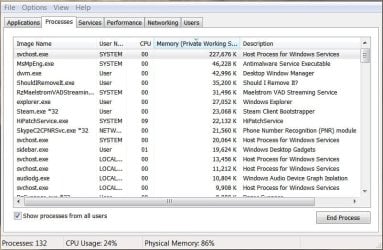
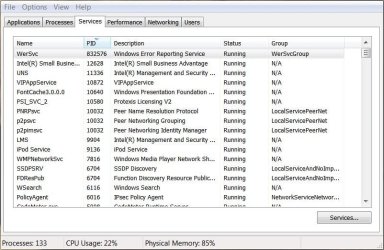
So just as i said in the description, my ram fills up till there is nothing left (8GB) there are no open programs and i shut off unnecessary processes but its still right up there, here are some screen shots.
Any Help will be greatly appreciated.
Attachments
Perf6.5.JPG
72.8 KB
· Views: 0
Process6.5.JPG
81.1 KB
· Views: 1
Service6.5.JPG
82.3 KB
· Views: 0
My Computer
At a glance
Windows 7 Professional service pack 1 64 biti7-3612QM 2.10GHzGT-630M
Post a screenshot of Task Manager - Processes tab showing and sorted by the "Memory - Working set" column. You will need to add this column with the "Select columns" option in the view menu. The "Memory(Private working set)" column does not show all of the processes usage.
My Computer
At a glance
Windows 7 Pro 64 bitXeon W35208 GBNvidia Geforce 210
As I suspected the process list shows nothing that would account for the problem. The Non paged pool seems high but not nearly high enough to account for the issue. More advanced diagnostics will be required. I don't think I can be of much further help.
My Computer
At a glance
Windows 7 Pro 64 bitXeon W35208 GBNvidia Geforce 210
advanced system settings-performance settings-advanced tab-virtual memory Should be checked to automatically manage page file.
My Computer
At a glance
Windows 10 ProAMD Ryzen 5 2400G Processor with Radeon RX Ve...G.SKILL Ripjaws V Series 16GB (2 x 8GB) 288-P...2047MB NVIDIA GeForce GTX 1060 6GB (EVGA)
Windows likes to use as much RAM as possible. Yours doesn't seem out of line to me. One thing that may help is to set the Paging File/Virtual Memory to the recommended 1.5 times the installed RAM [in Search, Help and Support on Virtual Memory]. Virtual Memory allows offloading the older data from RAM to make room for newer. I also have 8GB on my Win7 and have the Virtual Memory at 12GB but it's on a second physical HDD [not a separate partition on the C: drive] and usually get a noticeable improvement playing videos.
My Computer
At a glance
Windows 7 Ultimate 64-bit, Windows 8.1 64-bit...
Computer type
PC/Desktop
Computer Manufacturer/Model Number
Customs, Dell, Gateway, HP, Toshiba, Acer, ASUS
OS
Windows 7 Ultimate 64-bit, Windows 8.1 64-bit, Mac OS X 10.10, Linux Mint 17, Windows 10 Pro TP
The pagefile is most likely system managed. We already know that the current size of the pagefile is roughly the same size as RAM. The commit limit (currently 15 GB) is the size of RAM plus the size of the pagefile minus a small overhead. Under normal conditions the current size should be more than enough. The commit charge tells us nothing about how much of the pagefile is actually in use.
My Computer
At a glance
Windows 7 Pro 64 bitXeon W35208 GBNvidia Geforce 210
Recommended virtual memory size is often misleading. Windows guru Mark Russinovich from Sysinternals(Microsoft) recommends this:
So how do you know how much commit charge your workloads require? You might have noticed in the screenshots that Windows tracks that number and Process Explorer shows it: Peak Commit Charge. To optimally size your paging file you should start all the applications you run at the same time, load typical data sets, and then note the commit charge peak (or look at this value after a period of time where you know maximum load was attained). Set the paging file minimum to be that value minus the amount of RAM in your system (if the value is negative, pick a minimum size to permit the kind of crash dump you are configured for). If you want to have some breathing room for potentially large commit demands, set the maximum to double that number. Blogs - Mark's Blog - Site Home - TechNet Blogs
My Computer
At a glance
Windows 7 Pro 32Intel(R) Core(TM) i5 CPU M 540 @ 2.53GHz4,00 GB (Usable 2,98)NVIDIA NVS 5100M
Computer type
Laptop
Computer Manufacturer/Model Number
HP Elitebook 8540p
OS
Windows 7 Pro 32
CPU
Intel(R) Core(TM) i5 CPU M 540 @ 2.53GHz
Motherboard
Hewlett-Packard 1521
Memory
4,00 GB (Usable 2,98)
Graphics Card(s)
NVIDIA NVS 5100M
Sound Card
NVIDIA High Definition Audio
Screen Resolution
1600x900
Hard Drives
INTEL SSDSA2CW120G3
Antivirus
F-Secure Internet Security
Browser
IE, Firefox, Opera
Other Info
Sandboxie,
SRP (Software Restriction Policy),
EMET (Enhanced Mitigation Experience Toolkit),
WFC (Windows Firewall Control by BiniSoft),
Malwarebytes Premium