Solved Exclamation mark in yellow triangle

jamtin53

New member
Member
Local time
8:57 AM
Messages
63
http://speccy.piriform.com/results/5OUPcYzXZDOcWOZsHOejYhH

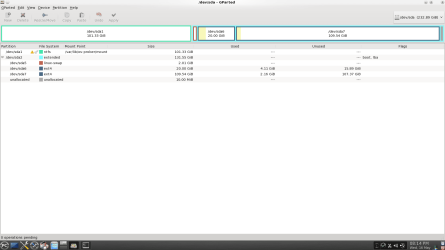
Gooday folks. I ran G Parted to check some thing about one of my hard drives and I noticed that the NTFS partition that has this windows7 installation on it has the above mentioned yellow triangle with exclamation mark in it. Could some one please advise what this is about and what if anything I should do about it. Regards and thank you in advance, James.
 

My Computer

Computer Manufacturer/Model Number
Sont Vaio VPCEH13FD
OS
Windows7 Home Premium 64 bit SP1
CPU
INTEL CORE i3/i5/i7 @2.10ghz Sandy Bridge 32nm Technology
Motherboard
Sony Corporation VAIO (N/A)
Memory
6.00gb Dual Channel DDR3 @665 mhz (9-9-9-24)
Graphics Card(s)
Generic PnP Monitor (1366x768 @60 Hz. Intel(R) HD Graphics F
Sound Card
Conexant Smart Audio HD
Hard Drives
625 gb SamsungHM641JI SATA
Was there a yellow tri/exclamation mark in the pic from your link? I couldn't see one. A yellow triangle w/ a exclamation make is Windows way of telling you there is a problem with the devices it's with.
 

My Computer

Computer Manufacturer/Model Number
Custom build
OS
Windows 7 Ultimate x64 SP1
CPU
i7 960 3.20Ghz
Motherboard
Gigabyte X58A UD3R
Memory
16GB Crucial Ballistix DDR3 Triple Channel
Graphics Card(s)
Nvidia GeForce GTX 670 ftw
Sound Card
On-Broad
Monitor(s) Displays
27" Samsung HD
Screen Resolution
1920x1080
Hard Drives
Crucial m4 128GB SSD
WD 1TB Caviar Black HD
Seagate 2TB External drive
PSU
850W Thermaltake
Case
CoolerMaster HAF 932 Advanced
Cooling
Corsair H80,
Internet Speed
DSL
Thanks Nitro 58. There doesn't appear to be a tri/ex on the speccy file so I can't comment on this. The tri/ex appears next to the letters NTFS when I run the partition editor G Parted. Going by your comment that it shows up when something is amiss, I would assume that there may be something wrong with the partition it's self. Everything is running as normal and I have a Linux distro on the drive as well. I will run G Parted again and see if there are any observable signs of something amiss.
 

My Computer

Computer Manufacturer/Model Number
Sont Vaio VPCEH13FD
OS
Windows7 Home Premium 64 bit SP1
CPU
INTEL CORE i3/i5/i7 @2.10ghz Sandy Bridge 32nm Technology
Motherboard
Sony Corporation VAIO (N/A)
Memory
6.00gb Dual Channel DDR3 @665 mhz (9-9-9-24)
Graphics Card(s)
Generic PnP Monitor (1366x768 @60 Hz. Intel(R) HD Graphics F
Sound Card
Conexant Smart Audio HD
Hard Drives
625 gb SamsungHM641JI SATA
After a bit of stuffing around I have a snapshot of what I am talking about. I hope this makes it clear. Thanks again for your interest and help.
 

Attachments

  • snapshot1.png
    snapshot1.png
    40.9 KB · Views: 180

My Computer

Computer Manufacturer/Model Number
Sont Vaio VPCEH13FD
OS
Windows7 Home Premium 64 bit SP1
CPU
INTEL CORE i3/i5/i7 @2.10ghz Sandy Bridge 32nm Technology
Motherboard
Sony Corporation VAIO (N/A)
Memory
6.00gb Dual Channel DDR3 @665 mhz (9-9-9-24)
Graphics Card(s)
Generic PnP Monitor (1366x768 @60 Hz. Intel(R) HD Graphics F
Sound Card
Conexant Smart Audio HD
Hard Drives
625 gb SamsungHM641JI SATA
That icon is specific to gparted......is there anything on it in the gparted help?

regards,
Golden
 

My Computer

Computer type
PC/Desktop
Computer Manufacturer/Model Number
Golden Mk. I.4
OS
Windows 10 Pro x64 ; Xubuntu x64
CPU
Intel i7 860 @ 2.80 GHz O/C'ed to 4.0GHz
Motherboard
Gigabyte P55A-UD3R Rev.1. Award BIOS F13
Memory
16GB Corsair Vengance DDR3 @ 661 MHz Dual Channel (9-9-9-24)
Graphics Card(s)
EVGA NVidia GTX 560 1024MB
Sound Card
Realtek Integrated
Monitor(s) Displays
Dual Samsung SyncMaster 2494HS
Screen Resolution
1920*1080 and 1920*1080
Hard Drives
1*Samsung 840 EVO 120GB SSD;
1*OCZ Vertex 2 60GB SSD;
2*Samsung F3 SpinPoint 1TB in RAID0;
1*Samsung F1 SpinPoint 1TB;
2*Western Digital 1TB External USB 3.0
1*Western Digital 500GB External USB 3.0
1*Seagate 500GB External USB 2.0
PSU
Thermaltake ToughPower QFan 750W
Case
Thermaltake Element S VK60001W2Z
Cooling
Corsair H60 Water Cooling, 2*230mm and 2*80mm case fans
Keyboard
Logitech G110
Mouse
Logitech MX518
Thanks for your attention in this matter. I ran chkdsk and after a long process the partition is now clean and running as normal. The issue is now resolved.

 

My Computer

Computer Manufacturer/Model Number
Sont Vaio VPCEH13FD
OS
Windows7 Home Premium 64 bit SP1
CPU
INTEL CORE i3/i5/i7 @2.10ghz Sandy Bridge 32nm Technology
Motherboard
Sony Corporation VAIO (N/A)
Memory
6.00gb Dual Channel DDR3 @665 mhz (9-9-9-24)
Graphics Card(s)
Generic PnP Monitor (1366x768 @60 Hz. Intel(R) HD Graphics F
Sound Card
Conexant Smart Audio HD
Hard Drives
625 gb SamsungHM641JI SATA
Back
Top