EXE Problem fixed, but what about my Icons?

tayschren

New member
Local time
9:47 PM
Messages
9
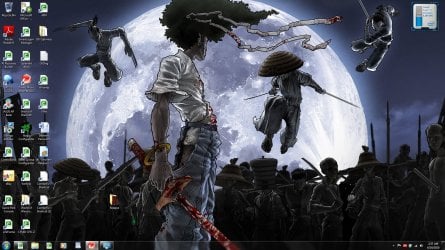
So I just had a minor panic attack. I hadthe EXE error, which I assumed was a virus. I changed my registry and rebooted my computer, and everything is running fine. My only issue now is I have BitTorrent symbols on 3/4s of my desktop and a bit of my toolbar. Is there any way to reset these?

Example: World of Warcraft is showing up as a BitTorrent symbol on a peice of paper. I would prefer not to have to delete my entire download just to get the symbol back. Is there a way to get this symbol to return to the "W"?

I have no back-up restore points.

Thanks much,

Tay
 

Attachments
  • Desktopcapture.jpg
    Desktopcapture.jpg
    285.2 KB · Views: 65

My Computer My Computer

At a glance

Windows 7 64 bitIntel i78 GBMobile Radeon HD 5870
Computer Manufacturer/Model Number
ASUS
OS
Windows 7 64 bit
CPU
Intel i7
Memory
8 GB
Graphics Card(s)
Mobile Radeon HD 5870

My Computer My Computer

At a glance

windows 7Phenom II AMD Dragon 3.5GhzDDR3 4GBATI Radeon 512Mb
Computer Manufacturer/Model Number
built up
OS
windows 7
CPU
Phenom II AMD Dragon 3.5Ghz
Memory
DDR3 4GB
Graphics Card(s)
ATI Radeon 512Mb
Monitor(s) Displays
HP L1506
Screen Resolution
1152 x 864
Hard Drives
WDC 1 TB SATA-II Green Power
Keyboard
HP wireless keyboard
Mouse
HP Optic
Internet Speed
1GB
It isn't exactly what I am looking for. They aren't system default icons, is the issue.
 

My Computer My Computer

At a glance

Windows 7 64 bitIntel i78 GBMobile Radeon HD 5870
Computer Manufacturer/Model Number
ASUS
OS
Windows 7 64 bit
CPU
Intel i7
Memory
8 GB
Graphics Card(s)
Mobile Radeon HD 5870
maybe that's cause by virus.
and i saw that's just shortcut. if you trying to pin or send shortcut to the desktop.does the icon appear bitTorrent again?
 

My Computer My Computer

At a glance

windows 7Phenom II AMD Dragon 3.5GhzDDR3 4GBATI Radeon 512Mb
Computer Manufacturer/Model Number
built up
OS
windows 7
CPU
Phenom II AMD Dragon 3.5Ghz
Memory
DDR3 4GB
Graphics Card(s)
ATI Radeon 512Mb
Monitor(s) Displays
HP L1506
Screen Resolution
1152 x 864
Hard Drives
WDC 1 TB SATA-II Green Power
Keyboard
HP wireless keyboard
Mouse
HP Optic
Internet Speed
1GB
Actually, right clicking and selecting properties on the icon, as it appears on the desktop, lets me change it back to it's original state. I never imagined that it would be that easy.

As far as athe virus, if there is one, I am running TrendMicro on a full system scan to find if there are any issues.
 

My Computer My Computer

At a glance

Windows 7 64 bitIntel i78 GBMobile Radeon HD 5870
Computer Manufacturer/Model Number
ASUS
OS
Windows 7 64 bit
CPU
Intel i7
Memory
8 GB
Graphics Card(s)
Mobile Radeon HD 5870
Hello tayschren, welcome to Seven Forums!


At the link below is another very good, free scanner, it would be a good idea to have a go at that one also.


Malwarebytes Free Virus Scanner
 

My Computer My Computer

At a glance

W 7 64-bit UltimateIntel Q9550 Yorkfield8GB Dominator 8500C5DATI : XFX 5870
Computer Manufacturer/Model Number
* BFK Customs *
OS
W 7 64-bit Ultimate
CPU
Intel Q9550 Yorkfield
Motherboard
ASUS P5Q Pro
Memory
8GB Dominator 8500C5D
Graphics Card(s)
ATI : XFX 5870
Sound Card
Realtek HD Audio 7-1
Monitor(s) Displays
1x 47" LCD HDMI & 3x 26" LCD HDMI
Screen Resolution
1920x1080P & 1920x1200
Hard Drives
1x 80GB Intel X25-M G2 SSD : 1x 500GB & 1x 640GB WD Caviar Black(s)
PSU
Corsair 620HX
Case
Cooler Master RC-690
Cooling
Tuniq Tower 120, 2x 140mm and 3x 120mm case fans
Keyboard
Microsoft 500
Mouse
Razer Diamondback 3G
Internet Speed
14 Mb/s
Other Info
1x Koutech 3Gb/s SATA HDD Hot Swap Rack
Actually, right clicking and selecting properties on the icon, as it appears on the desktop, lets me change it back to it's original state. I never imagined that it would be that easy.

As far as athe virus, if there is one, I am running TrendMicro on a full system scan to find if there are any issues.

that's seems like trojan.
but as bare post link..that's good software too for try it out. :D
 

My Computer My Computer

At a glance

windows 7Phenom II AMD Dragon 3.5GhzDDR3 4GBATI Radeon 512Mb
Computer Manufacturer/Model Number
built up
OS
windows 7
CPU
Phenom II AMD Dragon 3.5Ghz
Memory
DDR3 4GB
Graphics Card(s)
ATI Radeon 512Mb
Monitor(s) Displays
HP L1506
Screen Resolution
1152 x 864
Hard Drives
WDC 1 TB SATA-II Green Power
Keyboard
HP wireless keyboard
Mouse
HP Optic
Internet Speed
1GB
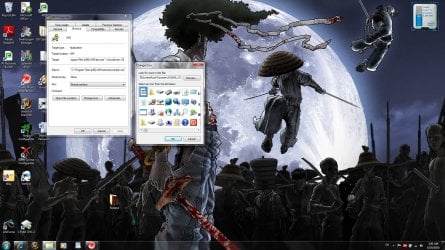
I would just like to thank both of you guys for the help. I really hope it is not a trojan. This is a brand new laptop, and I would hate to system restore it. Especially since I dont have a windows 7 disk??? I have managd to restore most of my icons to their original state, but I ran into an issue with two, specifically.

Example:
AIM will show a symbol, but I get "Windows can't find the file %ProgramFiles%\AIM\aim.exe"

There is one more that has this problem, as well. But I can drag the correct symbols to my taskbar without issue.

Any ideas?

Thanks,

Tay
 

Attachments

  • Problem.jpg
    Problem.jpg
    282.4 KB · Views: 17

My Computer My Computer

At a glance

Windows 7 64 bitIntel i78 GBMobile Radeon HD 5870
Computer Manufacturer/Model Number
ASUS
OS
Windows 7 64 bit
CPU
Intel i7
Memory
8 GB
Graphics Card(s)
Mobile Radeon HD 5870

My Computer My Computer

At a glance

windows 7Phenom II AMD Dragon 3.5GhzDDR3 4GBATI Radeon 512Mb
Computer Manufacturer/Model Number
built up
OS
windows 7
CPU
Phenom II AMD Dragon 3.5Ghz
Memory
DDR3 4GB
Graphics Card(s)
ATI Radeon 512Mb
Monitor(s) Displays
HP L1506
Screen Resolution
1152 x 864
Hard Drives
WDC 1 TB SATA-II Green Power
Keyboard
HP wireless keyboard
Mouse
HP Optic
Internet Speed
1GB
Update:

Both antivirus software (TrendMicro and Malwarebytes') came up with no malicious files. TrendMicro found some cookies, but nothing important.
 

My Computer My Computer

At a glance

Windows 7 64 bitIntel i78 GBMobile Radeon HD 5870
Computer Manufacturer/Model Number
ASUS
OS
Windows 7 64 bit
CPU
Intel i7
Memory
8 GB
Graphics Card(s)
Mobile Radeon HD 5870
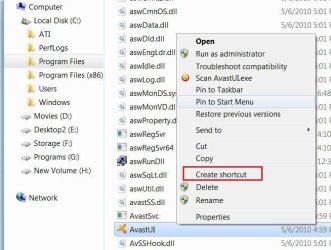
That's good to hear. You should be able to add shortcuts by finding the "Application" file where the program/app is installed and creating a shortcut from there.

click image to enlarge
Avast3.jpg
 

My Computer My Computer

At a glance

W 7 64-bit UltimateIntel Q9550 Yorkfield8GB Dominator 8500C5DATI : XFX 5870
Computer Manufacturer/Model Number
* BFK Customs *
OS
W 7 64-bit Ultimate
CPU
Intel Q9550 Yorkfield
Motherboard
ASUS P5Q Pro
Memory
8GB Dominator 8500C5D
Graphics Card(s)
ATI : XFX 5870
Sound Card
Realtek HD Audio 7-1
Monitor(s) Displays
1x 47" LCD HDMI & 3x 26" LCD HDMI
Screen Resolution
1920x1080P & 1920x1200
Hard Drives
1x 80GB Intel X25-M G2 SSD : 1x 500GB & 1x 640GB WD Caviar Black(s)
PSU
Corsair 620HX
Case
Cooler Master RC-690
Cooling
Tuniq Tower 120, 2x 140mm and 3x 120mm case fans
Keyboard
Microsoft 500
Mouse
Razer Diamondback 3G
Internet Speed
14 Mb/s
Other Info
1x Koutech 3Gb/s SATA HDD Hot Swap Rack
Back
Top