Execute Program in Batch File As Administrator (Or Other Solution)

StrongEagle

New member
Local time
4:16 PM
Messages
24
We use a program called TFC.exe (Temp File Cleaner - addpcs.com) to wipe all sorts of temp files off a computer on a monthly basis.

The older version was a standalone .exe that users used to execute from a a folder on a server. The newer version is actually installed on each user's PC.

If TFC it is not run in administrator mode, it is limited to wiping the temp files as allowed by users file permissions. Most of our users do not have admin privileges, and thus, the system files and other user profiles that may be on the computer do not get cleaned.

What I want to do is allow this one program to execute in admin mode, either by having the user execute a batch file (or batch file converted to exe) using a shortcut, or maybe by automatically running it via the task scheduler.

The open ended question is: Can this be accomplished or am I going to have to log in to each computer to run as admin?

TIA.
 

My Computer

Computer type
PC/Desktop
OS
Win 7 Pro 64 bit
Use an Eleveted Shortcut

Suggest using an Elevated Shortcut in Task Scheduler. Personally I use this:

WinAero: ElevatedShortcut for Windows 7 and Windows 8

As for the batch file to run the program use:

C:\Windows\system32\schtasks.exe /run /tn taskname

taskname is the name as displayed in Task Scheduler. Wrap it in quotes if it contains spaces.
 

My Computer

Computer type
Laptop
Computer Manufacturer/Model Number
ASUS
OS
Microsoft Windows 7 Home Premium 64-bit 7601 Multiprocessor Free Service Pack 1
CPU
AMD C-60 APU with Radeon(tm) HD Graphics
Motherboard
ASUSTeK COMPUTER INC. X501U
Memory
4.00 GB
Graphics Card(s)
AMD Radeon HD 6290 Graphics
Sound Card
(1) AMD High Definition Audio Device (2) Realtek High Defi
Screen Resolution
1366 x 768 x 32 bits (4294967296 colors) @ 60 Hz
Hard Drives
Hitachi HTS545050A7E380 SATA Disk Device
Antivirus
Comodo CIS & FW, SecureAplus App Whitelisting, Threatfire
Browser
Cyberfox 64bit, Opera 64bit, Airfox
Other Info
Spy-The-Spy, HitmanPro.Alert, Norton Connect Safe, MJRegWatcher, BitDefender TrafficLight, Voodoo Shield, Zemana AntiMalware
Thanks for the information. I see that in the Elevated Shortcut article there is the warning:

This shortcut and task can only be created and work while logged in as an administrator account.
This shortcut will not work in a standard user account.

I gather, then, that this will not solve my problem since I want to run TFC on computers with standard users, without me having to login as administrator. Looks like this is tough to do. Thank you.
 

My Computer

Computer type
PC/Desktop
OS
Win 7 Pro 64 bit
Elevated Shortcut

I hadn't spotted that! In that case I'm not sure. I reckon it must be possible. I know that in my workplace clean up scripts run overnight even with no users logged on but I'm no expert on networks.

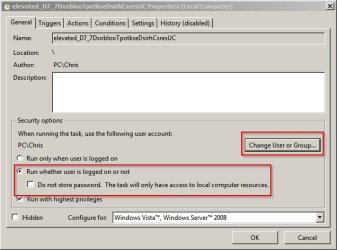
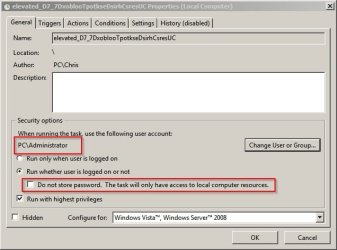
When I create an Elevated Shortcut I see the following options:

E-levated_(Local Computer).jpg

Elevated_(Local Computer)2.jpg

Maybe changing to Administrator will allow it to run without UAC using a stored password but I'm not 100% certain.

Also check if this might be suitable - there are some restrictions.

http://www.sevenforums.com/tutorials/193743-elevated-program-shortcut-create-standard-user.html
 

My Computer

Computer type
Laptop
Computer Manufacturer/Model Number
ASUS
OS
Microsoft Windows 7 Home Premium 64-bit 7601 Multiprocessor Free Service Pack 1
CPU
AMD C-60 APU with Radeon(tm) HD Graphics
Motherboard
ASUSTeK COMPUTER INC. X501U
Memory
4.00 GB
Graphics Card(s)
AMD Radeon HD 6290 Graphics
Sound Card
(1) AMD High Definition Audio Device (2) Realtek High Defi
Screen Resolution
1366 x 768 x 32 bits (4294967296 colors) @ 60 Hz
Hard Drives
Hitachi HTS545050A7E380 SATA Disk Device
Antivirus
Comodo CIS & FW, SecureAplus App Whitelisting, Threatfire
Browser
Cyberfox 64bit, Opera 64bit, Airfox
Other Info
Spy-The-Spy, HitmanPro.Alert, Norton Connect Safe, MJRegWatcher, BitDefender TrafficLight, Voodoo Shield, Zemana AntiMalware
Back
Top