
Existence of 'Other Network'

pooksahib

New member
Member
VIP
Local time
3:27 AM
Messages
149
Location
Scotland
Hi. I've just gone 'wireless for the first time by using a USB wireless adapter and a Siemens Gigaset SE587 router (the kind given away free by Tiscali). I had a fight to get it all working but I think I have it now. I even managed to update the router's firmware in the middle of it all...

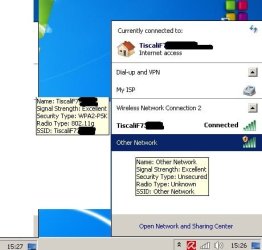
Anyway, here's a pic I've made of my screen after clicking the 'connected' icon on the bottom right corner. What is this 'Other Network' - is it maybe a neighbours's internet connection? If so, it must be a good one to be showing 'excellent' signal strength. If it has nothing to do with the neighbours, what problems do I have and how would I solve them?

Thanks in advance.
 

Attachments
  • other network.jpg
    other network.jpg
    26.7 KB · Views: 50

My Computer My Computer

At a glance

Microsoft Windows 7 Ultimate 64-bit 7601 Mult...Intel(R) Core(TM) i3-4150 CPU @ 3.50GHz8.00 GBIntel(R) HD Graphics 4400
Computer type
PC/Desktop
Computer Manufacturer/Model Number
self build
OS
Microsoft Windows 7 Ultimate 64-bit 7601 Multiprocessor Free Service Pack 1
CPU
Intel(R) Core(TM) i3-4150 CPU @ 3.50GHz
Motherboard
ASUSTeK COMPUTER INC. H97M-PLUS
Memory
8.00 GB
Graphics Card(s)
Intel(R) HD Graphics 4400
Sound Card
(1) High Definition Audio Device (2) USB Audio Device
Screen Resolution
1024 x 768 x 32 bits (4294967296 colors) @ 75 Hz
Hard Drives
(1) SAMSUNG HD103SI ATA Device (2) Samsung SSD 840 EVO 120GB ATA Device (3) ST31000528AS ATA Device (4) GENERIC USB Storage-CFC USB Device (5) GENERIC USB Storage-MSC USB Device (6) GENERIC USB Storage-SDC USB Device (7) GENERIC USB Stora
PSU
Corsair CXM 430W Modular 80 PLUS Bronze
Antivirus
Panda Free
Browser
Firefox+NoScript, AdBlockPlus, Disconnect
Hi. I've just gone 'wireless for the first time by using a USB wireless adapter and a Siemens Gigaset SE587 router (the kind given away free by Tiscali). I had a fight to get it all working but I think I have it now. I even managed to update the router's firmware in the middle of it all...

Anyway, here's a pic I've made of my screen after clicking the 'connected' icon on the bottom right corner. What is this 'Other Network' - is it maybe a neighbours's internet connection? If so, it must be a good one to be showing 'excellent' signal strength. If it has nothing to do with the neighbours, what problems do I have and how would I solve them?

Thanks in advance.

Hi and welcome

Nice avitar

You have connect automatically to available networks. You can chane it in networking. You also should have encryption enabled and a firewall and AV running.

You can absolutely prevent other PC/devices connecting by enabling Mac address in th router. You can specifiy the MAC address of you computer as the only ones that can connect

Let us know if you need help

Ken J
 

My Computer My Computer

At a glance

Win 8 Release candidate 8400[email protected]4 gigsNvidia 9600M
Computer Manufacturer/Model Number
HP Pavillion dv-7 1005 Tx
OS
Win 8 Release candidate 8400
CPU
[email protected]
Memory
4 gigs
Graphics Card(s)
Nvidia 9600M
Sound Card
HD built-in
Monitor(s) Displays
17" Wxga
Screen Resolution
1440x900
Cooling
none
Internet Speed
45Mb down 5Mb up
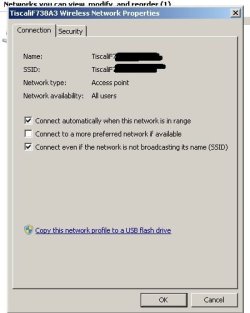
Hi Ken. Yes, the Floyd album cover does make for a good avatar. I'm attaching a shot of my Wireless Network Properties box. I can't see that there's any better way to configure it. Here's my (probably flawed) logic:
My wireless adapter (a USB stick) 'searches' for signals.
It's picking up (and connecting with) my own router.
It's also picking up another signal, probably the neighbour. No doubt I could connect to this if I knew its SSID etc??

Would you agree that, from the first jpeg I posted, I'm simply picking up a neighbour's signal (but unable to do anything with it)?

Is there a way of telling the USB stick NOT to pick up anything other than my own Tiscali router??

Be assured I have Firewalls etc coming out of my ears. Also, I'm happy that my wireless signal isn't available to anyone else.

Thanks again
 

Attachments

  • connect.jpg
    connect.jpg
    21.8 KB · Views: 28

My Computer My Computer

At a glance

Microsoft Windows 7 Ultimate 64-bit 7601 Mult...Intel(R) Core(TM) i3-4150 CPU @ 3.50GHz8.00 GBIntel(R) HD Graphics 4400
Computer type
PC/Desktop
Computer Manufacturer/Model Number
self build
OS
Microsoft Windows 7 Ultimate 64-bit 7601 Multiprocessor Free Service Pack 1
CPU
Intel(R) Core(TM) i3-4150 CPU @ 3.50GHz
Motherboard
ASUSTeK COMPUTER INC. H97M-PLUS
Memory
8.00 GB
Graphics Card(s)
Intel(R) HD Graphics 4400
Sound Card
(1) High Definition Audio Device (2) USB Audio Device
Screen Resolution
1024 x 768 x 32 bits (4294967296 colors) @ 75 Hz
Hard Drives
(1) SAMSUNG HD103SI ATA Device (2) Samsung SSD 840 EVO 120GB ATA Device (3) ST31000528AS ATA Device (4) GENERIC USB Storage-CFC USB Device (5) GENERIC USB Storage-MSC USB Device (6) GENERIC USB Storage-SDC USB Device (7) GENERIC USB Stora
PSU
Corsair CXM 430W Modular 80 PLUS Bronze
Antivirus
Panda Free
Browser
Firefox+NoScript, AdBlockPlus, Disconnect
Back
Top