Expanding a partition backwards

Thomas27

New member
Local time
4:18 PM
Messages
22
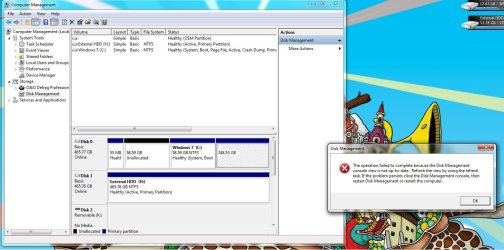
Can you do it? I currently have Windows 7 RC1 installed and I just deleted my Windows Vista partition. Now I have unallocated space. I planned to expand my Windows 7 partition to this area, but it won't let me. Any ideas?

Here's what I mean:
 

Attachments

  • 7problem.jpg
    7problem.jpg
    85.8 KB · Views: 245

My Computer

OS
Windows 7 Professional x64
CPU
Intel Core i7 970
Motherboard
Gigabyte GA-X58A-UD9
Memory
6GB STT Speed (Hypers)
Graphics Card(s)
Nvidia GTX 570, 470
Monitor(s) Displays
Dell 22"
Screen Resolution
1680x1050
Hard Drives
WD Caviar Black 500GB
WD Caviar Black 1TB
Samsung Spinpoint F3 1TB
Seagate Barracuda
PSU
Corsair HX1000
Windows will not do it. Yoou need something like paragon disk manager suite 2009 to expand to the left. You are like the third person with the same problem today. M$ should really let you expand if you have un allocated space.

Ken
 

My Computer

Computer Manufacturer/Model Number
HP Pavillion dv-7 1005 Tx
OS
Win 8 Release candidate 8400
CPU
[email protected]
Memory
4 gigs
Graphics Card(s)
Nvidia 9600M
Sound Card
HD built-in
Monitor(s) Displays
17" Wxga
Screen Resolution
1440x900
Cooling
none
Internet Speed
45Mb down 5Mb up
Do I risk any stability issues if I expand to the left with Paragon?
 

My Computer

OS
Windows 7 Professional x64
CPU
Intel Core i7 970
Motherboard
Gigabyte GA-X58A-UD9
Memory
6GB STT Speed (Hypers)
Graphics Card(s)
Nvidia GTX 570, 470
Monitor(s) Displays
Dell 22"
Screen Resolution
1680x1050
Hard Drives
WD Caviar Black 500GB
WD Caviar Black 1TB
Samsung Spinpoint F3 1TB
Seagate Barracuda
PSU
Corsair HX1000
"Hard Disk Manager 2009 Professional Edition does not work under this OS"
 

My Computer

OS
Windows 7 Professional x64
CPU
Intel Core i7 970
Motherboard
Gigabyte GA-X58A-UD9
Memory
6GB STT Speed (Hypers)
Graphics Card(s)
Nvidia GTX 570, 470
Monitor(s) Displays
Dell 22"
Screen Resolution
1680x1050
Hard Drives
WD Caviar Black 500GB
WD Caviar Black 1TB
Samsung Spinpoint F3 1TB
Seagate Barracuda
PSU
Corsair HX1000
Hi Thomas,

That's odd, it works on mine. Do you have the right bit version for the o/s you are trying to install it to?

The reason Disk Management has those limitations is to stop users getting into trouble.

If you expand the System partition to the left (into the lower address spaces) - you lose the ability to boot.

You can use the Paragon to do it, but will need to run startup repair to correct the bcd entry afterwards.

Or, use the Paragon "Copy partition" function to copy the C partition into the unallocated space - the Paragon will create the bcd entry for you.

Then mark the new partition active, delete the C you have now and extend the new one to the right.

NOTE: When copying a partition, the unallocated space needs to as large or larger than the source ( obviously) - so you may want to shrink C a little before copying it.
 

My Computers

System One System Two

  • Computer type
    PC/Desktop
    OS
    7 X64
    CPU
    i5 8400
    Motherboard
    gigabyte b365m ds3h
    Memory
    2x8gb 3200mhz
    Hard Drives
    various
    PSU
    pure power 11 400w cm
    Case
    Coolermaster
    Cooling
    cryorig m9i
  • Computer type
    PC/Desktop
    OS
    7x64
    CPU
    g5400
    Motherboard
    ga b365m ds3h
    Memory
    8gb ddr4 2400
    PSU
    xfx pro 450w
I REALLY hope someone can help me fix what I did.

I took an image of my OS partition.
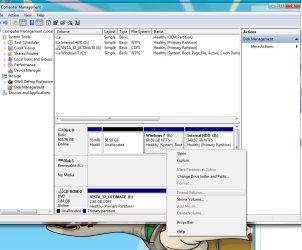
Then I opened Partition Magic. I got some errors about compatibility issues, then it asked to fix some problems and I told it to proceed. I think it resized my media/program files partition and now I can't get that to show up and all the programs that I had on it won't load. I went into disk management to try to give it a name and letter in case that was the issue but it wouldn't let me. I received the attached error. I then ran my setup repair disk and it said there were issues so I told it to repair and restart, but it didn't fix the issues.

HELP! That partition has my setup folder (the setup.exe files of all my programs). Also, I haven't backed up since I got home from school and I've acquired much more. I know the files are still on the disk, but I just can't get to them.

Here's the error:
 

Attachments

  • 7Error.jpg
    7Error.jpg
    127.3 KB · Views: 123

My Computer

OS
Windows 7 Professional x64
CPU
Intel Core i7 970
Motherboard
Gigabyte GA-X58A-UD9
Memory
6GB STT Speed (Hypers)
Graphics Card(s)
Nvidia GTX 570, 470
Monitor(s) Displays
Dell 22"
Screen Resolution
1680x1050
Hard Drives
WD Caviar Black 500GB
WD Caviar Black 1TB
Samsung Spinpoint F3 1TB
Seagate Barracuda
PSU
Corsair HX1000
Hi,

Yes partition magic will do that - it is not compatible with the new NT6 (Vista / Win 7 ) partitioning rules.

You can transfer off anything you need with the File Transfer Wizard
on this free bootable app. from the nice people at Paragon:

FREE Rescue Kit 9.0 Express - Don't wait for disaster, get instant data recovery software!

You might try making an image of the partition with the free Macrium Reflect. Then delete that partition - recreate it with Disk Management and restore the Macrium image.

Macrium Reflect FREE Edition - Information and download
 

My Computers

System One System Two

  • Computer type
    PC/Desktop
    OS
    7 X64
    CPU
    i5 8400
    Motherboard
    gigabyte b365m ds3h
    Memory
    2x8gb 3200mhz
    Hard Drives
    various
    PSU
    pure power 11 400w cm
    Case
    Coolermaster
    Cooling
    cryorig m9i
  • Computer type
    PC/Desktop
    OS
    7x64
    CPU
    g5400
    Motherboard
    ga b365m ds3h
    Memory
    8gb ddr4 2400
    PSU
    xfx pro 450w
Parted Magic is a live Linux disk designed specifically for partitioning. It's become an indispensable tool for me.

Parted Magic homepage
 

My Computer

OS
Windows 7 64-bit
CPU
Intel C2D E8400 Wolfdale
Motherboard
Asus Maximus Formula
Memory
Mushkin 2GB DDR2 800
Graphics Card(s)
Asus 8800GT
Hard Drives
2x Seagate Barracuda ES.2 ST3250310NS 250GB 7200 RPM 32MB Cache SATA-II
PSU
Cooler Master Real Power Pro RS-650-ACAA-A1
Case
Lian-li PC-1010B
Mouse
Logitech G7
Well... it's still going. 10 hours down, 7 more to go! It seems to be working... so THANK YOU SIW2. This Paragon stuff might be worth the purchase.
 

My Computer

OS
Windows 7 Professional x64
CPU
Intel Core i7 970
Motherboard
Gigabyte GA-X58A-UD9
Memory
6GB STT Speed (Hypers)
Graphics Card(s)
Nvidia GTX 570, 470
Monitor(s) Displays
Dell 22"
Screen Resolution
1680x1050
Hard Drives
WD Caviar Black 500GB
WD Caviar Black 1TB
Samsung Spinpoint F3 1TB
Seagate Barracuda
PSU
Corsair HX1000
Hi Thomas,

Glad it seems to be working.

You don't specify exactly what you are doing at the moment - 17 hours seems very long.

Are you using a trial version , or something?
 

My Computers

System One System Two

  • Computer type
    PC/Desktop
    OS
    7 X64
    CPU
    i5 8400
    Motherboard
    gigabyte b365m ds3h
    Memory
    2x8gb 3200mhz
    Hard Drives
    various
    PSU
    pure power 11 400w cm
    Case
    Coolermaster
    Cooling
    cryorig m9i
  • Computer type
    PC/Desktop
    OS
    7x64
    CPU
    g5400
    Motherboard
    ga b365m ds3h
    Memory
    8gb ddr4 2400
    PSU
    xfx pro 450w
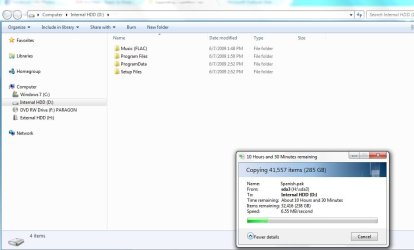
I went in and was copying all the data from my corrupt partition to my external hard drive. I had to copy 285GB. It ended up taking 13 hours. And now I've reformatted my partition and I'm copying it back. Time remaining: about 13 hours. So this will take a while but it's totally worth it. When this whole process is over, I'll let you know!
 

My Computer

OS
Windows 7 Professional x64
CPU
Intel Core i7 970
Motherboard
Gigabyte GA-X58A-UD9
Memory
6GB STT Speed (Hypers)
Graphics Card(s)
Nvidia GTX 570, 470
Monitor(s) Displays
Dell 22"
Screen Resolution
1680x1050
Hard Drives
WD Caviar Black 500GB
WD Caviar Black 1TB
Samsung Spinpoint F3 1TB
Seagate Barracuda
PSU
Corsair HX1000
Seems like a lot of time,,, would not
1. make total full backup
2. format drive,
3. boot to disk
4. restore full backup be way faster.

13 hours is a long time, and if (summer time) you have a power hiccup your screwed.
 
Seems like a lot of time,,, would not
1. make total full backup
2. format drive,
3. boot to disk
4. restore full backup be way faster.

13 hours is a long time, and if (summer time) you have a power hiccup your screwed.

That's pretty much what I did, except I didn't take a image. I just literally copied the files. Also, the partition was corrupt. I couldn't do anything with it while in Windows. I had to do the copying the first time from the boot disk. I was able to delete it. Then after that I was able to create a new volume.
 

My Computer

OS
Windows 7 Professional x64
CPU
Intel Core i7 970
Motherboard
Gigabyte GA-X58A-UD9
Memory
6GB STT Speed (Hypers)
Graphics Card(s)
Nvidia GTX 570, 470
Monitor(s) Displays
Dell 22"
Screen Resolution
1680x1050
Hard Drives
WD Caviar Black 500GB
WD Caviar Black 1TB
Samsung Spinpoint F3 1TB
Seagate Barracuda
PSU
Corsair HX1000
Here's where I'm at:
 

Attachments

  • recovery.jpg
    recovery.jpg
    52.2 KB · Views: 55

My Computer

OS
Windows 7 Professional x64
CPU
Intel Core i7 970
Motherboard
Gigabyte GA-X58A-UD9
Memory
6GB STT Speed (Hypers)
Graphics Card(s)
Nvidia GTX 570, 470
Monitor(s) Displays
Dell 22"
Screen Resolution
1680x1050
Hard Drives
WD Caviar Black 500GB
WD Caviar Black 1TB
Samsung Spinpoint F3 1TB
Seagate Barracuda
PSU
Corsair HX1000
Oh I see , you are using Windows - it will work, but it's slow - reliable, though.

If you are wanting to buy the Paragon app. ( assuming you haven't already ), there is a deal this weekend only on Partition Manager 10, just $9.99.

US only - or maybe if you pay in dollars it would work anywhere - not sure:

Paragon Software Sale
 

My Computers

System One System Two

  • Computer type
    PC/Desktop
    OS
    7 X64
    CPU
    i5 8400
    Motherboard
    gigabyte b365m ds3h
    Memory
    2x8gb 3200mhz
    Hard Drives
    various
    PSU
    pure power 11 400w cm
    Case
    Coolermaster
    Cooling
    cryorig m9i
  • Computer type
    PC/Desktop
    OS
    7x64
    CPU
    g5400
    Motherboard
    ga b365m ds3h
    Memory
    8gb ddr4 2400
    PSU
    xfx pro 450w
Oh I see , you are using Windows - it will work, but it's slow - reliable, though.

If you are wanting to buy the Paragon app. ( assuming you haven't already ), there is a deal this weekend only on Partition Manager 10, just $9.99.

US only - or maybe if you pay in dollars it would work anywhere - not sure:

Paragon Software Sale

The first transfer using the Paragon boot tool took 13 hours as well. And the time is dropping in a not so linear fashion. I only have 7 hours left now. So I think in the end it will have taken about 10 hours this time. I'm limited by the firewire connection on my external HDD.
 

My Computer

OS
Windows 7 Professional x64
CPU
Intel Core i7 970
Motherboard
Gigabyte GA-X58A-UD9
Memory
6GB STT Speed (Hypers)
Graphics Card(s)
Nvidia GTX 570, 470
Monitor(s) Displays
Dell 22"
Screen Resolution
1680x1050
Hard Drives
WD Caviar Black 500GB
WD Caviar Black 1TB
Samsung Spinpoint F3 1TB
Seagate Barracuda
PSU
Corsair HX1000
wow, that does seem long :S I hope it finishes...

I still don't udnerstand why your Windows Partitioner wasen't working... did you try re-deleting the un-allocated partition, then extending? i believe there is also some 'consequitive' peramiter rules, saying the win7 part must be beside each other.

My suggestion... playing with one HD in this manner with continous extensions/shrinks will cuase your HD to fail much faster. I suggest one OS per HD for maximum life, and limit to only <5 partition edits through the LIFE of your drive.

that said, wipe yur drive, THEN change your partitions with the installer, and install clean when you decide to go to a newer build. This will make your entire drive write on consequtively laid out partitions.

hope this helps...

-D
 

My Computer

Computer Manufacturer/Model Number
Myself
OS
Windows 7 64bit Ultimate Build 7268.0.090701-1900
CPU
Quad CPU Q6600 @ 2.4GHz
Memory
4GB 6400 Dual Channel
Graphics Card(s)
1GB DDR3 x16 + 512mb ddr2 x1
Sound Card
I dunno, but it puts out a good 7.1 sur through the fiber :D
Monitor(s) Displays
Quad-Monitor display (check out the photo)
Screen Resolution
1200x1600
Hard Drives
(2 x 1TB) + (1 x 500Gb)

tip: Always run your OS on a small Disk with away from your large storage files, and make sure theirs plenty of Cache (32mb recommnded).
PSU
1000w
Case
a block of wood
Cooling
Intel Standard. tip: Dont overclock with beta win7...
Internet Speed
15meg
Thanks for all of the help. I'm sure the 10,000 RPM or SSD drives will become affordable before I need to purchase a new HDD. That said, my 1TB drive arrives tomorrow. I'll definitely keep that in mind. On a lighter note, all went well. Everything transfered and all of my shortcuts work again! I'll have a backup partition on my new HDD as well as on my external. Anyways, this isn't happening to me again. But if it does, I'm well prepared. Thanks all of you for your help and input.
 

My Computer

OS
Windows 7 Professional x64
CPU
Intel Core i7 970
Motherboard
Gigabyte GA-X58A-UD9
Memory
6GB STT Speed (Hypers)
Graphics Card(s)
Nvidia GTX 570, 470
Monitor(s) Displays
Dell 22"
Screen Resolution
1680x1050
Hard Drives
WD Caviar Black 500GB
WD Caviar Black 1TB
Samsung Spinpoint F3 1TB
Seagate Barracuda
PSU
Corsair HX1000
Back
Top