
Expanding Computer Menu

jc4gavejc

New member
Local time
10:13 PM
Messages
37
I love the Windows 7 Start Menu, and its versitality astounds me at times, but the inability for the "Computer" menu to be completely expandable cripples quite a bit of my productivity...
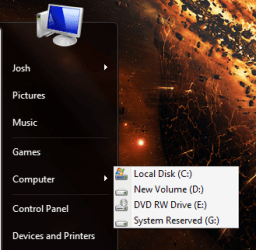
Computer Menu.PNG

This problem does not exist with the personal menu, which quite frankly I could care less about completely expanding.
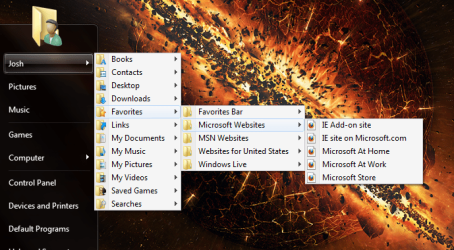
Personal Menu.PNG

In general, Windows 7 has seemed to abandon the concept of expanding menus which can actually make things much much quicker at least for me, but I have gotten a separate toolbar working in the taskbar, but this seems inconvenient coming from someone who has always used classic menus on the Start Menu.

Don't get me wrong, I am very GLAD that Windows 7 makes such improvements to the way the start menu functions and in general these improvements have greatly added to my efficiency, but this really cripples someone like me!

Computer toolbar.PNG

Any suggestions?
 

My Computer

OS
Windows 7 RC build 7100
Hi jc4gavejc,

I'm sure a registry hack will fix this. I'll look into it.

greetz
 

My Computer

OS
Win7 Build 7600 x86
CPU
Pentium II 300MHz
Motherboard
Asus
Memory
32mb EDO RAM
Graphics Card(s)
Diamond Viper
Sound Card
Soundblaster 16
Monitor(s) Displays
14" AOC CRT 16K color
Screen Resolution
800x600
Hard Drives
300mb Quantum fireball
PSU
110 Watts
Cooling
Passive
Keyboard
Trust Ergonomic
Mouse
Generic
Internet Speed
256K u 128K d
Here's what I'm thinking.

The only way that I know of accomplishing this is by using a folder with fully expandable menu support that is already in the Start Menu, setting up symbolic links to all your drives (through MKLINK /d) and editing the registry to change the display name of the start menu item.

Don't want to do that if I don't have to though
 

My Computer

OS
Windows 7 RC build 7100
I'll get back to you when i figured out the right reg key.

Tomorrow because I'm off to bed soon.

greetz
 

My Computer

OS
Win7 Build 7600 x86
CPU
Pentium II 300MHz
Motherboard
Asus
Memory
32mb EDO RAM
Graphics Card(s)
Diamond Viper
Sound Card
Soundblaster 16
Monitor(s) Displays
14" AOC CRT 16K color
Screen Resolution
800x600
Hard Drives
300mb Quantum fireball
PSU
110 Watts
Cooling
Passive
Keyboard
Trust Ergonomic
Mouse
Generic
Internet Speed
256K u 128K d
got it working just by using the "Recorded TV" Library and manually adding the drives I have, but...

Doesn't hide drives if they are empty (have a multiformat card reader which displays 8 or so drives in the Library and I use maybe 5 of em, but I like them to be hidden as they are in Explorer when not in use)

USB drives plugged in present a bit of a dilemma as well

still trying to figure out how to get CD ROM support, which this method does not seem to have (gives me an error)
 

My Computer

OS
Windows 7 RC build 7100
Spend a few hrs fiddling with the registry.

Found the one that changes, and set the subkeys according to the user key.

That didn't change a thing.

So I give up. It's to a minor issue to spend more time on.

Good to hear you found some sort of alternative.

Greetz
 

My Computer

OS
Win7 Build 7600 x86
CPU
Pentium II 300MHz
Motherboard
Asus
Memory
32mb EDO RAM
Graphics Card(s)
Diamond Viper
Sound Card
Soundblaster 16
Monitor(s) Displays
14" AOC CRT 16K color
Screen Resolution
800x600
Hard Drives
300mb Quantum fireball
PSU
110 Watts
Cooling
Passive
Keyboard
Trust Ergonomic
Mouse
Generic
Internet Speed
256K u 128K d
Back
Top