Solved Expanding partition into free space - but it's not letting me?

My Computer My Computer

At a glance

Vista, Windows7, Mint Mate, Zorin, Windows 8from 1.6GHz Duo to i7
Computer Manufacturer/Model Number
HP, Dell, Gateway, Toshiba - 4 laptops and 2 desktops
OS
Vista, Windows7, Mint Mate, Zorin, Windows 8
CPU
from 1.6GHz Duo to i7
Monitor(s) Displays
2x HP w2207
Hard Drives
5x HDD, 7x SSD, 12x Externals
Keyboard
with trackball - no mices
Mouse
Trackball mice
Internet Speed
DSL 6000
Any progress yet?
 

My Computer My Computer

At a glance

W 7 64-bit UltimateIntel Q9550 Yorkfield8GB Dominator 8500C5DATI : XFX 5870
Computer Manufacturer/Model Number
* BFK Customs *
OS
W 7 64-bit Ultimate
CPU
Intel Q9550 Yorkfield
Motherboard
ASUS P5Q Pro
Memory
8GB Dominator 8500C5D
Graphics Card(s)
ATI : XFX 5870
Sound Card
Realtek HD Audio 7-1
Monitor(s) Displays
1x 47" LCD HDMI & 3x 26" LCD HDMI
Screen Resolution
1920x1080P & 1920x1200
Hard Drives
1x 80GB Intel X25-M G2 SSD : 1x 500GB & 1x 640GB WD Caviar Black(s)
PSU
Corsair 620HX
Case
Cooler Master RC-690
Cooling
Tuniq Tower 120, 2x 140mm and 3x 120mm case fans
Keyboard
Microsoft 500
Mouse
Razer Diamondback 3G
Internet Speed
14 Mb/s
Other Info
1x Koutech 3Gb/s SATA HDD Hot Swap Rack
Hello,

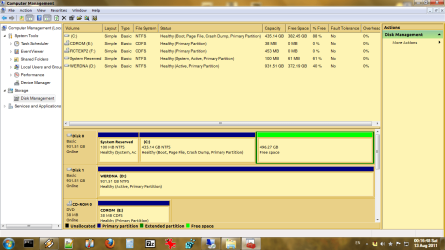
I am posting back here to notify that I have indeed fixed this issue thanks to a blank CD and the Partition Wizard bootup disk, as you can see in the screencap. My only other question is what's up with that bizarre 8 GB of unclaimed space at the end of my drive (see my Ubuntu screenshot)? I cannot for the life of me figure it out.

Thanks for all of your assistance!
 

Attachments

  • allbetter.png
    allbetter.png
    57.4 KB · Views: 24

My Computer My Computer

At a glance

Win7 Ultimate x64 (with a side of Ubuntu)
OS
Win7 Ultimate x64 (with a side of Ubuntu)
Hello again, good to see you have a solution.


If you still have the Linux extended partition, here that's part of that, and I have no explanation for you concerning Linux partitioning as I have little knowledge of that.
 

My Computer My Computer

At a glance

W 7 64-bit UltimateIntel Q9550 Yorkfield8GB Dominator 8500C5DATI : XFX 5870
Computer Manufacturer/Model Number
* BFK Customs *
OS
W 7 64-bit Ultimate
CPU
Intel Q9550 Yorkfield
Motherboard
ASUS P5Q Pro
Memory
8GB Dominator 8500C5D
Graphics Card(s)
ATI : XFX 5870
Sound Card
Realtek HD Audio 7-1
Monitor(s) Displays
1x 47" LCD HDMI & 3x 26" LCD HDMI
Screen Resolution
1920x1080P & 1920x1200
Hard Drives
1x 80GB Intel X25-M G2 SSD : 1x 500GB & 1x 640GB WD Caviar Black(s)
PSU
Corsair 620HX
Case
Cooler Master RC-690
Cooling
Tuniq Tower 120, 2x 140mm and 3x 120mm case fans
Keyboard
Microsoft 500
Mouse
Razer Diamondback 3G
Internet Speed
14 Mb/s
Other Info
1x Koutech 3Gb/s SATA HDD Hot Swap Rack
This is why I asked you to post up a Partition Wizard screenshot earlier.
Sorry about that; I was AWOL for the past two weeks and missed you saying that. But thanks for your assistance.

I looked around the boot disk version of Partition Wizard, but didn't find out how to do it. The display looked terrible on my widescreen anyway :p.

Anyways, I'm not overwhelmingly concerned about that random 8 GB I can't seem to access - at least not for now. But any thoughts on its nature based on my previous screenshots are welcomed.
 

My Computer My Computer

At a glance

Win7 Ultimate x64 (with a side of Ubuntu)
OS
Win7 Ultimate x64 (with a side of Ubuntu)
I just gave you the steps with illustrated tutorials on how to delete and then extend C into the 8GB. Are you even reading the steps?
 
As it turns out, I somehow zorched my Ubuntu partition straight off the drive. Not exactly pressing because it didn't have any vital information, but now that space is listed as "free" by all partition utilities we've discussed here (with the obvious exception of gparted).

gregrocker, I am sorry I seem to have irritated you. Before I conducted any operations on it, I wanted to make sure there was nothing important about that 8GB such that I shouldn't be manipulating it. The process you mentioned looks like the same one I used for expanding my Windows partition, which I achieved using Partition Wizard.

Anyways, I'm content with this end result, so for all intensive purposes this issue is [SOLVED].
 

My Computer My Computer

At a glance

Win7 Ultimate x64 (with a side of Ubuntu)
OS
Win7 Ultimate x64 (with a side of Ubuntu)
Hello again, good to see you seem to found a solution.


If you have indeed lost the Linux install, I would suggest you use the installed version of Partition Wizard to do a complete wipe (Method Two in this tutorial) of the entire space previously occupied by the Linux install, that will leave it as "Raw" space, completely over-writing all the Grub code, which can then be reused as you like.

Have a look through the information in this tutorial linked below for use if you should need to (re)create the Windows 7 System boot files to the Windows System Reserved partition in future.


My Computer My Computer

At a glance

W 7 64-bit UltimateIntel Q9550 Yorkfield8GB Dominator 8500C5DATI : XFX 5870
Computer Manufacturer/Model Number
* BFK Customs *
OS
W 7 64-bit Ultimate
CPU
Intel Q9550 Yorkfield
Motherboard
ASUS P5Q Pro
Memory
8GB Dominator 8500C5D
Graphics Card(s)
ATI : XFX 5870
Sound Card
Realtek HD Audio 7-1
Monitor(s) Displays
1x 47" LCD HDMI & 3x 26" LCD HDMI
Screen Resolution
1920x1080P & 1920x1200
Hard Drives
1x 80GB Intel X25-M G2 SSD : 1x 500GB & 1x 640GB WD Caviar Black(s)
PSU
Corsair 620HX
Case
Cooler Master RC-690
Cooling
Tuniq Tower 120, 2x 140mm and 3x 120mm case fans
Keyboard
Microsoft 500
Mouse
Razer Diamondback 3G
Internet Speed
14 Mb/s
Other Info
1x Koutech 3Gb/s SATA HDD Hot Swap Rack
Back
Top