
Explorer crashes when uninstall, Error: The instruction at 0x77beb7...

mojo333

New member
Local time
4:16 PM
Messages
5
Location
Oxford
Explorer crashes when I either try to uninstall any program or move a file into a folder with administrative permissions, I believe these are corralent because they both require administrative permissions.

Error Message: "The instruction at 0x77beb707 referenced memory at 0x00000030. The memory could not be read.
Click Ok to terminate the program."
I've found absolutly nothing anywhere else so I made my own thread.
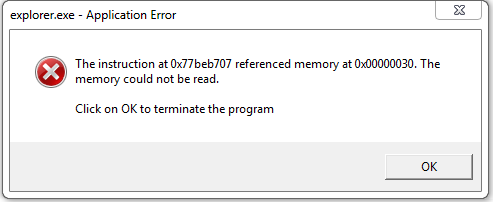
PZ0rNVr.png
 

My Computer My Computer

Computer type
PC/Desktop
Computer Manufacturer/Model Number
custom build
OS
Windows 7 (64 bit)
CPU
Intel i7 4770k
Motherboard
Asus Z87-Pro
Memory
Corsair 8Gb Ram
Graphics Card(s)
Geforce Gtx 680
Hard Drives
1Tb HD, 120Gb SSD
Internet Speed
20mb downloads, 2mb upload
Antivirus
Avast, MalwareBytes Trial
Browser
Google Chrome
Welcome to the forum.

MSINFO32:
  • Please go to Start and type in "msinfo32.exe" (without the quotes) and press Enter.
  • Save the report as an .nfo file, then zip up the .nfo file and upload/attach the .zip file with your next post.
  • Also, save a copy as a .txt file and include it also (it's much more difficult to read, but we have greater success in getting the info from it).
Run the System File Checker that scans the of all protected Windows 7 system files and replaces incorrect corrupted, changed/modified, or damaged versions with the correct versions if possible:
  • Click on the :orb:
  • Type CMD on Search
  • Left click and Run as Administrator
  • Type SFC /scannow
Full tutorial here:
 

My Computer My Computer

Computer type
PC/Desktop
Computer Manufacturer/Model Number
Self assembled
OS
Windows 10 Home 64Bit
CPU
Intel Core i5 10400 @ 2.90GHz
Motherboard
Intel Corporation DG41WV (PROCESSOR)
Memory
8.00GB Single-Channel Unknown @ 1329MHz (16-20-20-38)
Sound Card
Realtek High Definition Audio
Monitor(s) Displays
DELL E170S
Screen Resolution
1280x1024 pixels
Hard Drives
931GB TOSHIBA DT01ACA100 (SATA)
238GB TEAM TM8PS7256G (SATA SSD)
Case
Nothing Fancy
Cooling
Fans
Keyboard
A4 Tech Co LTD
Mouse
A4 Tech Co Ltd/Logitech
Internet Speed
25 Mbps
Welcome to the forum.

MSINFO32:
  • Please go to Start and type in "msinfo32.exe" (without the quotes) and press Enter.
  • Save the report as an .nfo file, then zip up the .nfo file and upload/attach the .zip file with your next post.
  • Also, save a copy as a .txt file and include it also (it's much more difficult to read, but we have greater success in getting the info from it).
Run the System File Checker that scans the of all protected Windows 7 system files and replaces incorrect corrupted, changed/modified, or damaged versions with the correct versions if possible:
  • Click on the :orb:
  • Type CMD on Search
  • Left click and Run as Administrator
  • Type SFC /scannow
Full tutorial here:

Hello, Thank you for replying, I did as you said and I got these results in the MSINFO32:
*Results attached in Zip Folder*

I also used the SFC.exe scan command and I got the following message:
sOYu9FZ.png


Because of this, I also included the CBS.log file into the ZIP Folder.
(Note: I had to go into safe mode to allow the file to be moved.)

Thank You for your help!
 

Attachments

Last edited:

My Computer My Computer

Computer type
PC/Desktop
Computer Manufacturer/Model Number
custom build
OS
Windows 7 (64 bit)
CPU
Intel i7 4770k
Motherboard
Asus Z87-Pro
Memory
Corsair 8Gb Ram
Graphics Card(s)
Geforce Gtx 680
Hard Drives
1Tb HD, 120Gb SSD
Internet Speed
20mb downloads, 2mb upload
Antivirus
Avast, MalwareBytes Trial
Browser
Google Chrome
The SFC scan shows the following problems...
Code:
 Line 33865: 2014-07-05 11:38:19, Info                  CSI    00000325 [SR] Repairing 3 components
 Line 33866: 2014-07-05 11:38:19, Info                  CSI    00000326 [SR] Beginning Verify and Repair transaction
 Line 33869: 2014-07-05 11:38:19, Info                  CSI    00000328 [SR] Cannot repair member file [l:22{11}]"comsvcs.dll" of Microsoft-Windows-COM-ComPlus-Runtime-QFE-CATSRVUT-COMSVCS, Version = 6.1.7600.16385, pA = PROCESSOR_ARCHITECTURE_AMD64 (9), Culture neutral, VersionScope = 1 nonSxS, PublicKeyToken = {l:8 b:31bf3856ad364e35}, Type neutral, TypeName neutral, PublicKey neutral in the store, hash mismatch
 Line 33872: 2014-07-05 11:38:19, Info                  CSI    0000032a [SR] Cannot repair member file [l:14{7}]"mmc.exe" of Microsoft-Windows-Microsoft-Management-Console, Version = 6.1.7600.16385, pA = PROCESSOR_ARCHITECTURE_AMD64 (9), Culture neutral, VersionScope = 1 nonSxS, PublicKeyToken = {l:8 b:31bf3856ad364e35}, Type neutral, TypeName neutral, PublicKey neutral in the store, hash mismatch
 Line 33875: 2014-07-05 11:38:19, Info                  CSI    0000032c [SR] Cannot repair member file [l:14{7}]"evr.dll" of Microsoft-Windows-EnhancedVideoRenderer, Version = 6.1.7601.17514, pA = PROCESSOR_ARCHITECTURE_INTEL (0), Culture neutral, VersionScope = 1 nonSxS, PublicKeyToken = {l:8 b:31bf3856ad364e35}, Type neutral, TypeName neutral, PublicKey neutral in the store, hash mismatch
I'm not too surprised you have problems with these errors!

I'll post a fix protocol soon.
 

My Computer My Computer

Computer type
Laptop
Computer Manufacturer/Model Number
Asus K52F or Lenovo B51-80
OS
Win 7 x64 Home Premium (and x86 VirtualBox VM)/Win10
CPU
i3 370M/i7 6500U
Motherboard
Asus/Lenovo
Memory
8GB - finally :)/8GB
Graphics Card(s)
it's an i3, dude!/dual Intel&nVidia
Sound Card
onboard
Monitor(s) Displays
15.6" built-in
Screen Resolution
1366x768/1920x1080
Hard Drives
750GB Seagate internal
Sundry external drives attached to other computers on the local network
1TB SSD on the Lenovo
PSU
n/a
Internet Speed
as much as I can get - usually on a dongle/phone, so <1MB/s
Antivirus
MSE/Defender
Browser
IE11/12/Edge/Chrome/FF(if I must)
I've uploaded a file - mj3aa.zip - to my OneDrive at Noel's OneDrive
Please download and save it.

Right-click on the saved file and select Extract all...
Change the target to C:\ and click on Extract
Close all windows (it would be a good idea to print these instructions!)

Now reboot to the Repair Environment - as soon as the machine restarts, start tapping F8 - this should bring up the Advanced Boot Menu, at the top of which should be the option 'Repair my Computer'
Pick that
You'll have to log in with your username and password.

Pick the option to use a Command Prompt
At the prompt type
DIR C:\mj3aa
hit the enter key - if you get a 'Not Found' error try
DIR D:\mj3aa
or
DIR E:\mj3aa


The drive letter in use when you find the folder will need to be substituted (for<drive>) into the following command...


XCOPY <drive>:\mj3aa <drive>:\windows\winsxs /y /i /s /v /h


(e.g. XCOPY P:\wfire P:\windows\winsxs /y /i /s /v /h )


run the command (it should take almost no time) and when the prompt returns, type
EXIT
and hit the Enter key to exit Command Prompt - reboot to Normal Mode Windows.

Now run SFC /SCANNOW in an Elevated Command Prompt
then reboot and upload the new CBS.log file to your reply
 

My Computer My Computer

Computer type
Laptop
Computer Manufacturer/Model Number
Asus K52F or Lenovo B51-80
OS
Win 7 x64 Home Premium (and x86 VirtualBox VM)/Win10
CPU
i3 370M/i7 6500U
Motherboard
Asus/Lenovo
Memory
8GB - finally :)/8GB
Graphics Card(s)
it's an i3, dude!/dual Intel&nVidia
Sound Card
onboard
Monitor(s) Displays
15.6" built-in
Screen Resolution
1366x768/1920x1080
Hard Drives
750GB Seagate internal
Sundry external drives attached to other computers on the local network
1TB SSD on the Lenovo
PSU
n/a
Internet Speed
as much as I can get - usually on a dongle/phone, so <1MB/s
Antivirus
MSE/Defender
Browser
IE11/12/Edge/Chrome/FF(if I must)
I've uploaded a file - mj3aa.zip - to my OneDrive at Noel's OneDrive
Please download and save it.

Right-click on the saved file and select Extract all...
Change the target to C:\ and click on Extract
Close all windows (it would be a good idea to print these instructions!)

Now reboot to the Repair Environment - as soon as the machine restarts, start tapping F8 - this should bring up the Advanced Boot Menu, at the top of which should be the option 'Repair my Computer'
Pick that
You'll have to log in with your username and password.

Pick the option to use a Command Prompt
At the prompt type
DIR C:\mj3aa
hit the enter key - if you get a 'Not Found' error try
DIR D:\mj3aa
or
DIR E:\mj3aa


The drive letter in use when you find the folder will need to be substituted (for<drive>) into the following command...


XCOPY <drive>:\mj3aa <drive>:\windows\winsxs /y /i /s /v /h


(e.g. XCOPY P:\wfire P:\windows\winsxs /y /i /s /v /h )


run the command (it should take almost no time) and when the prompt returns, type
EXIT
and hit the Enter key to exit Command Prompt - reboot to Normal Mode Windows.

Now run SFC /SCANNOW in an Elevated Command Prompt
then reboot and upload the new CBS.log file to your reply

Hello, sorry for the late reply (I've been busy all day)

Unfortunately, I cannot use the command prompt there because I have a wireless keyboard and windows dosn't load the drivers for the keyboard, is there any other way to use a command prompt with significant permissions while I wait for a usb keyboard to arrive?

Many Thanks, Joseph
 

My Computer My Computer

Computer type
PC/Desktop
Computer Manufacturer/Model Number
custom build
OS
Windows 7 (64 bit)
CPU
Intel i7 4770k
Motherboard
Asus Z87-Pro
Memory
Corsair 8Gb Ram
Graphics Card(s)
Geforce Gtx 680
Hard Drives
1Tb HD, 120Gb SSD
Internet Speed
20mb downloads, 2mb upload
Antivirus
Avast, MalwareBytes Trial
Browser
Google Chrome
Yeurgh! - a wireless Keyboard should still work, I thought? Is Legacy USB enabled in the BIOS?
 

My Computer My Computer

Computer type
Laptop
Computer Manufacturer/Model Number
Asus K52F or Lenovo B51-80
OS
Win 7 x64 Home Premium (and x86 VirtualBox VM)/Win10
CPU
i3 370M/i7 6500U
Motherboard
Asus/Lenovo
Memory
8GB - finally :)/8GB
Graphics Card(s)
it's an i3, dude!/dual Intel&nVidia
Sound Card
onboard
Monitor(s) Displays
15.6" built-in
Screen Resolution
1366x768/1920x1080
Hard Drives
750GB Seagate internal
Sundry external drives attached to other computers on the local network
1TB SSD on the Lenovo
PSU
n/a
Internet Speed
as much as I can get - usually on a dongle/phone, so <1MB/s
Antivirus
MSE/Defender
Browser
IE11/12/Edge/Chrome/FF(if I must)
Yeurgh! - a wireless Keyboard should still work, I thought? Is Legacy USB enabled in the BIOS?

Hmm, well I don't remember enabling it at any point so I guess not, I'll give you an update in a few hours if I get any results.
Thanks for your help again.
 

My Computer My Computer

Computer type
PC/Desktop
Computer Manufacturer/Model Number
custom build
OS
Windows 7 (64 bit)
CPU
Intel i7 4770k
Motherboard
Asus Z87-Pro
Memory
Corsair 8Gb Ram
Graphics Card(s)
Geforce Gtx 680
Hard Drives
1Tb HD, 120Gb SSD
Internet Speed
20mb downloads, 2mb upload
Antivirus
Avast, MalwareBytes Trial
Browser
Google Chrome
So after having gone through the bios and changing what I could find, in the end I borrowed a keyboard off someone else and it worked fine. I ran the command and now the issues seem to have gone away, the sfc scan also detected nothing.

96veqfY.png


Again thank you for your help in telling me how to and fixing the errors on my computer.
 

My Computer My Computer

Computer type
PC/Desktop
Computer Manufacturer/Model Number
custom build
OS
Windows 7 (64 bit)
CPU
Intel i7 4770k
Motherboard
Asus Z87-Pro
Memory
Corsair 8Gb Ram
Graphics Card(s)
Geforce Gtx 680
Hard Drives
1Tb HD, 120Gb SSD
Internet Speed
20mb downloads, 2mb upload
Antivirus
Avast, MalwareBytes Trial
Browser
Google Chrome
Good! that means that the file changes worked properly ;)


How is Explorer working now?
 

My Computer My Computer

Computer type
Laptop
Computer Manufacturer/Model Number
Asus K52F or Lenovo B51-80
OS
Win 7 x64 Home Premium (and x86 VirtualBox VM)/Win10
CPU
i3 370M/i7 6500U
Motherboard
Asus/Lenovo
Memory
8GB - finally :)/8GB
Graphics Card(s)
it's an i3, dude!/dual Intel&nVidia
Sound Card
onboard
Monitor(s) Displays
15.6" built-in
Screen Resolution
1366x768/1920x1080
Hard Drives
750GB Seagate internal
Sundry external drives attached to other computers on the local network
1TB SSD on the Lenovo
PSU
n/a
Internet Speed
as much as I can get - usually on a dongle/phone, so <1MB/s
Antivirus
MSE/Defender
Browser
IE11/12/Edge/Chrome/FF(if I must)
Back
Top