dcwill83
New member
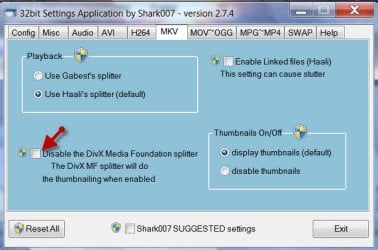
This problem has bugged me for a few weeks now and I can't seem to find a solution. When I open the folder, some folders' thumbnails load quickly while others don't at all or only a fewfiles (when i look inside a particular folder). The green 'loading bar" in the filepath bar stops moving and explorer.exe crashes and restarts. This only happens with the .mkv files, I've never had a problem with .avi or other formats. Below you'll find what Event Viewer had to say about the error.
Faulting application name: explorer.exe, version: 6.1.7601.17514, time stamp: 0x4ce796f3
Faulting module name: MSVCR80.dll, version: 8.0.50727.4940, time stamp: 0x4ca2b271
Exception code: 0xc0000005
Fault offset: 0x000153fe
Faulting process id: 0x17b0
Faulting application start time: 0x01cbe9c7dc1f54b2
Faulting application path: C:\Windows\explorer.exe
Faulting module path: C:\Windows\WinSxS\x86_microsoft.vc80.crt_1fc8b3b9a1e18e3b_8.0.50727.4940_none_d08cc06a442b34fc\MSVCR80.dll
Report Id: 5859db40-55bc-11e0-86e7-e74ab3946573
Log Name: Application
Source: Application Error
Date: 3/23/2011 10:13:45 PM
Event ID: 1000
Task Category: (100)
Level: Error
Keywords: Classic
User: N/A
Computer: Horo
Description:
Faulting application name: explorer.exe, version: 6.1.7601.17514, time stamp: 0x4ce796f3
Faulting module name: MSVCR80.dll, version: 8.0.50727.4940, time stamp: 0x4ca2b271
Exception code: 0xc0000005
Fault offset: 0x000153fe
Faulting process id: 0x17b0
Faulting application start time: 0x01cbe9c7dc1f54b2
Faulting application path: C:\Windows\explorer.exe
Faulting module path: C:\Windows\WinSxS\x86_microsoft.vc80.crt_1fc8b3b9a1e18e3b_8.0.50727.4940_none_d08cc06a442b34fc\MSVCR80.dll
Report Id: 5859db40-55bc-11e0-86e7-e74ab3946573
Event Xml:
<Event xmlns="http://schemas.microsoft.com/win/2004/08/events/event">
<System>
<Provider Name="Application Error" />
<EventID Qualifiers="0">1000</EventID>
<Level>2</Level>
<Task>100</Task>
<Keywords>0x80000000000000</Keywords>
<TimeCreated SystemTime="2011-03-24T02:13:45.000000000Z" />
<EventRecordID>9103</EventRecordID>
<Channel>Application</Channel>
<Computer>Horo</Computer>
<Security />
</System>
<EventData>
<Data>explorer.exe</Data>
<Data>6.1.7601.17514</Data>
<Data>4ce796f3</Data>
<Data>MSVCR80.dll</Data>
<Data>8.0.50727.4940</Data>
<Data>4ca2b271</Data>
<Data>c0000005</Data>
<Data>000153fe</Data>
<Data>17b0</Data>
<Data>01cbe9c7dc1f54b2</Data>
<Data>C:\Windows\explorer.exe</Data>
<Data>C:\Windows\WinSxS\x86_microsoft.vc80.crt_1fc8b3b9a1e18e3b_8.0.50727.4940_none_d08cc06a442b34fc\MSVCR80.dll</Data>
<Data>5859db40-55bc-11e0-86e7-e74ab3946573</Data>
</EventData>
</Event>
Faulting application name: explorer.exe, version: 6.1.7601.17514, time stamp: 0x4ce796f3
Faulting module name: MSVCR80.dll, version: 8.0.50727.4940, time stamp: 0x4ca2b271
Exception code: 0xc0000005
Fault offset: 0x000153fe
Faulting process id: 0x17b0
Faulting application start time: 0x01cbe9c7dc1f54b2
Faulting application path: C:\Windows\explorer.exe
Faulting module path: C:\Windows\WinSxS\x86_microsoft.vc80.crt_1fc8b3b9a1e18e3b_8.0.50727.4940_none_d08cc06a442b34fc\MSVCR80.dll
Report Id: 5859db40-55bc-11e0-86e7-e74ab3946573
Log Name: Application
Source: Application Error
Date: 3/23/2011 10:13:45 PM
Event ID: 1000
Task Category: (100)
Level: Error
Keywords: Classic
User: N/A
Computer: Horo
Description:
Faulting application name: explorer.exe, version: 6.1.7601.17514, time stamp: 0x4ce796f3
Faulting module name: MSVCR80.dll, version: 8.0.50727.4940, time stamp: 0x4ca2b271
Exception code: 0xc0000005
Fault offset: 0x000153fe
Faulting process id: 0x17b0
Faulting application start time: 0x01cbe9c7dc1f54b2
Faulting application path: C:\Windows\explorer.exe
Faulting module path: C:\Windows\WinSxS\x86_microsoft.vc80.crt_1fc8b3b9a1e18e3b_8.0.50727.4940_none_d08cc06a442b34fc\MSVCR80.dll
Report Id: 5859db40-55bc-11e0-86e7-e74ab3946573
Event Xml:
<Event xmlns="http://schemas.microsoft.com/win/2004/08/events/event">
<System>
<Provider Name="Application Error" />
<EventID Qualifiers="0">1000</EventID>
<Level>2</Level>
<Task>100</Task>
<Keywords>0x80000000000000</Keywords>
<TimeCreated SystemTime="2011-03-24T02:13:45.000000000Z" />
<EventRecordID>9103</EventRecordID>
<Channel>Application</Channel>
<Computer>Horo</Computer>
<Security />
</System>
<EventData>
<Data>explorer.exe</Data>
<Data>6.1.7601.17514</Data>
<Data>4ce796f3</Data>
<Data>MSVCR80.dll</Data>
<Data>8.0.50727.4940</Data>
<Data>4ca2b271</Data>
<Data>c0000005</Data>
<Data>000153fe</Data>
<Data>17b0</Data>
<Data>01cbe9c7dc1f54b2</Data>
<Data>C:\Windows\explorer.exe</Data>
<Data>C:\Windows\WinSxS\x86_microsoft.vc80.crt_1fc8b3b9a1e18e3b_8.0.50727.4940_none_d08cc06a442b34fc\MSVCR80.dll</Data>
<Data>5859db40-55bc-11e0-86e7-e74ab3946573</Data>
</EventData>
</Event>
My Computer
- Computer Manufacturer/Model Number
- Presario CQ60-420US
- OS
- Windows 7 Home Premium 32bit
- CPU
- Pentium Dual-Core CPU T4200 @ 2.00GHz
- Memory
- 3.00GB
- Graphics Card(s)
- Intel Graphics Media Accelerator 4500MHD
- Hard Drives
- 500 GB WD MyBook (WD Caviar Green)