Explorer crashes

dannyhill

New member
Local time
4:32 PM
Messages
4
Hi there,
I have windows 7 Home premium 32 installed on a partition (C) of my hard drive, using another (D) for non-system files.
A few weeks back I started to get explorer (not IE) crashing. No problem with any programs running but I would have to go back and open a new file browser which can be annoying when working.
Following the instructions on this site I am uploading here a dmp file.
I have already run malwarebytes, AVAST, cccleaner on registry, disc check and sfc /scannow - still have the problem. Both partitions have 1% or less fragmentation, the C drive is 75% full (20.4GB free of 80GB) and D is similarly 75% full (63 free of 207GB).
Any ideas?
Many thanks in advance,

Daniel
 

My Computer

OS
Windows 7 Home preimum 32
Separate Process

I reinstalled my operating systems in September.
The only real change I made was swapping from AVG to Avast.

My Windows Explorer has crashed regularly ever since. :(

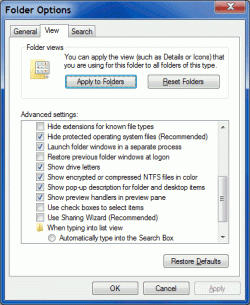
As a workaround, I selected "Launch folder windows in a separate process" ("Folder Options" > "View" tab).
Click on the picture for an animation
Folder Option - Separate Process.gif
It means that when Explorer crashes, it doesn't cause havoc with the programs that start at login.
 

My Computer

Computer type
PC/Desktop
Computer Manufacturer/Model Number
n/a
OS
W7 Ultimate SP1, LM19.2 MATE, W10 Home 1703, W10 Pro 1703 VM, #All 64 bit
CPU
AMD Phenom II x6 1100T, 3.3 GHz
Motherboard
ASUS M4A88T-M/USB3 (AM3)
Memory
12GB DDR3 1333 G-Skill (4GB x 2), G-Skill (2GB x 2)
Graphics Card(s)
NVIDIA GeForce GTX 660
Sound Card
Realtek?
Monitor(s) Displays
Samsung S23B350
Screen Resolution
1920x1080
Hard Drives
WD Green 2TB (SATA), WD Green 3TB (SATA), WD Blue 4TB (SATA), WD Blue 6TB (SATA)
PSU
Cooler Master
Case
Antec GX300 Tower
Cooling
3x Antec TRICOOL 120mm Fans
Mouse
Wired Optical
Internet Speed
DSL
Antivirus
Avast
Browser
Pale Moon (64 bit)
Other Info
2018-12-27 Upgraded HDDs
2015-12-10 Upgraded case, graphics card, storage
2015-08-15 Upgraded motherboard & RAM
2015-07-15 Upgraded LM17.1 to LM17.2
Oh great!
I'm using Avast.
I already have that checked under folder options.

D
 

My Computer

OS
Windows 7 Home preimum 32
It might not be ...

Oh great!
I'm using Avast.
I already have that checked under folder options.

It might not be related to Avast.

I haven't heard other members complaining about Explorer problems related to Avast.
 

My Computer

Computer type
PC/Desktop
Computer Manufacturer/Model Number
n/a
OS
W7 Ultimate SP1, LM19.2 MATE, W10 Home 1703, W10 Pro 1703 VM, #All 64 bit
CPU
AMD Phenom II x6 1100T, 3.3 GHz
Motherboard
ASUS M4A88T-M/USB3 (AM3)
Memory
12GB DDR3 1333 G-Skill (4GB x 2), G-Skill (2GB x 2)
Graphics Card(s)
NVIDIA GeForce GTX 660
Sound Card
Realtek?
Monitor(s) Displays
Samsung S23B350
Screen Resolution
1920x1080
Hard Drives
WD Green 2TB (SATA), WD Green 3TB (SATA), WD Blue 4TB (SATA), WD Blue 6TB (SATA)
PSU
Cooler Master
Case
Antec GX300 Tower
Cooling
3x Antec TRICOOL 120mm Fans
Mouse
Wired Optical
Internet Speed
DSL
Antivirus
Avast
Browser
Pale Moon (64 bit)
Other Info
2018-12-27 Upgraded HDDs
2015-12-10 Upgraded case, graphics card, storage
2015-08-15 Upgraded motherboard & RAM
2015-07-15 Upgraded LM17.1 to LM17.2
Back
Top