AC73
New member
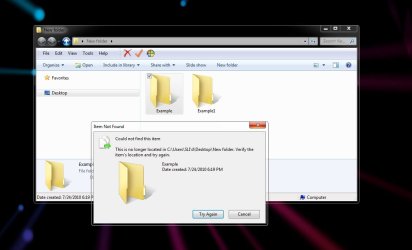
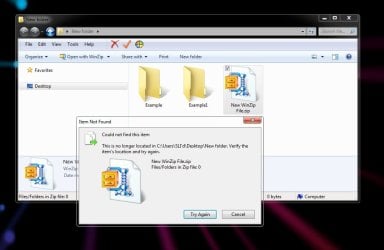
When moving or renaming a folder or zip file only in windows 7 I get this message:
"Could not find this item.
This is no longer located in [path]. Verify the item's location and try again."
I can click Try Again or Cancel.
Click Try Again and the folder moves as is should.
I see this error posted all over the net. The problem always occurs when someone deletes a folder or any file for that matter.
That's not my problem.
I get this message only when I move or rename any folder or zip file any where on any drive. No other file types are affected by this. Copying folders or zip files does not create this message.
I have been using Windows Double Explorer from time to time and I get the messages using that as well, but not with Directory Opus.
In the screen shots I have provided, all I did was drag and drop Example folder to Example1 folder and the same for New WinZip File.zip to Example1 folder.
I have not been able to find a solution anywhere for this. I figure that is has something to do with file associations or something along those lines but I just can't be certain.
Any help would be most appreciated. Thank you.
"Could not find this item.
This is no longer located in [path]. Verify the item's location and try again."
I can click Try Again or Cancel.
Click Try Again and the folder moves as is should.
I see this error posted all over the net. The problem always occurs when someone deletes a folder or any file for that matter.
That's not my problem.
I get this message only when I move or rename any folder or zip file any where on any drive. No other file types are affected by this. Copying folders or zip files does not create this message.
I have been using Windows Double Explorer from time to time and I get the messages using that as well, but not with Directory Opus.
In the screen shots I have provided, all I did was drag and drop Example folder to Example1 folder and the same for New WinZip File.zip to Example1 folder.
I have not been able to find a solution anywhere for this. I figure that is has something to do with file associations or something along those lines but I just can't be certain.
Any help would be most appreciated. Thank you.
Attachments
My Computer
- Computer type
- PC/Desktop
- Computer Manufacturer/Model Number
- Custom and Self Built
- OS
- Windows 7 Professional 64bit - Retail
- CPU
- Intel Core i5 4590S Haswell-DT Refresh Rev.C0 Stepping 3
- Motherboard
- ASUS H97M-E (CSM) MicroATX
- Memory
- 16 GB (A-Data DDR-1600)
- Graphics Card(s)
- NVIDIA GeForce GTX 960 Mini-SFF (GM206)
- Sound Card
- ASUS Xonar DSX Audio PCI-E
- Monitor(s) Displays
- Dell U2311H
- Screen Resolution
- 1920x1080
- Hard Drives
- Samsung SSD 840 EVO 120GB ATA Device
300GB Velociraptor
150GB Raptor
Many external drives via Esata and USB 3.0
- PSU
- Corsair HX650 Single +12V rail - Modular
- Case
- Silverstone TJ-08-E
- Cooling
- Intel Stock
- Keyboard
- Razer BlackWidow Ultimate Stealth Edition
- Mouse
- Gigabyte M8000X
- Internet Speed
- Bell DSL (Latest test -13.31mbps down, 10.37mbps up)
- Antivirus
- ESET Internet Security
- Browser
- Waterfox x64
- Other Info
- Silicon Image SiI 3132 SATALink Controller x2 eSATA ports -
Windows Experience Index - 6.6

 ) with some software and games ie Crysis and FarCry2 simply will not run on my machine. Half Life 2 and other Valve games will not display textures properly as well and there are other games which either do not run or won't run properly. So I will work as many kinks out as I can before I reinstall.