
Solved Explorer.exe causes Iexplore to open multiple instances and high mem

SuperAntiSpyware is failing to load at boot - could that be causing the problem? - try uninstalling it and using their removal tool (if they have one!)

The Afa Card Reader Service service failed to start because "The system cannot find the path specified" -which could mean a number of things, such as a missing file, or a missing registry entry... reinstalling the drivers may help.

There seem to be a number of controller errors on DR0 - it may be worth checking the drive connections, and running Seatools or the manufacturer's test utility over the HD.
The only other point of note is problems with AVG - I would uninstall it and run the removers over the system (including also ones for any previously-installed AV). Install MSE as a temporary/permanent replacement until the system is stable at least.


That's really about it - it 's not as bad as I was expecting it to be.

I will give these a shot. It runs great when explorer is closed :rolleyes:
I can even open up the 32bit IE without issue.
just wish I could figure out what's calling up the extra Explorer.exe to action.
If I temporarily rename exeplorer.exe you think is would give me a workable error? This only effected the 64bit IExplore.exe originally. When I renamed the IExplore.exe 64bit the error or rather issue then transferred to explorer.exe.
 

My Computer My Computer

At a glance

Windows 7 Professional x64AMD Athlon II x4 3.00 GHz16GB Kingston DDR3Nvidia 8600 (dual DVI out for 2 monitors)
Computer type
PC/Desktop
Computer Manufacturer/Model Number
Custom Build MPCBS AMII
OS
Windows 7 Professional x64
CPU
AMD Athlon II x4 3.00 GHz
Motherboard
MSI GF615M-p33
Memory
16GB Kingston DDR3
Graphics Card(s)
Nvidia 8600 (dual DVI out for 2 monitors)
Sound Card
Onboard
Monitor(s) Displays
Acer H233H 23", ASUS 23"
Screen Resolution
1366 x 768
Hard Drives
(2) WD Blue 1 TB 3 partitions, (1) Seagate 7200 500GB with 2 partitions for useless and frequently deleted data Looking forward do an ssd for os soon.
PSU
Corsair 1100Watt
Case
Apevia HAF
Cooling
HAF AMD High Profile Heat sink and fan
Keyboard
wireless Logitech
Mouse
wireless Logitech
Internet Speed
16 mbps
Antivirus
eSet, AVG, Clam and Clamwin (depends on machine)
Browser
Firefox
Other Info
(9) Win 7 machines all x64 (POS Updated to Windows 7 pro YEA), (4) Linux machines x64 and x86 including a v3000 compaq lappy brought back to life with Mint 9 used to scan drives, (1) Linux Machine dual boot XP Pro (for testing and destroying), (1) Win 7 pro x64/Win 8.1 Lenovo Laptop Dual Boot.
If you reinstall I'd use 32 bit.

I was reminded of this when trying to clean up a 64 bit with 4gb RAM a few days back. The sluggishness reminded me of other 64 bit I've had on low resource PC's so I reinstalled 32 bit and it was faster.

That should also solve your 64 bit Explorer issue, although it will almost certainly go away anyway with a reinstall unless a program setting is replicated that spurs it.
 
That's really about it - it 's not as bad as I was expecting it to be.

Oh ye of little faith:cry:

Just joking with ya Noel

I still have a few skills and wits about me :p

:roflmao:
 

My Computer My Computer

At a glance

Windows 7 Professional x64AMD Athlon II x4 3.00 GHz16GB Kingston DDR3Nvidia 8600 (dual DVI out for 2 monitors)
Computer type
PC/Desktop
Computer Manufacturer/Model Number
Custom Build MPCBS AMII
OS
Windows 7 Professional x64
CPU
AMD Athlon II x4 3.00 GHz
Motherboard
MSI GF615M-p33
Memory
16GB Kingston DDR3
Graphics Card(s)
Nvidia 8600 (dual DVI out for 2 monitors)
Sound Card
Onboard
Monitor(s) Displays
Acer H233H 23", ASUS 23"
Screen Resolution
1366 x 768
Hard Drives
(2) WD Blue 1 TB 3 partitions, (1) Seagate 7200 500GB with 2 partitions for useless and frequently deleted data Looking forward do an ssd for os soon.
PSU
Corsair 1100Watt
Case
Apevia HAF
Cooling
HAF AMD High Profile Heat sink and fan
Keyboard
wireless Logitech
Mouse
wireless Logitech
Internet Speed
16 mbps
Antivirus
eSet, AVG, Clam and Clamwin (depends on machine)
Browser
Firefox
Other Info
(9) Win 7 machines all x64 (POS Updated to Windows 7 pro YEA), (4) Linux machines x64 and x86 including a v3000 compaq lappy brought back to life with Mint 9 used to scan drives, (1) Linux Machine dual boot XP Pro (for testing and destroying), (1) Win 7 pro x64/Win 8.1 Lenovo Laptop Dual Boot.
<chuckle>
Even the older events weren't abounding in errors - although I only went back a week or so.

I know how difficult isolating this sort of problem can be - have you use resource manager to see what's eating Explorer/Iexplore? I wouldn't be surprised it the problem is a shortcut somewhere that's being launched in Explorer, that Explorer is trying then to hand off to Iexplore and failing now that you've killed 64-bit Iexplore.
 

My Computer My Computer

At a glance

Win 7 x64 Home Premium (and x86 VirtualBox VM...i3 370M/i7 6500U8GB - finally :)/8GBit's an i3, dude!/dual Intel&nVidia
Computer type
Laptop
Computer Manufacturer/Model Number
Asus K52F or Lenovo B51-80
OS
Win 7 x64 Home Premium (and x86 VirtualBox VM)/Win10
CPU
i3 370M/i7 6500U
Motherboard
Asus/Lenovo
Memory
8GB - finally :)/8GB
Graphics Card(s)
it's an i3, dude!/dual Intel&nVidia
Sound Card
onboard
Monitor(s) Displays
15.6" built-in
Screen Resolution
1366x768/1920x1080
Hard Drives
750GB Seagate internal
Sundry external drives attached to other computers on the local network
1TB SSD on the Lenovo
PSU
n/a
Internet Speed
as much as I can get - usually on a dongle/phone, so <1MB/s
Antivirus
MSE/Defender
Browser
IE11/12/Edge/Chrome/FF(if I must)
<chuckle>
Even the older events weren't abounding in errors - although I only went back a week or so.

I know how difficult isolating this sort of problem can be - have you use resource manager to see what's eating Explorer/Iexplore? I wouldn't be surprised it the problem is a shortcut somewhere that's being launched in Explorer, that Explorer is trying then to hand off to Iexplore and failing now that you've killed 64-bit Iexplore.

What resource manager do you use? I have tried a couple but they just don't show enough.:confused:
perhaps I am not looking at the windows built in resource meter correctly. I cannot tell what is calling Explorer to action.
 

My Computer My Computer

At a glance

Windows 7 Professional x64AMD Athlon II x4 3.00 GHz16GB Kingston DDR3Nvidia 8600 (dual DVI out for 2 monitors)
Computer type
PC/Desktop
Computer Manufacturer/Model Number
Custom Build MPCBS AMII
OS
Windows 7 Professional x64
CPU
AMD Athlon II x4 3.00 GHz
Motherboard
MSI GF615M-p33
Memory
16GB Kingston DDR3
Graphics Card(s)
Nvidia 8600 (dual DVI out for 2 monitors)
Sound Card
Onboard
Monitor(s) Displays
Acer H233H 23", ASUS 23"
Screen Resolution
1366 x 768
Hard Drives
(2) WD Blue 1 TB 3 partitions, (1) Seagate 7200 500GB with 2 partitions for useless and frequently deleted data Looking forward do an ssd for os soon.
PSU
Corsair 1100Watt
Case
Apevia HAF
Cooling
HAF AMD High Profile Heat sink and fan
Keyboard
wireless Logitech
Mouse
wireless Logitech
Internet Speed
16 mbps
Antivirus
eSet, AVG, Clam and Clamwin (depends on machine)
Browser
Firefox
Other Info
(9) Win 7 machines all x64 (POS Updated to Windows 7 pro YEA), (4) Linux machines x64 and x86 including a v3000 compaq lappy brought back to life with Mint 9 used to scan drives, (1) Linux Machine dual boot XP Pro (for testing and destroying), (1) Win 7 pro x64/Win 8.1 Lenovo Laptop Dual Boot.

Will take a little getting used to but I like it. I just have to figure out how to tell which is which.

I may have solved the error on repair install. I googled and yahooed and binged for hours yesterday and this morning I ran into this. The fix didn't help but down in the comments was a bit about c: not being active.

I checked and low and behold C:Acer was not active which is indeed where the OS is installed. We have rebooted once and are at the "Expanding Windows files 18%" Stage 3 so far so good. we will see if this fixes the issue or not here in a few. Will let you know.

**update**
We are now at the "Transfering files" stage 5 so the "Active" setting was the key in repair installation error.
 
Last edited:

My Computer My Computer

At a glance

Windows 7 Professional x64AMD Athlon II x4 3.00 GHz16GB Kingston DDR3Nvidia 8600 (dual DVI out for 2 monitors)
Computer type
PC/Desktop
Computer Manufacturer/Model Number
Custom Build MPCBS AMII
OS
Windows 7 Professional x64
CPU
AMD Athlon II x4 3.00 GHz
Motherboard
MSI GF615M-p33
Memory
16GB Kingston DDR3
Graphics Card(s)
Nvidia 8600 (dual DVI out for 2 monitors)
Sound Card
Onboard
Monitor(s) Displays
Acer H233H 23", ASUS 23"
Screen Resolution
1366 x 768
Hard Drives
(2) WD Blue 1 TB 3 partitions, (1) Seagate 7200 500GB with 2 partitions for useless and frequently deleted data Looking forward do an ssd for os soon.
PSU
Corsair 1100Watt
Case
Apevia HAF
Cooling
HAF AMD High Profile Heat sink and fan
Keyboard
wireless Logitech
Mouse
wireless Logitech
Internet Speed
16 mbps
Antivirus
eSet, AVG, Clam and Clamwin (depends on machine)
Browser
Firefox
Other Info
(9) Win 7 machines all x64 (POS Updated to Windows 7 pro YEA), (4) Linux machines x64 and x86 including a v3000 compaq lappy brought back to life with Mint 9 used to scan drives, (1) Linux Machine dual boot XP Pro (for testing and destroying), (1) Win 7 pro x64/Win 8.1 Lenovo Laptop Dual Boot.
Ok the In place upgrade fixed the issue. No more running away on the memory and system seems stable. Hundreds of updates and reinstall MSSE and all will be good I think. Thank you all for your help.
 

My Computer My Computer

At a glance

Windows 7 Professional x64AMD Athlon II x4 3.00 GHz16GB Kingston DDR3Nvidia 8600 (dual DVI out for 2 monitors)
Computer type
PC/Desktop
Computer Manufacturer/Model Number
Custom Build MPCBS AMII
OS
Windows 7 Professional x64
CPU
AMD Athlon II x4 3.00 GHz
Motherboard
MSI GF615M-p33
Memory
16GB Kingston DDR3
Graphics Card(s)
Nvidia 8600 (dual DVI out for 2 monitors)
Sound Card
Onboard
Monitor(s) Displays
Acer H233H 23", ASUS 23"
Screen Resolution
1366 x 768
Hard Drives
(2) WD Blue 1 TB 3 partitions, (1) Seagate 7200 500GB with 2 partitions for useless and frequently deleted data Looking forward do an ssd for os soon.
PSU
Corsair 1100Watt
Case
Apevia HAF
Cooling
HAF AMD High Profile Heat sink and fan
Keyboard
wireless Logitech
Mouse
wireless Logitech
Internet Speed
16 mbps
Antivirus
eSet, AVG, Clam and Clamwin (depends on machine)
Browser
Firefox
Other Info
(9) Win 7 machines all x64 (POS Updated to Windows 7 pro YEA), (4) Linux machines x64 and x86 including a v3000 compaq lappy brought back to life with Mint 9 used to scan drives, (1) Linux Machine dual boot XP Pro (for testing and destroying), (1) Win 7 pro x64/Win 8.1 Lenovo Laptop Dual Boot.
You're welcome - and good luck with the updates!
 

My Computer My Computer

At a glance

Win 7 x64 Home Premium (and x86 VirtualBox VM...i3 370M/i7 6500U8GB - finally :)/8GBit's an i3, dude!/dual Intel&nVidia
Computer type
Laptop
Computer Manufacturer/Model Number
Asus K52F or Lenovo B51-80
OS
Win 7 x64 Home Premium (and x86 VirtualBox VM)/Win10
CPU
i3 370M/i7 6500U
Motherboard
Asus/Lenovo
Memory
8GB - finally :)/8GB
Graphics Card(s)
it's an i3, dude!/dual Intel&nVidia
Sound Card
onboard
Monitor(s) Displays
15.6" built-in
Screen Resolution
1366x768/1920x1080
Hard Drives
750GB Seagate internal
Sundry external drives attached to other computers on the local network
1TB SSD on the Lenovo
PSU
n/a
Internet Speed
as much as I can get - usually on a dongle/phone, so <1MB/s
Antivirus
MSE/Defender
Browser
IE11/12/Edge/Chrome/FF(if I must)

My Computer My Computer

At a glance

Windows 7 Professional x64AMD Athlon II x4 3.00 GHz16GB Kingston DDR3Nvidia 8600 (dual DVI out for 2 monitors)
Computer type
PC/Desktop
Computer Manufacturer/Model Number
Custom Build MPCBS AMII
OS
Windows 7 Professional x64
CPU
AMD Athlon II x4 3.00 GHz
Motherboard
MSI GF615M-p33
Memory
16GB Kingston DDR3
Graphics Card(s)
Nvidia 8600 (dual DVI out for 2 monitors)
Sound Card
Onboard
Monitor(s) Displays
Acer H233H 23", ASUS 23"
Screen Resolution
1366 x 768
Hard Drives
(2) WD Blue 1 TB 3 partitions, (1) Seagate 7200 500GB with 2 partitions for useless and frequently deleted data Looking forward do an ssd for os soon.
PSU
Corsair 1100Watt
Case
Apevia HAF
Cooling
HAF AMD High Profile Heat sink and fan
Keyboard
wireless Logitech
Mouse
wireless Logitech
Internet Speed
16 mbps
Antivirus
eSet, AVG, Clam and Clamwin (depends on machine)
Browser
Firefox
Other Info
(9) Win 7 machines all x64 (POS Updated to Windows 7 pro YEA), (4) Linux machines x64 and x86 including a v3000 compaq lappy brought back to life with Mint 9 used to scan drives, (1) Linux Machine dual boot XP Pro (for testing and destroying), (1) Win 7 pro x64/Win 8.1 Lenovo Laptop Dual Boot.
TBH, I'm surprised it took them so long to pull them in the first place - I'm thinking that someone's going to lose their bonus this year - if nothing else!
 

My Computer My Computer

At a glance

Win 7 x64 Home Premium (and x86 VirtualBox VM...i3 370M/i7 6500U8GB - finally :)/8GBit's an i3, dude!/dual Intel&nVidia
Computer type
Laptop
Computer Manufacturer/Model Number
Asus K52F or Lenovo B51-80
OS
Win 7 x64 Home Premium (and x86 VirtualBox VM)/Win10
CPU
i3 370M/i7 6500U
Motherboard
Asus/Lenovo
Memory
8GB - finally :)/8GB
Graphics Card(s)
it's an i3, dude!/dual Intel&nVidia
Sound Card
onboard
Monitor(s) Displays
15.6" built-in
Screen Resolution
1366x768/1920x1080
Hard Drives
750GB Seagate internal
Sundry external drives attached to other computers on the local network
1TB SSD on the Lenovo
PSU
n/a
Internet Speed
as much as I can get - usually on a dongle/phone, so <1MB/s
Antivirus
MSE/Defender
Browser
IE11/12/Edge/Chrome/FF(if I must)
mohavepc;2858079 I checked and low and behold C:Acer was not active which is indeed where the OS is installed. We have rebooted once and are at the [B said:
"Expanding Windows files 18%"[/B] Stage 3 so far so good. we will see if this fixes the issue or not here in a few. Will let you know.

**update**
We are now at the "Transfering files" stage 5 so the "Active" setting was the key in repair installation error.


The picture you posted shows System Reserved is booting C as signified by the System label and therefore it must be marked Active and should not be expected to boot Win7 if it's not. To move it to C it would normally require running 3 Startup Repairs or transferring the System flag there by some other method as the Active flag alone cannot boot Win7 but only points to the intended boot partition, where the boot files must still be installed and bcd edited to change boot partition.

However doing a Repair Install it should reconfigure the boot so it may itself transfer the System flag to C based on where you planted the Active flag and abandon the System Reserved partition. You'll know this because it will boot. If it won't then I'd move the Active flag back to SysReserved to boot it.

The linked post refers to this possibly working for your purposes because SysReserved doesn't have enough free space to stage the Repair Install, something we've seen before with Win7 imaging failing to run due to not enough space for the the SysVol file to expand. So its plausible and would be easier to know if we could see the used space of SysReserved partition since those readings are masked in your screenshot. No more than half should be used.
 
mohavepc;2858079 I checked and low and behold C:Acer was not active which is indeed where the OS is installed. We have rebooted once and are at the [B said:
"Expanding Windows files 18%"[/B] Stage 3 so far so good. we will see if this fixes the issue or not here in a few. Will let you know.

**update**
We are now at the "Transfering files" stage 5 so the "Active" setting was the key in repair installation error.


The picture you posted shows System Reserved is booting C as signified by the System label and therefore it must be marked Active and should not be expected to boot Win7 if it's not. To move it to C it would normally require running 3 Startup Repairs or transferring the System flag there by some other method as the Active flag alone cannot boot Win7 but only points to the intended boot partition, where the boot files must still be installed and bcd edited to change boot partition.

However doing a Repair Install it should reconfigure the boot so it may itself transfer the System flag to C based on where you planted the Active flag and abandon the System Reserved partition. You'll know this because it will boot. If it won't then I'd move the Active flag back to SysReserved to boot it.

The linked post refers to this possibly working for your purposes because SysReserved doesn't have enough free space to stage the Repair Install, something we've seen before with Win7 imaging failing to run due to not enough space for the the SysVol file to expand. So its plausible and would be easier to know if we could see the used space of SysReserved partition since those readings are masked in your screenshot. No more than half should be used.

The new screenshot shows 60 percent free on that partition. I did not intentionally mask the original screenshot. (you should have corrected me and made me take another:confused: ) :rolleyes:

I found that NONE of the partitions were marked active. Is this possible? don't think so as windows needs to know where to look. When I marked c: active it threw me a warning that only the partition with windows installed should be marked active. It rebooted without issue so I believe it Was active but not reading so from within windows hence the corruption and inability to do an in place upgrade.

It should have never booted if I had actually moved the flag. I believe all I did was correct an error. seatools shows the drive as healthy and it is running like a champ. It is now activated and has 144 updates done. will be ready to give back to the customer tomorrow. :geek:
 

Attachments

  • newpartitiontable.PNG
    newpartitiontable.PNG
    53 KB · Views: 3
Last edited:

My Computer My Computer

At a glance

Windows 7 Professional x64AMD Athlon II x4 3.00 GHz16GB Kingston DDR3Nvidia 8600 (dual DVI out for 2 monitors)
Computer type
PC/Desktop
Computer Manufacturer/Model Number
Custom Build MPCBS AMII
OS
Windows 7 Professional x64
CPU
AMD Athlon II x4 3.00 GHz
Motherboard
MSI GF615M-p33
Memory
16GB Kingston DDR3
Graphics Card(s)
Nvidia 8600 (dual DVI out for 2 monitors)
Sound Card
Onboard
Monitor(s) Displays
Acer H233H 23", ASUS 23"
Screen Resolution
1366 x 768
Hard Drives
(2) WD Blue 1 TB 3 partitions, (1) Seagate 7200 500GB with 2 partitions for useless and frequently deleted data Looking forward do an ssd for os soon.
PSU
Corsair 1100Watt
Case
Apevia HAF
Cooling
HAF AMD High Profile Heat sink and fan
Keyboard
wireless Logitech
Mouse
wireless Logitech
Internet Speed
16 mbps
Antivirus
eSet, AVG, Clam and Clamwin (depends on machine)
Browser
Firefox
Other Info
(9) Win 7 machines all x64 (POS Updated to Windows 7 pro YEA), (4) Linux machines x64 and x86 including a v3000 compaq lappy brought back to life with Mint 9 used to scan drives, (1) Linux Machine dual boot XP Pro (for testing and destroying), (1) Win 7 pro x64/Win 8.1 Lenovo Laptop Dual Boot.
It's booting because a Repair Install like any install refreshes the boot config so it moved System to C following the Active flag - unless you're saying it booted before the Repair Install yet after the Active flag moved

The fact that System Active was flagged in picture on SysReserved is always determinative so I doubt Disk Mgmt had it wrong at that point, although its possible. Otherwise For C to be bootable it had to have the boot files written and be bootsected previously.

Now you have an orphan Sys Reserved which can be deleted. That it interfered with Repair Install is hard to say as I've never seen it before and we get the toughest cases here. It is an interesting case to remember. Bookmarked
 
It's booting because a Repair Install like any install refreshes the boot config so it moved System to C following the Active flag - unless you're saying it booted before the Repair Install yet after the Active flag moved Yes that is what I am saying

The fact that System Active was flagged in picture on SysReserved is always determinative so I doubt Disk Mgmt had it wrong at that point, although its possible. Otherwise For C to be bootable it had to have the boot files written and be bootsected previously. Which I believe it did

Now you have an orphan Sys Reserved which can be deleted. That it interfered with Repair Install is hard to say as I've never seen it before and we get the toughest cases here. It is an interesting case to remember. Bookmarked

I as well. I have only seen something similar Once Before but it was with a Linux install that had issues with a system flag outside and inside the os. I had set up a Ext4 partition using g parted but the os when loaded reported it as ntsf and would not allow me access to the data.

I know it sounds impossible and stupid but it happened. I figure that windows had it wrong and when it saw it correctly it was able to repair install. I don't know for sure what happened, I just know it worked without too much issue and it is running great.
 

My Computer My Computer

At a glance

Windows 7 Professional x64AMD Athlon II x4 3.00 GHz16GB Kingston DDR3Nvidia 8600 (dual DVI out for 2 monitors)
Computer type
PC/Desktop
Computer Manufacturer/Model Number
Custom Build MPCBS AMII
OS
Windows 7 Professional x64
CPU
AMD Athlon II x4 3.00 GHz
Motherboard
MSI GF615M-p33
Memory
16GB Kingston DDR3
Graphics Card(s)
Nvidia 8600 (dual DVI out for 2 monitors)
Sound Card
Onboard
Monitor(s) Displays
Acer H233H 23", ASUS 23"
Screen Resolution
1366 x 768
Hard Drives
(2) WD Blue 1 TB 3 partitions, (1) Seagate 7200 500GB with 2 partitions for useless and frequently deleted data Looking forward do an ssd for os soon.
PSU
Corsair 1100Watt
Case
Apevia HAF
Cooling
HAF AMD High Profile Heat sink and fan
Keyboard
wireless Logitech
Mouse
wireless Logitech
Internet Speed
16 mbps
Antivirus
eSet, AVG, Clam and Clamwin (depends on machine)
Browser
Firefox
Other Info
(9) Win 7 machines all x64 (POS Updated to Windows 7 pro YEA), (4) Linux machines x64 and x86 including a v3000 compaq lappy brought back to life with Mint 9 used to scan drives, (1) Linux Machine dual boot XP Pro (for testing and destroying), (1) Win 7 pro x64/Win 8.1 Lenovo Laptop Dual Boot.
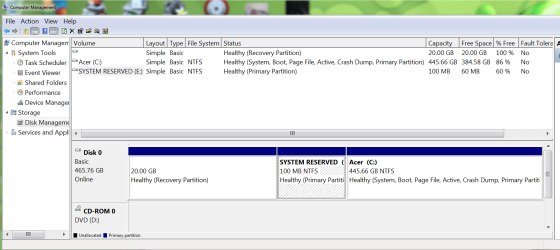
Got another with the same symptoms the 64bit version of IE is running up memory. This time I was trying out a new scanner software from Sophos and it came up with a Trojan cidoxVBR-a that it said could not be healed. Kaspersky rescue and AVG rescue find nothing. I am currently running a scan with Bit defender Rescue that has found nothing with the exception of a couple of disk errors even though sea tools found no issues. Malware bytes trial shows constant attempts of IE trying to reach out to several questionable sites but unable to find what is triggering it. A repair install fails with the unable to prepare system to restart. The active flag is on the system reserved partition and if moved it fails to boot as expected.

This is a gaming rig and there are at least 45 different steam games and several more other games that the customer adamantly does not want to reinstall(can't exactly blame him there). I realize I may have no other choice but with this not being a one off issue I was hoping someone might have an idea what the cause is or how to go about finding the little bugger causing it.
Thank you
 

My Computer My Computer

At a glance

Windows 7 Professional x64AMD Athlon II x4 3.00 GHz16GB Kingston DDR3Nvidia 8600 (dual DVI out for 2 monitors)
Computer type
PC/Desktop
Computer Manufacturer/Model Number
Custom Build MPCBS AMII
OS
Windows 7 Professional x64
CPU
AMD Athlon II x4 3.00 GHz
Motherboard
MSI GF615M-p33
Memory
16GB Kingston DDR3
Graphics Card(s)
Nvidia 8600 (dual DVI out for 2 monitors)
Sound Card
Onboard
Monitor(s) Displays
Acer H233H 23", ASUS 23"
Screen Resolution
1366 x 768
Hard Drives
(2) WD Blue 1 TB 3 partitions, (1) Seagate 7200 500GB with 2 partitions for useless and frequently deleted data Looking forward do an ssd for os soon.
PSU
Corsair 1100Watt
Case
Apevia HAF
Cooling
HAF AMD High Profile Heat sink and fan
Keyboard
wireless Logitech
Mouse
wireless Logitech
Internet Speed
16 mbps
Antivirus
eSet, AVG, Clam and Clamwin (depends on machine)
Browser
Firefox
Other Info
(9) Win 7 machines all x64 (POS Updated to Windows 7 pro YEA), (4) Linux machines x64 and x86 including a v3000 compaq lappy brought back to life with Mint 9 used to scan drives, (1) Linux Machine dual boot XP Pro (for testing and destroying), (1) Win 7 pro x64/Win 8.1 Lenovo Laptop Dual Boot.
I'd research everything you can find on the infection, post it up in Security section. Try cleaning it up with the customer understanding this is often not advisable on such an infection.

I'd also check closely all Browser Add-On's and Search services to see if it's lodged in there since IE is irregular. Often times even when uninstalled these spywares often stay running via the registry but are found by SuperAntiSpyware scan.
 
Again - check the Scheduled Tasks and see if there's anything odd in there - a lot of recent nasties have put stuff in there, and very few cleaners seem to look there.
 

My Computer My Computer

At a glance

Win 7 x64 Home Premium (and x86 VirtualBox VM...i3 370M/i7 6500U8GB - finally :)/8GBit's an i3, dude!/dual Intel&nVidia
Computer type
Laptop
Computer Manufacturer/Model Number
Asus K52F or Lenovo B51-80
OS
Win 7 x64 Home Premium (and x86 VirtualBox VM)/Win10
CPU
i3 370M/i7 6500U
Motherboard
Asus/Lenovo
Memory
8GB - finally :)/8GB
Graphics Card(s)
it's an i3, dude!/dual Intel&nVidia
Sound Card
onboard
Monitor(s) Displays
15.6" built-in
Screen Resolution
1366x768/1920x1080
Hard Drives
750GB Seagate internal
Sundry external drives attached to other computers on the local network
1TB SSD on the Lenovo
PSU
n/a
Internet Speed
as much as I can get - usually on a dongle/phone, so <1MB/s
Antivirus
MSE/Defender
Browser
IE11/12/Edge/Chrome/FF(if I must)
I'd research everything you can find on the infection, post it up in Security section. Try cleaning it up.

I'd also check closely all Browser Add-On's and Search services to see if it's lodged in there since IE is irregular. Often times even when uninstalled these spywares often stay running via the registry but are found by SuperAntiSpyware scan.

Ran SAS but all it found was a few tracking cookies. I will try resetting IE again and perhaps removing and reinstalling in features. All I can find on the infection of the CidoxVBR-a is a couple pages on Sophos website whick essentially says to run their scanner which coincidentally fails to remove the infection then fails a second run saying it must be activated (of course it does). The other relevant page says to run the bitdefender rescue to remove the rootkit. will let you know and if Repairing IE doesn't fix it I will post in Security. Thanks Greg.
 

My Computer My Computer

At a glance

Windows 7 Professional x64AMD Athlon II x4 3.00 GHz16GB Kingston DDR3Nvidia 8600 (dual DVI out for 2 monitors)
Computer type
PC/Desktop
Computer Manufacturer/Model Number
Custom Build MPCBS AMII
OS
Windows 7 Professional x64
CPU
AMD Athlon II x4 3.00 GHz
Motherboard
MSI GF615M-p33
Memory
16GB Kingston DDR3
Graphics Card(s)
Nvidia 8600 (dual DVI out for 2 monitors)
Sound Card
Onboard
Monitor(s) Displays
Acer H233H 23", ASUS 23"
Screen Resolution
1366 x 768
Hard Drives
(2) WD Blue 1 TB 3 partitions, (1) Seagate 7200 500GB with 2 partitions for useless and frequently deleted data Looking forward do an ssd for os soon.
PSU
Corsair 1100Watt
Case
Apevia HAF
Cooling
HAF AMD High Profile Heat sink and fan
Keyboard
wireless Logitech
Mouse
wireless Logitech
Internet Speed
16 mbps
Antivirus
eSet, AVG, Clam and Clamwin (depends on machine)
Browser
Firefox
Other Info
(9) Win 7 machines all x64 (POS Updated to Windows 7 pro YEA), (4) Linux machines x64 and x86 including a v3000 compaq lappy brought back to life with Mint 9 used to scan drives, (1) Linux Machine dual boot XP Pro (for testing and destroying), (1) Win 7 pro x64/Win 8.1 Lenovo Laptop Dual Boot.
Again - check the Scheduled Tasks and see if there's anything odd in there - a lot of recent nasties have put stuff in there, and very few cleaners seem to look there.

nothing abnormal in tasks (checked there first :) ) but disabled everything as well as a clean boot. Clean boot still has IE pop up regularly and run ram up.
 

My Computer My Computer

At a glance

Windows 7 Professional x64AMD Athlon II x4 3.00 GHz16GB Kingston DDR3Nvidia 8600 (dual DVI out for 2 monitors)
Computer type
PC/Desktop
Computer Manufacturer/Model Number
Custom Build MPCBS AMII
OS
Windows 7 Professional x64
CPU
AMD Athlon II x4 3.00 GHz
Motherboard
MSI GF615M-p33
Memory
16GB Kingston DDR3
Graphics Card(s)
Nvidia 8600 (dual DVI out for 2 monitors)
Sound Card
Onboard
Monitor(s) Displays
Acer H233H 23", ASUS 23"
Screen Resolution
1366 x 768
Hard Drives
(2) WD Blue 1 TB 3 partitions, (1) Seagate 7200 500GB with 2 partitions for useless and frequently deleted data Looking forward do an ssd for os soon.
PSU
Corsair 1100Watt
Case
Apevia HAF
Cooling
HAF AMD High Profile Heat sink and fan
Keyboard
wireless Logitech
Mouse
wireless Logitech
Internet Speed
16 mbps
Antivirus
eSet, AVG, Clam and Clamwin (depends on machine)
Browser
Firefox
Other Info
(9) Win 7 machines all x64 (POS Updated to Windows 7 pro YEA), (4) Linux machines x64 and x86 including a v3000 compaq lappy brought back to life with Mint 9 used to scan drives, (1) Linux Machine dual boot XP Pro (for testing and destroying), (1) Win 7 pro x64/Win 8.1 Lenovo Laptop Dual Boot.
Back
Top