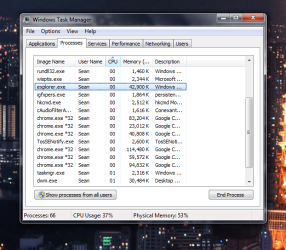
explorer exe cpu issue

froqqer

New member
Local time
6:41 PM
Messages
28
Hi sure you have heard this before so I will let you know what I have tried to so far ccleaner,app that searches for broken shortcuts,and deleting almost everything that I don't need,and the clean boot technique.I am trying to locate the fake explorer.exe but I am confused.When I go to c windows explorer and click on and brings me to a libary page,music photos etc.I did find explorer .mui and an explorer.exe that has download program for its icon but it also does the same thing.When I search for explorer.exe inside c windows numerous explorer files from winsxs/wow64 come up but they all bring me to the same default library page.I am really clueless right now please help.
 

My Computer

Computer type
PC/Desktop
OS
Massachusetts
The real explore.exe is inside C:\Windows .

I'm kinda confused what you really trying to do .
 

My Computer

Computer Manufacturer/Model Number
Custom Built
OS
Windows 7 Ultimate 32-Bit & Windows 7 Ultimate 64-Bit
CPU
Intel Core i7 CPU 950 @ 3.07GHz
Motherboard
ASUS P6T DELUXE V2
Memory
OCZ 6GB (3 x 2GB) 240-Pin DDR3 SDRAM DDR3 1600 OCZ3X1600R2
Graphics Card(s)
ATI Radeon HD 5700 Series
Sound Card
OnBoard
Hard Drives
WD6400AACS-00M3B0 (640GB SATA )
PSU
CORSAIR 850w
Case
NZXT LEXA
Cooling
Intel Stock Heatsink Fan
Keyboard
Microsoft Wireless Laser Keyboard 7000
Mouse
Microsoft Wireless Laser Mouse 7000
Sorry I this has just been driving crazy I kind have lost tract of what I have been doing.Forget what every non sense I have said.I just need to get rid of this explorer.exe trojan or whatever.I cannot use fl studio half of the time because of it.
 

My Computer

Computer type
PC/Desktop
OS
Massachusetts
Lets use this


   Warning

You will need a USB FLASH DRIVE


   Tip
Download the Tool from a non infected PC


Download Farbar Recovery Scan Tool

Here :ar: Farbar Recovery Scan Tool Download

Click on the Download Now button that goes with your bit version

   Note
Click the :orb: button and right-click Computer .Select Properties .Look for System Type: which will say 32-bit Operating System or 64-bit Operating System


Plug the flash drive into the infected PC.

Enter System Recovery Options.

:ar: To enter System Recovery Options from the Advanced Boot Options:
Restart the computer.
As soon as the BIOS is loaded begin tapping the F8 key until Advanced Boot Options appears.
Use the arrow keys to select the Repair your computer menu item.
Select US as the keyboard language settings, and then click Next.
Select the operating system you want to repair, and then click Next.
Select your user account an click Next.

:ar: To enter System Recovery Options by using Windows installation disc:
Insert the installation disc.
Restart your computer.
If prompted, press any key to start Windows from the installation disc. If your computer is not configured to start from a CD or DVD, check your BIOS settings.
Click Repair your computer.
Select US as the keyboard language settings, and then click Next.
Select the operating system you want to repair, and then click Next.
Select your user account and click Next.

:ar: On the System Recovery Options menu you will get the following options:
Startup Repair

System Restore

Windows Complete PC Restore

Windows Memory Diagnostic Tool

Command Prompt

Select Command Prompt

In the command window type e:\frst.exe (for x64 bit version type e:\frst64) and press Enter
   Note
Replace letter e with the drive letter of your flash drive.

   Tip
Type the commands below to see what your letter is for the USB drive and press ENTER after each command

Code:
Diskpart
List volume
The tool will start to run.
When the tool opens click Yes to disclaimer.
Press Scan button.
FRST will let you know when the scan is complete and has written the FRST.txt to file
Please copy and paste both logs in your reply.(FRST.txt and Addition.txt)

 

My Computer

Computer Manufacturer/Model Number
Custom Built
OS
Windows 7 Ultimate 32-Bit & Windows 7 Ultimate 64-Bit
CPU
Intel Core i7 CPU 950 @ 3.07GHz
Motherboard
ASUS P6T DELUXE V2
Memory
OCZ 6GB (3 x 2GB) 240-Pin DDR3 SDRAM DDR3 1600 OCZ3X1600R2
Graphics Card(s)
ATI Radeon HD 5700 Series
Sound Card
OnBoard
Hard Drives
WD6400AACS-00M3B0 (640GB SATA )
PSU
CORSAIR 850w
Case
NZXT LEXA
Cooling
Intel Stock Heatsink Fan
Keyboard
Microsoft Wireless Laser Keyboard 7000
Mouse
Microsoft Wireless Laser Mouse 7000
Well I guess I am out of luck since there is no way for me to access another computer,any of the installation discs,or a flash drive at the moment.Is there an easier way to do this?
 

My Computer

Computer type
PC/Desktop
OS
Massachusetts
Let me see what is running on your PC

Click here DDS

:ar: Click on Download Now button

:ar: Right-click the DDS icon choose Run as administrator to run the tool.

:ar: Place a check next to attact.txt and click Start . When done, DDS will open two logs
DDS.txt
Attach.txt

:ar: Save two logs onto your desktop and upload them with your reply

   Note
No personal info will be in the logs
 

My Computer

Computer Manufacturer/Model Number
Custom Built
OS
Windows 7 Ultimate 32-Bit & Windows 7 Ultimate 64-Bit
CPU
Intel Core i7 CPU 950 @ 3.07GHz
Motherboard
ASUS P6T DELUXE V2
Memory
OCZ 6GB (3 x 2GB) 240-Pin DDR3 SDRAM DDR3 1600 OCZ3X1600R2
Graphics Card(s)
ATI Radeon HD 5700 Series
Sound Card
OnBoard
Hard Drives
WD6400AACS-00M3B0 (640GB SATA )
PSU
CORSAIR 850w
Case
NZXT LEXA
Cooling
Intel Stock Heatsink Fan
Keyboard
Microsoft Wireless Laser Keyboard 7000
Mouse
Microsoft Wireless Laser Mouse 7000
Lets download AdwCleaner

Click here Adwcleaner

:ar: Click on Download Now button

:ar: Save to the Desktop

:ar: Right-click on AdwCleaner.exe and choose Run as administrator

:ar: Click the Search button

:ar: Upload the AdwCleaner[Sn].txt in your reply.

   Note
The log file is at C:\AdwCleaner[Sn].txt


Question : Did you purchase Norton Internet Security ? If not its a 15 or 30 day trial . Uninstall it and install MSE
 

My Computer

Computer Manufacturer/Model Number
Custom Built
OS
Windows 7 Ultimate 32-Bit & Windows 7 Ultimate 64-Bit
CPU
Intel Core i7 CPU 950 @ 3.07GHz
Motherboard
ASUS P6T DELUXE V2
Memory
OCZ 6GB (3 x 2GB) 240-Pin DDR3 SDRAM DDR3 1600 OCZ3X1600R2
Graphics Card(s)
ATI Radeon HD 5700 Series
Sound Card
OnBoard
Hard Drives
WD6400AACS-00M3B0 (640GB SATA )
PSU
CORSAIR 850w
Case
NZXT LEXA
Cooling
Intel Stock Heatsink Fan
Keyboard
Microsoft Wireless Laser Keyboard 7000
Mouse
Microsoft Wireless Laser Mouse 7000
I purchased a one year Norton subscription but I only 7 days remaining.Can I still run adwcleaner with norton installed?
 

My Computer

Computer type
PC/Desktop
OS
Massachusetts
Yes you can .
 

My Computer

Computer Manufacturer/Model Number
Custom Built
OS
Windows 7 Ultimate 32-Bit & Windows 7 Ultimate 64-Bit
CPU
Intel Core i7 CPU 950 @ 3.07GHz
Motherboard
ASUS P6T DELUXE V2
Memory
OCZ 6GB (3 x 2GB) 240-Pin DDR3 SDRAM DDR3 1600 OCZ3X1600R2
Graphics Card(s)
ATI Radeon HD 5700 Series
Sound Card
OnBoard
Hard Drives
WD6400AACS-00M3B0 (640GB SATA )
PSU
CORSAIR 850w
Case
NZXT LEXA
Cooling
Intel Stock Heatsink Fan
Keyboard
Microsoft Wireless Laser Keyboard 7000
Mouse
Microsoft Wireless Laser Mouse 7000
Run the Delete

:ar: Close all open programs.

:ar: To run the program, right-click AdwCleaner.exe and select Run as administrator

:ar: Click on Delete and confirm the prompt.

:ar: After it finishes, the computer is restarted.

Upload the log saved at C:\AdwCleaner[S1].txt
 

My Computer

Computer Manufacturer/Model Number
Custom Built
OS
Windows 7 Ultimate 32-Bit & Windows 7 Ultimate 64-Bit
CPU
Intel Core i7 CPU 950 @ 3.07GHz
Motherboard
ASUS P6T DELUXE V2
Memory
OCZ 6GB (3 x 2GB) 240-Pin DDR3 SDRAM DDR3 1600 OCZ3X1600R2
Graphics Card(s)
ATI Radeon HD 5700 Series
Sound Card
OnBoard
Hard Drives
WD6400AACS-00M3B0 (640GB SATA )
PSU
CORSAIR 850w
Case
NZXT LEXA
Cooling
Intel Stock Heatsink Fan
Keyboard
Microsoft Wireless Laser Keyboard 7000
Mouse
Microsoft Wireless Laser Mouse 7000
How's the PC running ?

Run Malwarebytes
Download


When the installation is done uncheck Enable free trial of Malwarebytes (see image below )

2013-03-09_224312_zps62dc7c23.jpg


Update the definitions and do a full scan
 

My Computer

Computer Manufacturer/Model Number
Custom Built
OS
Windows 7 Ultimate 32-Bit & Windows 7 Ultimate 64-Bit
CPU
Intel Core i7 CPU 950 @ 3.07GHz
Motherboard
ASUS P6T DELUXE V2
Memory
OCZ 6GB (3 x 2GB) 240-Pin DDR3 SDRAM DDR3 1600 OCZ3X1600R2
Graphics Card(s)
ATI Radeon HD 5700 Series
Sound Card
OnBoard
Hard Drives
WD6400AACS-00M3B0 (640GB SATA )
PSU
CORSAIR 850w
Case
NZXT LEXA
Cooling
Intel Stock Heatsink Fan
Keyboard
Microsoft Wireless Laser Keyboard 7000
Mouse
Microsoft Wireless Laser Mouse 7000
I am running the scan right now.It seems to be running better but explorer.exe is still the same.
 

My Computer

Computer type
PC/Desktop
OS
Massachusetts

My Computer

Computer Manufacturer/Model Number
Custom Built
OS
Windows 7 Ultimate 32-Bit & Windows 7 Ultimate 64-Bit
CPU
Intel Core i7 CPU 950 @ 3.07GHz
Motherboard
ASUS P6T DELUXE V2
Memory
OCZ 6GB (3 x 2GB) 240-Pin DDR3 SDRAM DDR3 1600 OCZ3X1600R2
Graphics Card(s)
ATI Radeon HD 5700 Series
Sound Card
OnBoard
Hard Drives
WD6400AACS-00M3B0 (640GB SATA )
PSU
CORSAIR 850w
Case
NZXT LEXA
Cooling
Intel Stock Heatsink Fan
Keyboard
Microsoft Wireless Laser Keyboard 7000
Mouse
Microsoft Wireless Laser Mouse 7000
Explorer.exe turns out to be good .

Can you show me a scrnshot of what you're referring to as " explorer.exe is still the same "
 

My Computer

Computer Manufacturer/Model Number
Custom Built
OS
Windows 7 Ultimate 32-Bit & Windows 7 Ultimate 64-Bit
CPU
Intel Core i7 CPU 950 @ 3.07GHz
Motherboard
ASUS P6T DELUXE V2
Memory
OCZ 6GB (3 x 2GB) 240-Pin DDR3 SDRAM DDR3 1600 OCZ3X1600R2
Graphics Card(s)
ATI Radeon HD 5700 Series
Sound Card
OnBoard
Hard Drives
WD6400AACS-00M3B0 (640GB SATA )
PSU
CORSAIR 850w
Case
NZXT LEXA
Cooling
Intel Stock Heatsink Fan
Keyboard
Microsoft Wireless Laser Keyboard 7000
Mouse
Microsoft Wireless Laser Mouse 7000
Even if I exit out of everything it sometimes even takes up to 70k to 80k.The lowest it ever goes down to is 30k .
 

Attachments

  • exe.PNG
    exe.PNG
    70.8 KB · Views: 7

My Computer

Computer type
PC/Desktop
OS
Massachusetts
Back
Top