Okay - the moment I have no idea but would suggest:
As a test disable all non-microsoft shell extensions.
Fully remove any software that you no longer use that has installed a shell extension.
In the meantime try portable Explorer++ for file browsing. If that doesn't crash then it means that you've got a software problem rather than a system file problem. You can install it and pin a shortcut to your taskbar.
Explorer++
For a quick way to restart explorer when it crashes see Rexplorer:
Sordum's Small tools
You can extract the executable from the small tools package and run it when needed.
[EDIT]
Also worth a shot:
Check for updates for any software that installed a shell extension and if updates are found - install them.
If using old versions of free software that installed a shell extension - fully remove the software and reboot before downloading and installing the latest versions.
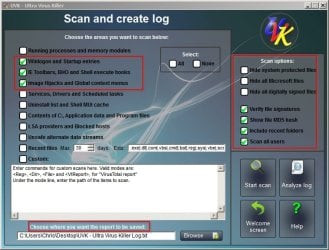
If you like you can run a scan with UVK and upload the log containing a list of anything that integrates with explorer.
Download UVK - UVK Installer (exe)
Once installed right click the desktop icon and choose run as administrator.
On the welcome screen choose "Scan & Create Log" and upload when finished.
Settings needed:


 I only tried Explorer++ after experiencing explorer crashes myself around a year ago but that's been fixed now.


