Explorer.exe keeps crashing. (7100)

djfirestorm

New member
Power User
Local time
8:08 AM
Messages
93
Since I installed build 7100, my explorer keeps crashing when I right click files. This is the error code I keep getting:

Problem Event Name: APPCRASH
Application Name: Explorer.EXE
Application Version: 6.1.7100.0
Application Timestamp: 49ee918d
Fault Module Name: StackHash_9bc2
Fault Module Version: 6.1.7100.0
Fault Module Timestamp: 49eea66e
Exception Code: c0000374
Exception Offset: 000c2cd3
OS Version: 6.1.7100.2.0.0.256.1
Locale ID: 4105
Additional Information 1: 9bc2
Additional Information 2: 9bc266246e54cb810d6f81f0055791d8
Additional Information 3: be70
Additional Information 4: be700e305a32ac7b5fb4aef0df29ccea
Any Ideas? I need to access compatibility mode and I can't.
 

My Computer

OS
Windows 7 (Build 7068)
Since I installed build 7100, my explorer keeps crashing when I right click files. This is the error code I keep getting:

Any Ideas? I need to access compatibility mode and I can't.

Did you verify that your ISO wasn't a modified ISO?
 

My Computer

Computer Manufacturer/Model Number
fakeasdf (c)
OS
Win 7 Pro x64 x 3, Win 7 Pro x86, Ubuntu 9.04
CPU
2 x C2D [email protected] Ghz, C2D [email protected] ghz, P4 @ 3.0 ghz,
Motherboard
GIGABYTE GA-EP35-DS3P LGA 775 Intel P35 ATX Dynamic Energy S
Memory
2x8 GB Corsair, 4GB Kingston, 2GB GSkill
Graphics Card(s)
ATI Radeon 4670 1 GB DDR3, 2600 Pro, 2400 Pro, Intel 965
Sound Card
I don't care... Connected using Optical on Media Center
Monitor(s) Displays
Panasonic Viera 50" Plasma, 2x 19"
Screen Resolution
1080P, 1280x1024's
Hard Drives
4 Terabytes
Case
Antec P182 Gun Metal Black
Internet Speed
20 Mbit U/D
Hello DJfirestorm,

Was this a upgrade installation? Sometimes these are not as reliable with beta builds. Doing a repair install may be able to fix this for you.

Hope this helps,
Shawn
 

My Computer

Computer type
PC/Desktop
Computer Manufacturer/Model Number
Self built custom
OS
64-bit Windows 11 Pro for Workstations
CPU
Intel i7-8700K OC'd to 5 GHz
Motherboard
ASUS ROG Maximus XI Formula Z390
Memory
64 GB (4x16GB) G.SKILL TridentZ RGB DDR4 3600 MHz
Graphics Card(s)
ASUS ROG-STRIX-GTX1080TI-O11G-GAMING
Sound Card
Integrated
Monitor(s) Displays
2 x Samsung Odyssey G7 27"
Screen Resolution
2560x1440
Hard Drives
1TB Samsung 990 PRO M.2,
4TB Samsung 990 PRO PRO M.2,
TerraMaster F8 SSD Plus NAS
PSU
Seasonic Prime Titanium 850W
Case
Thermaltake Core P3
Cooling
Corsair Hydro H115i
Keyboard
Logitech wireless K800
Mouse
Logitech MX Master 4
Internet Speed
2 Gb/s Download and 100 Mb/s Upload
Antivirus
Malwarebyte Anti-Malware Premium
Browser
Google Chrome
Other Info
Logitech Z625 speaker system,
Logitech BRIO 4K Pro webcam,
HP Color LaserJet Pro MFP M477fdn,
APC SMART-UPS RT 1000 XL - SURT1000XLI,
Galaxy S23 Plus phone
i got the same issue
and i did re installing
and the problem was solved!!!
 

My Computer

Computer Manufacturer/Model Number
Custom Build
OS
win 7 build 7600.16385 x64
CPU
AMD Athlon Dual core 7750 2.7GHz
Motherboard
Gigabyte GA78MA s2h
Memory
4GB 800Mhz
Graphics Card(s)
ATI HD 3200 IGP
Monitor(s) Displays
Acer 15 inch
Screen Resolution
1280x720
Hard Drives
Seagate 1 TB
Keyboard
Logitech
Mouse
Logitech
Internet Speed
Airtel DSL 2Mbps
i got the same issue
and i did re installing
and the problem was solved!!!
Well if it worked for you, I guess I will give it a try. I do like to figure out how to fix issues without doing that so next time I come across it I can fix it faster. But it is quite new. I will report back if that doesn't work.
Ad yes it is an upgrade from the previous build. I have upgraded upgrades at this point about 5 times, and I had my first glitch...but somehow I don't think it is related to that...I think that possibly a program that was installed before the upgrade did it.
 

My Computer

OS
Windows 7 (Build 7068)
i had it too in 7077. my problem was 7z, just uninstall it
 

My Computer

OS
Windows 7 Pro
Mouse
Razer DeathAdder 3500
ohh ok i have 7z, will take it out and give that a shot before i go through the process of repair install. because i know explorer dumps in xp are usually from context menu entries. if this solves it, will report back.


EDIT: Removed 7z and all other programs that created context menus, did not solve the issue. Any other ideas before I start over? I am more interested in problem solving than being lazy.
 
Last edited:

My Computer

OS
Windows 7 (Build 7068)
Have you recently installed any registry cleaning programs? (e.g. registry mechanic).

These (however highly rated) will no doubt cause issues with Windows 7 at the moment. You could try looking at your task manager to see what programs/processes you have running that could adversly affect explorer (a screenshot would be handy too). Just type 'task manager' in the start menu search panel if right-click not working.

Until this issue is fixed you can still access the properties from the 'Organise' menu in explorer. This will allow you to continue changing 'Compatability' properties for apps.
 

My Computer

Computer Manufacturer/Model Number
Compaq Desktop
OS
Windows 7 Ultimate x64
CPU
AMD Sempron Dual Core
Memory
3GB
Graphics Card(s)
NVIDIA GeForce 6150SE nForce 430
Screen Resolution
1024x768
Hard Drives
150GB Sata
Thanks Orbital Shark, I forgot about the organize button. Your a genius. LOL at myself. That works, and as for the desktop (for anyone who was wondering where that was haha) you need to explore to it, and there is no address bar on the desktop, duh.lol
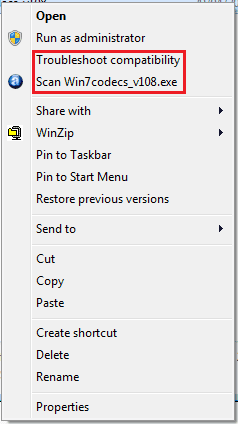
I have also narrowed down the glitch: It only does it on 2 types of files (I tried any file extension I could think of to make sure) EXE, and Shortcuts.
 

My Computer

OS
Windows 7 (Build 7068)
What Antivirus software do you have running? Just out of interest :p

Added: I'm thinking 'Context Menus' the same as you are.
 

Attachments

  • Untitled.png
    Untitled.png
    4.3 KB · Views: 76
Last edited:

My Computer

Computer Manufacturer/Model Number
Compaq Desktop
OS
Windows 7 Ultimate x64
CPU
AMD Sempron Dual Core
Memory
3GB
Graphics Card(s)
NVIDIA GeForce 6150SE nForce 430
Screen Resolution
1024x768
Hard Drives
150GB Sata
same problem... running avast.. sharks codecs... nothing else i am running that i can see or observe that could be a problem.... thos this persists. Not as much as with 7000. I would say maybe half as much, but thats too much still. Most times this happens with tabs, either one or multiple. Happens when closing out a tab for me. Has happened in other occasions, some that i havent seen when on 7000, but freak looking occasions those are, no explanations.

[edit] I too have 7zip... will uninstall and report back
 

My Computer

Computer Manufacturer/Model Number
CUSTOM
OS
XP/win7 x86 build 7127
CPU
Athlon64 X2 DUAL 4200+ 2.21ghz
Motherboard
ASUS K8 PRO SLI
Memory
2GB Dual Chan DDR2 Corsair
Graphics Card(s)
Nvidia 6800GT
Sound Card
nvidia
Monitor(s) Displays
19' LCD
Screen Resolution
1280x1024
Hard Drives
WD 250, 2x500, 2x1TB IDE/USB
WD 250 SATA (system)
SEAGATE 120 Sata
PSU
coolermaster 450
Case
SUPERFLOWER
Cooling
1 HDD bay fan, 5x80mm Case Fans, AEROGATE II Fan/Temp
Keyboard
MS wireless
Mouse
MS Wireless
Internet Speed
fassssssssst
AntiVirus? What is that? If you want my opinion, viruses are made by antivirus companies to create an artificial need for their software. The best antivirus is the user of the pc.lol Don't click on every web banner, don't install from sources you don't know, and don't download porn. So no antivirus.

I don't really have any outstanding software installed, a couple games, just normal day to day stuff...minus 7z. It wouldn't be hard to just start from scratch, but then that would defeat the purpose of problem solving, that's just problem avoiding. The thing is, it worked fine the first 2 days, I didn't install anything, then it just started. I think this is a good problem for everyone to figure out, because it happens on EVERY damn operating system Microsoft created. There must be a solution!
 

My Computer

OS
Windows 7 (Build 7068)
I had the same problem but somehow disabling the Windows Defender Service stopped this problem for me.

Since then no more problems :)
 
I had the same problem but somehow disabling the Windows Defender Service stopped this problem for me.

Since then no more problems :)

Nope, tried that, didn't work...although it will most likely remove other problems that I have not experienced yet.lol
 

My Computer

OS
Windows 7 (Build 7068)
Hey Digger, did you ever figure this out? I got another hard drive and reinstalled, but I discovered that many games that worked on previous builds DO NOT work on the new one. Yet they work on my copy with the screwed up explore.exe because its an upgrade from the last build. So if anyone can help fix this, it would be great, because I still have working games on it!!!!!!!!!!!!!!!!!!!!
 

My Computer

OS
Windows 7 (Build 7068)
I'm running Win7 RTM and having the same problem, i'm starting to think it's BF2...does anyone else have it installed?

I'm going to uninstall and see if that works, report back soon.
 

My Computer

OS
Windows 7 RTM
Digger was banned.

I'm running Win7 RTM and having the same problem, i'm starting to think it's BF2...does anyone else have it installed?

I'm going to uninstall and see if that works, report back soon.

You also ought to check your reliability history (just hit start and start searching reliability). It will show you all the crashes on there, if you choose one, then right click to view technical details it will often give you the crashing module. You can then google the module, and if you are lucky it's something that could require updating etc. In one of my friends cases it was a Visual Studio piece that had an update, and post update his explorer crashing constantly disappeared. Which brings up another good point, make sure everything you have is up to date! Drivers, programs, etc, etc, etc.
 

My Computer

Computer Manufacturer/Model Number
fakeasdf (c)
OS
Win 7 Pro x64 x 3, Win 7 Pro x86, Ubuntu 9.04
CPU
2 x C2D [email protected] Ghz, C2D [email protected] ghz, P4 @ 3.0 ghz,
Motherboard
GIGABYTE GA-EP35-DS3P LGA 775 Intel P35 ATX Dynamic Energy S
Memory
2x8 GB Corsair, 4GB Kingston, 2GB GSkill
Graphics Card(s)
ATI Radeon 4670 1 GB DDR3, 2600 Pro, 2400 Pro, Intel 965
Sound Card
I don't care... Connected using Optical on Media Center
Monitor(s) Displays
Panasonic Viera 50" Plasma, 2x 19"
Screen Resolution
1080P, 1280x1024's
Hard Drives
4 Terabytes
Case
Antec P182 Gun Metal Black
Internet Speed
20 Mbit U/D
Well uninstalling BF2 (and everything else) hasn't solved the problem but i'm still not convinced it didn't cause it.

I have 4 PCs running Win7 RTM and the 2 with BF2 are the ones affected and it started happening the day after it was installed...it could be the directX installer it comes bundled with as that's the ONLY thing left on the machine - anyone know of a way to uninstall DirectX updates?

All drivers and apps were up to date before i started uninstalling stuff, i'll post the name of the crashing module when i get home.

Cheers
 

My Computer

OS
Windows 7 RTM
:party: FIXED !!!!

I downloaded/installed/ran this ShellExView - Shell Extension Manager For Windows

Disabled --> CmdLineContextMenu Class | SecuROM context menu | SONY ADAC Austria

Now all is Good :D

I recon it's part of Battlefield2s new 1.50 patch, they added some good stuff ie allows you to play without the disc but they must have added SecuROM as a subsitute and it was released in '05 FFS.

BTW did i mention i hate DRM/Sony/securom and EA. And microsoft please add a function to win7 to disable problem context menu items.
 

My Computer

OS
Windows 7 RTM
That's good to hear, or bad to hear. Good for you, crappy that those SOB's can't create software that doesn't put your system in an unstable state. What a POS software.
 

My Computer

Computer Manufacturer/Model Number
fakeasdf (c)
OS
Win 7 Pro x64 x 3, Win 7 Pro x86, Ubuntu 9.04
CPU
2 x C2D [email protected] Ghz, C2D [email protected] ghz, P4 @ 3.0 ghz,
Motherboard
GIGABYTE GA-EP35-DS3P LGA 775 Intel P35 ATX Dynamic Energy S
Memory
2x8 GB Corsair, 4GB Kingston, 2GB GSkill
Graphics Card(s)
ATI Radeon 4670 1 GB DDR3, 2600 Pro, 2400 Pro, Intel 965
Sound Card
I don't care... Connected using Optical on Media Center
Monitor(s) Displays
Panasonic Viera 50" Plasma, 2x 19"
Screen Resolution
1080P, 1280x1024's
Hard Drives
4 Terabytes
Case
Antec P182 Gun Metal Black
Internet Speed
20 Mbit U/D
Back
Top