Explorer.exe normal memory usage Q and file extraction problems

Jonguy30

New member
Local time
12:56 PM
Messages
160
Hello. I have two questions I want to ask. I don't think this should be in software forum as I think it's an admin related problem?
I've been having problems with extracting 7-zip and RAR file formats with the 7-zip file archiver utility. My problem is that I can't seem to extract rar or 7-zip or any compressed file formats as I get a "can not open output file......" or "Can not delete output file....."
This is a little annoying as it works when I open the software itself, confirm the UAC prompt and then browse to the file I want to extract. But as I said it's a little annoying having to open the program UI every time. I want to right click on a file in windows explorer and select "7-zip" and "Extract...". And I should also say that it works when I extract the file using "Extract here" but not if I want to choose a folder I want it to go to. And the built-in windows zip extractor does work flawlessly but not this. Is there any way I can solve this?
It doesn't work for me but it does work in my brother's computer... :(
And I tried googling but there doesn't seem to be any answers. Only thing I stumbled upon was a tool called "Longpathtool" which supposedly fixes problems like this but don't know if it's legit...

Oh, and what is the normal memory consumption of the explorer.exe process? Right now I have it running at around 56000 kilobytes and 60000 kb. Is it normal for it to increase in memory usage when I have windows explorer open? It doesn't increase if I don't use it, but when I do memory usage increases over time and I don't know if there is a limit.
 

My Computer

Computer type
Laptop
Computer Manufacturer/Model Number
HP
OS
Windows 7 x64 Home Premium SP1
CPU
Intel Pentium 6100 dual core
Memory
4GB
Graphics Card(s)
ATI mobility radeon 5470, 512 MB RAM
Screen Resolution
1366 x 768
Mouse
Logitech M100
Internet Speed
42 Mbps Dual Carrier 4G
Antivirus
Microsoft security essentials, MSE
Browser
Palemoon
The memory usage of the explorer.exe process (or any other process for that matter) can vary widely and this is perfectly normal. Usage will depend on how much RAM you have, what the process is doing now, what it was doing recently, and the current and recent usage of other processes. Currently my 32 bit Windows 7 OS shows a usage for explorer.exe of 67,196 KB with a peak usage of 96,016 KB. I have also seen it much less. I don't consider that in any way abnormal. The memory manager at all times controls how much memory a process will receive. Generally a process that is actively using memory will get more while an idle process will get less. This is very complex.

Edit: I noticed that your system specs don't show RAM size. This is often very important so should be added.
 

My Computer

Computer type
PC/Desktop
Computer Manufacturer/Model Number
HP
OS
Windows 7 Pro 64 bit
CPU
Xeon W3520
Memory
8 GB
Graphics Card(s)
Nvidia Geforce 210
Have you tried uninstalling 7-Zip then downloading the latest and installing it?

Does it fail no matter what folder (other than here) you try to extract to or only certain ones?
 

My Computer

Computer type
PC/Desktop
Computer Manufacturer/Model Number
Lenovo IdeaCenter 450
OS
Windows 10 Pro X64
CPU
Intel Quad Core i7-4770 @ 3.4Ghz
Memory
16.0GB PC3-12800 DDR3 SDRAM 1600 MHz
Graphics Card(s)
Intel Integrated HD Graphics
Sound Card
Realtek HD Audio
Monitor(s) Displays
HP 22" LCD
Screen Resolution
1680 x 1050
Hard Drives
250GB Samsung EVO SATA-3 SSD
2TB Seagate ST2000DM001 SATA-2
1.5TB Seagate ST3150041AS SATA
Keyboard
Dell USB
Mouse
Lenovo USB
Internet Speed
Cable via Road Runner 3MB Upload, 30MB Download
Antivirus
Windows Defender, MBAM Pro, MBAE
Browser
Seamonkey
Other Info
UEFI/GPT
PLDS DVD-RW DH16AERSH
Hello and good morning. I've tried uninstalling and reinstalling, and reverting back to 9.20 stable and I've tried 9.25 alpha too. Every time it's the same. And I should add that I can extract files to the desktop and also to the same folder using "Extract here" in the menus. And in the source forge 7-zip forum I saw someone had developed a fork of 7-zip called "Easy 7-zip" based on the code of 9.20 stable. But it's the same there too. Should I also try the latest 9.30 alpha, even though it reads that it's not recommended and that it's a development version? But I don't think that would help. Since, as I mentioned, it does work on my brother's laptop.
Oh, and I have 4GB of RAM in my laptop (3,80 GB can be used).
 

My Computer

Computer type
Laptop
Computer Manufacturer/Model Number
HP
OS
Windows 7 x64 Home Premium SP1
CPU
Intel Pentium 6100 dual core
Memory
4GB
Graphics Card(s)
ATI mobility radeon 5470, 512 MB RAM
Screen Resolution
1366 x 768
Mouse
Logitech M100
Internet Speed
42 Mbps Dual Carrier 4G
Antivirus
Microsoft security essentials, MSE
Browser
Palemoon
Hello? Anyone? Is there any solution to my file extraction problems? I also ran the 9.30 alpha, but no, same as before. I can't extract files using the context menus.
 

My Computer

Computer type
Laptop
Computer Manufacturer/Model Number
HP
OS
Windows 7 x64 Home Premium SP1
CPU
Intel Pentium 6100 dual core
Memory
4GB
Graphics Card(s)
ATI mobility radeon 5470, 512 MB RAM
Screen Resolution
1366 x 768
Mouse
Logitech M100
Internet Speed
42 Mbps Dual Carrier 4G
Antivirus
Microsoft security essentials, MSE
Browser
Palemoon
You didn't answer my question:

Does it fail no matter what folder (other than here) you try to extract to or only certain ones?
 

My Computer

Computer type
PC/Desktop
Computer Manufacturer/Model Number
Lenovo IdeaCenter 450
OS
Windows 10 Pro X64
CPU
Intel Quad Core i7-4770 @ 3.4Ghz
Memory
16.0GB PC3-12800 DDR3 SDRAM 1600 MHz
Graphics Card(s)
Intel Integrated HD Graphics
Sound Card
Realtek HD Audio
Monitor(s) Displays
HP 22" LCD
Screen Resolution
1680 x 1050
Hard Drives
250GB Samsung EVO SATA-3 SSD
2TB Seagate ST2000DM001 SATA-2
1.5TB Seagate ST3150041AS SATA
Keyboard
Dell USB
Mouse
Lenovo USB
Internet Speed
Cable via Road Runner 3MB Upload, 30MB Download
Antivirus
Windows Defender, MBAM Pro, MBAE
Browser
Seamonkey
Other Info
UEFI/GPT
PLDS DVD-RW DH16AERSH
Oh, sorry. It fails to extract when I place it on program files (x86), as that's where I have my steam apps folder and my Skyrim game which I plan to mod. And I need that feature (explorer shell, context menus) when I extract mods to Skyrim data folders... (it's faster that way). It doesn't fail when I place it on the desktop, or if I use the application GUI itself. I haven't tried any other folders except desktop and program files x86, because program files will be the primary folder I extract to.

And I also tried the portable version, same there. And would it work if I switched to WinRAR, as I used to have that on my old Win XP family PC that is now dead.. but WinRAR never failed there, but I wouldn't use that now, only if I have to.
 

My Computer

Computer type
Laptop
Computer Manufacturer/Model Number
HP
OS
Windows 7 x64 Home Premium SP1
CPU
Intel Pentium 6100 dual core
Memory
4GB
Graphics Card(s)
ATI mobility radeon 5470, 512 MB RAM
Screen Resolution
1366 x 768
Mouse
Logitech M100
Internet Speed
42 Mbps Dual Carrier 4G
Antivirus
Microsoft security essentials, MSE
Browser
Palemoon
Try going to the start menu, locating 7-Zip and right clicking the icon. Choose "Properties" then the "Compatibility" tab. Select "Run as Administrator" and click OK. It should work then.
 

My Computer

Computer type
PC/Desktop
Computer Manufacturer/Model Number
Mellon Labs (custom build)
OS
Win 7 Pro x64/Win 10 Pro x64 dual boot
CPU
AMD FX 8350 Vishera @ 4200
Motherboard
ASUS M5A97 R2.0
Memory
16 GB Mushkin Blackline DDR3-2400 @ 1866 (9-10-10-10-31)
Graphics Card(s)
XFX Radeon R9 280 Double D Black Edition
Sound Card
Realtek HD Audio on MB. Sounds great.
Monitor(s) Displays
Acer 24", Acer 22"
Screen Resolution
3840 x 1080
Hard Drives
1 x Mushkin Chronos 120 GB SSD (Win 10)
1 x Samsung 850 EVO 250 GB SSD (Win 7)
1 x WD 1TB SATA Blue
1 x WD 1TB SATA Green
PSU
Corsair TX-750
Case
CoolerMaster HAF 912+
Cooling
Coolermaster Seidon 240M Liquid AIO. 6 case fans
Keyboard
Logitech G710+
Mouse
Logitech G500s
Internet Speed
Much better since I got fiber, but still way overpriced.
Antivirus
MSE, Malware Bytes for scanning
Browser
Firefox
Other Info
Corsair VOID USB headphones.

A Mellon Labs X-1 - LCD Smartie driven system status display.

Brought to you by the letter E
I installed 7-zip 9.22 beta again and still the same problem. And it installs the program to run as admin by default. And I've tried making the other files to run as admin too, 7zG and 7z command line and whatever else there is. But when I do that I get a "this action requires a higher privilege...." error message.
 

My Computer

Computer type
Laptop
Computer Manufacturer/Model Number
HP
OS
Windows 7 x64 Home Premium SP1
CPU
Intel Pentium 6100 dual core
Memory
4GB
Graphics Card(s)
ATI mobility radeon 5470, 512 MB RAM
Screen Resolution
1366 x 768
Mouse
Logitech M100
Internet Speed
42 Mbps Dual Carrier 4G
Antivirus
Microsoft security essentials, MSE
Browser
Palemoon
~~~
...it works when I open the software itself, confirm the UAC prompt and then browse to the file I want to extract.
~~~
...it works when I extract the file using "Extract here" but not if I want to choose a folder I want it to go to.
~~~
It doesn't work for me but it does work in my brother's computer... :(
~~~
Does your brother's computer use UAC?


...It fails to extract when I place it on program files (x86),
~~~
It doesn't fail when I place it on the desktop, or if I use the application GUI itself. I haven't tried any other folders except desktop and program files x86, because program files will be the primary folder I extract to.
~~~
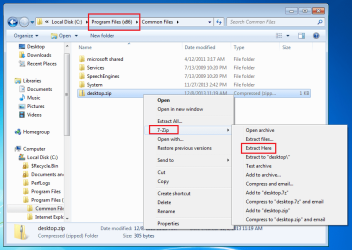
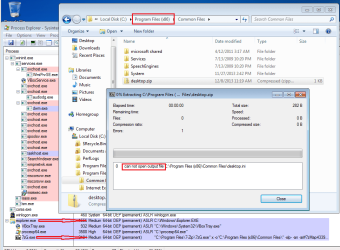
The Program Files (x86) folder is a protected folder. It requires elevated privileges to write files to that folder. This is why 7zip works for you if you "open the software itself, confirm the UAC prompt and then browse to the file I want to extract". Because doing that causes the 7zip app to run at the high integrity level (elevated privileges).

If you have the UAC turned on (which you should keep turned on), then the Windows (file) Explorer starts at the medium integrity level (not elevated). When you right click on a file and use Explorer's context menus (and sub-menus) any app that you launch from there will also run at the medium integrity level (not elevated)*.

*there are some exceptions - but I'll not go there for this post.

7z-1.png

7z-2.png


If you do not have the UAC turned on (which is not a smart thing to do), then the Windows (file) Explorer starts at the high integrity level (elevated). When you right click on a file and use Explorer's context menus (and sub-menus) any app that you launch from there will also run at the high integrity level.

(For this screen capture, I had to select "Extract to..." from the context sub-menu because selecting "Extract Here" did not keep the 7-Zip app open long enough for Process Explorer to see it - even with the update rate set to 0.5 seconds.)
7z-3.png
 

My Computer

Computer type
Laptop
Computer Manufacturer/Model Number
Employer provided Dell Latitude
OS
W7 Pro SP1 64bit
CPU
i7
Memory
8GB
Graphics Card(s)
Intel HD Graphics
Hard Drives
crappy SSD
Antivirus
Employer mandated Symantec Endpoint Protection
Browser
Pale Moon 64bit, IE11 64bit & Chrome 64bit
Cool. Very nice and informative post. So 7-zip won't work from explorer context menus when writing to program files x86? How about if I used WinRAR, would that program behave in the same way too?

I don't know if my brother has UAC turned on, and last time I asked him if I could check some info from his laptop he wouldn't let me, but I don't remember seeing many UAC prompts in his PC, so I don't know.
 

My Computer

Computer type
Laptop
Computer Manufacturer/Model Number
HP
OS
Windows 7 x64 Home Premium SP1
CPU
Intel Pentium 6100 dual core
Memory
4GB
Graphics Card(s)
ATI mobility radeon 5470, 512 MB RAM
Screen Resolution
1366 x 768
Mouse
Logitech M100
Internet Speed
42 Mbps Dual Carrier 4G
Antivirus
Microsoft security essentials, MSE
Browser
Palemoon
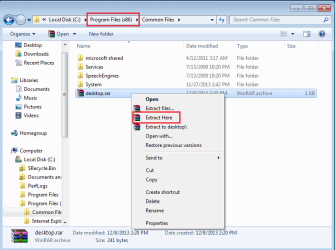
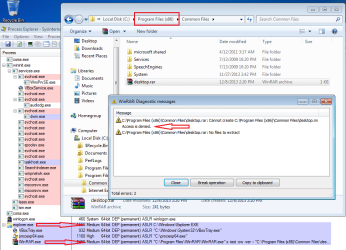
WinRar acts the same way.

WinRAR-1.png

WinRAR-2.png


Your workaround would be to keep using 7-zip as an elevated process.

There are less secure workarounds - but I would not suggest them.

In my opinion, anyone that has turned off UAC is giving up a considerable amount of security; others disagree :-)
 

My Computer

Computer type
Laptop
Computer Manufacturer/Model Number
Employer provided Dell Latitude
OS
W7 Pro SP1 64bit
CPU
i7
Memory
8GB
Graphics Card(s)
Intel HD Graphics
Hard Drives
crappy SSD
Antivirus
Employer mandated Symantec Endpoint Protection
Browser
Pale Moon 64bit, IE11 64bit & Chrome 64bit
Back
Top