
- Local time
- 1:29 AM
- Messages
- 50
I've been having quite annoying problems with the windows file browser (Explorer.exe) recently - when I open a location that contains things other than "plain" files (like Computer, Network, or Control Panel), nothing loads - there are no icons displayed, the address bar shows loading for an infinite amount of time, and the navigation bar is screwed up, showing that it is continually searching. Other problems that explorer experiences are not loading thumbnails, and completely freezing up on right clicking a file. Oddly, the explorer window invoked by Open/Save/etc doesn't experience any of these things - well maybe the right click problem, but not the never ending navigation bar searches. When I kill explorer.exe and then manually launch it, SOMETIMES the problem goes away - my computer loads instantly, thumbnails do too, but right clicking still causes it to need to be restarted. And sometimes I restart explorer.exe and it works for like 1 minute before reverting to it's old ways.
What could cause this? I have an up to date anti-virus, up to date firewall, and I also have Malware Bytes antimalware on as well. I don't believe it is caused by malware in any way. The memory usage is not out of the ordinary or high for the process, and the CPU usage is like 0-1% when this also happens. I haven't installed anything big recently, and for the most part, my computer has stayed the same. Could this be affected by defragging? I haven't done that for a while. I also don't have much ram (only 4GB on Windows 7 Home Premium 64 bit). I could do a registry scan and also checkdisk, but I want to know what you guys think about this problem as well - any ideas?
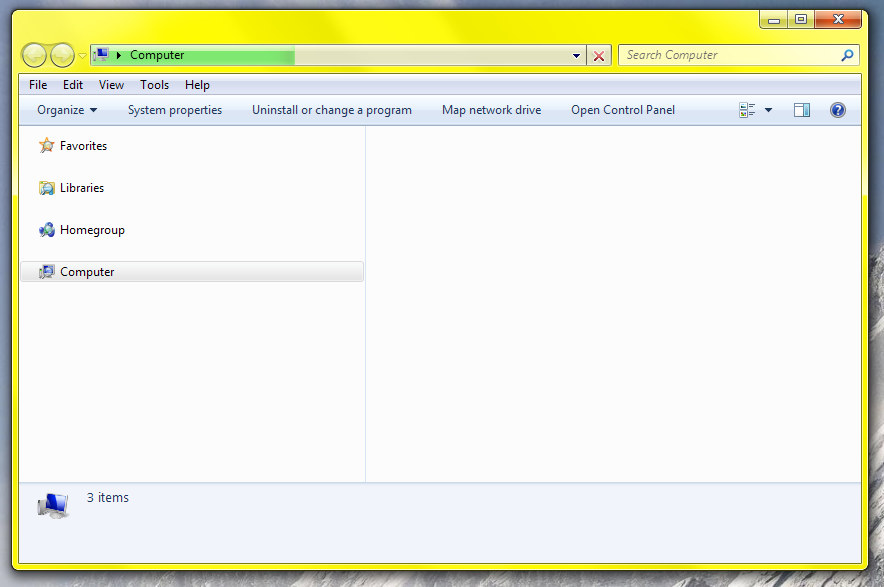
Continual loading

Thumbnails not loading
What could cause this? I have an up to date anti-virus, up to date firewall, and I also have Malware Bytes antimalware on as well. I don't believe it is caused by malware in any way. The memory usage is not out of the ordinary or high for the process, and the CPU usage is like 0-1% when this also happens. I haven't installed anything big recently, and for the most part, my computer has stayed the same. Could this be affected by defragging? I haven't done that for a while. I also don't have much ram (only 4GB on Windows 7 Home Premium 64 bit). I could do a registry scan and also checkdisk, but I want to know what you guys think about this problem as well - any ideas?
Continual loading
Thumbnails not loading
Last edited:
My Computer
- Computer Manufacturer/Model Number
- Self built
- OS
- Windows 7 x64
- CPU
- AMD Athlon II X2 245 Regor 2.9GHz
- Motherboard
- Foxconn A78AX-S AM2+/AM2 AMD 770 ATX AMD
- Memory
- G.SKILL 4GB (2 x 2GB) 240-Pin DDR2 SDRAM DDR2 800 (PC2 6400)
- Graphics Card(s)
- MSI R4670-2D512/D3 Radeon HD 4670 512MB
- Sound Card
- Integrated
- Hard Drives
- Western Digital Caviar Blue WD3200AAJS 320GB 7200 RPM SATA 3.0Gb/s 3.5" Internal
, Random LaCie external
- PSU
- OCZ ModXStream Pro OCZ500MXSP 500W ATX12V V2.2 / EPS12V


