I finally got her to boot and for a minute everything was fine until everything but the mouse stopped working. Nothing opened and as soon as i clicked the start icon the taskbar turned a light blue as If explorer was going to crash. After 5 minutes everything I clicked came to life and it hung again. I rebooted 10 minutes ago and back to my original concern.... Stuck staring at the windows 7 splash screen. Very very long boot.
Hello GTC mate can you boot into safe mode? if so run these
SFC /SCANNOW Command - System File Checker Disk Check < if necessary include the /f and /r in the command line as per Option2
Run these in safe mode and the sfc often best run for two to three runs – you can leave out the /r switch in ckdsk if you feel it not necessary
My Computer
Computer type
PC/Desktop
Computer Manufacturer/Model Number
Own build (new) Desk1 / Asus ROG Win 7 / Desk2 1st build
OS
Desk1 7 Home Prem / Desk2 10 Pro / Main lap Asus ROG 10 Pro 2 laptop Toshiba 7 Pro Asus P2520 7 & 10
One other Desktop (tester) and spare Toshba laptop both with SSD's
Running Kaspersky 2016 ISS on all machines config'd identically
Logitec audio stereo systems on each machine (x3)
Canon MG5250MFC
Router/modem TP-Link running WPA2SK
I found the cause... one of my brand new hard drives from seagate was failing. As soon as I disabled it, everything was fine again. luckily all it stored was movies.
Ok mate that is good and look at thi syou might be able to recover any data you would lie to keep
BOOTABLE UBUNTU
Make a bootable Ubuntu disk Get Ubuntu | Download | Ubuntu
Set the BIOS to boot from the optical when the machine boots it will show you a screen with TRY or INSTALL > select TRY not INSTALL
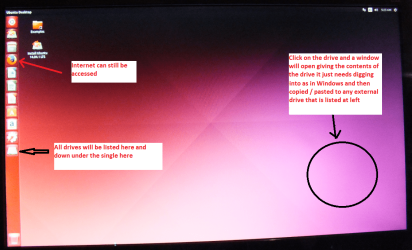
When it is finished - it takes very little time you will get a screen like in the pic .
Open the drive you want > User and dig down until you get to the data / settings you may be able to copy / paste the material you want to an external source or other installed drive doing this.
I am not sure if it will but I have recovered tons of data etc using this method both on "dead" or just plain drives that you cannot get data from using Windows.
There is an alternative Linux based program that will do the same thing but I prefer the Ubuntu - I find it easier to set up. Emergency Kit - save your files from a dead OS
You can just hook up the drive again or use a USB to SATA adaptor or a SATA to USB docking station which makes it seen as an external and don't worry about the crashing because this is running the machine in a Linux environment
Attachments
UBUNTU SCREEN X2.PNG
1.1 MB
· Views: 1
My Computer
Computer type
PC/Desktop
Computer Manufacturer/Model Number
Own build (new) Desk1 / Asus ROG Win 7 / Desk2 1st build
OS
Desk1 7 Home Prem / Desk2 10 Pro / Main lap Asus ROG 10 Pro 2 laptop Toshiba 7 Pro Asus P2520 7 & 10
One other Desktop (tester) and spare Toshba laptop both with SSD's
Running Kaspersky 2016 ISS on all machines config'd identically
Logitec audio stereo systems on each machine (x3)
Canon MG5250MFC
Router/modem TP-Link running WPA2SK