
- Local time
- 11:02 PM
- Messages
- 31
Hi,
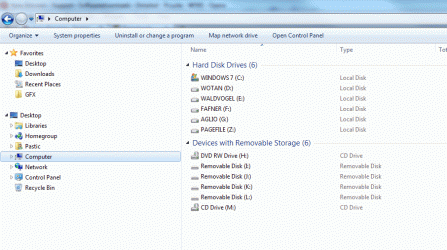
I just installed a fresh version of Win 7 Ultimate. I enclose a screenshot of how my Explorer window and folder pane looks like. I am not happy with it.
There are two top level items, Favorites and Desktop. When I was running the RC I did not have a desktop item, instead all the items sorting under Desktop in (the screenshot below) were on the same level as Favorites. There were Favorites and then a white space and then my Libraries and then a white space and then my Profile and then a white space and then Computer and then a white space and so on.
1) Can I get the spacing in between items back somehow?
2) Can I remove the Homegroup and the Network icons?
3) Can I move the computer item upwards in the sort order?
Thanks!
I just installed a fresh version of Win 7 Ultimate. I enclose a screenshot of how my Explorer window and folder pane looks like. I am not happy with it.
There are two top level items, Favorites and Desktop. When I was running the RC I did not have a desktop item, instead all the items sorting under Desktop in (the screenshot below) were on the same level as Favorites. There were Favorites and then a white space and then my Libraries and then a white space and then my Profile and then a white space and then Computer and then a white space and so on.
1) Can I get the spacing in between items back somehow?
2) Can I remove the Homegroup and the Network icons?
3) Can I move the computer item upwards in the sort order?
Thanks!
Attachments
My Computer
- Computer Manufacturer/Model Number
- built it myself
- OS
- Windows 7 Pro 64-bit
- CPU
- Intel i7 950
- Motherboard
- Asus Sabertooth X58
- Memory
- 18GB
- Graphics Card(s)
- Gigabyte Radeon HD7700
- Sound Card
- onboard Realtek HD audio chip
- Monitor(s) Displays
- 2 x Dell U2412M
- Screen Resolution
- 1920x1200
- Hard Drives
- 3 SSD
4 Western Digital Caviar Green
- PSU
- SeaSonic x650
- Case
- Fractal Design R3 case
- Cooling
- Magehalems rev. B CPU cooler


