Explorer keeps hiding the last part of file extension

AlexandrePRBR

New member
Local time
3:04 AM
Messages
5
Last edited:

My Computer My Computer

At a glance

Windows 7 Ultimate x64Intel C2D 65504GB DDR3EVGA GTX 550Ti
Computer type
PC/Desktop
Computer Manufacturer/Model Number
custom build
OS
Windows 7 Ultimate x64
CPU
Intel C2D 6550
Motherboard
ASUS P5G41T-M LX V2
Memory
4GB DDR3
Graphics Card(s)
EVGA GTX 550Ti
Antivirus
ESET Nod32 Antivirus 5
Browser
Google Chrome
There is a setting that hides known file extensions, is there a pattern to what is missing or is it random

Can you give a few examples
What is missing of the path you typed above
 

My Computer My Computer

At a glance

Win7 Ultimate X64Intel i5 3570K8GB DDR3 1600Onboard
Computer type
PC/Desktop
Computer Manufacturer/Model Number
Pauly Special
OS
Win7 Ultimate X64
CPU
Intel i5 3570K
Motherboard
Gigabyte Z77X-DS3H
Memory
8GB DDR3 1600
Graphics Card(s)
Onboard
Sound Card
Onboard
Screen Resolution
1280x1024
Hard Drives
Samsung 840 Evo SSD (OS)
1TB Spinner (Data)
PSU
800W Arctic
Case
Cooler Master
Cooling
3x120mm Fans
Keyboard
MS Wireless
Mouse
MS Wireless
Internet Speed
20M
c:\folder\version\0.8

So you are saying the above is what you see?
 

My Computer My Computer

At a glance

Win 10 Pro 64Intel Core i7 960 @3.20 GHz24.0 GB DDR3EVGA GTX 750Ti
Computer type
PC/Desktop
Computer Manufacturer/Model Number
Custom Build
OS
Win 10 Pro 64
CPU
Intel Core i7 960 @3.20 GHz
Motherboard
MSI MS7522
Memory
24.0 GB DDR3
Graphics Card(s)
EVGA GTX 750Ti
Monitor(s) Displays
LG E2341 23 Inch
Screen Resolution
1920x1080
Hard Drives
1TB Western Dgital 1002FAEX-00Y9A0
1TB Hitachi HDS721010CLA322
PSU
700 Watt
Case
Haf 912
Cooling
Fans
Keyboard
Logitech MK710
Mouse
Logitech M705
Internet Speed
Cable
Antivirus
AIS 2015 .10.0.2225
Browser
Firefox 49
Other Info
MalwareBytes Anti-Rootkit utility
For example:

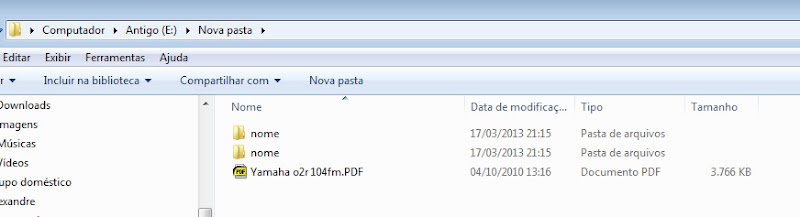
001.jpg


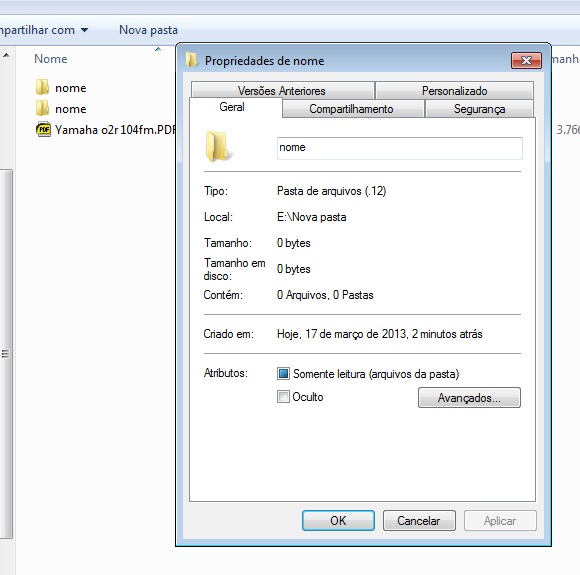
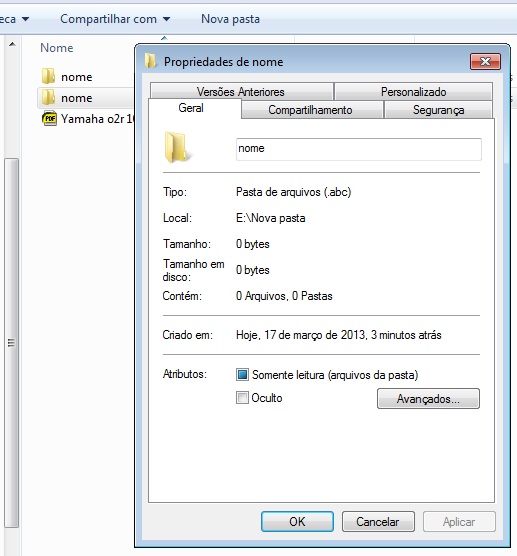
These are the properties of the folders "nome":

002.jpg

003.jpg


At the first image you can see a .PDF file. I really don't understand why folders are not showing extensions. Already checked all options as suggested on the old topic.

c:\folder\version\0.8

So you are saying the above is what you see?

Yes. A folder named as C:\folder\version\0.8.4 shows as you say.
 

My Computer My Computer

At a glance

Windows 7 Ultimate x64Intel C2D 65504GB DDR3EVGA GTX 550Ti
Computer type
PC/Desktop
Computer Manufacturer/Model Number
custom build
OS
Windows 7 Ultimate x64
CPU
Intel C2D 6550
Motherboard
ASUS P5G41T-M LX V2
Memory
4GB DDR3
Graphics Card(s)
EVGA GTX 550Ti
Antivirus
ESET Nod32 Antivirus 5
Browser
Google Chrome
It says that the third file is a .PDF the first two are empty files.
 

My Computer My Computer

At a glance

Win 10 Pro 64Intel Core i7 960 @3.20 GHz24.0 GB DDR3EVGA GTX 750Ti
Computer type
PC/Desktop
Computer Manufacturer/Model Number
Custom Build
OS
Win 10 Pro 64
CPU
Intel Core i7 960 @3.20 GHz
Motherboard
MSI MS7522
Memory
24.0 GB DDR3
Graphics Card(s)
EVGA GTX 750Ti
Monitor(s) Displays
LG E2341 23 Inch
Screen Resolution
1920x1080
Hard Drives
1TB Western Dgital 1002FAEX-00Y9A0
1TB Hitachi HDS721010CLA322
PSU
700 Watt
Case
Haf 912
Cooling
Fans
Keyboard
Logitech MK710
Mouse
Logitech M705
Internet Speed
Cable
Antivirus
AIS 2015 .10.0.2225
Browser
Firefox 49
Other Info
MalwareBytes Anti-Rootkit utility
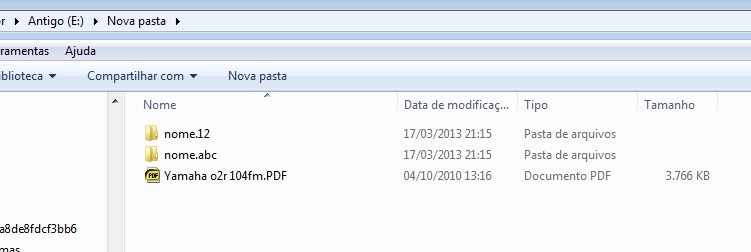
Those folders are:

"E:\Nova pasta\nome.12" and "E:\Nova pasta\nome.abc"
 

My Computer My Computer

At a glance

Windows 7 Ultimate x64Intel C2D 65504GB DDR3EVGA GTX 550Ti
Computer type
PC/Desktop
Computer Manufacturer/Model Number
custom build
OS
Windows 7 Ultimate x64
CPU
Intel C2D 6550
Motherboard
ASUS P5G41T-M LX V2
Memory
4GB DDR3
Graphics Card(s)
EVGA GTX 550Ti
Antivirus
ESET Nod32 Antivirus 5
Browser
Google Chrome
You have them in your root directory E: and they show as 0 Byte files. My PDF files are in H:\My Documents\PDF File XXXX
 

My Computer My Computer

At a glance

Win 10 Pro 64Intel Core i7 960 @3.20 GHz24.0 GB DDR3EVGA GTX 750Ti
Computer type
PC/Desktop
Computer Manufacturer/Model Number
Custom Build
OS
Win 10 Pro 64
CPU
Intel Core i7 960 @3.20 GHz
Motherboard
MSI MS7522
Memory
24.0 GB DDR3
Graphics Card(s)
EVGA GTX 750Ti
Monitor(s) Displays
LG E2341 23 Inch
Screen Resolution
1920x1080
Hard Drives
1TB Western Dgital 1002FAEX-00Y9A0
1TB Hitachi HDS721010CLA322
PSU
700 Watt
Case
Haf 912
Cooling
Fans
Keyboard
Logitech MK710
Mouse
Logitech M705
Internet Speed
Cable
Antivirus
AIS 2015 .10.0.2225
Browser
Firefox 49
Other Info
MalwareBytes Anti-Rootkit utility
Workaround

I know this isn't a fix for your problem, but as a temporary workaround, why not substitute a different character for the dot in folder names?

For example, replace "." with "_" or "-".

You could also put brackets around numbers.
For example, c:\folder\version\(0.8.4) or change the path to c:\folder\version(0.8.4).
 

My Computer My Computer

At a glance

W7 Ultimate SP1, LM19.2 MATE, W10 Home 1703, ...AMD Phenom II x6 1100T, 3.3 GHz12GB DDR3 1333 G-Skill (4GB x 2), G-Skill (2G...NVIDIA GeForce GTX 660
Computer type
PC/Desktop
Computer Manufacturer/Model Number
n/a
OS
W7 Ultimate SP1, LM19.2 MATE, W10 Home 1703, W10 Pro 1703 VM, #All 64 bit
CPU
AMD Phenom II x6 1100T, 3.3 GHz
Motherboard
ASUS M4A88T-M/USB3 (AM3)
Memory
12GB DDR3 1333 G-Skill (4GB x 2), G-Skill (2GB x 2)
Graphics Card(s)
NVIDIA GeForce GTX 660
Sound Card
Realtek?
Monitor(s) Displays
Samsung S23B350
Screen Resolution
1920x1080
Hard Drives
WD Green 2TB (SATA), WD Green 3TB (SATA), WD Blue 4TB (SATA), WD Blue 6TB (SATA)
PSU
Cooler Master
Case
Antec GX300 Tower
Cooling
3x Antec TRICOOL 120mm Fans
Mouse
Wired Optical
Internet Speed
DSL
Antivirus
Avast
Browser
Pale Moon (64 bit)
Other Info
2018-12-27 Upgraded HDDs
2015-12-10 Upgraded case, graphics card, storage
2015-08-15 Upgraded motherboard & RAM
2015-07-15 Upgraded LM17.1 to LM17.2
Maybe I'm not clear. Sorry, english is not my native language.

If i have any word document in a folder, i see the file with the extension .doc because I have unchecked the "hide extentions for know file types" option.

My problem is:

If I create a folder using any extension in name, that extension is not showed.

A folder "C:\test.123" will be showed as "C:\test".
A folder "C:\test.123.a" will be showed as "C:\test.123".
 

My Computer My Computer

At a glance

Windows 7 Ultimate x64Intel C2D 65504GB DDR3EVGA GTX 550Ti
Computer type
PC/Desktop
Computer Manufacturer/Model Number
custom build
OS
Windows 7 Ultimate x64
CPU
Intel C2D 6550
Motherboard
ASUS P5G41T-M LX V2
Memory
4GB DDR3
Graphics Card(s)
EVGA GTX 550Ti
Antivirus
ESET Nod32 Antivirus 5
Browser
Google Chrome
folder_zpsecf59f8d.png


Go to your folder options and just reset everything to default like the highlight shows in the image:
 

My Computer My Computer

At a glance

Win 10 Pro 64Intel Core i7 960 @3.20 GHz24.0 GB DDR3EVGA GTX 750Ti
Computer type
PC/Desktop
Computer Manufacturer/Model Number
Custom Build
OS
Win 10 Pro 64
CPU
Intel Core i7 960 @3.20 GHz
Motherboard
MSI MS7522
Memory
24.0 GB DDR3
Graphics Card(s)
EVGA GTX 750Ti
Monitor(s) Displays
LG E2341 23 Inch
Screen Resolution
1920x1080
Hard Drives
1TB Western Dgital 1002FAEX-00Y9A0
1TB Hitachi HDS721010CLA322
PSU
700 Watt
Case
Haf 912
Cooling
Fans
Keyboard
Logitech MK710
Mouse
Logitech M705
Internet Speed
Cable
Antivirus
AIS 2015 .10.0.2225
Browser
Firefox 49
Other Info
MalwareBytes Anti-Rootkit utility
If i have any word document in a folder, i see the file with the extension .doc because I have unchecked the "hide extentions for know file types" option.

I do not have that unchecked. Maybe that is your problem?
 

My Computer My Computer

At a glance

Win 10 Pro 64Intel Core i7 960 @3.20 GHz24.0 GB DDR3EVGA GTX 750Ti
Computer type
PC/Desktop
Computer Manufacturer/Model Number
Custom Build
OS
Win 10 Pro 64
CPU
Intel Core i7 960 @3.20 GHz
Motherboard
MSI MS7522
Memory
24.0 GB DDR3
Graphics Card(s)
EVGA GTX 750Ti
Monitor(s) Displays
LG E2341 23 Inch
Screen Resolution
1920x1080
Hard Drives
1TB Western Dgital 1002FAEX-00Y9A0
1TB Hitachi HDS721010CLA322
PSU
700 Watt
Case
Haf 912
Cooling
Fans
Keyboard
Logitech MK710
Mouse
Logitech M705
Internet Speed
Cable
Antivirus
AIS 2015 .10.0.2225
Browser
Firefox 49
Other Info
MalwareBytes Anti-Rootkit utility
I haven't tried the Reset Folders before, but I did with the Restore defaults.

Reset Folders worked. Solved.

Thanks.

004.jpg
 

My Computer My Computer

At a glance

Windows 7 Ultimate x64Intel C2D 65504GB DDR3EVGA GTX 550Ti
Computer type
PC/Desktop
Computer Manufacturer/Model Number
custom build
OS
Windows 7 Ultimate x64
CPU
Intel C2D 6550
Motherboard
ASUS P5G41T-M LX V2
Memory
4GB DDR3
Graphics Card(s)
EVGA GTX 550Ti
Antivirus
ESET Nod32 Antivirus 5
Browser
Google Chrome
Glad I could help!
 

My Computer My Computer

At a glance

Win 10 Pro 64Intel Core i7 960 @3.20 GHz24.0 GB DDR3EVGA GTX 750Ti
Computer type
PC/Desktop
Computer Manufacturer/Model Number
Custom Build
OS
Win 10 Pro 64
CPU
Intel Core i7 960 @3.20 GHz
Motherboard
MSI MS7522
Memory
24.0 GB DDR3
Graphics Card(s)
EVGA GTX 750Ti
Monitor(s) Displays
LG E2341 23 Inch
Screen Resolution
1920x1080
Hard Drives
1TB Western Dgital 1002FAEX-00Y9A0
1TB Hitachi HDS721010CLA322
PSU
700 Watt
Case
Haf 912
Cooling
Fans
Keyboard
Logitech MK710
Mouse
Logitech M705
Internet Speed
Cable
Antivirus
AIS 2015 .10.0.2225
Browser
Firefox 49
Other Info
MalwareBytes Anti-Rootkit utility
Back
Top