
Explorer not showing drives

Sansoclute

New member
Local time
5:55 AM
Messages
4
Can someone help me how to solve this problem?

F drive (label: Multimedia) and G drive (label: Download) doesn't show in win7 explorer
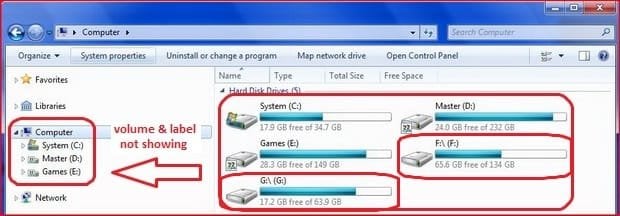
Win7_Confused.jpg

And here's the Disk Management window

Win7_Confused2.jpg

Anyone can help me with this?
I'm running on Windows7 Build 6801 32bit

I'm sorry for my English, I'm Indonesian.
 

My Computer

OS
Windows 7 Build 6801 32bit
CPU
Phenom II X4 940 Black Edition
Motherboard
DFI Lanparty-DK 790FX-B
Memory
OC-Z Fatality 2x2 GB DDR2 1066
Graphics Card(s)
GeForce 9800 GTX+ 1GB DDR3
Sound Card
Onboard
Monitor(s) Displays
19" Samsung SyncMaster 920NW
Screen Resolution
1440x900 @75Hz 16:10
Hard Drives
2 x WDC 250 GB
1 x ST 160 GB
PSU
Blue Storm II 500 Watt
Case
Armor LCS
Cooling
OCZ Vandeta II
Keyboard
Logitech Cordless
Mouse
Logitech Cordless
Don't remember if there was a solution for that, but why are you on build 6801?
 

My Computer

OS
Win 7
My connection are too slow to download newer build, and I think it's better just to wait for the final release :D:D:D
 

My Computer

OS
Windows 7 Build 6801 32bit
CPU
Phenom II X4 940 Black Edition
Motherboard
DFI Lanparty-DK 790FX-B
Memory
OC-Z Fatality 2x2 GB DDR2 1066
Graphics Card(s)
GeForce 9800 GTX+ 1GB DDR3
Sound Card
Onboard
Monitor(s) Displays
19" Samsung SyncMaster 920NW
Screen Resolution
1440x900 @75Hz 16:10
Hard Drives
2 x WDC 250 GB
1 x ST 160 GB
PSU
Blue Storm II 500 Watt
Case
Armor LCS
Cooling
OCZ Vandeta II
Keyboard
Logitech Cordless
Mouse
Logitech Cordless
Thank's but still doesn't solve my problem.
 

My Computer

OS
Windows 7 Build 6801 32bit
CPU
Phenom II X4 940 Black Edition
Motherboard
DFI Lanparty-DK 790FX-B
Memory
OC-Z Fatality 2x2 GB DDR2 1066
Graphics Card(s)
GeForce 9800 GTX+ 1GB DDR3
Sound Card
Onboard
Monitor(s) Displays
19" Samsung SyncMaster 920NW
Screen Resolution
1440x900 @75Hz 16:10
Hard Drives
2 x WDC 250 GB
1 x ST 160 GB
PSU
Blue Storm II 500 Watt
Case
Armor LCS
Cooling
OCZ Vandeta II
Keyboard
Logitech Cordless
Mouse
Logitech Cordless
Windows 7 hides empty drives by default.

To view them go to windows explorer, tools, folder options. Select view tab. Part way down the list untick the box for "hide empty drives in the computer folder".
 

My Computer

Computer Manufacturer/Model Number
self built
OS
Windows 7 Professional 64-bit
CPU
Intel E8400 3GHz
Motherboard
Intel DX48BT2
Memory
Kingston PC3-10700H 4Gb
Graphics Card(s)
XFX Radeon HD 5850 BlackEd.
Sound Card
Asus Xonar DG
Monitor(s) Displays
2x Samsung SM-T220HD 22"
Screen Resolution
1680x1050 on two monitors
Hard Drives
OCZ Vertex 2 120gb 3.5" (OS)
Seagate Momentus XT 500gb
Samsung F3 1Tb (games)
2x Samsung F1 1Tb
PSU
Thermaltake ToughPower 850w
Case
Thermaltake Armor
Cooling
Scythe Mugen II
Keyboard
Microsoft Comfort Curve USB
Mouse
Razer Diamondback 3G
Internet Speed
8128/443
No, these 2 volumes are not empty. It was 4 volumes on the drive before I modified the partition with EASUS Partition Master (C, F, G ,H). Then I remove G and move F and H to make C bigger, since 7 needs a lot of space than XP ( I used XP before ). It's goes well without any problem. Then when I rename the H to G, this problem occurs. I don't know why. Now I can't even rename the label for F and G ... Is it only because I'm using 6801 or what? I've tried all the solution from this forum, but it's still there... :cry:
 

My Computer

OS
Windows 7 Build 6801 32bit
CPU
Phenom II X4 940 Black Edition
Motherboard
DFI Lanparty-DK 790FX-B
Memory
OC-Z Fatality 2x2 GB DDR2 1066
Graphics Card(s)
GeForce 9800 GTX+ 1GB DDR3
Sound Card
Onboard
Monitor(s) Displays
19" Samsung SyncMaster 920NW
Screen Resolution
1440x900 @75Hz 16:10
Hard Drives
2 x WDC 250 GB
1 x ST 160 GB
PSU
Blue Storm II 500 Watt
Case
Armor LCS
Cooling
OCZ Vandeta II
Keyboard
Logitech Cordless
Mouse
Logitech Cordless
Back
Top