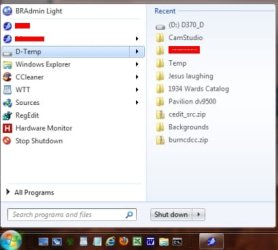
All of a sudden something has changed in my Windows 7.
If I click on Documents in the Navigation window (left side) I then get a list of Directories but only the first 10 subdirectories are listed and I've got a link saying Show All ?? Objects.
It doesn't matter which directory I select I always get the first 10 and then I need to click on the link to show all.
Is there some way to remove this behaviour?
// Anders
My Computer
Computer type
PC/Desktop
Computer Manufacturer/Model Number
Dell Vostro 1720, HP 7300 elite mt
OS
Microsoft Windows 7 Ultimate 32-bit 7601 Multiprocessor Free Service Pack 1
CPU
Intel(R) Core(TM)2 Duo CPU P8700 @ 2.53GHz, 2 cores
Motherboard
Dell Inc. 0J056T
Memory
4GB
Graphics Card(s)
NVIDIA GeForce 9600M GS, 512 Mb
Sound Card
High Definition Audio Device
Screen Resolution
1440 x 900 x 59 hertz
Hard Drives
ST750LX003-1AC154 ATA Device 698,64 GB
Keyboard
Standard Keyboard - PS/2
Mouse
Microsoft Wireless Notebook Presenter Mouse 8000 (IntelliPoi
I think this is how it's supposed to work. At least that's how it is for me also.
Edit: If I click on the link for D-Temp that opens the folder in Windows Explorer and everything is there as it should be. The folders listed in the Start Menu are there to give you a hint or idea of what that folder contains.
My Computer
Computer type
PC/Desktop
Computer Manufacturer/Model Number
Lenovo IdeaCenter 450
OS
Windows 10 Pro X64
CPU
Intel Quad Core i7-4770 @ 3.4Ghz
Memory
16.0GB PC3-12800 DDR3 SDRAM 1600 MHz
Graphics Card(s)
Intel Integrated HD Graphics
Sound Card
Realtek HD Audio
Monitor(s) Displays
HP 22" LCD
Screen Resolution
1680 x 1050
Hard Drives
250GB Samsung EVO SATA-3 SSD
2TB Seagate ST2000DM001 SATA-2
1.5TB Seagate ST3150041AS SATA
How the Navigation window works I can live with. My annoyance is with the list (right side).
I did a check and it was link Rich said: it's only Libraries that has this function.
So to solve it I created a Favorite of My Documents and voilà! Now I get a list with all subdirectories and files!
Thanks again!
// Anders
My Computer
Computer type
PC/Desktop
Computer Manufacturer/Model Number
Dell Vostro 1720, HP 7300 elite mt
OS
Microsoft Windows 7 Ultimate 32-bit 7601 Multiprocessor Free Service Pack 1
CPU
Intel(R) Core(TM)2 Duo CPU P8700 @ 2.53GHz, 2 cores
Motherboard
Dell Inc. 0J056T
Memory
4GB
Graphics Card(s)
NVIDIA GeForce 9600M GS, 512 Mb
Sound Card
High Definition Audio Device
Screen Resolution
1440 x 900 x 59 hertz
Hard Drives
ST750LX003-1AC154 ATA Device 698,64 GB
Keyboard
Standard Keyboard - PS/2
Mouse
Microsoft Wireless Notebook Presenter Mouse 8000 (IntelliPoi
Hmmm...
I just made some trial and error. When I create a Favorite to My Document. When I click on it I am moved to My Document under the Library Documents. I see all subdirectories and files.
This also happens if I "open" Documents so that I see all directories that is included in this Library. If I select My Documents I will see all subdirectories and files
I can't see any special settings, but I might have done something...
// Anders
My Computer
Computer type
PC/Desktop
Computer Manufacturer/Model Number
Dell Vostro 1720, HP 7300 elite mt
OS
Microsoft Windows 7 Ultimate 32-bit 7601 Multiprocessor Free Service Pack 1
CPU
Intel(R) Core(TM)2 Duo CPU P8700 @ 2.53GHz, 2 cores
Motherboard
Dell Inc. 0J056T
Memory
4GB
Graphics Card(s)
NVIDIA GeForce 9600M GS, 512 Mb
Sound Card
High Definition Audio Device
Screen Resolution
1440 x 900 x 59 hertz
Hard Drives
ST750LX003-1AC154 ATA Device 698,64 GB
Keyboard
Standard Keyboard - PS/2
Mouse
Microsoft Wireless Notebook Presenter Mouse 8000 (IntelliPoi