acskansasguy
New member
- Local time
- 3:18 PM
- Messages
- 4
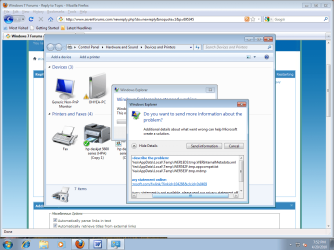
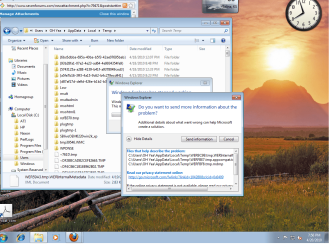
I have Windows 7 Ultimate and when I click on the Printers and Devices button. It opens just enough for me to see the information and then I get an error Windows Explorer has Stopped working "Windows is collecting more information about the problem. This might take several minutes...
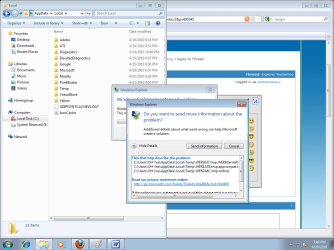
Then another Box pops up with Do you want to send more information about the problem...
When I click on the View Details here is what is listed..
Files that help describe the problem:
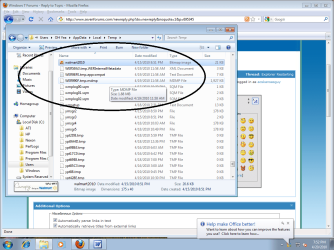
C:\Users\OH Yea\AppData\Local\Temp\WERD048.tmp.WERInternalMetadata.xml
C:\Users\OH Yea\AppData\Local\Temp\WER1169.tmp.appcompat.txt
C:\Users\OH Yea\AppData\Local\Temp\WER118A.tmp.mdmp
Read our privacy statement online:
Windows 7 Privacy Statement - Microsoft Windows
If the online privacy statement is not available, please read our privacy statement offline:
C:\Windows\system32\en-US\erofflps.txt
Then another box pops up with, Windows is Restarting... then everything seems fine. This happens only when I try to open Devices and Printers. And I never got BSOD. Also I have tried a clean boot and still no luck. I have also tried using just windows drivers with again no luck..
Any ideas?
Then another Box pops up with Do you want to send more information about the problem...
When I click on the View Details here is what is listed..
Files that help describe the problem:
C:\Users\OH Yea\AppData\Local\Temp\WERD048.tmp.WERInternalMetadata.xml
C:\Users\OH Yea\AppData\Local\Temp\WER1169.tmp.appcompat.txt
C:\Users\OH Yea\AppData\Local\Temp\WER118A.tmp.mdmp
Read our privacy statement online:
Windows 7 Privacy Statement - Microsoft Windows
If the online privacy statement is not available, please read our privacy statement offline:
C:\Windows\system32\en-US\erofflps.txt
Then another box pops up with, Windows is Restarting... then everything seems fine. This happens only when I try to open Devices and Printers. And I never got BSOD. Also I have tried a clean boot and still no luck. I have also tried using just windows drivers with again no luck..
Any ideas?
My Computer
- Computer Manufacturer/Model Number
- Compaq
- OS
- Windows 7 Ultimate
- CPU
- AMD Athlon 64 Processor 3400+ 2.41GHz
- Motherboard
- K8s-la
- Memory
- 2 GB Kingston DDR 400
- Graphics Card(s)
- Ati Radeon 4650 1GB
- Sound Card
- Internal
- Monitor(s) Displays
- Standard 14" crt 60hz
- Hard Drives
- 320 GB SATA 7200rpm
- PSU
- OKIA model LC-8460BTX 400w
- Case
- Antec High Tower
- Cooling
- 5 Cooling Fans and 1 Ball Bearing Blower