Explorer Right-Click Menu "Preview" option no longer works

RicLloyd

New member
Local time
12:40 PM
Messages
4
I have looked all over for a fix for this. Everyone offers a way to "Open" the file by associating its extension, but the problem is that the right-click "Preview" option does nothing anymore, and I want that fixed. Anyone have an actual solution?
 

My Computer My Computer

At a glance

Windows 7 Ultimate x64
Computer type
PC/Desktop
OS
Windows 7 Ultimate x64

My Computer My Computer

At a glance

Win 10 x64, Linux Lite, Win 7 x64, BlackArch,...
Computer type
PC/Desktop
Computer Manufacturer/Model Number
HP Desktop & Compaq Laptop
OS
Win 10 x64, Linux Lite, Win 7 x64, BlackArch, & Kali
Hard Drives
Samsung 850 Pro 256Gb,
Hitachi HDD 1Tb,
Crucial MX SSD 250Gb
Segate 3Tb USB 3.0 Ext. Backup HDD
Internet Speed
150Mbps dn, 20Mbps up
Antivirus
Avast Free, Malwarebytes Anti-Exploit & Anti-Ransomware
Browser
Firefox, Chrome, Opera, & VPN
Nope, doesn't work.

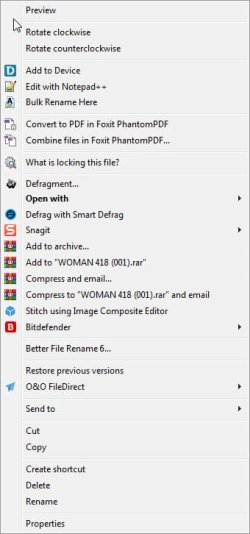
You see the first entry in the image of the explorer right-click menu? It is no longer functional. It used to be.

Now, the only way to get the Image Viewer to work is with the OPEN WITH drop-down.

I want the PREVIEW option back.


Also, can you tell me what Registry entry I need so I can remove the fix you provided that did not work?
 

Attachments

  • Right-Click.jpg
    Right-Click.jpg
    31.9 KB · Views: 6
Last edited:

My Computer My Computer

At a glance

Windows 7 Ultimate x64
Computer type
PC/Desktop
OS
Windows 7 Ultimate x64
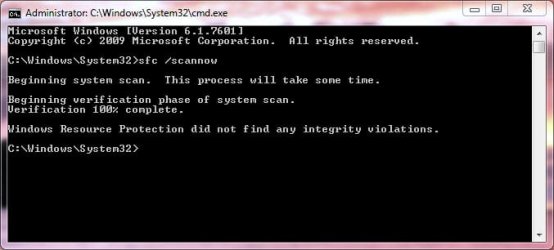
Could be something got corrupted. Open a command prompt with administrator rights. Run-

sfc /scannow

Does it find anything?
 

My Computer My Computer

At a glance

Windows 7 Pro SP1 64 bit8 GB
Computer type
Laptop
Computer Manufacturer/Model Number
Dell M6500 Precision Work Station
OS
Windows 7 Pro SP1 64 bit
Memory
8 GB
Screen Resolution
1920x
Internet Speed
30 Mbps
Antivirus
Norton Security
Browser
IE 11
SFC found nothing


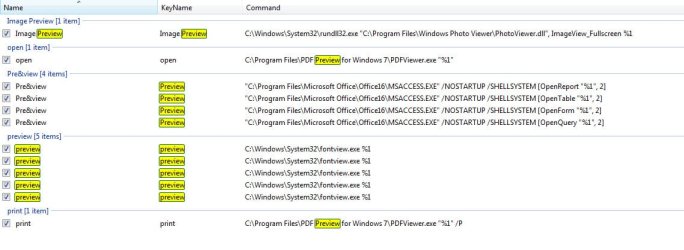
The first image is from Right Click Enhancer showing Image Previewer not associated with Preview at all.
 

Attachments

  • Right-Click Preview.jpg
    Right-Click Preview.jpg
    63.1 KB · Views: 0
  • scannow.jpg
    scannow.jpg
    24.4 KB · Views: 7

My Computer My Computer

At a glance

Windows 7 Ultimate x64
Computer type
PC/Desktop
OS
Windows 7 Ultimate x64
In Control Panel, Default Programs, Set Default Program Files, is Windows Photo Viewer shown and can you set it as default?
 

My Computer My Computer

At a glance

Windows 7 Pro SP1 64 bit8 GB
Computer type
Laptop
Computer Manufacturer/Model Number
Dell M6500 Precision Work Station
OS
Windows 7 Pro SP1 64 bit
Memory
8 GB
Screen Resolution
1920x
Internet Speed
30 Mbps
Antivirus
Norton Security
Browser
IE 11
This has no effect on the "Preview" option not working on the right-click context menu.
 

My Computer My Computer

At a glance

Windows 7 Ultimate x64
Computer type
PC/Desktop
OS
Windows 7 Ultimate x64

My Computer My Computer

At a glance

Win 10 x64, Linux Lite, Win 7 x64, BlackArch,...
Computer type
PC/Desktop
Computer Manufacturer/Model Number
HP Desktop & Compaq Laptop
OS
Win 10 x64, Linux Lite, Win 7 x64, BlackArch, & Kali
Hard Drives
Samsung 850 Pro 256Gb,
Hitachi HDD 1Tb,
Crucial MX SSD 250Gb
Segate 3Tb USB 3.0 Ext. Backup HDD
Internet Speed
150Mbps dn, 20Mbps up
Antivirus
Avast Free, Malwarebytes Anti-Exploit & Anti-Ransomware
Browser
Firefox, Chrome, Opera, & VPN
Back
Top