Explorer Search Problem !!!

borhan48

New member
Local time
6:24 PM
Messages
7
Location
Bangladesh
Hi,
I've installed windows 7 on my PC more than a year ago. Everything was working fine. But from the past few days I'm noticing that whenever trying to navigate a file by pressing any letter from keyboard in windows explorer it starts searching instead of highlighting that file/folder.
Normally it should happen after clicking the search box or by pressing CTRL+E. I'm in a great difficulty, what should I do ? Please help me.:cry:
 

My Computer

OS
Windows 7 Ultimate SP1 32-bit
Motherboard
Intel D945GCNL
Graphics Card(s)
Intel Built-in
Monitor(s) Displays
LG Flatron L177WSB
Screen Resolution
1440*900
Hard Drives
SAMSUNG SATA
Keyboard
A4Tech
Mouse
Mercury
Internet Speed
1Mbps
Is the cursor in the WE search field when you press the letter?
 

My Computer

OS
Win7U 64 RTM
CPU
Q9550
Motherboard
GA-EP45-UD3R
Memory
8GB Gskill
Graphics Card(s)
ASUS|EAH4850/HTDI/1GD3/A
Sound Card
xfi Plat
Monitor(s) Displays
Dell 2405fpw
Screen Resolution
1920x1200
Hard Drives
Seagate & WD sata Drives
PSU
Antec
Case
Antec
Keyboard
MS Natural Ergonomic 4000
Mouse
Logitech MX610 USB Cordless

My Computer

OS
Windows 7 Ultimate SP1 32-bit
Motherboard
Intel D945GCNL
Graphics Card(s)
Intel Built-in
Monitor(s) Displays
LG Flatron L177WSB
Screen Resolution
1440*900
Hard Drives
SAMSUNG SATA
Keyboard
A4Tech
Mouse
Mercury
Internet Speed
1Mbps

My Computer

OS
Win7U 64 RTM
CPU
Q9550
Motherboard
GA-EP45-UD3R
Memory
8GB Gskill
Graphics Card(s)
ASUS|EAH4850/HTDI/1GD3/A
Sound Card
xfi Plat
Monitor(s) Displays
Dell 2405fpw
Screen Resolution
1920x1200
Hard Drives
Seagate & WD sata Drives
PSU
Antec
Case
Antec
Keyboard
MS Natural Ergonomic 4000
Mouse
Logitech MX610 USB Cordless

My Computer

OS
Windows 7 Ultimate SP1 32-bit
Motherboard
Intel D945GCNL
Graphics Card(s)
Intel Built-in
Monitor(s) Displays
LG Flatron L177WSB
Screen Resolution
1440*900
Hard Drives
SAMSUNG SATA
Keyboard
A4Tech
Mouse
Mercury
Internet Speed
1Mbps
A curious problem. If it was just the last few days that this issue started ocurring, I would try the easy way out with a System Restore point pre-dating the issue. It may not reveal the cause, but it may eliminate the annoyance.
 

My Computer

OS
Win7U 64 RTM
CPU
Q9550
Motherboard
GA-EP45-UD3R
Memory
8GB Gskill
Graphics Card(s)
ASUS|EAH4850/HTDI/1GD3/A
Sound Card
xfi Plat
Monitor(s) Displays
Dell 2405fpw
Screen Resolution
1920x1200
Hard Drives
Seagate & WD sata Drives
PSU
Antec
Case
Antec
Keyboard
MS Natural Ergonomic 4000
Mouse
Logitech MX610 USB Cordless
There are no restore point in my PC at this time. What should I do now ?:o
 

My Computer

OS
Windows 7 Ultimate SP1 32-bit
Motherboard
Intel D945GCNL
Graphics Card(s)
Intel Built-in
Monitor(s) Displays
LG Flatron L177WSB
Screen Resolution
1440*900
Hard Drives
SAMSUNG SATA
Keyboard
A4Tech
Mouse
Mercury
Internet Speed
1Mbps
Honestly, I'm stumped. Tedious, but you could try unchecking options one at a time in Control Panel/System/Advanced|Performance tab. And also play with the checkbox options in Folder Options|View tab. It might help, but it's grasping at straws. Other than that, a repair install? Perhaps someone will come along who has heard of this issue before. Sorry I couldn't help.

James
 

My Computer

OS
Win7U 64 RTM
CPU
Q9550
Motherboard
GA-EP45-UD3R
Memory
8GB Gskill
Graphics Card(s)
ASUS|EAH4850/HTDI/1GD3/A
Sound Card
xfi Plat
Monitor(s) Displays
Dell 2405fpw
Screen Resolution
1920x1200
Hard Drives
Seagate & WD sata Drives
PSU
Antec
Case
Antec
Keyboard
MS Natural Ergonomic 4000
Mouse
Logitech MX610 USB Cordless
@James Colbert,
Thanks for your effort buddy. At least you tried to help me. But my problem is still ongoing.
 

My Computer

OS
Windows 7 Ultimate SP1 32-bit
Motherboard
Intel D945GCNL
Graphics Card(s)
Intel Built-in
Monitor(s) Displays
LG Flatron L177WSB
Screen Resolution
1440*900
Hard Drives
SAMSUNG SATA
Keyboard
A4Tech
Mouse
Mercury
Internet Speed
1Mbps
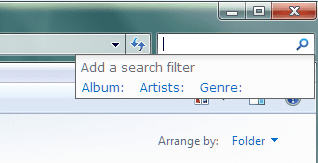
Hi borhan48, I've been following along with your issue. When in a folder and you press a letter does the Search Filter box open?
Untitled.png
Or do you see the progress bar in the address area?
Have you installed a keyboard app or a file manager app of any kind?
I would advise to turn on System Protection (restore). It has saved my butt on a few occasions.
 

My Computer

Computer type
PC/Desktop
Computer Manufacturer/Model Number
Home Built Desktop By DataTech
OS
Windows 7 Ultimate X64 SP1
CPU
Intel i5-2550K, Differing ~4.4-4.8GHz No built in GPU
Motherboard
ASUS P8Z68-V PRO/GEN3
Memory
16GB G.Skill Sniper 1866MHz @ 2133MHz 2x8GB
Graphics Card(s)
ASUS GTX650TIB-DC2OC-2GD5, (650TI Boost)
Sound Card
Onboard Realtek 5-1
Monitor(s) Displays
Samsung P2570HD
Screen Resolution
1920x1080
Hard Drives
Samsung 840 Pro 256GB SSD for OS, 500GB Seagate Constellation (Enterprise drive) for Data
PSU
Corsair HX650W
Case
Inwin Dragon Rider
Cooling
Hyper 212 EVO w/two Noctua fans, push-pull, @1300 RPM
Keyboard
E-Z Eyes, bright yellow keys with large characters
Mouse
steelseries SENSEI Laser Pro Gaming
Internet Speed
48-51Mbs Mbs down, 11 Mbs up Xfinity Cable
Antivirus
Norton Internet Security 2013
Browser
IE 10, Opera, Pale Moon if needed
Other Info
4 case fans, LG BluRay-RE, ASUS DVD-RW, Mr. Fusion power supply, 1.21 gigawatts.
Hi borhan48, I've been following along with your issue. When in a folder and you press a letter does the Search Filter box open?
View attachment 157342

Have you installed a keyboard app or a file manager app of any kind?

Yes with the bold part.
Nope, I don't remember installing anything like that for a while.
 

My Computer

OS
Windows 7 Ultimate SP1 32-bit
Motherboard
Intel D945GCNL
Graphics Card(s)
Intel Built-in
Monitor(s) Displays
LG Flatron L177WSB
Screen Resolution
1440*900
Hard Drives
SAMSUNG SATA
Keyboard
A4Tech
Mouse
Mercury
Internet Speed
1Mbps
Try to think what you did just before this happened. Windows usually doesn't react on its own.
Two things to try if you haven't are SFC /scannow, the system file checker and Basic Trouble Shooting Tips.
If that is no help look into Default File Associations.It would be tedious as you have to do each file type separately.
 

My Computer

Computer type
PC/Desktop
Computer Manufacturer/Model Number
Home Built Desktop By DataTech
OS
Windows 7 Ultimate X64 SP1
CPU
Intel i5-2550K, Differing ~4.4-4.8GHz No built in GPU
Motherboard
ASUS P8Z68-V PRO/GEN3
Memory
16GB G.Skill Sniper 1866MHz @ 2133MHz 2x8GB
Graphics Card(s)
ASUS GTX650TIB-DC2OC-2GD5, (650TI Boost)
Sound Card
Onboard Realtek 5-1
Monitor(s) Displays
Samsung P2570HD
Screen Resolution
1920x1080
Hard Drives
Samsung 840 Pro 256GB SSD for OS, 500GB Seagate Constellation (Enterprise drive) for Data
PSU
Corsair HX650W
Case
Inwin Dragon Rider
Cooling
Hyper 212 EVO w/two Noctua fans, push-pull, @1300 RPM
Keyboard
E-Z Eyes, bright yellow keys with large characters
Mouse
steelseries SENSEI Laser Pro Gaming
Internet Speed
48-51Mbs Mbs down, 11 Mbs up Xfinity Cable
Antivirus
Norton Internet Security 2013
Browser
IE 10, Opera, Pale Moon if needed
Other Info
4 case fans, LG BluRay-RE, ASUS DVD-RW, Mr. Fusion power supply, 1.21 gigawatts.
Back
Top