Solved Explorer status bars

Trucidation

Sister Complex
Pro User
VIP
Local time
4:10 AM
Messages
710
Location
Stage 5.0 (26 Dimensional Jump)
Hi folks,

Is it possible to make this abomination smaller? At the "small" setting, it still looks like this:
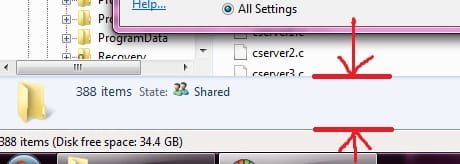
win7_explorer_status_bar.jpg

I've already got the latest Classic Shell installed -- it's great but there are only 3 options for the status bar and none deal with its size. As you can see in my screenshot it's unnecessarily large; all I need on it is filesize/date, or just size for multiple selections. The icon for file type and share status is garbage, I don't need those, I can look at the freaking file properties itself if I wanted to know that.

On a related Explorer rant, what is the proper name of this bar? I've helpfully painted a large 'X' on it, it's the one under the Classic Explorer bar:
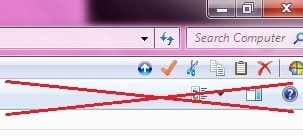
win7_wtf_bar.jpg

Are there any instructions for getting rid of this bar? All it does is provide some useless and redundant shortcuts.

Thanks! I need to get back out to my rocking chair on the porch, there are some youngsters on my lawn...
 

My Computer

Computer Manufacturer/Model Number
Self-built rig
OS
Win7 Pro x64
CPU
Koa i5-2550K
Memory
8 GB
Graphics Card(s)
Sapphire ATI 6870 1GB GDDR5
Sound Card
RealTek HD Audio / ATI HDMI Audio
Monitor(s) Displays
Samsung HDTV Monitor T23A350
Screen Resolution
1920 x 1080
Hard Drives
- SSD (C:)
- HDD (D:)
- BD-ROM (E:)
Keyboard
Logitech G110
Internet Speed
Unifi home (5mbps)
Hi folks,

Is it possible to make this abomination smaller? At the "small" setting, it still looks like this:
View attachment 154900

I don't know about making it smaller but it can be removed if you want?

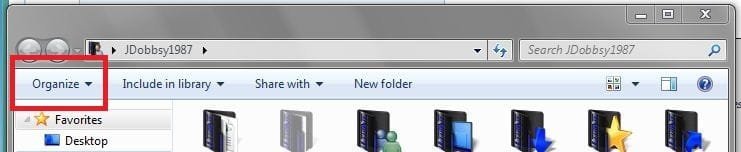
Click Organise:
Capture.JPG

Click 'Layout' and then un-check 'Details Pane'


I'm not sure if the other window can be removed sorry.

Regards,
JDobbsy1987
 

My Computer

Computer type
PC/Desktop
Computer Manufacturer/Model Number
Self Built
OS
Windows 8.1 Pro x64
CPU
Intel Core i5-2500K @ 3.30GHz - S1155
Motherboard
Asus P8P67 LE Rev3, Intel P67, S115
Memory
8GB Corsair DDR3 XMS3, PC3-12800
Graphics Card(s)
NVIDIA GeForce GTX 650
Sound Card
On-Board
Monitor(s) Displays
3 x 24" {Extended Display}
Screen Resolution
1920 x 1080
Hard Drives
300GB Seagate Barracuda 7200
PSU
550W Coolermaster GX550
Case
Silverstone Precision PS04B
Cooling
Stock
Keyboard
Logitech K120
Mouse
World of Warcraft Cataclysm MMO Gaming Mouse
Internet Speed
80 MB
Antivirus
MSE / Windows Defender
Browser
Chrome
Wow, that was fast! Thanks!

...but I had to use something on that other bar (apparently it's called the folder band, or something) to get rid of that. Now I feel unclean and confused as to whether I really want to get rid of it or not. Perhaps resize the folder band? Make it autohide?
 

My Computer

Computer Manufacturer/Model Number
Self-built rig
OS
Win7 Pro x64
CPU
Koa i5-2550K
Memory
8 GB
Graphics Card(s)
Sapphire ATI 6870 1GB GDDR5
Sound Card
RealTek HD Audio / ATI HDMI Audio
Monitor(s) Displays
Samsung HDTV Monitor T23A350
Screen Resolution
1920 x 1080
Hard Drives
- SSD (C:)
- HDD (D:)
- BD-ROM (E:)
Keyboard
Logitech G110
Internet Speed
Unifi home (5mbps)
Wow, that was fast! Thanks!

...but I had to use something on that other bar (apparently it's called the folder band, or something) to get rid of that. Now I feel unclean and confused as to whether I really want to get rid of it or not. Perhaps resize the folder band? Make it autohide?

I could probably live without the details pane but I like the other bar, I use it to change the display and create new folders.

I'm afraid I don't know how to customise that bar, if anything i would say that someone may know how to remove it but I don't think it would be able to auto hide or made smaller.

Regards,
JDobbsy1987
 

My Computer

Computer type
PC/Desktop
Computer Manufacturer/Model Number
Self Built
OS
Windows 8.1 Pro x64
CPU
Intel Core i5-2500K @ 3.30GHz - S1155
Motherboard
Asus P8P67 LE Rev3, Intel P67, S115
Memory
8GB Corsair DDR3 XMS3, PC3-12800
Graphics Card(s)
NVIDIA GeForce GTX 650
Sound Card
On-Board
Monitor(s) Displays
3 x 24" {Extended Display}
Screen Resolution
1920 x 1080
Hard Drives
300GB Seagate Barracuda 7200
PSU
550W Coolermaster GX550
Case
Silverstone Precision PS04B
Cooling
Stock
Keyboard
Logitech K120
Mouse
World of Warcraft Cataclysm MMO Gaming Mouse
Internet Speed
80 MB
Antivirus
MSE / Windows Defender
Browser
Chrome
Hmm... I usually just right-click to bring up the context menu if I need a new folder (the extra step forces me to evaluate whether I really want to do this, instead of accidentally clicking on something), and the View menu to change the display (actually, I just press the hotkeys - been hitting alt+v+d for years).

Found this tutorial here, it looks exactly what I was looking for:
http://www.sevenforums.com/tutorials/65416-window-explorer-toolbar-remove.html

Works exactly as advertised :)
 

My Computer

Computer Manufacturer/Model Number
Self-built rig
OS
Win7 Pro x64
CPU
Koa i5-2550K
Memory
8 GB
Graphics Card(s)
Sapphire ATI 6870 1GB GDDR5
Sound Card
RealTek HD Audio / ATI HDMI Audio
Monitor(s) Displays
Samsung HDTV Monitor T23A350
Screen Resolution
1920 x 1080
Hard Drives
- SSD (C:)
- HDD (D:)
- BD-ROM (E:)
Keyboard
Logitech G110
Internet Speed
Unifi home (5mbps)
Ah, i missed that tutorial sorry :o

I'm glad you have managed to sort it :)

Regards,
JDobbsy1987
 

My Computer

Computer type
PC/Desktop
Computer Manufacturer/Model Number
Self Built
OS
Windows 8.1 Pro x64
CPU
Intel Core i5-2500K @ 3.30GHz - S1155
Motherboard
Asus P8P67 LE Rev3, Intel P67, S115
Memory
8GB Corsair DDR3 XMS3, PC3-12800
Graphics Card(s)
NVIDIA GeForce GTX 650
Sound Card
On-Board
Monitor(s) Displays
3 x 24" {Extended Display}
Screen Resolution
1920 x 1080
Hard Drives
300GB Seagate Barracuda 7200
PSU
550W Coolermaster GX550
Case
Silverstone Precision PS04B
Cooling
Stock
Keyboard
Logitech K120
Mouse
World of Warcraft Cataclysm MMO Gaming Mouse
Internet Speed
80 MB
Antivirus
MSE / Windows Defender
Browser
Chrome
Back
Top