
Hi, I've some Questions about the Customization of the Explorer of my New installed Windows:
It is a Windows 7x64 Professional
First I tried to put back some classical Buttons to the Explorer Toolbar.
Using this:
http://www.sevenforums.com/customization/38296-how-rearrange-items-toolbar-windows-explor-2.html
But I don't find any Entry under the:
HKEY_LOCAL_MACHINE\SOFTWARE\Microsoft\Windows\CurrentVersion\Explorer\FolderTypes
....
What can I do than?
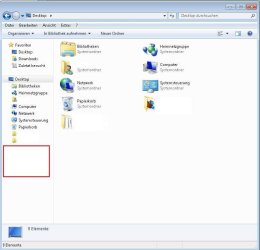
Second thing is that I miss in the left side Directory Tree the node for the Computer:
Here a image where the node is missing:
Here is the node:
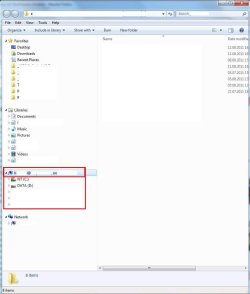
Is there a way to get it there
It is a Windows 7x64 Professional
First I tried to put back some classical Buttons to the Explorer Toolbar.
Using this:
http://www.sevenforums.com/customization/38296-how-rearrange-items-toolbar-windows-explor-2.html
But I don't find any Entry under the:
HKEY_LOCAL_MACHINE\SOFTWARE\Microsoft\Windows\CurrentVersion\Explorer\FolderTypes
....
What can I do than?
Second thing is that I miss in the left side Directory Tree the node for the Computer:
Here a image where the node is missing:
Here is the node:
Is there a way to get it there
My Computer
At a glance
Windows 7
- OS
- Windows 7


