
mission031
New member
- Local time
- 11:49 AM
- Messages
- 1
Thank you in advance for reading and offering potential help. I actually located the exact same problem another poster posted in these forums (see below URL). However, his problem "just fixed itself" before he really began to do much troubleshooting.
http://www.sevenforums.com/general-...er-window-folder-thumbnails-disappearing.html
Here is my problem (which I've just directly copied and pasted from above URL:
When I start my computer, go to my user folder, documents etc., all appears fine. Folders/thumbnails and images within the folder appear as normal.
However, if I open (for instance) my "downloads" folder, the folder icons and associated icons are initially displayed as "normal", but I see that the explorer bar (where I see C:/user/downloads, etc) is "computing items" but it never stops. A green "progress bar" SLOWLY moves across that "text window" and then it stays green. As if the pc is having trouble reading what is in the folder.
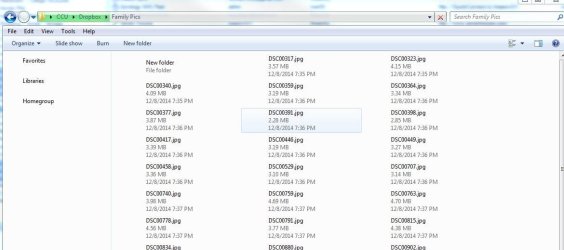
Once that happens, if I back out of the folder and then go back in to it, most of the folder icons/thumbnails/pictures are no longer visible. If I navigate to other folders, it's the same thing; many (but not all) of the folder icons and the thumbnails within are not displayed. I have also noticed that when I go to start/control panel, computer, network etc. the windows are completely blank. No icons, no file names displayed.
I have run anti-virus: Microsoft security essentials, malwarebytes, and Combo Fix but no luck. I've also done some research and cleared out my Thumbs cache.
I have taken some screen shots to illustrate. If they might help, I can add them here.
Anyone have an idea of what is going on? I'd rather not do another restore if I can avoid it.
Again, thanks in advance
http://www.sevenforums.com/general-...er-window-folder-thumbnails-disappearing.html
Here is my problem (which I've just directly copied and pasted from above URL:
When I start my computer, go to my user folder, documents etc., all appears fine. Folders/thumbnails and images within the folder appear as normal.
However, if I open (for instance) my "downloads" folder, the folder icons and associated icons are initially displayed as "normal", but I see that the explorer bar (where I see C:/user/downloads, etc) is "computing items" but it never stops. A green "progress bar" SLOWLY moves across that "text window" and then it stays green. As if the pc is having trouble reading what is in the folder.
Once that happens, if I back out of the folder and then go back in to it, most of the folder icons/thumbnails/pictures are no longer visible. If I navigate to other folders, it's the same thing; many (but not all) of the folder icons and the thumbnails within are not displayed. I have also noticed that when I go to start/control panel, computer, network etc. the windows are completely blank. No icons, no file names displayed.
I have run anti-virus: Microsoft security essentials, malwarebytes, and Combo Fix but no luck. I've also done some research and cleared out my Thumbs cache.
I have taken some screen shots to illustrate. If they might help, I can add them here.
Anyone have an idea of what is going on? I'd rather not do another restore if I can avoid it.
Again, thanks in advance
Attachments

My Computer
At a glance
Windows 7 Professionali7-260016GB
- Computer type
- PC/Desktop
- Computer Manufacturer/Model Number
- ZT
- OS
- Windows 7 Professional
- CPU
- i7-2600
- Memory
- 16GB
- Antivirus
- Microsoft Security Essentials
- Browser
- Firefox