Explorer & WSB (yes, again)

Rand Marks

Banned
Local time
9:38 PM
Messages
96
Hi,

In Windows Style Builder (or maybe shellstyle.dll), how do I change the text, background, and highlighting colors of a file or folder that is being (re)named? Here are some screenshots of my theme.
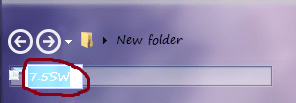
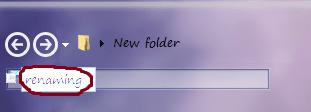
7rename1.png
7rename2.png

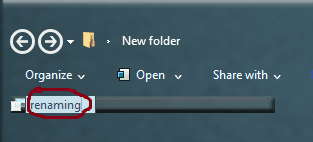
Here are some screenshots of how I want it to look.
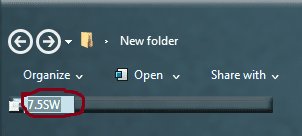
00rename1.png
00renaming2.png

Also, I can’t find in WSB the image for a selected (not mouse-hovered) file or folder, as shown below.
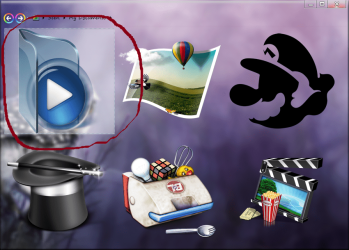
select.png

Appreciate the support!

Best regards,

Rand Marks
 

My Computer

OS
Windows 7 Ultimate SP1 64-bit
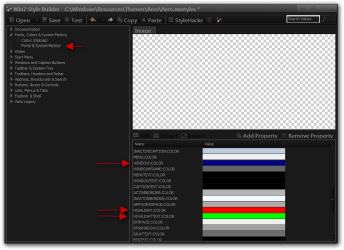
Highlight
Fonts, Colors & System Metrics > Fonts & System Metrics > HIGHLIGHT:COLOR
Text color
Fonts, Colors & System Metrics > Fonts & System Metrics > HIGHLIGHTTEXT:COLOR
Background
Fonts, Colors & System Metrics > Fonts & System Metrics > WINDOW:COLOR (this one will change other areas also like the main window of Notepad)

Explorer selected
Explorer & Shell > Explorer > Items View > ListView > ListItem > HotSelected

Jerry
 

My Computer

Computer type
Laptop
Computer Manufacturer/Model Number
Sager NP9170
OS
Win 7 Pro x64 / Win 10 Pro
CPU
Intel(R) Core(TM) i7-3630QM CPU @ 2.40GHz
Motherboard
CLEVO P170EM
Memory
12 GB
Graphics Card(s)
(1) Intel(R) HD Graphics 4000 (2) NVIDIA GeForce GTX 675M
Sound Card
(1) Realtek High Definition Audio (2) Intel(R) Display Aud
Monitor(s) Displays
17.3
Screen Resolution
1920x1080
Hard Drives
(1) Samsung 860 EVO 500GB(OS) (1) Samsung 860 EVO 500GB(Data)
Keyboard
Backlite
Antivirus
MSE, Malwarebytes Pro
Browser
Firefox
Other Info
DESKTOP: Custom-built.
OS: Win 10 Pro x64.
CASE: Rosewill R5.
CPU: Intel I5 4670K CPU @ 3.40GHz.
CPU COOLER: Cool Master Hyper 212 EVO.
MOTHERBOARD: Asus Z87-A.
MEMORY: Kingston HyperX 2x4 GB.
GPU: Nvidia Geforce 650 TI.
PSU: Corsair TX750.
DRIVES: (1) Samsung 840 120 GB SSD (2) Western Digital blue 500 GB 7200 RPM.
Hi, Jerry,

I was able to change the "selected" images just fine. Thanks! However, much to my surprise, changing the "highlight", "text", and "background" colors produced no result. Am I missing something? :o

Also, do you know of a way to change the dotted border that sometimes appears around files and folders in both Explorer and on the desktop? Is it in WSB? Here is a screenshot.

shot1.png

Rand Marks
 

My Computer

OS
Windows 7 Ultimate SP1 64-bit
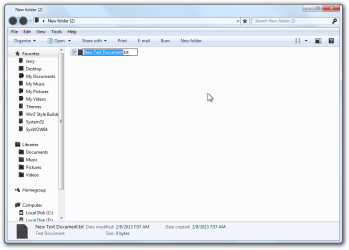
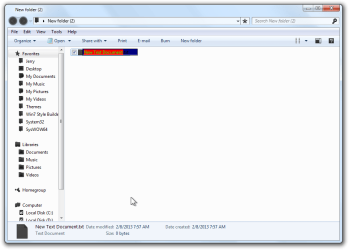
That should have worked. Look at my screenshots below and it will show what I did.
1.png2.png
3.png


For the dotted line is either Explorer & Shell > Explorer > Items View > ItemsView > ListItemNotFocused > Normal
or use this http://www.sevenforums.com/customization/53318-remove-focus-rectangle-icons.html Look at post #8 the download link is broken so I added it in a zip folder at the bottom of the post.

Jerry
 

My Computer

Computer type
Laptop
Computer Manufacturer/Model Number
Sager NP9170
OS
Win 7 Pro x64 / Win 10 Pro
CPU
Intel(R) Core(TM) i7-3630QM CPU @ 2.40GHz
Motherboard
CLEVO P170EM
Memory
12 GB
Graphics Card(s)
(1) Intel(R) HD Graphics 4000 (2) NVIDIA GeForce GTX 675M
Sound Card
(1) Realtek High Definition Audio (2) Intel(R) Display Aud
Monitor(s) Displays
17.3
Screen Resolution
1920x1080
Hard Drives
(1) Samsung 860 EVO 500GB(OS) (1) Samsung 860 EVO 500GB(Data)
Keyboard
Backlite
Antivirus
MSE, Malwarebytes Pro
Browser
Firefox
Other Info
DESKTOP: Custom-built.
OS: Win 10 Pro x64.
CASE: Rosewill R5.
CPU: Intel I5 4670K CPU @ 3.40GHz.
CPU COOLER: Cool Master Hyper 212 EVO.
MOTHERBOARD: Asus Z87-A.
MEMORY: Kingston HyperX 2x4 GB.
GPU: Nvidia Geforce 650 TI.
PSU: Corsair TX750.
DRIVES: (1) Samsung 840 120 GB SSD (2) Western Digital blue 500 GB 7200 RPM.
Back
Top