
explorerframe.dll

mickey megabyte

мιи∂вℓσ&#9
Guru
Gold Member
VIP
Local time
7:43 PM
Messages
7,146
hi all,

i'm new to themeing, and looking for a little help.

i've downloaded plastiQ Aero from deviantart.

i've no trouble installing and using the main parts of the theme, but i'm not sure what to do with explorerframe.dll, to change the explorer forward/back buttons.

what i've tried:

1 - i was using the uxstylecore service to enable the theme. then i replaced explorerframe.dll in both windows/system32 and windows/syswow64

that didn't work.

2 - so i tried uninstalling the uxstylecore and patched my uxtheme instead, using universal theme patcher.

replacing explorerframe again didn't work.

3 - so i downloaded 7CustoMizer.INC, and tried using that to replace explorerframe.
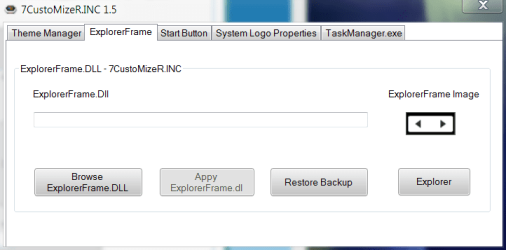
7inc.PNG

looking at the screenshot, the buttons image on the right seems to have changed, but when i run explorer, nothing has changed.

what am i doing wrong?

i'm on 64bit ultimate, haven't installed sp1 yet, and i'm certain i was using the 64bit explorerframe.dll supplied in the download.

the downloaded theme rar file also included some image files for the explorer buttons, in both png and bmp - am i meant to extract these somewhere too?
 

My Computer

Computer Manufacturer/Model Number
mickey megabyte 1234
OS
ultimate 64 sp1
CPU
i5 2500K [email protected]
Motherboard
MSI P67A-GD53
Memory
8 gigs GSkill Ripjaws 1600
Graphics Card(s)
amd hd6950
Sound Card
creative x-fi gamer
Monitor(s) Displays
samsung 24"
Screen Resolution
1920x1080
Hard Drives
ocz vertex 2e 60 gig, samsung f3 1tb, buffalo 2tb ext
PSU
antec 550
Case
antec three hundred
Cooling
i'm a cooling fan
Keyboard
saitek eclipse ii
Mouse
logitech g3
Internet Speed
about 4 Mbps
Other Info
i love win7
Have you restarted your computer or logged in and out after the changes?
 

My Computer

Computer Manufacturer/Model Number
Vostro
OS
Windows 7 Ultimate (SP1)
CPU
AMD Sempron 3600+
Graphics Card(s)
ATI Radeon Xpress 1150
Screen Resolution
1200 x 800
Hard Drives
WD Scorpio Blue 500 GB
yep - many times over the last couple of days
 

My Computer

Computer Manufacturer/Model Number
mickey megabyte 1234
OS
ultimate 64 sp1
CPU
i5 2500K [email protected]
Motherboard
MSI P67A-GD53
Memory
8 gigs GSkill Ripjaws 1600
Graphics Card(s)
amd hd6950
Sound Card
creative x-fi gamer
Monitor(s) Displays
samsung 24"
Screen Resolution
1920x1080
Hard Drives
ocz vertex 2e 60 gig, samsung f3 1tb, buffalo 2tb ext
PSU
antec 550
Case
antec three hundred
Cooling
i'm a cooling fan
Keyboard
saitek eclipse ii
Mouse
logitech g3
Internet Speed
about 4 Mbps
Other Info
i love win7
Have you tried it this way?
Copy original files to desktop.
Open the dloaded files via Resource hacker and save the resources (navigation buttons).
Replacing the ones in original files wit hthe ones saved in previous step.
Pasting the files back to their location.

And have you taken ownership and full control of the files your gonna replace ?
 

My Computer

Computer Manufacturer/Model Number
HCL
OS
Winbdows 7 ultimate x64 | Ubuntu 12.04 x64 LTS
CPU
Core 2 Duo e7400 @ 2.90GHz
Motherboard
Gigabyte G31M-ES2L
Memory
3GB DDR2
Graphics Card(s)
Asus Nvidia GTX 560Ti 1GB
Sound Card
On-board
Monitor(s) Displays
HCL eZeeBee 18.5" LCD
Screen Resolution
1366x768 @ 60Hz
Hard Drives
Western Digital 320GB
PSU
Corsair CX500 V2 500W
Cooling
Stock
Keyboard
Stock
Mouse
Stock
Internet Speed
15-25kBps D/L | 10kBps U/L | Hey Don't laugh
i haven't tried resource hacking - i shouldn't need to as i've been given a custom explorerframe.dll as part of the theme package.

i didn't need to do all the 'take ownership' stuff - i'm on a multi-boot system, so i booted into another os, and replaced the files from there.

am i meant to replace explorerframe.dll in both windows/system32 and /syswow64? putting the supplied 64bit dll into each folder?

am i meant to do something with the image files for the explorer buttons, or does the dll contain the images inside it?

i'm sure it's something really simple that i'm doing wrong. :confused:
 

My Computer

Computer Manufacturer/Model Number
mickey megabyte 1234
OS
ultimate 64 sp1
CPU
i5 2500K [email protected]
Motherboard
MSI P67A-GD53
Memory
8 gigs GSkill Ripjaws 1600
Graphics Card(s)
amd hd6950
Sound Card
creative x-fi gamer
Monitor(s) Displays
samsung 24"
Screen Resolution
1920x1080
Hard Drives
ocz vertex 2e 60 gig, samsung f3 1tb, buffalo 2tb ext
PSU
antec 550
Case
antec three hundred
Cooling
i'm a cooling fan
Keyboard
saitek eclipse ii
Mouse
logitech g3
Internet Speed
about 4 Mbps
Other Info
i love win7
If you've been supplied with the customized dll's then just put them into their respective folders.
If your supplied with only images for different things like navigation buttons, refresh buttons etc, you'll have to manually edit the current dll file and replace the pictures in them with the downloaded ones using resource hacker or restorator.
 

My Computer

Computer Manufacturer/Model Number
HCL
OS
Winbdows 7 ultimate x64 | Ubuntu 12.04 x64 LTS
CPU
Core 2 Duo e7400 @ 2.90GHz
Motherboard
Gigabyte G31M-ES2L
Memory
3GB DDR2
Graphics Card(s)
Asus Nvidia GTX 560Ti 1GB
Sound Card
On-board
Monitor(s) Displays
HCL eZeeBee 18.5" LCD
Screen Resolution
1366x768 @ 60Hz
Hard Drives
Western Digital 320GB
PSU
Corsair CX500 V2 500W
Cooling
Stock
Keyboard
Stock
Mouse
Stock
Internet Speed
15-25kBps D/L | 10kBps U/L | Hey Don't laugh
explorerframe.dll is located in your C:\Windows\Sytem32 folder. Before replacing your original explorerframe.dll with the modified one make sure you backup the original just in case you don't like the modifications on the one you are replacing the original with or ever want to go back to the original.
The exploreframe images should be ( if any ) in a folder that will go into your C:\Windows\Resources\Themes\*nameof theme folder - the images should be called out from there , the same as in changing objects in the shell32.dll file when theming , at least that's my experience with it.

You will also need to take ownership of the original in order to replace it , you cannot just copy and paste and overwrite.

I usually back up my original .dll's that get replaced to an external thumbdrive that gets put away in a safe place this way there is no chance of them getting deleted.
 

My Computer

Computer type
PC/Desktop
Computer Manufacturer/Model Number
HP
OS
Windows 8 Pro / Windows 7 Home Premium x64 dual boot
Memory
6 gigs
Graphics Card(s)
Nvidia GEForce 9400 GT
Screen Resolution
1600 x 900
Hard Drives
Internal - Western Digital 600 gb HDD
Internal - Western Digital 250 gb HDD
External - Western Digital 1 TB HDD
Antivirus
Avast!
Browser
Pale Moon

My Computer

Computer type
PC/Desktop
OS
Windows 10 Home x64
CPU
INTEL Core i5-750 Quad-Core 3.37GHz
Motherboard
ASUS P7P55D
Memory
HyperX Fury Black Series 8GB (2 x 4GB) 1866Mhz
Graphics Card(s)
EVGA GeForce GTX 750 Superclocked 1GB 128-Bit GDDR5
Monitor(s) Displays
LG 32MA68HY 32" IPS
Screen Resolution
1920 x 1080
Hard Drives
Samsung 840 Evo 120GB, SEAGATE 500GB Barracuda® 7200.12, SATA 3 Gb/s, 7200 RPM, 16MB cache
PSU
ANTEC TruePower New TP-550, 80 PLUS, 550W
Case
ANTEC Three Hundred Illusion
Cooling
COOLER MASTER Hyper 212 Plus, 4 x 120mm 1 x 140mm Noctua's
Internet Speed
85 + Mbps
Antivirus
Avast
Browser
Vivaldi
thanks pal, i'll have a look at that prog later. :)
 

My Computer

Computer Manufacturer/Model Number
mickey megabyte 1234
OS
ultimate 64 sp1
CPU
i5 2500K [email protected]
Motherboard
MSI P67A-GD53
Memory
8 gigs GSkill Ripjaws 1600
Graphics Card(s)
amd hd6950
Sound Card
creative x-fi gamer
Monitor(s) Displays
samsung 24"
Screen Resolution
1920x1080
Hard Drives
ocz vertex 2e 60 gig, samsung f3 1tb, buffalo 2tb ext
PSU
antec 550
Case
antec three hundred
Cooling
i'm a cooling fan
Keyboard
saitek eclipse ii
Mouse
logitech g3
Internet Speed
about 4 Mbps
Other Info
i love win7
I must say, I've not only tried changing the exploereframe.dll, and even changing the images one by one, and it's never changed anything. I finally gave up as it's not that important. Have a look at this Mickey, it just may do the trick for you:

How To Replace Explorer.exe, OobeFldr.dll, ExplorerFrame.dll & Shell32.dll Files In Windows 7

A Guy

sigh - didn't work either.

i don't know why it's proving to be so difficult.

i'm glad it's not just me though. :)

i never use those explorer buttons anyhow (my mouse side buttons do the job), but was curious to see how it looked. :huh:

i'll just stick to the rest of the theme, which i like, but seems a bit half-finished.

one day when i'm bored and have nothing to do, i may look into making it how i like it...when i've got time.
 

My Computer

Computer Manufacturer/Model Number
mickey megabyte 1234
OS
ultimate 64 sp1
CPU
i5 2500K [email protected]
Motherboard
MSI P67A-GD53
Memory
8 gigs GSkill Ripjaws 1600
Graphics Card(s)
amd hd6950
Sound Card
creative x-fi gamer
Monitor(s) Displays
samsung 24"
Screen Resolution
1920x1080
Hard Drives
ocz vertex 2e 60 gig, samsung f3 1tb, buffalo 2tb ext
PSU
antec 550
Case
antec three hundred
Cooling
i'm a cooling fan
Keyboard
saitek eclipse ii
Mouse
logitech g3
Internet Speed
about 4 Mbps
Other Info
i love win7
Yeah, I just tried again with that tool, and it definitely saved a new explorer.exe, but nada changed, even after a restart. Oh well. If you want to sort it out, you might ask at VC, that's their thing. A Guy
 

My Computer

Computer type
PC/Desktop
OS
Windows 10 Home x64
CPU
INTEL Core i5-750 Quad-Core 3.37GHz
Motherboard
ASUS P7P55D
Memory
HyperX Fury Black Series 8GB (2 x 4GB) 1866Mhz
Graphics Card(s)
EVGA GeForce GTX 750 Superclocked 1GB 128-Bit GDDR5
Monitor(s) Displays
LG 32MA68HY 32" IPS
Screen Resolution
1920 x 1080
Hard Drives
Samsung 840 Evo 120GB, SEAGATE 500GB Barracuda® 7200.12, SATA 3 Gb/s, 7200 RPM, 16MB cache
PSU
ANTEC TruePower New TP-550, 80 PLUS, 550W
Case
ANTEC Three Hundred Illusion
Cooling
COOLER MASTER Hyper 212 Plus, 4 x 120mm 1 x 140mm Noctua's
Internet Speed
85 + Mbps
Antivirus
Avast
Browser
Vivaldi
Hi Micky ! Is the explorerframe changing project is successful ? If so, congrats . :D

If not , look at the thread http://www.sevenforums.com/themes-styles/144449-i-really-need-help.html#post1239927 . Post 5 and post 7 may be helpful to you .

EDIT : I know that advising you for TAKING OWNERSHIP (http://www.vistax64.com/tutorials/67717-take-ownership-file.html) is not needed at all, but for sake of making a complete post , I am adding this point . You are to take ownership of the file you are intending to modify; ExplorerFrame.dll in your case .
 

My Computer

Computer type
PC/Desktop
Computer Manufacturer/Model Number
Self Assembled
OS
Microsoft Windows 10 Pro Insider Preview 64-bit
CPU
Intel(R) Core(TM) i3-4130 CPU @ 3.40GHz
Motherboard
Gigabyte Technology Co., Ltd. B85M-D3H
Memory
Corsair Vengence 4GB x2 (8.00GB Dual-Channel DDR3 @ 798MHz)
Graphics Card(s)
2047MB GeForce GTS 450 (ZOTAC International)
Sound Card
Onboard (Realtek High Definition Audio)
Monitor(s) Displays
LG Flatron E2040T
Screen Resolution
1600x900
Hard Drives
Western Digital 1 TB
Seagate 500 GB
PSU
Corsair VS550
Case
Cooler Master K380
Cooling
Cooler Master Seidon 120V Plus
Keyboard
Logitech MK260r
Mouse
Logitech MK260r
Internet Speed
PMPL Broadband
Antivirus
Windows Defender + MBAM
Browser
Firefox
Other Info
Dell Studio 15" Laptop
Back
Top