Exposing a hidden folder

Involute

New member
Local time
11:00 AM
Messages
55
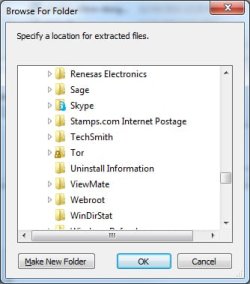
I just downloaded and unzipped Tor (a browser that preserves anonymity) on my Win7 Pro x64 system. During the unzipping process I told the self-extractor to create a Tor folder in my Program Files (x86) directory and extract everything into it. When it finished I opened Windows Explorer to navigate to the directory, but couldn't find it (see NoTor.jpg attachment). I re-ran the extractor and it shows the directory, and everything previously extracted (YesTor.jpg). I have show hidden files and folders checked in Control Panel | Folder Options. I realize there's a lock on the Tor folder, but I thought that had to do with access control, not visibility.

I'm asking here rather than at Tor as I'd like to learn the Windows principle involved rather than just solve this immediate problem.

Thanks.
 

Attachments

  • NoTor.jpg
    NoTor.jpg
    515.9 KB · Views: 13
  • YesTor.jpg
    YesTor.jpg
    98.5 KB · Views: 4

My Computer

Computer Manufacturer/Model Number
Titanus
OS
Windows 7 Pro x64
CPU
Intel i7-970
Motherboard
Asus P-6X58D-E
Memory
12GB
Graphics Card(s)
Nvidia Quadro 4000
Sound Card
Creative SB X-Fi
Monitor(s) Displays
Samsung SyncMaster 204T
Hard Drives
Corsair Nova V128 128GB SSD; WD Velociraptor 600GB (x2 configured as RAID 1)
Case
Tuniq 3
Cooling
ECO Advanced Liquid Cooling
Internet Speed
Cable

My Computer

Computer Manufacturer/Model Number
HP Pavilion Elite 495UK
OS
Windows 7 Ultimate SP1 64-Bit
CPU
Intel Core i7 870 @ 2.93GHz
Motherboard
MSI 2A9C (CPU1)
Memory
8Gb Dual-Channel DDR3 @ 664MHz
Graphics Card(s)
nVidia GeForce GTX 460 1024MB dedicated RAM
Sound Card
Realtek HD Audio
Monitor(s) Displays
HP2310i
Screen Resolution
1920 x 1080
Hard Drives
1x1954GB Hitachi HDS22020ALA 330 (RAID), 1x1954GB Hitachi External for backup and storage
PSU
460W
Case
HP Elite
Cooling
Air cooled
Keyboard
Logitech K750 solar-powered keyboard
Mouse
Logitech Wireless M180 mouse
Internet Speed
2Mb
Other Info
Pure Avanti Flow Internet Radio with iPod Dock, 64Gb iPod, HP USB Speakers, Sony MDR-V500 Headphones, Sony Vaio F-Series Laptop
Ooops, er, nm.

Besides the show hidden files, on that same dialog there is "Hide protected operating system files" which you can uncheck to see it.

I'd then set the permissions for that folder properly and put your explorer settings back.

The the real Q is, why did it come out that way? Are you sure of your source for that file? I'd virus scan it before running it.
 

My Computer

Computer Manufacturer/Model Number
Scratch built
OS
Windows 7 x64 Ultimate
CPU
i7 960
Motherboard
Asus P6X58D
Memory
12 Gig Corsair Dominator
Graphics Card(s)
Nvidia 480
Sound Card
Maudio Delta 44 + breakout box
Monitor(s) Displays
Dell UltraSharp U2410 24in and Samsung 21 dual monitors
Screen Resolution
1920x1200 and 1280x1024
Hard Drives
Primary: Intel X-25M G2 160G SSD
Secondary: Segate baracuda 1.0 TB
HDs in AHCI mode.
PSU
Corasair TX850
Case
Cooler Master HAF
Cooling
Corsair H50
Keyboard
Logitech G15 + N52 game pad
Mouse
Logitech MX518
Internet Speed
15kbs down 4.5kbps up
Other Info
WEI 7.6
CPU & RAM 7.6
Graphics 7.9
Hard disk 7.7
Thanks for the pointers, seavixen32. Unfortunately I'm unable to change my permissions or create new users per the tutorial (the checkboxes and add button are disabled). I'm the first and only user of this PC and I never have to log in. User Accounts identifies me as Administrator. Any other ideas?
 

My Computer

Computer Manufacturer/Model Number
Titanus
OS
Windows 7 Pro x64
CPU
Intel i7-970
Motherboard
Asus P-6X58D-E
Memory
12GB
Graphics Card(s)
Nvidia Quadro 4000
Sound Card
Creative SB X-Fi
Monitor(s) Displays
Samsung SyncMaster 204T
Hard Drives
Corsair Nova V128 128GB SSD; WD Velociraptor 600GB (x2 configured as RAID 1)
Case
Tuniq 3
Cooling
ECO Advanced Liquid Cooling
Internet Speed
Cable

My Computer

Computer Manufacturer/Model Number
HP Pavilion Elite 495UK
OS
Windows 7 Ultimate SP1 64-Bit
CPU
Intel Core i7 870 @ 2.93GHz
Motherboard
MSI 2A9C (CPU1)
Memory
8Gb Dual-Channel DDR3 @ 664MHz
Graphics Card(s)
nVidia GeForce GTX 460 1024MB dedicated RAM
Sound Card
Realtek HD Audio
Monitor(s) Displays
HP2310i
Screen Resolution
1920 x 1080
Hard Drives
1x1954GB Hitachi HDS22020ALA 330 (RAID), 1x1954GB Hitachi External for backup and storage
PSU
460W
Case
HP Elite
Cooling
Air cooled
Keyboard
Logitech K750 solar-powered keyboard
Mouse
Logitech Wireless M180 mouse
Internet Speed
2Mb
Other Info
Pure Avanti Flow Internet Radio with iPod Dock, 64Gb iPod, HP USB Speakers, Sony MDR-V500 Headphones, Sony Vaio F-Series Laptop
Back
Top