
Hello!
I bought a WD My Passport 1TB awhile back, now i got problems. It worked fine until recently and i have tried different compuiters with no luck, and that tells me something is wrong with the drive.
When i plug it in, Windows recognizes it and i hear the sound. The LED on the drive keeps blinking and nothing happens for 3-4 minutes. Then it shows up under Computer as simply "Local Disk (K " like this screenshot shows:

Then if i right click on it to get the drop menu or try to open it, the window stops responding. Like this:

Now, if i go in to Disk Management i dont see any HDDs and all i get is "Connecting to Virtual Disk Service..." Like this:

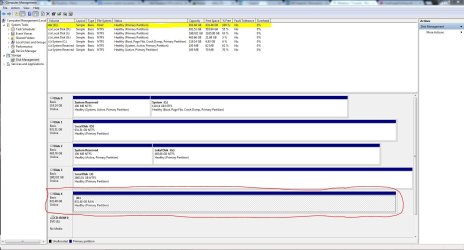
And again after some time the HDD shows itself, now like 20 minutes Disk Management shows as normal. Like this:

As you can see it says the file system is RAW, it has a 100% free space (thou i had files on it).
Another wired thing that happens when the drive is plugged in, is that i can't shut down the computer, it just keeps rotating on "Shutting down..." until i unplug it. I was able to update the firmwire with WD's "self updater" but nothing changed. I can't find a way to format it, since all programs that touch the drive stops responding, maybe there are programs that can force a format?
Does anyone have any thoughts on what this could be? I'm at a total standstill. Help is very much appreciated and tell me if you want any additional information as I'm sure I've forgot something.
//Staffan
I bought a WD My Passport 1TB awhile back, now i got problems. It worked fine until recently and i have tried different compuiters with no luck, and that tells me something is wrong with the drive.
When i plug it in, Windows recognizes it and i hear the sound. The LED on the drive keeps blinking and nothing happens for 3-4 minutes. Then it shows up under Computer as simply "Local Disk (K
" like this screenshot shows:Then if i right click on it to get the drop menu or try to open it, the window stops responding. Like this:
Now, if i go in to Disk Management i dont see any HDDs and all i get is "Connecting to Virtual Disk Service..." Like this:
And again after some time the HDD shows itself, now like 20 minutes Disk Management shows as normal. Like this:
As you can see it says the file system is RAW, it has a 100% free space (thou i had files on it).
Another wired thing that happens when the drive is plugged in, is that i can't shut down the computer, it just keeps rotating on "Shutting down..." until i unplug it. I was able to update the firmwire with WD's "self updater" but nothing changed. I can't find a way to format it, since all programs that touch the drive stops responding, maybe there are programs that can force a format?
Does anyone have any thoughts on what this could be? I'm at a total standstill. Help is very much appreciated and tell me if you want any additional information as I'm sure I've forgot something.
//Staffan
Attachments


My Computer
- OS
- Windows 7 Enterprise 64bit
- CPU
- Intel Core i7-950 Quad
- Motherboard
- ASUS P6X58D-E
- Memory
- Corsair XMS3 DDR3 1600MHz 12GB CL9
- Graphics Card(s)
- ASUS GeForce GTX 570 x2
- Sound Card
- Creative SB X-Fi
- Monitor(s) Displays
- BENQ G2420HDBL
- PSU
- Corsair AX 1200W PSU
- Case
- Antec Three Hundred
- Cooling
- Stock, plus two front fans

