Extended desktop feature wears off after shut down or standby

ricksis

New member
Member
Local time
1:49 PM
Messages
84
Location
Leeuwarden, Netherlands
I recently started using another screen with my [old] laptop, and it works fine, but every time it shutdowns or wakes up from sleep, the option switches automatically to "Show desktop only on 1". And as much as I love to change settings 5 times a day, I would like to get rid of it.

I checked for updates for my ATI 3650 HD, led to nothing. Any ideas? :(
 

My Computer My Computer

At a glance

Microsoft Windows 7 Ultimate 64-bitIntel(R) Core(TM) i5 CPU 3230M @ 2.53GHz8,00 GB DDR3@1600MhznVidia GT730M
Computer type
Laptop
Computer Manufacturer/Model Number
Acer
OS
Microsoft Windows 7 Ultimate 64-bit
CPU
Intel(R) Core(TM) i5 CPU 3230M @ 2.53GHz
Motherboard
Sony Corporation Base Board VAIO
Memory
8,00 GB DDR3@1600Mhz
Graphics Card(s)
nVidia GT730M
Screen Resolution
1920 x 1080
Topic still up.
 

My Computer My Computer

At a glance

Microsoft Windows 7 Ultimate 64-bitIntel(R) Core(TM) i5 CPU 3230M @ 2.53GHz8,00 GB DDR3@1600MhznVidia GT730M
Computer type
Laptop
Computer Manufacturer/Model Number
Acer
OS
Microsoft Windows 7 Ultimate 64-bit
CPU
Intel(R) Core(TM) i5 CPU 3230M @ 2.53GHz
Motherboard
Sony Corporation Base Board VAIO
Memory
8,00 GB DDR3@1600Mhz
Graphics Card(s)
nVidia GT730M
Screen Resolution
1920 x 1080
AMD Catalyst
Download the software catalyst and setup your presets.
1)TAB = Desktop Management > Creating and Arranging Desktops. (here you decide if you want to extend or mirror)
2)When that is completed press apply.
3)TAB = Presets > Add preset.

Try putting the computer to sleep does it still occur? How about after a reboot.
I gotta go now but I will be back later tonight (5 hours)
 

My Computer My Computer

At a glance

Windows 8 64 bit PROAMD Phenom X4 9100e2GB X2 DDR2Sapphire HD 6850
Computer type
PC/Desktop
Computer Manufacturer/Model Number
Gateway / Slight Modifications
OS
Windows 8 64 bit PRO
CPU
AMD Phenom X4 9100e
Motherboard
Gateway RS780
Memory
2GB X2 DDR2
Graphics Card(s)
Sapphire HD 6850
Sound Card
Integrated
Monitor(s) Displays
Gateway 19" + Dell 19"
Screen Resolution
1440X900 sometimes 2880 by 900
Hard Drives
WD 80GB
WD 640GB
WD 1,000GB
PSU
Antec BP 550watts
Case
Antec 300
Cooling
Stock Cooling
Keyboard
Saitek Eclipse II
Mouse
Gigabyte GM-M6800
Internet Speed
D: 30Mbps U:4Mbps
Antivirus
Avast version 8
Browser
Internet Explorer ver 10 64 bit
Other Info
This is my work computer.
I have another laptop running Windows 7 64 bit.
Another PC running Windows 8 64 bit pro.
Total of 3
I did that in the past. I actually configured the extended monitors setup through the AMD Catalyst when I bought the second screen. It is true that I didn't have the latest update for the driver, but it should have worked, right?
 

My Computer My Computer

At a glance

Microsoft Windows 7 Ultimate 64-bitIntel(R) Core(TM) i5 CPU 3230M @ 2.53GHz8,00 GB DDR3@1600MhznVidia GT730M
Computer type
Laptop
Computer Manufacturer/Model Number
Acer
OS
Microsoft Windows 7 Ultimate 64-bit
CPU
Intel(R) Core(TM) i5 CPU 3230M @ 2.53GHz
Motherboard
Sony Corporation Base Board VAIO
Memory
8,00 GB DDR3@1600Mhz
Graphics Card(s)
nVidia GT730M
Screen Resolution
1920 x 1080
Having the latest drivers can sometime fix random bugs, however my next assumption would be to check power settings and set them to max performance and possibly bios settings since they can often affect how a computer will resume.

We need to make sure we update your latest drivers for :Display Adapter and BIOS.

Please post specific details on what laptop you are using. I can help you find the appropriate drivers.
 

My Computer My Computer

At a glance

Windows 8 64 bit PROAMD Phenom X4 9100e2GB X2 DDR2Sapphire HD 6850
Computer type
PC/Desktop
Computer Manufacturer/Model Number
Gateway / Slight Modifications
OS
Windows 8 64 bit PRO
CPU
AMD Phenom X4 9100e
Motherboard
Gateway RS780
Memory
2GB X2 DDR2
Graphics Card(s)
Sapphire HD 6850
Sound Card
Integrated
Monitor(s) Displays
Gateway 19" + Dell 19"
Screen Resolution
1440X900 sometimes 2880 by 900
Hard Drives
WD 80GB
WD 640GB
WD 1,000GB
PSU
Antec BP 550watts
Case
Antec 300
Cooling
Stock Cooling
Keyboard
Saitek Eclipse II
Mouse
Gigabyte GM-M6800
Internet Speed
D: 30Mbps U:4Mbps
Antivirus
Avast version 8
Browser
Internet Explorer ver 10 64 bit
Other Info
This is my work computer.
I have another laptop running Windows 7 64 bit.
Another PC running Windows 8 64 bit pro.
Total of 3
Windows Windows 7 Ultimate Edition (64-bit) Service Pack 1 (Build 7601)
Internet Explorer 8.0.7601.17514
Memory (RAM) 3993 MB
CPU Info Intel(R) Core(TM)2 Duo CPU P8700 @ 2.53GHz
CPU Speed 2526,5 MHz
Sound Card Headphones (Conexant 20561 Smar |
SPDIF Interface (Conexant 20561 |
Speakers (Conexant 20561 SmartA |

Display Adapters Mobile Intel(R) 4 Series Express Chipset Family | Mobile Intel(R) 4 Series Express Chipset Family | ATI Mobility Radeon HD 3650 | ATI Mobility Radeon HD 3650 | RDPDD Chained DD | RDP Encoder Mirror Driver | RDP Reflector Display Driver
Monitors 2x; ThinkPad Display 1680x1050 | Generic PnP Monitor |
Screen Resolution 1680 X 1050 - 32 bit
Network Network Present
Network Adapters Intel(R) WiFi Link 5300 AGN | Intel(R) 82567LF Gigabit Network Connection
CD / DVD Drives 5x (E: | F: | G: | H: | I: | ) E: | F: Optiarc DVD RW AD-7910S | G: | H: | I:
Ports COM3 LPT Port NOT Present.
Mouse 5 Button Wheel Mouse Present
Hard Disks C: 49,0GB | D: 98,6GB
Hard Disks - Free C: 2,9GB | D: 7,6GB
USB Controllers 8 host controllers.
Firewire (1394) 1 host controllers.
Manufacturer * LENOVO
Product Make * 20828VG
AC Power Status OnLine
BIOS Info AT/AT COMPATIBLE | 12/13/11 | LENOVO - 3240
Time Zone W. Europe Standard Time
Battery Status No Battery
Motherboard * LENOVO 20828VG
IP Address 192.168.1.12 |
MAC Address 00-24-7E-6D-F4-A7
Host Name RADUSISOE
SM BIOS 7VET94WW (3.24 )
 

My Computer My Computer

At a glance

Microsoft Windows 7 Ultimate 64-bitIntel(R) Core(TM) i5 CPU 3230M @ 2.53GHz8,00 GB DDR3@1600MhznVidia GT730M
Computer type
Laptop
Computer Manufacturer/Model Number
Acer
OS
Microsoft Windows 7 Ultimate 64-bit
CPU
Intel(R) Core(TM) i5 CPU 3230M @ 2.53GHz
Motherboard
Sony Corporation Base Board VAIO
Memory
8,00 GB DDR3@1600Mhz
Graphics Card(s)
nVidia GT730M
Screen Resolution
1920 x 1080
I tried searching for Lenovo 20828VG, any chance you can let me know what kind of series is it? Lenovo Thinkpad, IdeaPad, or some other series.
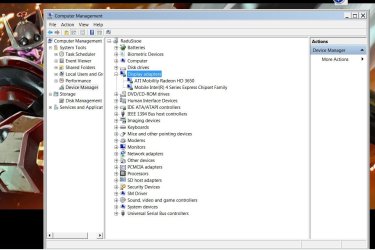
Also can you please take a screenshot of your device manager.
Use the snooping tool : How to Use the Snipping Tool in Vista (also applies to Seven)
and upload the picture using this method :
http://www.sevenforums.com/tutorials/9733-screenshots-files-upload-post-seven-forums.html

Anyways I want you to take a picture of Device Manager. In order to get to device manager press the Windows key on your keyboard + R key. Which will bring up the run box type in devmgmt.msc this will open up device manager window. Once your here you will see something that says "Display Adapter" click on it so that it expands.

Also have you done Windows Updates, I STRONGLY encourage you do windows updates before we continue with updating your video graphics or any other updates
 

My Computer My Computer

At a glance

Windows 8 64 bit PROAMD Phenom X4 9100e2GB X2 DDR2Sapphire HD 6850
Computer type
PC/Desktop
Computer Manufacturer/Model Number
Gateway / Slight Modifications
OS
Windows 8 64 bit PRO
CPU
AMD Phenom X4 9100e
Motherboard
Gateway RS780
Memory
2GB X2 DDR2
Graphics Card(s)
Sapphire HD 6850
Sound Card
Integrated
Monitor(s) Displays
Gateway 19" + Dell 19"
Screen Resolution
1440X900 sometimes 2880 by 900
Hard Drives
WD 80GB
WD 640GB
WD 1,000GB
PSU
Antec BP 550watts
Case
Antec 300
Cooling
Stock Cooling
Keyboard
Saitek Eclipse II
Mouse
Gigabyte GM-M6800
Internet Speed
D: 30Mbps U:4Mbps
Antivirus
Avast version 8
Browser
Internet Explorer ver 10 64 bit
Other Info
This is my work computer.
I have another laptop running Windows 7 64 bit.
Another PC running Windows 8 64 bit pro.
Total of 3
The laptop is a Levovo ThinkPad T500. I thought you were referring to the full specifications, not the actual model number.
 

Attachments

  • 1.jpg
    1.jpg
    108.5 KB · Views: 8
  • 2.jpg
    2.jpg
    91.3 KB · Views: 5

My Computer My Computer

At a glance

Microsoft Windows 7 Ultimate 64-bitIntel(R) Core(TM) i5 CPU 3230M @ 2.53GHz8,00 GB DDR3@1600MhznVidia GT730M
Computer type
Laptop
Computer Manufacturer/Model Number
Acer
OS
Microsoft Windows 7 Ultimate 64-bit
CPU
Intel(R) Core(TM) i5 CPU 3230M @ 2.53GHz
Motherboard
Sony Corporation Base Board VAIO
Memory
8,00 GB DDR3@1600Mhz
Graphics Card(s)
nVidia GT730M
Screen Resolution
1920 x 1080
So your laptop needs specific drivers, all laptops that have 2 different gpu chipsets have different drivers than those from say NVidia or AMD. Please download your drivers for your machine. Lenovo Support - Drivers & Software (US)
Click on Notebook/Laptop > T Series > Thinkpad T 500 > 2082 > 8VG > Windows 7 64 bit

Download Software Manager for Switchable GFX
ThinkPad Switchable Graphics Driver for Windows 7 (32-bit, 64-bit) - ThinkPad
Restart after it's completed


Download the latest driver for your integrated GPU chipset
Intel GM45 Display Driver for Windows 7 (32-bit), Vista (32-bit) - ThinkPad

Edit for future reference, switchable graphics driver only need their main driver.

Extend your displays and then put computer to sleep/hibernate or lock to attempt to recreate scenario. Does it still happen?

If so please go to control panel, underneath the search bar for control panel there will be something that says View by: Category(by default) change it to large or small icons. See if you can find Mobility Center or Lenovo Tablet Controls or something related to tablet/mobility settings. Sometimes these settings must be saved within these options for them to be saved and used.


Also check if Windows has any updates for your hardware under Optional drivers,
 
Last edited:

My Computer My Computer

At a glance

Windows 8 64 bit PROAMD Phenom X4 9100e2GB X2 DDR2Sapphire HD 6850
Computer type
PC/Desktop
Computer Manufacturer/Model Number
Gateway / Slight Modifications
OS
Windows 8 64 bit PRO
CPU
AMD Phenom X4 9100e
Motherboard
Gateway RS780
Memory
2GB X2 DDR2
Graphics Card(s)
Sapphire HD 6850
Sound Card
Integrated
Monitor(s) Displays
Gateway 19" + Dell 19"
Screen Resolution
1440X900 sometimes 2880 by 900
Hard Drives
WD 80GB
WD 640GB
WD 1,000GB
PSU
Antec BP 550watts
Case
Antec 300
Cooling
Stock Cooling
Keyboard
Saitek Eclipse II
Mouse
Gigabyte GM-M6800
Internet Speed
D: 30Mbps U:4Mbps
Antivirus
Avast version 8
Browser
Internet Explorer ver 10 64 bit
Other Info
This is my work computer.
I have another laptop running Windows 7 64 bit.
Another PC running Windows 8 64 bit pro.
Total of 3
I have installed the latest AMD driver update, which now causes textures and writing to go wild.
I tried installing the Intel Gm45 thing and it says that my computer does not meet the minimum specifications.
I set the options from the Catalyst Center, I restarted, but the problem persists.
 

Attachments

  • Untitled.jpg
    Untitled.jpg
    24.4 KB · Views: 4
  • Untitled2.jpg
    Untitled2.jpg
    61.3 KB · Views: 4
  • Untitled3.jpg
    Untitled3.jpg
    113.3 KB · Views: 5

My Computer My Computer

At a glance

Microsoft Windows 7 Ultimate 64-bitIntel(R) Core(TM) i5 CPU 3230M @ 2.53GHz8,00 GB DDR3@1600MhznVidia GT730M
Computer type
Laptop
Computer Manufacturer/Model Number
Acer
OS
Microsoft Windows 7 Ultimate 64-bit
CPU
Intel(R) Core(TM) i5 CPU 3230M @ 2.53GHz
Motherboard
Sony Corporation Base Board VAIO
Memory
8,00 GB DDR3@1600Mhz
Graphics Card(s)
nVidia GT730M
Screen Resolution
1920 x 1080
When you say AMD you mean ThinkPad Switchable Graphics Driver for Windows 7 (32-bit, 64-bit) - ThinkPad ?
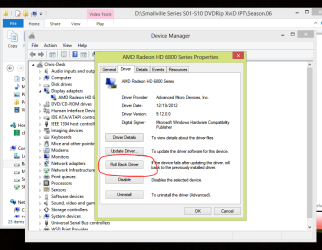
This was design for your system something happen in the installation process? AT this point let's just take a step back, please revert changes via going to device manager > Display Adapter > click on driver tab and roll back

I'll be paying close attention to this thread for the next few hours, hopefully we can make faster progress.
 

Attachments

  • RollBack.PNG
    RollBack.PNG
    34.4 KB · Views: 4

My Computer My Computer

At a glance

Windows 8 64 bit PROAMD Phenom X4 9100e2GB X2 DDR2Sapphire HD 6850
Computer type
PC/Desktop
Computer Manufacturer/Model Number
Gateway / Slight Modifications
OS
Windows 8 64 bit PRO
CPU
AMD Phenom X4 9100e
Motherboard
Gateway RS780
Memory
2GB X2 DDR2
Graphics Card(s)
Sapphire HD 6850
Sound Card
Integrated
Monitor(s) Displays
Gateway 19" + Dell 19"
Screen Resolution
1440X900 sometimes 2880 by 900
Hard Drives
WD 80GB
WD 640GB
WD 1,000GB
PSU
Antec BP 550watts
Case
Antec 300
Cooling
Stock Cooling
Keyboard
Saitek Eclipse II
Mouse
Gigabyte GM-M6800
Internet Speed
D: 30Mbps U:4Mbps
Antivirus
Avast version 8
Browser
Internet Explorer ver 10 64 bit
Other Info
This is my work computer.
I have another laptop running Windows 7 64 bit.
Another PC running Windows 8 64 bit pro.
Total of 3
No, I meant the ATI Catalyst Control Center.
I rolled back the driver, now the box is grey. The computer had 1 minute of seizures, switching the 2nd monitor on and off several times.
What now? What driver do I install? My screen is kinda flashy...

Edit: Actually, the Catalyst client is still here. I don't know what the rollback thing does.
 

My Computer My Computer

At a glance

Microsoft Windows 7 Ultimate 64-bitIntel(R) Core(TM) i5 CPU 3230M @ 2.53GHz8,00 GB DDR3@1600MhznVidia GT730M
Computer type
Laptop
Computer Manufacturer/Model Number
Acer
OS
Microsoft Windows 7 Ultimate 64-bit
CPU
Intel(R) Core(TM) i5 CPU 3230M @ 2.53GHz
Motherboard
Sony Corporation Base Board VAIO
Memory
8,00 GB DDR3@1600Mhz
Graphics Card(s)
nVidia GT730M
Screen Resolution
1920 x 1080
Well the driver I pointed you to, may use the catalyst user interface. The rollback does exactly what it says. It will revert back to the previous driver found if possible. Since your computer is still behaving improperly I want to check what is installed on your computer. Please download CCleaner from here Download CCleaner 3.28.1913 - FileHippo.com click on Download Latest Version should be about 4.00MB in size. This is a free program at no time should you need to pay. During the installation it may ask you to download extra software watch out for it just click no or uncheck.

Launch CCleaner and click on tools. This will bring up the list of all your install programs, on bottom right corner you will see Save to text file please save it in a location you can remember it and please upload it to Seven Forums as an attachment. Also since your here check System Restore do you see a date that is older than one week ago? If so we may just use system restore to return before doing any updates. Please DO NOT delete any restore point!

If you do see dates that are older than one week or more (before we made changes) please press the windows key + R and type sysdm.cpl
This will open system properties, click on system restore tab.
Click on system restore button inside the window.
It will give you a recommended restore point if it's older than 8 days please go ahead and use it if not click Choose a different restore point. Find one that will be useful meaning old enough.

I strongly hope that you have not disable restore points, system restore was made for this kind of job :) .

There is a lot of text that may be confusing please don't hesitate to ask for clarification or help.
 

My Computer My Computer

At a glance

Windows 8 64 bit PROAMD Phenom X4 9100e2GB X2 DDR2Sapphire HD 6850
Computer type
PC/Desktop
Computer Manufacturer/Model Number
Gateway / Slight Modifications
OS
Windows 8 64 bit PRO
CPU
AMD Phenom X4 9100e
Motherboard
Gateway RS780
Memory
2GB X2 DDR2
Graphics Card(s)
Sapphire HD 6850
Sound Card
Integrated
Monitor(s) Displays
Gateway 19" + Dell 19"
Screen Resolution
1440X900 sometimes 2880 by 900
Hard Drives
WD 80GB
WD 640GB
WD 1,000GB
PSU
Antec BP 550watts
Case
Antec 300
Cooling
Stock Cooling
Keyboard
Saitek Eclipse II
Mouse
Gigabyte GM-M6800
Internet Speed
D: 30Mbps U:4Mbps
Antivirus
Avast version 8
Browser
Internet Explorer ver 10 64 bit
Other Info
This is my work computer.
I have another laptop running Windows 7 64 bit.
Another PC running Windows 8 64 bit pro.
Total of 3
I already had CCleaner installed, so I attached the .txt.
I have deleted my restore points, or better be saying that TuneUp Utilities cleaned them for me. My laptop's old, its HDD is only 150 gigs, with the windows and key programs only being around 45gigs, so every bit counts for me.
And this is getting too much of a deal. After all, it's a one minute thing I have to do every time. I thought its solution would be simple, a 10 minute deal, "check this here, change that there and there you go". But this is too much of a hassle. I will deal with it this way and yo can mark the thread solved.
But tell me what to do next. Simply get the latest driver from AMD? And I still did not get what is with the Switchable Graphics and the Intel thing.
 

Attachments

My Computer My Computer

At a glance

Microsoft Windows 7 Ultimate 64-bitIntel(R) Core(TM) i5 CPU 3230M @ 2.53GHz8,00 GB DDR3@1600MhznVidia GT730M
Computer type
Laptop
Computer Manufacturer/Model Number
Acer
OS
Microsoft Windows 7 Ultimate 64-bit
CPU
Intel(R) Core(TM) i5 CPU 3230M @ 2.53GHz
Motherboard
Sony Corporation Base Board VAIO
Memory
8,00 GB DDR3@1600Mhz
Graphics Card(s)
nVidia GT730M
Screen Resolution
1920 x 1080
http://support.lenovo.com/en_US/downloads/detail.page?DocID=DS018891
This is the driver for your, this is your driver because you have Intel display chipset along with AMD HD 36XX. Once you install it, it will look like AMD Control Catalyst however it will be different than a graphics driver that you would download directly from AMD.

I am sorry that this has taken much more time than expected.
I recommend you download and save the driver on your desktop. They recommend we uninstall the previous driver before going on so we will.

Manual Uninstall

1. Start Windows and logon with an administrator account.
2. Click Start, then click Control Panel.
3. Make sure "View by Category" is selected, and click Uninstall a program.
4. Select ATI Catalyst Install Manager, and click Uninstall or
Uninstall/Change.
5. Follow the instructions on the screen.
6. Click Next to open the Catalyst Install Manager window.
7. In the Catalyst Install Manager window, select Express Uninstall All ATI
Software.
8. Click Next to continue and finish the uninstallation.
9. Click Remove button to remove ATI Catalyst Install Manager.
10. Click Fisish to restart Windows.

Manual Install

This section assumes to use Internet Explorer and Windows Explorer.

Downloading file
1. Click once on the underlined file name. Once this is done, some pop-up
windows will appear.
2. Follow the instructions on the screen.
3. In the window to choose Run or Save, click Save.
4. Choose the folder you would like to download the file to and click Save.
A different window will appear and the download will begin and complete.
Once the download has completed, there may or may not be a message stating
that the download completed successfully.

Extracting file
5. Make sure to be logged on with an administrator account.
6. Locate the folder where the file was downloaded.
7. Locate the file that was downloaded and double-click it.
8. Follow the instructions on the screen.
9. In the Select Destination Location window, click Next. If you would like to
select a different folder, click Browse.
10. In the Ready to Install window, click Install. All the necessary files will
be extracted to the folder selected in the step 9.

Installing files
11. Make sure the checkbox next to "Install ..... now" is checked and click
Finish.
12. Follow the instructions on the screen.
13. At the Select Installation Option screen, click Install.
14. At the Installer Welcome screen, click Express.
15. Click Finish to complete installation and restart the computer.

Finally delete the file saved in the step 4.
 

My Computer My Computer

At a glance

Windows 8 64 bit PROAMD Phenom X4 9100e2GB X2 DDR2Sapphire HD 6850
Computer type
PC/Desktop
Computer Manufacturer/Model Number
Gateway / Slight Modifications
OS
Windows 8 64 bit PRO
CPU
AMD Phenom X4 9100e
Motherboard
Gateway RS780
Memory
2GB X2 DDR2
Graphics Card(s)
Sapphire HD 6850
Sound Card
Integrated
Monitor(s) Displays
Gateway 19" + Dell 19"
Screen Resolution
1440X900 sometimes 2880 by 900
Hard Drives
WD 80GB
WD 640GB
WD 1,000GB
PSU
Antec BP 550watts
Case
Antec 300
Cooling
Stock Cooling
Keyboard
Saitek Eclipse II
Mouse
Gigabyte GM-M6800
Internet Speed
D: 30Mbps U:4Mbps
Antivirus
Avast version 8
Browser
Internet Explorer ver 10 64 bit
Other Info
This is my work computer.
I have another laptop running Windows 7 64 bit.
Another PC running Windows 8 64 bit pro.
Total of 3
Did everything, except the final reboot, which I will do tomorrow.

This is not a major thing, right?

Microsoft Visual C++ 2010 Redistributable Final Status: Fail Version of Item: 10.0.30319 Size: 9 Mbytes
 

My Computer My Computer

At a glance

Microsoft Windows 7 Ultimate 64-bitIntel(R) Core(TM) i5 CPU 3230M @ 2.53GHz8,00 GB DDR3@1600MhznVidia GT730M
Computer type
Laptop
Computer Manufacturer/Model Number
Acer
OS
Microsoft Windows 7 Ultimate 64-bit
CPU
Intel(R) Core(TM) i5 CPU 3230M @ 2.53GHz
Motherboard
Sony Corporation Base Board VAIO
Memory
8,00 GB DDR3@1600Mhz
Graphics Card(s)
nVidia GT730M
Screen Resolution
1920 x 1080
reboot and double check windows updates. I remember that sometimes you can get fail if it's already there, and it doesn't have to do it. If it is a problem we download and install it.
 

My Computer My Computer

At a glance

Windows 8 64 bit PROAMD Phenom X4 9100e2GB X2 DDR2Sapphire HD 6850
Computer type
PC/Desktop
Computer Manufacturer/Model Number
Gateway / Slight Modifications
OS
Windows 8 64 bit PRO
CPU
AMD Phenom X4 9100e
Motherboard
Gateway RS780
Memory
2GB X2 DDR2
Graphics Card(s)
Sapphire HD 6850
Sound Card
Integrated
Monitor(s) Displays
Gateway 19" + Dell 19"
Screen Resolution
1440X900 sometimes 2880 by 900
Hard Drives
WD 80GB
WD 640GB
WD 1,000GB
PSU
Antec BP 550watts
Case
Antec 300
Cooling
Stock Cooling
Keyboard
Saitek Eclipse II
Mouse
Gigabyte GM-M6800
Internet Speed
D: 30Mbps U:4Mbps
Antivirus
Avast version 8
Browser
Internet Explorer ver 10 64 bit
Other Info
This is my work computer.
I have another laptop running Windows 7 64 bit.
Another PC running Windows 8 64 bit pro.
Total of 3
No updates via Windows Update.
 

My Computer My Computer

At a glance

Microsoft Windows 7 Ultimate 64-bitIntel(R) Core(TM) i5 CPU 3230M @ 2.53GHz8,00 GB DDR3@1600MhznVidia GT730M
Computer type
Laptop
Computer Manufacturer/Model Number
Acer
OS
Microsoft Windows 7 Ultimate 64-bit
CPU
Intel(R) Core(TM) i5 CPU 3230M @ 2.53GHz
Motherboard
Sony Corporation Base Board VAIO
Memory
8,00 GB DDR3@1600Mhz
Graphics Card(s)
nVidia GT730M
Screen Resolution
1920 x 1080
Ok, THAT has turned into this.
 

Attachments

  • Untitled4.jpg
    Untitled4.jpg
    65.2 KB · Views: 6

My Computer My Computer

At a glance

Microsoft Windows 7 Ultimate 64-bitIntel(R) Core(TM) i5 CPU 3230M @ 2.53GHz8,00 GB DDR3@1600MhznVidia GT730M
Computer type
Laptop
Computer Manufacturer/Model Number
Acer
OS
Microsoft Windows 7 Ultimate 64-bit
CPU
Intel(R) Core(TM) i5 CPU 3230M @ 2.53GHz
Motherboard
Sony Corporation Base Board VAIO
Memory
8,00 GB DDR3@1600Mhz
Graphics Card(s)
nVidia GT730M
Screen Resolution
1920 x 1080
is that everywhere? Desktop, other applications and all other games?
Have you tried changing your resolution ? What resolution are you running at ?
Double check device manager make sure there are no yellow exclamation signs, that indicated driver issues.
At this point I am wondering if there are other things that may be wrong with your system. Please run system file checker.
http://www.sevenforums.com/tutorials/1538-sfc-scannow-command-system-file-checker.html
Follow the instructions from OPTION 2 you may need to run it three times.


If the graphics artifacts happen in more games can you please tell me? Does this happen when you reboot? Also if you have done any overclocking please revert changes back now.
 

My Computer My Computer

At a glance

Windows 8 64 bit PROAMD Phenom X4 9100e2GB X2 DDR2Sapphire HD 6850
Computer type
PC/Desktop
Computer Manufacturer/Model Number
Gateway / Slight Modifications
OS
Windows 8 64 bit PRO
CPU
AMD Phenom X4 9100e
Motherboard
Gateway RS780
Memory
2GB X2 DDR2
Graphics Card(s)
Sapphire HD 6850
Sound Card
Integrated
Monitor(s) Displays
Gateway 19" + Dell 19"
Screen Resolution
1440X900 sometimes 2880 by 900
Hard Drives
WD 80GB
WD 640GB
WD 1,000GB
PSU
Antec BP 550watts
Case
Antec 300
Cooling
Stock Cooling
Keyboard
Saitek Eclipse II
Mouse
Gigabyte GM-M6800
Internet Speed
D: 30Mbps U:4Mbps
Antivirus
Avast version 8
Browser
Internet Explorer ver 10 64 bit
Other Info
This is my work computer.
I have another laptop running Windows 7 64 bit.
Another PC running Windows 8 64 bit pro.
Total of 3
Back
Top