Extended Displays Difficulty on ASUS 1001p

johntkucz

New member
Member
VIP
Local time
6:47 PM
Messages
126
Hi, Have an asus 1001p netbook.
attached to it is a DELL 19" flatscreen.
I have successfully extended the same hardware configuration in a different OS (ubuntu) so know the hardware is capable of extending displays.
in windows 7 (identical hardware configuration), the "extend displays" option isn't available.
I'd like to extend (instead of duplicate. duplicate does work) display in windows 7. Thanks.

-- John
 

My Computer My Computer

Computer Manufacturer/Model Number
self-built
OS
windows 7 pro
CPU
6100 3.3ghz zambezi amd
Motherboard
asus m5a97
Memory
8gb_kingston_ddr3_1333_pc310600
Graphics Card(s)
gigabyte_geforce_440gt_1gb
Monitor(s) Displays
asus_vs247hp and dell_19"
Hard Drives
7200 rpm barracuda seagate 2tb
PSU
antec_500w_green
Case
rosewill_future_gaming_case
Keyboard
i-rocks scissor-switch white keyboard
Mouse
mouse for life kengsington
Internet Speed
~400kb/s down DSL
Other Info
I'm VERY interested in building my own rig flatscreens and running ubuntu and windows home premium or prof. I've tripled-booted (mac os rubbish, ubuntu great!, and windows solid). Designing hardware rig: this forum might be a good resource!

Some of these parts are to a rig that is in the process of being built!
Hello johntkucz Welcome to the Seven Forums!

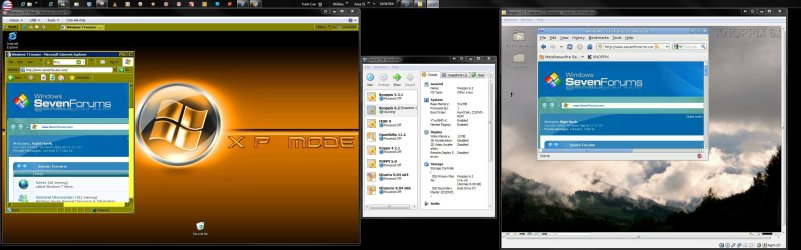
Besides the Asus utility other programs like UltraMON and DisplayFusion are available for seeing your desktop extended onto a second display. In fact here it was essential not to see a cloned desktop especially for having multiple VMs running at the same time as seen in the image below.

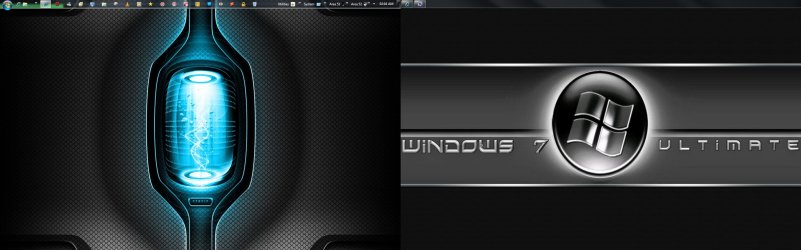
Note the "smart taskbar" option also extends the taskbar onto the second monitor where you can drag or move windows over and see the icon for that on the smart bar. With the 3rd party programs you can also have a separate wallpaper for each screen.
 

Attachments

  • Multitasking OSs No ICE for Windows.jpg
    Multitasking OSs No ICE for Windows.jpg
    275.3 KB · Views: 18
  • Latest Dual Theme.jpg
    Latest Dual Theme.jpg
    318.6 KB · Views: 12

My Computers My Computers

System One System Two

  • Computer type
    PC/Desktop
    Computer Manufacturer/Model Number
    Custom builds = 2
    OS
    W7 Ultimate x64/W10 Pro x64/W11 Pro Triple Boot - Main PC W7 Remote PC Micro ATX W7 Pro x64/W11 Pro
    CPU
    AMD Phenom II X4 975 Deneb 3.6ghz - 965 2nd remote pc
    Motherboard
    Gigabyte GA-790XTA-UD4-Gigabyte GA-880GM-D2H remote pc
    Memory
    Kingston Hyper X DDR3 1600 1.5v 16gb - Hyper X Fury 8gb 2nd
    Graphics Card(s)
    MSI HD Radeon 5750 1gb - MSI HD Radeon 6450 on mini tower
    Sound Card
    Creative Labs X-Fi Xtreme Audio P - Realtek onooard 2nd case
    Monitor(s) Displays
    ASUS VW199T-P 19" HP 2082a Main-HP 2082a 20" remote pc
    Screen Resolution
    Asus 1440x900 - HP 1600x900
    Hard Drives
    WD Black 1TB HD per OS W7, W10, and pending W11 presently on 500gb OS Drive - Pending Triple 1TB HDs for Spanned Storage/backup volume
    Single 2TB external USB enclosure, single 1TB System 7 Host/Boot drive, Pending 8TB external HD for system image b
    PSU
    Corsair 750TX - primary / Corsair CX600 - second
    Case
    Antec 900-2 - SSD compatible / NZXT Vulcan mini tower
    Cooling
    Zalman CNPS9900A
    Keyboard
    AZIO L70 Backlit Letters Gaming - ONN Cordless/USB
    Mouse
    MSI DS200 Programmable, Logitech Cordless
    Internet Speed
    30mbps upgrade - primary hard wired - mini tower usb WiFi
    Antivirus
    GFI VIPRE Internet Security 2014 on W7 2016 beta on W10,
    Browser
    Cyberfox, WaterFox 64bit FF variants, FireFox x64, Pale Moon
    Other Info
    Accomdata fan cooled usb 2.0 PIDE/Sata II, III external enclosure.
    Sambient usb/eSata PATA/Sata II, III external enclosure.
  • Computer type
    PC/Desktop
    System Manufacturer/Model Number
    CUSTOM ASSEMBLY
    OS
    W7 Pro x64/W11 Pro
    CPU
    AMD Deneb 3.6ghz - 965
    Motherboard
    Gigabyte GA-880GM-D2H remote pc
    Memory
    Kingston Hyper X Fury 8gb
    Graphics Card(s)
    MSI HD Radeon 6450 DVI Output
    Sound Card
    Realtek onooard Creative or Other separate PENDING
    Monitor(s) Displays
    VIZIO 32" LCD TV Separate LCD Pending
    Screen Resolution
    1600x1080
    Hard Drives
    WD 500GB OS Host/Boot WD Green 1TB Storage/Backup
    PSU
    Corsair 600W - THERMALTAKE 600W spare case
    Case
    NZXT Vulcan mini tower
    Cooling
    Twin 120mm Top Fans - 240mm Side Cover
    Keyboard
    ONN Cordless/USB Logitech Cordless
    Mouse
    ONN USB/Cordless - Logitech Cordless
    Internet Speed
    DSL 5G
    Browser
    MS Edge, FireFox, WaterFox x64, FireFox Nightly
    Other Info
    OS Testing-Remote Access to Main TeamViewer
If its windows 7 Starter you can't extend the display, that option is only available with higher versions. I know you can do it on Home Premium, not sure about Home Basic.
 

My Computer My Computer

Computer type
PC/Desktop
Computer Manufacturer/Model Number
Home Built
OS
Windows 10 Education 64 bit
CPU
AMD Phenom II X4 980 Black Edition Deneb 3.7GHz
Motherboard
Asus M4N68T-M V2 µATX Motherboard
Memory
8GB 4GBx2 Kingston PC10600 DDR3 1333 Memory
Graphics Card(s)
Zotac NVIDIA Geforce GT640 2 Gig DDR3 PCIe
Sound Card
VIA VT1708s High Definition Audio 8-channel Onboard
Monitor(s) Displays
22" LG E2242 1080p and 2 19" I-INC AG191D
Screen Resolution
1280x1024 - 1920x1080 - 1280x1024
Hard Drives
Crucial M100 256 GB SSD and 500 GB WD Blue SATA
PSU
Thermaltake TR 620
Case
Power Up Black ATX Mid-Tower Case
Cooling
Stock heatsink and fan
Keyboard
Logitech Wireless K350 Wave
Mouse
Logitech Wireless M570 Trackman Wheel
Internet Speed
80 Mbps Down 30 Mbps Up
Antivirus
Windows Defender
Browser
Internet Explorer 11
Other Info
HP DVD1040e Lightscribe - External USB2
I would say Home Premium on that. But looking over the comparisons of features in the different editions is the first best option. http://www.sevenforums.com/tutorials/14422-compare-windows-7-editions.html

The Home Basic also includes the Desktop Manager. The Control Panel>Display as well as video software are mainly what control extending or cloning settings however. The 3rd party apps mentioned allow the taskbar extension and other customizing like having two different wallpapers.
 

My Computers My Computers

System One System Two

  • Computer type
    PC/Desktop
    Computer Manufacturer/Model Number
    Custom builds = 2
    OS
    W7 Ultimate x64/W10 Pro x64/W11 Pro Triple Boot - Main PC W7 Remote PC Micro ATX W7 Pro x64/W11 Pro
    CPU
    AMD Phenom II X4 975 Deneb 3.6ghz - 965 2nd remote pc
    Motherboard
    Gigabyte GA-790XTA-UD4-Gigabyte GA-880GM-D2H remote pc
    Memory
    Kingston Hyper X DDR3 1600 1.5v 16gb - Hyper X Fury 8gb 2nd
    Graphics Card(s)
    MSI HD Radeon 5750 1gb - MSI HD Radeon 6450 on mini tower
    Sound Card
    Creative Labs X-Fi Xtreme Audio P - Realtek onooard 2nd case
    Monitor(s) Displays
    ASUS VW199T-P 19" HP 2082a Main-HP 2082a 20" remote pc
    Screen Resolution
    Asus 1440x900 - HP 1600x900
    Hard Drives
    WD Black 1TB HD per OS W7, W10, and pending W11 presently on 500gb OS Drive - Pending Triple 1TB HDs for Spanned Storage/backup volume
    Single 2TB external USB enclosure, single 1TB System 7 Host/Boot drive, Pending 8TB external HD for system image b
    PSU
    Corsair 750TX - primary / Corsair CX600 - second
    Case
    Antec 900-2 - SSD compatible / NZXT Vulcan mini tower
    Cooling
    Zalman CNPS9900A
    Keyboard
    AZIO L70 Backlit Letters Gaming - ONN Cordless/USB
    Mouse
    MSI DS200 Programmable, Logitech Cordless
    Internet Speed
    30mbps upgrade - primary hard wired - mini tower usb WiFi
    Antivirus
    GFI VIPRE Internet Security 2014 on W7 2016 beta on W10,
    Browser
    Cyberfox, WaterFox 64bit FF variants, FireFox x64, Pale Moon
    Other Info
    Accomdata fan cooled usb 2.0 PIDE/Sata II, III external enclosure.
    Sambient usb/eSata PATA/Sata II, III external enclosure.
  • Computer type
    PC/Desktop
    System Manufacturer/Model Number
    CUSTOM ASSEMBLY
    OS
    W7 Pro x64/W11 Pro
    CPU
    AMD Deneb 3.6ghz - 965
    Motherboard
    Gigabyte GA-880GM-D2H remote pc
    Memory
    Kingston Hyper X Fury 8gb
    Graphics Card(s)
    MSI HD Radeon 6450 DVI Output
    Sound Card
    Realtek onooard Creative or Other separate PENDING
    Monitor(s) Displays
    VIZIO 32" LCD TV Separate LCD Pending
    Screen Resolution
    1600x1080
    Hard Drives
    WD 500GB OS Host/Boot WD Green 1TB Storage/Backup
    PSU
    Corsair 600W - THERMALTAKE 600W spare case
    Case
    NZXT Vulcan mini tower
    Cooling
    Twin 120mm Top Fans - 240mm Side Cover
    Keyboard
    ONN Cordless/USB Logitech Cordless
    Mouse
    ONN USB/Cordless - Logitech Cordless
    Internet Speed
    DSL 5G
    Browser
    MS Edge, FireFox, WaterFox x64, FireFox Nightly
    Other Info
    OS Testing-Remote Access to Main TeamViewer
I wasn't sure if the third party apps would bypass Starter not letting you extend the display, but mainly I just wanted to point out that if it was Starter, that that was why it didn't work. If its Starter, its that way by design, and its not broken. ;) I also looked at the comparisons but couldn't really figure it out for sure if it would work in Home Basic or not. My step daughter has a netbook with starter on it and the big gripe she had was not being able to change her desktop wallpaper. Luckily HP offers a Stardock app in the list of downloads for it, that lets her do that.:)
 

My Computer My Computer

Computer type
PC/Desktop
Computer Manufacturer/Model Number
Home Built
OS
Windows 10 Education 64 bit
CPU
AMD Phenom II X4 980 Black Edition Deneb 3.7GHz
Motherboard
Asus M4N68T-M V2 µATX Motherboard
Memory
8GB 4GBx2 Kingston PC10600 DDR3 1333 Memory
Graphics Card(s)
Zotac NVIDIA Geforce GT640 2 Gig DDR3 PCIe
Sound Card
VIA VT1708s High Definition Audio 8-channel Onboard
Monitor(s) Displays
22" LG E2242 1080p and 2 19" I-INC AG191D
Screen Resolution
1280x1024 - 1920x1080 - 1280x1024
Hard Drives
Crucial M100 256 GB SSD and 500 GB WD Blue SATA
PSU
Thermaltake TR 620
Case
Power Up Black ATX Mid-Tower Case
Cooling
Stock heatsink and fan
Keyboard
Logitech Wireless K350 Wave
Mouse
Logitech Wireless M570 Trackman Wheel
Internet Speed
80 Mbps Down 30 Mbps Up
Antivirus
Windows Defender
Browser
Internet Explorer 11
Other Info
HP DVD1040e Lightscribe - External USB2
Besides the limitations seen with the Starter edition another thing that could prevent an extended desktop would be working with a netbook not a laptop where you can add in a separate video card if needed. Netbooks in comparison on more on the idea of Tablet PC somewhat where it's convenience of being small and portable over flexibility.
 

My Computers My Computers

System One System Two

  • Computer type
    PC/Desktop
    Computer Manufacturer/Model Number
    Custom builds = 2
    OS
    W7 Ultimate x64/W10 Pro x64/W11 Pro Triple Boot - Main PC W7 Remote PC Micro ATX W7 Pro x64/W11 Pro
    CPU
    AMD Phenom II X4 975 Deneb 3.6ghz - 965 2nd remote pc
    Motherboard
    Gigabyte GA-790XTA-UD4-Gigabyte GA-880GM-D2H remote pc
    Memory
    Kingston Hyper X DDR3 1600 1.5v 16gb - Hyper X Fury 8gb 2nd
    Graphics Card(s)
    MSI HD Radeon 5750 1gb - MSI HD Radeon 6450 on mini tower
    Sound Card
    Creative Labs X-Fi Xtreme Audio P - Realtek onooard 2nd case
    Monitor(s) Displays
    ASUS VW199T-P 19" HP 2082a Main-HP 2082a 20" remote pc
    Screen Resolution
    Asus 1440x900 - HP 1600x900
    Hard Drives
    WD Black 1TB HD per OS W7, W10, and pending W11 presently on 500gb OS Drive - Pending Triple 1TB HDs for Spanned Storage/backup volume
    Single 2TB external USB enclosure, single 1TB System 7 Host/Boot drive, Pending 8TB external HD for system image b
    PSU
    Corsair 750TX - primary / Corsair CX600 - second
    Case
    Antec 900-2 - SSD compatible / NZXT Vulcan mini tower
    Cooling
    Zalman CNPS9900A
    Keyboard
    AZIO L70 Backlit Letters Gaming - ONN Cordless/USB
    Mouse
    MSI DS200 Programmable, Logitech Cordless
    Internet Speed
    30mbps upgrade - primary hard wired - mini tower usb WiFi
    Antivirus
    GFI VIPRE Internet Security 2014 on W7 2016 beta on W10,
    Browser
    Cyberfox, WaterFox 64bit FF variants, FireFox x64, Pale Moon
    Other Info
    Accomdata fan cooled usb 2.0 PIDE/Sata II, III external enclosure.
    Sambient usb/eSata PATA/Sata II, III external enclosure.
  • Computer type
    PC/Desktop
    System Manufacturer/Model Number
    CUSTOM ASSEMBLY
    OS
    W7 Pro x64/W11 Pro
    CPU
    AMD Deneb 3.6ghz - 965
    Motherboard
    Gigabyte GA-880GM-D2H remote pc
    Memory
    Kingston Hyper X Fury 8gb
    Graphics Card(s)
    MSI HD Radeon 6450 DVI Output
    Sound Card
    Realtek onooard Creative or Other separate PENDING
    Monitor(s) Displays
    VIZIO 32" LCD TV Separate LCD Pending
    Screen Resolution
    1600x1080
    Hard Drives
    WD 500GB OS Host/Boot WD Green 1TB Storage/Backup
    PSU
    Corsair 600W - THERMALTAKE 600W spare case
    Case
    NZXT Vulcan mini tower
    Cooling
    Twin 120mm Top Fans - 240mm Side Cover
    Keyboard
    ONN Cordless/USB Logitech Cordless
    Mouse
    ONN USB/Cordless - Logitech Cordless
    Internet Speed
    DSL 5G
    Browser
    MS Edge, FireFox, WaterFox x64, FireFox Nightly
    Other Info
    OS Testing-Remote Access to Main TeamViewer
Thats a very good point. My step daughter has expressed no interest in connecting a second monitor so I haven't researched it to see if hers can do dual extended displays. It has a VGA out connector so at the very least she could connect an external display in lue of the built in LCD display. The OP stated that his worked in ubuntu just not in Windows 7. Being as most netbooks come with Starter, I figured I mention that it doesn't support extended displays and maybe same him some head scratching.
 

My Computer My Computer

Computer type
PC/Desktop
Computer Manufacturer/Model Number
Home Built
OS
Windows 10 Education 64 bit
CPU
AMD Phenom II X4 980 Black Edition Deneb 3.7GHz
Motherboard
Asus M4N68T-M V2 µATX Motherboard
Memory
8GB 4GBx2 Kingston PC10600 DDR3 1333 Memory
Graphics Card(s)
Zotac NVIDIA Geforce GT640 2 Gig DDR3 PCIe
Sound Card
VIA VT1708s High Definition Audio 8-channel Onboard
Monitor(s) Displays
22" LG E2242 1080p and 2 19" I-INC AG191D
Screen Resolution
1280x1024 - 1920x1080 - 1280x1024
Hard Drives
Crucial M100 256 GB SSD and 500 GB WD Blue SATA
PSU
Thermaltake TR 620
Case
Power Up Black ATX Mid-Tower Case
Cooling
Stock heatsink and fan
Keyboard
Logitech Wireless K350 Wave
Mouse
Logitech Wireless M570 Trackman Wheel
Internet Speed
80 Mbps Down 30 Mbps Up
Antivirus
Windows Defender
Browser
Internet Explorer 11
Other Info
HP DVD1040e Lightscribe - External USB2
The external port to connect an external lcd allows you to view everything on a larger screen. They were intended for customized desktops such as extending onto a second display. You have to remember the output signal doesn't realize the larger capacity for onboard video memory typically seen with the integrated perhaps 128-256mb on a laptop.

If you could find a way to feed the output onto the desktop of a laptop at least or desktop already set up for dual displays the windows could be stretched across both screens in theory. The laptop or desktop would be more capable there. But that would tend to defeat the purpose at the same time.

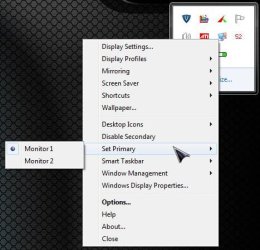
The only thing that could be tried would setting up an external display and then downloading the trial version of either UltraMon or DisplayFusion which are apps used to change from cloned to extended to see what the results would be. The settings in either program are what allows for the smart bar as well as extension of the desktop.

The screen here is a fast look at some of the settings readily seen for UltraMon when right clicking on the system tray icon.
 

Attachments

  • UltraMon Settings.jpg
    UltraMon Settings.jpg
    38.3 KB · Views: 3

My Computers My Computers

System One System Two

  • Computer type
    PC/Desktop
    Computer Manufacturer/Model Number
    Custom builds = 2
    OS
    W7 Ultimate x64/W10 Pro x64/W11 Pro Triple Boot - Main PC W7 Remote PC Micro ATX W7 Pro x64/W11 Pro
    CPU
    AMD Phenom II X4 975 Deneb 3.6ghz - 965 2nd remote pc
    Motherboard
    Gigabyte GA-790XTA-UD4-Gigabyte GA-880GM-D2H remote pc
    Memory
    Kingston Hyper X DDR3 1600 1.5v 16gb - Hyper X Fury 8gb 2nd
    Graphics Card(s)
    MSI HD Radeon 5750 1gb - MSI HD Radeon 6450 on mini tower
    Sound Card
    Creative Labs X-Fi Xtreme Audio P - Realtek onooard 2nd case
    Monitor(s) Displays
    ASUS VW199T-P 19" HP 2082a Main-HP 2082a 20" remote pc
    Screen Resolution
    Asus 1440x900 - HP 1600x900
    Hard Drives
    WD Black 1TB HD per OS W7, W10, and pending W11 presently on 500gb OS Drive - Pending Triple 1TB HDs for Spanned Storage/backup volume
    Single 2TB external USB enclosure, single 1TB System 7 Host/Boot drive, Pending 8TB external HD for system image b
    PSU
    Corsair 750TX - primary / Corsair CX600 - second
    Case
    Antec 900-2 - SSD compatible / NZXT Vulcan mini tower
    Cooling
    Zalman CNPS9900A
    Keyboard
    AZIO L70 Backlit Letters Gaming - ONN Cordless/USB
    Mouse
    MSI DS200 Programmable, Logitech Cordless
    Internet Speed
    30mbps upgrade - primary hard wired - mini tower usb WiFi
    Antivirus
    GFI VIPRE Internet Security 2014 on W7 2016 beta on W10,
    Browser
    Cyberfox, WaterFox 64bit FF variants, FireFox x64, Pale Moon
    Other Info
    Accomdata fan cooled usb 2.0 PIDE/Sata II, III external enclosure.
    Sambient usb/eSata PATA/Sata II, III external enclosure.
  • Computer type
    PC/Desktop
    System Manufacturer/Model Number
    CUSTOM ASSEMBLY
    OS
    W7 Pro x64/W11 Pro
    CPU
    AMD Deneb 3.6ghz - 965
    Motherboard
    Gigabyte GA-880GM-D2H remote pc
    Memory
    Kingston Hyper X Fury 8gb
    Graphics Card(s)
    MSI HD Radeon 6450 DVI Output
    Sound Card
    Realtek onooard Creative or Other separate PENDING
    Monitor(s) Displays
    VIZIO 32" LCD TV Separate LCD Pending
    Screen Resolution
    1600x1080
    Hard Drives
    WD 500GB OS Host/Boot WD Green 1TB Storage/Backup
    PSU
    Corsair 600W - THERMALTAKE 600W spare case
    Case
    NZXT Vulcan mini tower
    Cooling
    Twin 120mm Top Fans - 240mm Side Cover
    Keyboard
    ONN Cordless/USB Logitech Cordless
    Mouse
    ONN USB/Cordless - Logitech Cordless
    Internet Speed
    DSL 5G
    Browser
    MS Edge, FireFox, WaterFox x64, FireFox Nightly
    Other Info
    OS Testing-Remote Access to Main TeamViewer
Well thanks for the welcome!!

There's a lot of information here. Thanks for the hasty, but not wasty responde. A very complete set of information for solutions!! Thanks!

While I appreciate all those apps mentioned, nighthawk, I think alphanumeric's observation is the simple bit of information needed: not supported in starter (Multiple Monitors) technically multiple monitors ARE, but not extended monitors (because I have netbook and external monitor both displaynig)

If its windows 7 Starter you can't extend the display, that option is only available with higher versions. I know you can do it on Home Premium, not sure about Home Basic.

Despite that Windows Starter limitation, two ideas:
Would a third-party software allow multiple monitors (even given windows starter?)
wondering if/how I could install my copy of home premium (prob should get prof) on netbook (no drive).

In any case, at least I understand that the limitation is based on the operating system edition.

thanks forum (I like this forum already!) and especially nighthawk and alphanumeric. I will just deactivate netbook display (no point in having two of same, plus, by not mirroring (deactivating netbook display) the external monitor is no longer limited to the netbook's resolution.

So if I can't activate an extended display option via third party or upgrading OS edition on netbook (a slight feat given no dvd, but I know there are work arounds, just not sure if want to hassle), when at desktop will use mirrored external with netbook screen display off.

Thanks!
 

My Computer My Computer

Computer Manufacturer/Model Number
self-built
OS
windows 7 pro
CPU
6100 3.3ghz zambezi amd
Motherboard
asus m5a97
Memory
8gb_kingston_ddr3_1333_pc310600
Graphics Card(s)
gigabyte_geforce_440gt_1gb
Monitor(s) Displays
asus_vs247hp and dell_19"
Hard Drives
7200 rpm barracuda seagate 2tb
PSU
antec_500w_green
Case
rosewill_future_gaming_case
Keyboard
i-rocks scissor-switch white keyboard
Mouse
mouse for life kengsington
Internet Speed
~400kb/s down DSL
Other Info
I'm VERY interested in building my own rig flatscreens and running ubuntu and windows home premium or prof. I've tripled-booted (mac os rubbish, ubuntu great!, and windows solid). Designing hardware rig: this forum might be a good resource!

Some of these parts are to a rig that is in the process of being built!
I wasn't sure if the third party apps would bypass Starter not letting you extend the display, but mainly I just wanted to point out that if it was Starter, that that was why it didn't work. If its Starter, its that way by design, and its not broken. ;) I also looked at the comparisons but couldn't really figure it out for sure if it would work in Home Basic or not. My step daughter has a netbook with starter on it and the big gripe she had was not being able to change her desktop wallpaper. Luckily HP offers a Stardock app in the list of downloads for it, that lets her do that.:)


yeah, spot on. Was good to elim hardware incompatibiliiteis. Also, nighthawk, thanks for that comparing windows editions table. I love simple tech spec comparison tables of things like that (espeially os versions and hardware). Useful!

Additionally, am in the process of completely changing around my desk-work-living (I live in computer basically haha) setup. Very interested in designing my own rig. Will be selling old apple stuff.

I'm VERY interested in building my own rig with 2-4 mounted flatscreens and running ubuntu and windows home premium or prof. I've tripled-booted (mac os rubbish, ubuntu great!, and windows solid). Designing hardware rig: this forum might be a good resource!
 

My Computer My Computer

Computer Manufacturer/Model Number
self-built
OS
windows 7 pro
CPU
6100 3.3ghz zambezi amd
Motherboard
asus m5a97
Memory
8gb_kingston_ddr3_1333_pc310600
Graphics Card(s)
gigabyte_geforce_440gt_1gb
Monitor(s) Displays
asus_vs247hp and dell_19"
Hard Drives
7200 rpm barracuda seagate 2tb
PSU
antec_500w_green
Case
rosewill_future_gaming_case
Keyboard
i-rocks scissor-switch white keyboard
Mouse
mouse for life kengsington
Internet Speed
~400kb/s down DSL
Other Info
I'm VERY interested in building my own rig flatscreens and running ubuntu and windows home premium or prof. I've tripled-booted (mac os rubbish, ubuntu great!, and windows solid). Designing hardware rig: this forum might be a good resource!

Some of these parts are to a rig that is in the process of being built!
Besides the limitations seen with the Starter edition another thing that could prevent an extended desktop would be working with a netbook not a laptop where you can add in a separate video card if needed. Netbooks in comparison on more on the idea of Tablet PC somewhat where it's convenience of being small and portable over flexibility.

Negative. If you read my OP I already deduced that the hardware wasn't a problem and that consideration was eliminaetd because I'd already gotten extended displays working (with exact same hardware configuration) in a different OS (ubuntu).

I guess this just illustrates a ploy of microsoft's to sell more expensive os editions!

that starter pointer was great. Thanks again, alphanumeric and forum.

If I make progress with this (basically getting extended on netbook via windows with 3rd party or diff os edition, will notify).
 

My Computer My Computer

Computer Manufacturer/Model Number
self-built
OS
windows 7 pro
CPU
6100 3.3ghz zambezi amd
Motherboard
asus m5a97
Memory
8gb_kingston_ddr3_1333_pc310600
Graphics Card(s)
gigabyte_geforce_440gt_1gb
Monitor(s) Displays
asus_vs247hp and dell_19"
Hard Drives
7200 rpm barracuda seagate 2tb
PSU
antec_500w_green
Case
rosewill_future_gaming_case
Keyboard
i-rocks scissor-switch white keyboard
Mouse
mouse for life kengsington
Internet Speed
~400kb/s down DSL
Other Info
I'm VERY interested in building my own rig flatscreens and running ubuntu and windows home premium or prof. I've tripled-booted (mac os rubbish, ubuntu great!, and windows solid). Designing hardware rig: this forum might be a good resource!

Some of these parts are to a rig that is in the process of being built!
hey alpha I really like your bare bones system setup! I have been oggling at parts for a year, and been off and on considering building a bbs for 3 years. egg and tom's hardware as resources, but have not yet done it! I def won't be getting a western digital hd, though. They're inexpensive and common, but not reliable from personal experience.

Thanks again for the informative responses. I find this thread useful.
 

My Computer My Computer

Computer Manufacturer/Model Number
self-built
OS
windows 7 pro
CPU
6100 3.3ghz zambezi amd
Motherboard
asus m5a97
Memory
8gb_kingston_ddr3_1333_pc310600
Graphics Card(s)
gigabyte_geforce_440gt_1gb
Monitor(s) Displays
asus_vs247hp and dell_19"
Hard Drives
7200 rpm barracuda seagate 2tb
PSU
antec_500w_green
Case
rosewill_future_gaming_case
Keyboard
i-rocks scissor-switch white keyboard
Mouse
mouse for life kengsington
Internet Speed
~400kb/s down DSL
Other Info
I'm VERY interested in building my own rig flatscreens and running ubuntu and windows home premium or prof. I've tripled-booted (mac os rubbish, ubuntu great!, and windows solid). Designing hardware rig: this forum might be a good resource!

Some of these parts are to a rig that is in the process of being built!
For a netbook with no optical drive I would recommend doing the install from a bootable thumb drive. I do it that way on all my PC's, optical drive or not. It's more convenient and faster than doing it from the DVD. The Windows 7 USB/DVD Download tool > Microsoft Store Online < will make one for you from an ISO image. The other option is to connect a USB DVD-ROM and install from a DVD. The simplest way that I probably should have mentioned first is Windows anytime upgrade. You buy your ungraded to say Home Premium and just enter the product code though anytime upgrade. All the features of the version you bought are unlocked and you don't have to install anything.
 

My Computer My Computer

Computer type
PC/Desktop
Computer Manufacturer/Model Number
Home Built
OS
Windows 10 Education 64 bit
CPU
AMD Phenom II X4 980 Black Edition Deneb 3.7GHz
Motherboard
Asus M4N68T-M V2 µATX Motherboard
Memory
8GB 4GBx2 Kingston PC10600 DDR3 1333 Memory
Graphics Card(s)
Zotac NVIDIA Geforce GT640 2 Gig DDR3 PCIe
Sound Card
VIA VT1708s High Definition Audio 8-channel Onboard
Monitor(s) Displays
22" LG E2242 1080p and 2 19" I-INC AG191D
Screen Resolution
1280x1024 - 1920x1080 - 1280x1024
Hard Drives
Crucial M100 256 GB SSD and 500 GB WD Blue SATA
PSU
Thermaltake TR 620
Case
Power Up Black ATX Mid-Tower Case
Cooling
Stock heatsink and fan
Keyboard
Logitech Wireless K350 Wave
Mouse
Logitech Wireless M570 Trackman Wheel
Internet Speed
80 Mbps Down 30 Mbps Up
Antivirus
Windows Defender
Browser
Internet Explorer 11
Other Info
HP DVD1040e Lightscribe - External USB2
did you try extending using the keyboard shortcut? fn f6 or which ever function key it is on your netbook.
 

My Computer My Computer

Computer Manufacturer/Model Number
.
OS
.
CPU
.
Motherboard
.
Memory
.
Graphics Card(s)
.
Monitor(s) Displays
.
Screen Resolution
.
Hard Drives
.
PSU
.
Case
.
Cooling
.
Keyboard
.
Mouse
.
Internet Speed
.
Other Info
.
Back
Top