Extended partition

Bare Foot Kid

R.I.P. August 13th 2014
SF Team
Local time
6:41 PM
Messages
22,809
Location
The Lowcountry
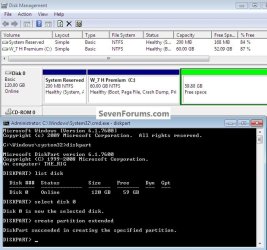
An Extended partition can be created using diskpart from within Windows wherever you like.


click to enlarge
disk.jpg
ext.jpg


My Computer

Computer Manufacturer/Model Number
* BFK Customs *
OS
W 7 64-bit Ultimate
CPU
Intel Q9550 Yorkfield
Motherboard
ASUS P5Q Pro
Memory
8GB Dominator 8500C5D
Graphics Card(s)
ATI : XFX 5870
Sound Card
Realtek HD Audio 7-1
Monitor(s) Displays
1x 47" LCD HDMI & 3x 26" LCD HDMI
Screen Resolution
1920x1080P & 1920x1200
Hard Drives
1x 80GB Intel X25-M G2 SSD : 1x 500GB & 1x 640GB WD Caviar Black(s)
PSU
Corsair 620HX
Case
Cooler Master RC-690
Cooling
Tuniq Tower 120, 2x 140mm and 3x 120mm case fans
Keyboard
Microsoft 500
Mouse
Razer Diamondback 3G
Internet Speed
14 Mb/s
Other Info
1x Koutech 3Gb/s SATA HDD Hot Swap Rack
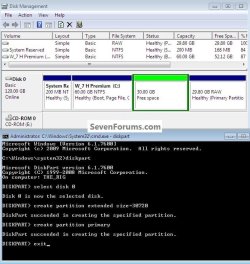
Or you could do this if you wanted to.


click to enlarge
pri.jpg
 

My Computer

Computer Manufacturer/Model Number
* BFK Customs *
OS
W 7 64-bit Ultimate
CPU
Intel Q9550 Yorkfield
Motherboard
ASUS P5Q Pro
Memory
8GB Dominator 8500C5D
Graphics Card(s)
ATI : XFX 5870
Sound Card
Realtek HD Audio 7-1
Monitor(s) Displays
1x 47" LCD HDMI & 3x 26" LCD HDMI
Screen Resolution
1920x1080P & 1920x1200
Hard Drives
1x 80GB Intel X25-M G2 SSD : 1x 500GB & 1x 640GB WD Caviar Black(s)
PSU
Corsair 620HX
Case
Cooler Master RC-690
Cooling
Tuniq Tower 120, 2x 140mm and 3x 120mm case fans
Keyboard
Microsoft 500
Mouse
Razer Diamondback 3G
Internet Speed
14 Mb/s
Other Info
1x Koutech 3Gb/s SATA HDD Hot Swap Rack
I think without a picture of his Disk Management, we are going nowhere.
 

My Computer

Computer Manufacturer/Model Number
HP, Dell, Gateway, Toshiba - 4 laptops and 2 desktops
OS
Vista, Windows7, Mint Mate, Zorin, Windows 8
CPU
from 1.6GHz Duo to i7
Monitor(s) Displays
2x HP w2207
Hard Drives
5x HDD, 7x SSD, 12x Externals
Keyboard
with trackball - no mices
Mouse
Trackball mice
Internet Speed
DSL 6000
We see so many cases of the System boot files being derailed to a primary data partition that it's easier to advise Logical for data partitions to avoid problems during partitioning, installs or repair operations.

Agreed. As long as we don't perpetuate the myth that Logical-volumes-in-extended-partitions are in any way unsuitable for Operating systems,

Logicals are for data, not an OS.

so I would like to edit your statement 180° to: Data is for Logicals, not Primaries.

BFK - very useful info on partitioning with diskpart. Partition Wizard is more comfortable for folks who like a friendly UI, and does the same job, also free of charge.
 

My Computer

OS
Windows 7

My Computer

Computer Manufacturer/Model Number
* BFK Customs *
OS
W 7 64-bit Ultimate
CPU
Intel Q9550 Yorkfield
Motherboard
ASUS P5Q Pro
Memory
8GB Dominator 8500C5D
Graphics Card(s)
ATI : XFX 5870
Sound Card
Realtek HD Audio 7-1
Monitor(s) Displays
1x 47" LCD HDMI & 3x 26" LCD HDMI
Screen Resolution
1920x1080P & 1920x1200
Hard Drives
1x 80GB Intel X25-M G2 SSD : 1x 500GB & 1x 640GB WD Caviar Black(s)
PSU
Corsair 620HX
Case
Cooler Master RC-690
Cooling
Tuniq Tower 120, 2x 140mm and 3x 120mm case fans
Keyboard
Microsoft 500
Mouse
Razer Diamondback 3G
Internet Speed
14 Mb/s
Other Info
1x Koutech 3Gb/s SATA HDD Hot Swap Rack
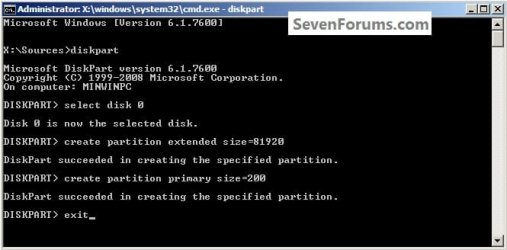
I don't know if you've seen it yet, have a look at this one mate, thanks!
System Reserved : Multi Boot from Logical Partitions

That's more or less how I've been doing it since way before you wrote the tutorial - you must've got the idea from me. (Lol) Seriously, I figured this out thanks to this forum, and about Partition Wizard. Before, I wiped out a lot of systems in multiboots trying to figure out what Windows 7 was doing. Once you realize that it puts boot files on the first active primary partition it can find, you begin to appreciate system reserve and logical volumes - you always know where the boot files will be.

I almost never have to do more than one startup repair to get Windows 7 back after installing XP after 7, so I'm missing out on the 3x fun.

The risky things are moving boot files around between partitions, or resizing or moving partitions - can be done, and then it seems easy, but if you don't have data backups you're mad. Not unsympathetic to the OP, losing data hurts, enough that you get serious about backups.
 

My Computer

OS
Windows 7
I'm still trying to sort a way to get XPired to install as C: in such a setup, any ideas?

If I move the SysResv after the Extended XP marks the SysResv as C: and tries to in stall there and I still lose the drive letter C: to the SysResv.

click to install
Create.jpg
 

My Computer

Computer Manufacturer/Model Number
* BFK Customs *
OS
W 7 64-bit Ultimate
CPU
Intel Q9550 Yorkfield
Motherboard
ASUS P5Q Pro
Memory
8GB Dominator 8500C5D
Graphics Card(s)
ATI : XFX 5870
Sound Card
Realtek HD Audio 7-1
Monitor(s) Displays
1x 47" LCD HDMI & 3x 26" LCD HDMI
Screen Resolution
1920x1080P & 1920x1200
Hard Drives
1x 80GB Intel X25-M G2 SSD : 1x 500GB & 1x 640GB WD Caviar Black(s)
PSU
Corsair 620HX
Case
Cooler Master RC-690
Cooling
Tuniq Tower 120, 2x 140mm and 3x 120mm case fans
Keyboard
Microsoft 500
Mouse
Razer Diamondback 3G
Internet Speed
14 Mb/s
Other Info
1x Koutech 3Gb/s SATA HDD Hot Swap Rack
Bare Foot Kid said:
I'm still trying to sort a way to get XPired to install as C: in such a setup, any ideas?

Really not. If you want XP to be C: you have to install it as the first active primary, and I don't see a way around that.
 

My Computer

OS
Windows 7
Back
Top