
You are using an out of date browser. It may not display this or other websites correctly.
You should upgrade or use an alternative browser.
You should upgrade or use an alternative browser.
Extending Partition
- Thread starter kEltoukhy
- Start date
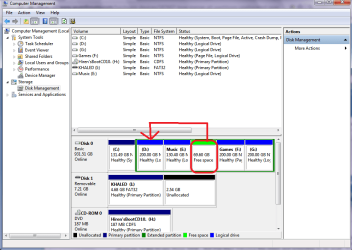

It is possible, but it will take a bit of time and effort. First you would need to extend the E partition to include the free space to the right of it. Once that is done, then you would need to resize the E partition to the right to create free space after the D partition. Once that is done, you can then extend the D partition into the newly created free space. If you have trouble using the Windows partitioning tool to get the job done, there are other good third party apps, like Partition Master, Easeus Partition, or Aomei Partition Master you can use.
My Computer
- Computer Manufacturer/Model Number
- Customized build from CyberPower
- OS
- Windows 7 Home Premium 64bit SP 1
- CPU
- Intel i5 2500k
- Motherboard
- Asus P8P67 Deluxe
- Memory
- 8 gigabytes Corsair PC3-12800 DDR3
- Graphics Card(s)
- EVGA GeForce GTX 460 superclocked
- Sound Card
- Integrated
- Monitor(s) Displays
- ViewSonic 23" LCD
- Screen Resolution
- 1980 x 1080
- Hard Drives
- 120 Gb Samsung 840 Pro SSD
120 Gb Kingston Hyper X SSD
1 Tb WD Caviar Black HDD
- PSU
- Coolermaster 1000 watt modular
- Case
- Coolermaster HAF X full tower
- Cooling
- Coolermaster Hyper 212 plus
- Keyboard
- Logitech USB
- Mouse
- Microsoft 3 button
- Internet Speed
- download 1.5 Mb/sec upload 300Kb/sec

- Local time
- 4:25 PM
- Messages
- 1,346
I want to add this unallocated free space to Drive d .. is it possible ?

I use Partition Wizard to perform this type of task, it's free and is simple enough to use. You can download it from;
Best Free Partition Manager Freeware and free partition magic for Windows 7, Windows 8, Windows Vista and Windows XP 32 bit & 64 bit. MiniTool Free Partition Manager Software Home Edition.
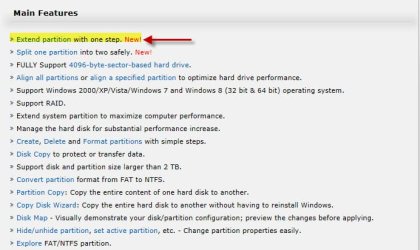
Once you have downloaded the prograrm, view the "Main Features" section and select "Extend Partition" on the same page;
HTH
My Computer
- Computer type
- PC/Desktop
- Computer Manufacturer/Model Number
- Custom Built
- OS
- Windows 7 Professional x64
- CPU
- Intel i5 quad processor
- Motherboard
- DP67BG
- Memory
- 16 GB
- Graphics Card(s)
- Radeon HD 5770
- Sound Card
- Realtek High Definition Audio
- Monitor(s) Displays
- Samsung SyncMaster
- Screen Resolution
- 1920X1080
- Hard Drives
- WD 2TB (SATA Internal)
WD 1TB (USB External)
- PSU
- Corsair GS800
- Case
- Tower (Generic)
- Cooling
- 3 Internal Fans
- Keyboard
- MS Wireless
- Mouse
- MS Optical Wired
- Internet Speed
- 54 mbps
- Antivirus
- Emsisoft
- Browser
- IE-Version 9, Palemoon-Version 24.2.0

- Local time
- 3:25 PM
- Messages
- 50,634
Use free Partition Wizard bootable CD burned to CD using Windows Image Burner.
Boot CD, rightclick on E, select Resize/Move, grab and slide E to the right into the free space, click OK.
Next click on D, select Resize, grab and drag right border to the right to take up the space where E was, click OK, then Apply.
Partition Wizard Move/Resize Partition Video Help.
Boot CD, rightclick on E, select Resize/Move, grab and slide E to the right into the free space, click OK.
Next click on D, select Resize, grab and drag right border to the right to take up the space where E was, click OK, then Apply.
Partition Wizard Move/Resize Partition Video Help.
- Local time
- 4:25 PM
- Messages
- 1,346
Use free Partition Wizard bootable CD burned to CD using Windows Image Burner.
Boot CD, rightclick on E, select Resize/Move, grab and slide E to the right into the free space, click OK.
Next click on D, select Resize, grab and drag right border to the right to take up the space where E was, click OK, then Apply.
Partition Wizard Move/Resize Partition Video Help.
I am not sure the new extended partition feature is available using the bootable CD, but it provides a simpler way to extend a partition, especially if the partitions are not adjacent;
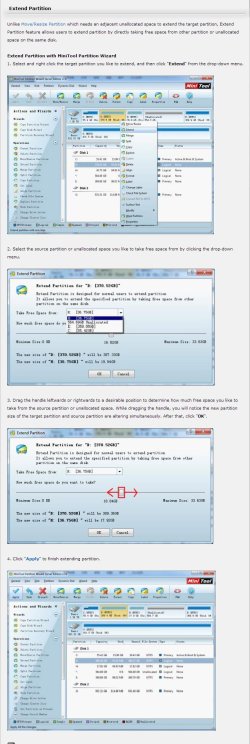
Just a heads on the improvement.
My Computer
- Computer type
- PC/Desktop
- Computer Manufacturer/Model Number
- Custom Built
- OS
- Windows 7 Professional x64
- CPU
- Intel i5 quad processor
- Motherboard
- DP67BG
- Memory
- 16 GB
- Graphics Card(s)
- Radeon HD 5770
- Sound Card
- Realtek High Definition Audio
- Monitor(s) Displays
- Samsung SyncMaster
- Screen Resolution
- 1920X1080
- Hard Drives
- WD 2TB (SATA Internal)
WD 1TB (USB External)
- PSU
- Corsair GS800
- Case
- Tower (Generic)
- Cooling
- 3 Internal Fans
- Keyboard
- MS Wireless
- Mouse
- MS Optical Wired
- Internet Speed
- 54 mbps
- Antivirus
- Emsisoft
- Browser
- IE-Version 9, Palemoon-Version 24.2.0
- Local time
- 3:25 PM
- Messages
- 50,634
Nice find, George. Am still at 7.5 so will upgrade later today to check it out.
I'd like to see how that works on non-adjacent partitions, and if it's on the boot disk which is to date fail safe.
I've always just slid partitions which are in the way over one way or the other. It's fun.
I'd like to see how that works on non-adjacent partitions, and if it's on the boot disk which is to date fail safe.
I've always just slid partitions which are in the way over one way or the other. It's fun.
- Local time
- 4:25 PM
- Messages
- 1,346
Nice find, George. Am still at 7.5 so will upgrade later today to check it out.
I'd like to see how that works on non-adjacent partitions, and if it's on the boot disk which is to date fail safe.
I've always just slid partitions which are in the way over one way or the other. It's fun.
I haven't used it, yet, so let me know how it goes.

My Computer
- Computer type
- PC/Desktop
- Computer Manufacturer/Model Number
- Custom Built
- OS
- Windows 7 Professional x64
- CPU
- Intel i5 quad processor
- Motherboard
- DP67BG
- Memory
- 16 GB
- Graphics Card(s)
- Radeon HD 5770
- Sound Card
- Realtek High Definition Audio
- Monitor(s) Displays
- Samsung SyncMaster
- Screen Resolution
- 1920X1080
- Hard Drives
- WD 2TB (SATA Internal)
WD 1TB (USB External)
- PSU
- Corsair GS800
- Case
- Tower (Generic)
- Cooling
- 3 Internal Fans
- Keyboard
- MS Wireless
- Mouse
- MS Optical Wired
- Internet Speed
- 54 mbps
- Antivirus
- Emsisoft
- Browser
- IE-Version 9, Palemoon-Version 24.2.0