I didn't know whether to post this in the crashes forum or here because it pertains to both.
My setup is an Alienware m15x and was originally set to run Vista 32-bit and upgraded to Windows 7 64-bit over a year ago.
Alienware didn't supply me with all the driver updates I need so I had to hunt for them and hope they were all that I needed. Now this morning I got the "Display driver wasn't recognized and can not be recovered" or whatever the error was and tried various tips and guides to fix this.
I gave up and went with a clean install I formatted the HD and re-installed Windows 7. I then ran the Windows 7 Upgrade Advisor and upgraded where I could.
I went on NVIDIA after I found my graphics card and ran the install just to get the same crash that sparked my fresh install to begin with.
Alienware offers an assortment of drivers but as much as I use my computer and know how it works I look like a complete retard when it comes to drivers and the sort.
I am hoping that someone can please tell me what drivers I need to install and in what order to maximize my chance of success.
I filled out my profile with all my computer info that I could find but if I need to post it in here I will immediately.
My Computer
Computer Manufacturer/Model Number
Alienware m15x
OS
Windows 7 Ultimate x64
CPU
Intel Core 2 Duo
Memory
2 GB RAM, 1 GB TURBO CACHE MEMORY
Graphics Card(s)
NVIDIA 8800M-GTX 512MB,
Sound Card
INTEL MOBILE HIGH-DEFINITION AUDIO SOUND CARD
Monitor(s) Displays
15" WXGA
Hard Drives
SEAGATE 160 GB 5400RPM HYBRID HARD DRIVE SYSTEM, SEAGATE 500 GB EXTERNAL HARD DRIVE.
Alienware is Dell I beleive. I'd try the Alienware drivers first. Especially the mother board. It has your USB, SATA drivers LAN, Ethernet. Almost everything but the graphics card.
Update to the newest driver by number or date.
Device Manager lists all hardware and drivers. See if you have any yellow flags in Device Manager. Click each listing to open curtain. Post back if you find any yellow flagged hardware devices and what device. Providing a Snip would be also good with the yellow flag showing.
Samsung 830 120GB SSD
Intel 320 120GB SSD
Western Digital Caviar Black WD7501AALS 750GB 7200 RPM SATA 3.0Gb/s
Western Digital Caviar Black WD6401AALS 640GB 7200 RPM SATA 3.0Gb/s
PSU
COOLER MASTER Silent Pro RS850-AMBAJ3-US 850W Modular
You will have to compare the Driver number in Device Manager to the driver number at the Dell link you provided.
If they are the same number you have the latest driver.
If the new number is larger it is a newer driver.
Just like Nvidia. 260.xx is newer than the 258.xx.
Samsung 830 120GB SSD
Intel 320 120GB SSD
Western Digital Caviar Black WD7501AALS 750GB 7200 RPM SATA 3.0Gb/s
Western Digital Caviar Black WD6401AALS 640GB 7200 RPM SATA 3.0Gb/s
PSU
COOLER MASTER Silent Pro RS850-AMBAJ3-US 850W Modular
I have taken care of every driver on the page except the graphics cards.
That seems to be the main thing that crashes it forcing me to system restore.
I just ran the NVIDIA driver search and am installing it now. My results with the last few tries in this department ended in a blue screen and Windows starting up screen freezing with red vertical bars.
I will report back after this.
My Computer
Computer Manufacturer/Model Number
Alienware m15x
OS
Windows 7 Ultimate x64
CPU
Intel Core 2 Duo
Memory
2 GB RAM, 1 GB TURBO CACHE MEMORY
Graphics Card(s)
NVIDIA 8800M-GTX 512MB,
Sound Card
INTEL MOBILE HIGH-DEFINITION AUDIO SOUND CARD
Monitor(s) Displays
15" WXGA
Hard Drives
SEAGATE 160 GB 5400RPM HYBRID HARD DRIVE SYSTEM, SEAGATE 500 GB EXTERNAL HARD DRIVE.
By search I mean i did the auto-detect but I am running off my integrated graphics. I dont even have the initial install on here yet because of the crashing.
Does this change things or should I try Guru?
My Computer
Computer Manufacturer/Model Number
Alienware m15x
OS
Windows 7 Ultimate x64
CPU
Intel Core 2 Duo
Memory
2 GB RAM, 1 GB TURBO CACHE MEMORY
Graphics Card(s)
NVIDIA 8800M-GTX 512MB,
Sound Card
INTEL MOBILE HIGH-DEFINITION AUDIO SOUND CARD
Monitor(s) Displays
15" WXGA
Hard Drives
SEAGATE 160 GB 5400RPM HYBRID HARD DRIVE SYSTEM, SEAGATE 500 GB EXTERNAL HARD DRIVE.
i would try driver sweeper, then make sure the machine is using "standard vga adapter" in control panel. then try running windows update to see if it finds a driver. then try installing the original vista driver that came with the computer.
Use the drivers given by the Win7 installer and quickly updated by optional Windows Updates.
If there is no Display driver provided, import it from NVidia by running their wizard or finding your model to download and install.
I would not change out other drivers unless performance requires it. This is not XP - MS spent a fortune getting drivers into installer or via Updates, with rare exception.
Well I ran the Guru and it found a bunch of NVIDIA chipset should I clean then do the nvidia program to find my graphics or try the ones provided by alienware for vista?
My Computer
Computer Manufacturer/Model Number
Alienware m15x
OS
Windows 7 Ultimate x64
CPU
Intel Core 2 Duo
Memory
2 GB RAM, 1 GB TURBO CACHE MEMORY
Graphics Card(s)
NVIDIA 8800M-GTX 512MB,
Sound Card
INTEL MOBILE HIGH-DEFINITION AUDIO SOUND CARD
Monitor(s) Displays
15" WXGA
Hard Drives
SEAGATE 160 GB 5400RPM HYBRID HARD DRIVE SYSTEM, SEAGATE 500 GB EXTERNAL HARD DRIVE.
clean them all out. restart. make sure "standard vga adapter" shows as the driver in control panel. run windows update to see if it finds a driver. if not, try installing the original vista driver that came with the computer. if successful, then you can try the nvidia website for the newest driver.
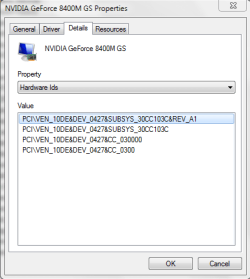
can you go to device manager then double click your display adapter, then choose the details tab, then select Hardware Ids and make a snip, that would help to find the right driver for you.
Attachments
Capture.PNG
11.2 KB
· Views: 0
My Computer
Computer Manufacturer/Model Number
HP dv6519tx
OS
Windows 7 Ultimate x64
CPU
1.80 GHz Intel Core 2 Duo processor T7100
Memory
3 gig ddr2
Graphics Card(s)
NVIDIA GeForce 8400M GS
Sound Card
Realtek High Definition Audio
Monitor(s) Displays
15.4” WXGA High Definition BrightView Widescreen
Screen Resolution
1280 x 800
Hard Drives
Hitachi 320 GB (5400 rpm)
PSU
90 W AC Power Adapter
Cooling
Kitchen plate under the lappy
Keyboard
101 key compatible
Mouse
Touch Pad with On/Off button and dedicated vertical Scroll
Internet Speed
Three Wireless internet prepaid using E160G USB dongle
I just tried getting the driver from nvidia again with a clean sweep but got the same error. I didnt get a blue screen this time just passed the windows starting up screen and it stayed black this time.
The biggest problem is that my NVIDIA graphics card isnt even showing up so it cant update or be found.
My Computer
Computer Manufacturer/Model Number
Alienware m15x
OS
Windows 7 Ultimate x64
CPU
Intel Core 2 Duo
Memory
2 GB RAM, 1 GB TURBO CACHE MEMORY
Graphics Card(s)
NVIDIA 8800M-GTX 512MB,
Sound Card
INTEL MOBILE HIGH-DEFINITION AUDIO SOUND CARD
Monitor(s) Displays
15" WXGA
Hard Drives
SEAGATE 160 GB 5400RPM HYBRID HARD DRIVE SYSTEM, SEAGATE 500 GB EXTERNAL HARD DRIVE.
hmm i would say you try downgrading back to vista and seeing if ur graphics card works. If it does, than that would help me much more finding a solution to ur problem. Try that for me.
I would try a clean installation following the guide available in the tutorial section, if you are getting errors constantly with W7 drivers.
My Computer
Computer Manufacturer/Model Number
Pugh Technologies
OS
W7 Professional x64
CPU
AMD Athlon II X3 445 Rana 3.10 GHz
Motherboard
MSI 870A-G54
Memory
PNY XLR DDR3 1600 4x2GB
Graphics Card(s)
NVIDIA GeForce GTS 450 (fermi) 1GB GDDR5
Sound Card
Realtek ALC892 onboard
Monitor(s) Displays
ASUS VE205t, Viewsonic VX2035WM
Screen Resolution
1600x900, 1600x1050
Hard Drives
977GB Hitachi Hitachi HDS721010CLA332
244GB Western Digital WDC WD2500AAJS-65B4A0
488GB Western Digital WDC WD5000AAJS-00A8B0
488GB Western Digital WDC WD5000AAKS-00UU3A0
PSU
Antec EarthWatts EA650 650W
Case
ThermalTake Armor A90 Mid Tower
Cooling
3x 120mm in, 1x 120mm & 200mm out, self built hydro-cooler