Extent C to another disk

houruoha

New member
Local time
11:29 PM
Messages
7
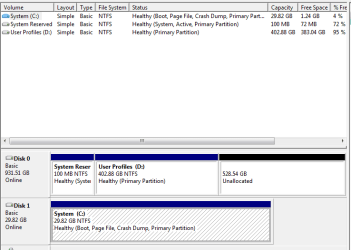
I have a 29.8GB m-sata which is my primary system (C:\) drive, also i have a 1TB which i have move Users and ProgramData to D Drive using this kari tutorial. Please help extend C Drive

also check screenshots below
 

Attachments
  • extend c.PNG
    extend c.PNG
    11 KB · Views: 2

My Computer

Computer type
Laptop
Computer Manufacturer/Model Number
DELL
OS
Windows 7 Ultimate x64
CPU
Intel(R) Core(TM) i7-3632QM CPU @ 2.20GHz
Graphics Card(s)
AMD Radeon HD 7730M/Intel(R) HD Graphics 4000
Screen Resolution
1080p
Hard Drives
WD10JPVT-75A1YT 1TB 5400RPM
LITEONIT LMS0-32 M-SATA 32GB
You can only extend the volume into unallocated space on the same physical drive. There is none. You could conserve some space on C: by moving the pagefile and a few other things but you really need a larger drive.
 

My Computer

Computer type
PC/Desktop
Computer Manufacturer/Model Number
HP
OS
Windows 7 Pro 64 bit
CPU
Xeon W3520
Memory
8 GB
Graphics Card(s)
Nvidia Geforce 210
You can only extend the volume into unallocated space on the same physical drive. There is none. You could conserve some space on C: by moving the pagefile and a few other things but you really need a larger drive.

What can i use my 32GB m-sata for? :mad:

Please help set maximum performance. 32GB M-SATA+1TB (5400RPM) + Windows 7 x64
:banghead::banghead::banghead: :cry: :mad:
 

My Computer

Computer type
Laptop
Computer Manufacturer/Model Number
DELL
OS
Windows 7 Ultimate x64
CPU
Intel(R) Core(TM) i7-3632QM CPU @ 2.20GHz
Graphics Card(s)
AMD Radeon HD 7730M/Intel(R) HD Graphics 4000
Screen Resolution
1080p
Hard Drives
WD10JPVT-75A1YT 1TB 5400RPM
LITEONIT LMS0-32 M-SATA 32GB
Turn off system restore for C:
reduce storage size of recycle bin for C:
Run Disk defragmentation analysis for C:
 

My Computer

Computer type
Laptop
Computer Manufacturer/Model Number
Dell Vostro 2520
OS
Windows 10 Tech Preview
CPU
Intel i5 (3rd Gen)
Motherboard
Intel® Mobile HM75 Express chipset
Memory
4GB
Graphics Card(s)
Intel HD Graphics 4000
Hard Drives
500GB
Keyboard
onboard keypad, USB keyboard
Mouse
touchpad, USB mouse, wireless muse
Internet Speed
4 Mbps
Antivirus
No
Browser
IE, chrome, firefox

My Computer

Computer type
Laptop
Computer Manufacturer/Model Number
DELL
OS
Windows 7 Ultimate x64
CPU
Intel(R) Core(TM) i7-3632QM CPU @ 2.20GHz
Graphics Card(s)
AMD Radeon HD 7730M/Intel(R) HD Graphics 4000
Screen Resolution
1080p
Hard Drives
WD10JPVT-75A1YT 1TB 5400RPM
LITEONIT LMS0-32 M-SATA 32GB
You have installed to the small 32gb SSD chip meant to provide a paging file and faster boot for the larger MSATA drive.

The correct method of reinstall is explained here: http://www.sevenforums.com/tutorials/306285-install-windows-msata-ssd-drive.html
http://www.sevenforums.com/tutorials/307529-install-windows-system-msata-isrt.html

However we have helped users install Win7 to the 32gb SSD for the speed benefits alone, since the RAIDed MSATA as originally designed does not speed up things that much compared to the lightning speed of SSD. Moving the data to the HD helps facilitate this. With adequate RAM you can also reduce the paging file although I would not offload it to HD as it will slow performance. You can save space the size of your RAM by turning off Hibernation, which is regrettable since it works so well in Win7.
Virtual Memory Paging File - Change - Vista Forums
http://www.sevenforums.com/tutorials/819-hibernate-enable-disable.html

If you decide to try the current configuration there is one change I would make: Move the System boot files to the C using EasyBCD Bootmgr - Move to C:\ with EasyBCD - Windows 7 Forums then mark Inactive and delete the System Reserved partition on the HDD. http://www.sevenforums.com/tutorials/197157-partition-mark-inactive.html

Let us know how it goes.
 
Finally Windows 7 x64 on my Dell Inspiron 15R 7520 SE

Used lots of Images Apologies :D
Here is how i did it? :party:

Create Bootable USB Drive With Rufus Follow UEFI Bootable USB Flash Drive - Create in Windows

Reset BIOS to Default

496OqQJ.jpg

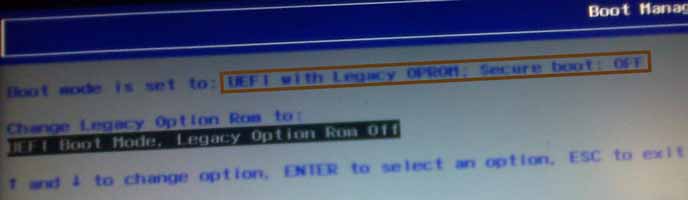
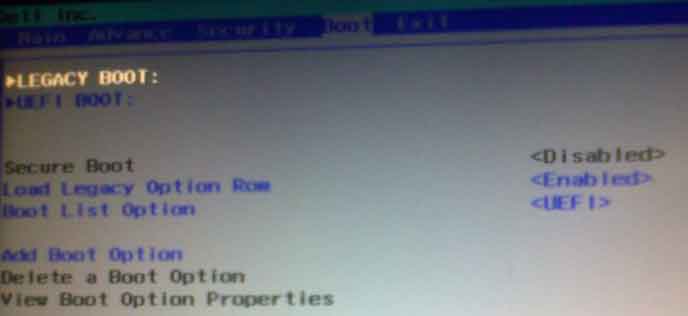
F12 change Peripheral Device setting (OPROM setting) -> UEFI with Legacy OPROM: Secure Boot :OFF

GBn7u6l.jpg


lRJbInQ.jpg


3jQQ3TV.jpg

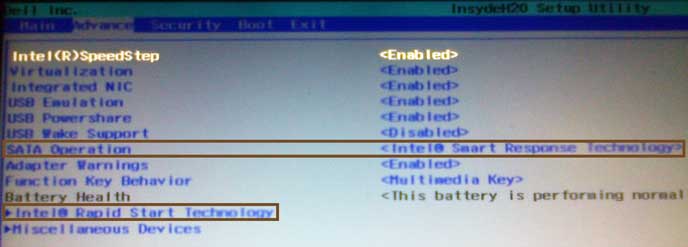
F12 -> Enter Setup or F2 -> Advance Tab -> Select Intel Smart Respone Technology from SATA Operation


Clean Disk and SSD Install Windows on MSATA (SSD) Drive

Install Windows on System with MSATA and ISRT

Boot Via UEFI BOOT: EFI USB/UEFI DVD Windows 7 Clean Install Windows 7


YqP1zeV.jpg

Hibernation and Start Up faster on Windows 8

BlCbVyS.jpg

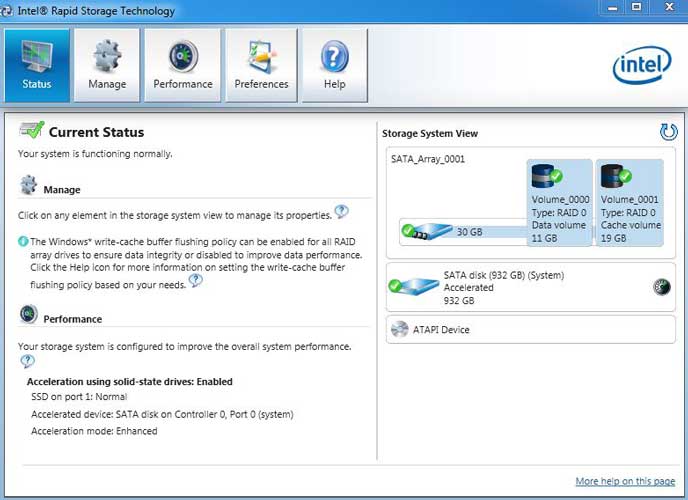
Uncertain Whether IRST is Working or not see above screenshot


Thanks everyone :D
 

My Computer

Computer type
Laptop
Computer Manufacturer/Model Number
DELL
OS
Windows 7 Ultimate x64
CPU
Intel(R) Core(TM) i7-3632QM CPU @ 2.20GHz
Graphics Card(s)
AMD Radeon HD 7730M/Intel(R) HD Graphics 4000
Screen Resolution
1080p
Hard Drives
WD10JPVT-75A1YT 1TB 5400RPM
LITEONIT LMS0-32 M-SATA 32GB
The install looks correct for MSATA/IRST and its control panel says its working correctly. But I'm not sure why the paging file isn't on the 32gb. Maybe your model requires moving it there. Virtual Memory Paging File - Change

Read your model on the PC's Support Downloads webpage to see if there are any extra steps.
 
The install looks correct for MSATA/IRST and its control panel says its working correctly. But I'm not sure why the paging file isn't on the 32gb. Maybe your model requires moving it there. Virtual Memory Paging File - Change


288885d1381254820-install-windows-system-msata-isrt-10.jpg


288891d1381254856-install-windows-system-msata-isrt-16.jpg


YqP1zeV.jpg


BlCbVyS.jpg

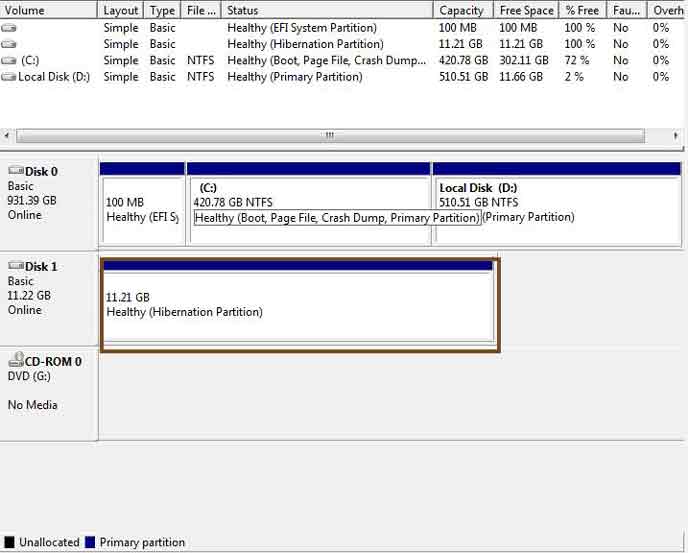
18.6 GB for Cache 11.21 for Hibernation

Hibernation is really slow and startup also

Encounter this
Code:
Your computer can't come out of hibernation.
Status: 0XC000009A
Fix with SFC /SCANNOW


System Start-up and Hibernation Slow (comparing with other System with cache/hibernation SSD)
 

My Computer

Computer type
Laptop
Computer Manufacturer/Model Number
DELL
OS
Windows 7 Ultimate x64
CPU
Intel(R) Core(TM) i7-3632QM CPU @ 2.20GHz
Graphics Card(s)
AMD Radeon HD 7730M/Intel(R) HD Graphics 4000
Screen Resolution
1080p
Hard Drives
WD10JPVT-75A1YT 1TB 5400RPM
LITEONIT LMS0-32 M-SATA 32GB
Was the startup and hibernate slow when you had win7 installed only to the SSD?

Have you checked the settings against your Manual. They look correctly installed to me.

This may be why we have many comments that IRST doesn't speed system and regularly have users want to try install OS to the SSD
 
Was the startup and hibernate slow when you had win7 installed only to the SSD?

Have you checked the settings against your Manual. They look correctly installed to me.

This may be why we have many comments that IRST doesn't speed system and regularly have users want to try install OS to the SSD

Start-up and Hibernation was very fast when win 7 was on SSD.
In my experience Hibernate/Startup was very fast on windows 8 + IRST. :mad:

Thank you
 

My Computer

Computer type
Laptop
Computer Manufacturer/Model Number
DELL
OS
Windows 7 Ultimate x64
CPU
Intel(R) Core(TM) i7-3632QM CPU @ 2.20GHz
Graphics Card(s)
AMD Radeon HD 7730M/Intel(R) HD Graphics 4000
Screen Resolution
1080p
Hard Drives
WD10JPVT-75A1YT 1TB 5400RPM
LITEONIT LMS0-32 M-SATA 32GB
Back
Top