External Drive Not Available

KenY7744

New member
Local time
6:21 AM
Messages
26
Location
Glenside, PA
I have an external WD 1Tb drive which is split into 2 500Gb partitions. This was done in WinXP. Both partitions are visible and accessible in WinXP Pro.

I recently installed Win7 on a new INTERNAL 1Tb drive. This is a second drive in my system, and I have the ability to boot into either OS with the F12 Boot Options menu on my Dell Inspiron 530.

When I am in the Win7 OS, I can see both partitions listed in Windows Explorer, and I can access the first partition of the external WD drive, but I get a "Location Is Not Available" error when I click on the second partition.

The first partition is Drive L: and the second is Drive M:

I have tried going into properties/security and allowing full access, but it doesn't "take." I still get the same error.

I can boot into XP and still access the second partition.

I have disconnected the drive in XP and reconnected it in Win7, but I still get the error.

I am thinking of going back into XP, running Partition Magic and merging the 2 500Gb partitions (after securing the data elsewhere, of course :D).

Any help?

Thanks,
Ken
 

Attachments

  • Drive Not Accessible.GIF
    Drive Not Accessible.GIF
    19 KB · Views: 7

My Computer

Computer Manufacturer/Model Number
Dell Vostro 200
OS
Windows 7 Enterprise Edition 32-bit
CPU
Pentium Dual Core 2.4 GHz
Memory
4Gb
Graphics Card(s)
ATI Radeon HD 3400
Sound Card
On board
Monitor(s) Displays
2 Dell flatscreen
Hard Drives
WD 160Gb Internal (Containing OS & Installed Programs)
Seagate 1Tb Internal (DATA, MUSIC, PHOTOS, VIDEOS, DOWNLOADS)
Various external HDs 500Gb & 1Tb for backups
Can you see all the partitions in Disk Management? Are you running any special software that might lock the partition?

Did you format or otherwise manage the partition with Partition Magic, and if so, what version?
 

My Computer

Computer Manufacturer/Model Number
Homebuilt
OS
Windows 7 x64
CPU
i7-2600K
Motherboard
Asus P8Z77-v Pro
Memory
8 G
Graphics Card(s)
GTX 480
Sound Card
Onboard
Monitor(s) Displays
LG W2753V
Screen Resolution
1920x1080
Hard Drives
Crucial M4 128 G SSD
Thanks for your response to my query, Saltgrass.

I can see the drive and all partitions in Disk Management.

As far as I know, there is no software locking the drive.

I can't remember for sure, but it's possible that the disk was partitioned with Partition Magic V. 7.0.

If Win7 is not compatible with drives partitions with PM, I guess I'll have to delete the partitions with PM in XP, and then repartition it in Win7 using Disk Management.

Thanks again,
Ken
 

My Computer

Computer Manufacturer/Model Number
Dell Vostro 200
OS
Windows 7 Enterprise Edition 32-bit
CPU
Pentium Dual Core 2.4 GHz
Memory
4Gb
Graphics Card(s)
ATI Radeon HD 3400
Sound Card
On board
Monitor(s) Displays
2 Dell flatscreen
Hard Drives
WD 160Gb Internal (Containing OS & Installed Programs)
Seagate 1Tb Internal (DATA, MUSIC, PHOTOS, VIDEOS, DOWNLOADS)
Various external HDs 500Gb & 1Tb for backups
If you're worried about compatibility from PM formatting, try Partition Wizard. It's free and I've used it multiple times with no problems.

If you haven't filled the partitions, this is what I'd suggest.

From XP:
- Open Partition Wizard
- Merge the two drives

From W7:
- Make sure the drive is accessible
- Open Partition Wizard
- Resize the one partition to it's original size.
- Create the second partition again.

Granted, atleast half of your drive has to be empty for this to work and I'd highly recommend backing up any data first, but it should work.
 

My Computer

Computer Manufacturer/Model Number
Apple Macbook Pro (April 2009)
OS
W7 Ult. x64 | OS X
CPU
Intel Mobile Core 2 Duo 2.93Ghz [T9800 Penryn]
Motherboard
NVIDIA nForce 730i Rev. B1 [Mac-F2268EC8 (U2E1)]
Memory
4096MB Samsung DDR3 Dual Channel [PC3-8500F 1066Mhz]
Graphics Card(s)
NVIDIA GeForce 9600M GT 512MB [G96M Rev. C1]
Sound Card
SB X-Fi Surround 5.1 USB | Onboard Realtek (Disabled)
Monitor(s) Displays
Acer x223wbd 22" | Apple Anti-Glare 17" (Disabled)
Screen Resolution
{Current} 1440x900 {Acer} 1680x1050 {Apple} 1920x1200
Hard Drives
{Internal}
Seagate Momentus 320GB 2.5" 7200RPM [ST9320421AS]

{Externals}
LaCie 320GB USB 2.0 HDD [301284UR]
LaCie 750GB USB 2.0 FW400 eSATA HDD [301314U]
LaCie 1TB USB 2.0 HDD [301304UR]
PSU
Magsafe
Case
Aluminum/Unibody (MBP52)
Cooling
2 x 6000 RPM Fans
Keyboard
Logitech G-15v2 [PN 920-000379]
Mouse
Logitech G-9 [PN 910-000338]
Internet Speed
12Mbps/2.5Mbps w/ 24Mbps Speed Boost [Comcast]
Other Info
Logitech X-540 Speakers [PN 970223-0122]
Sennheiser PC-151 Headset
I had an identical problem. I checked the files/folders from XP and found I had an inaccessible folder but the drive and other folders were fine. I backed up the drive, formatted it and restored and then it worked fine in Win7
 

My Computer

OS
windowsxp
I just asked about PM. Don't go doing anything for that reason--yet..

In disk management when you right click, so it say the same thing as when you try to access it another way?

Does the partition show a drive letter in Win 7 as it does in XP? Is it an NTFS partition?
 

My Computer

Computer Manufacturer/Model Number
Homebuilt
OS
Windows 7 x64
CPU
i7-2600K
Motherboard
Asus P8Z77-v Pro
Memory
8 G
Graphics Card(s)
GTX 480
Sound Card
Onboard
Monitor(s) Displays
LG W2753V
Screen Resolution
1920x1080
Hard Drives
Crucial M4 128 G SSD
Thanks for staying with this issue, Saltgrass.

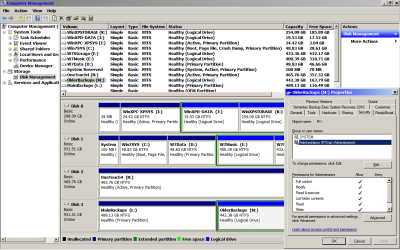
In disk management, I can right click and get the properties, which is shown on the screenshot. If I try to choose "EXPLORE" from the context menu, I still get the error message shown in my earlier post, access denied.

As shown on the current screenshot, the permissions for my own login (admin) all show "ALLOW" and it's the same for SYSTEM.

And as shown in the screenshot, the primary partition (Drive L:) and the logical drive (Drive M:) are both NTFS file system.
 

Attachments

  • DiskManagementScreenshot.png
    DiskManagementScreenshot.png
    49.5 KB · Views: 66

My Computer

Computer Manufacturer/Model Number
Dell Vostro 200
OS
Windows 7 Enterprise Edition 32-bit
CPU
Pentium Dual Core 2.4 GHz
Memory
4Gb
Graphics Card(s)
ATI Radeon HD 3400
Sound Card
On board
Monitor(s) Displays
2 Dell flatscreen
Hard Drives
WD 160Gb Internal (Containing OS & Installed Programs)
Seagate 1Tb Internal (DATA, MUSIC, PHOTOS, VIDEOS, DOWNLOADS)
Various external HDs 500Gb & 1Tb for backups
Keep in mind, I do not know why the partition is not accessible.

But I see you are running Symantec System Restore.. Does that program use the external drive to make backups? Is there any difference in the two partitions as far as Symantec is concerned? Any special backups or files that might not be accessible except by Symantec.

You might add your user with full control to see if that helps.

I also notice the inaccessible partition is logical.

If you can access one partition and not the other, I have to ask what is the difference. You have obviously checked the permissions for both and made sure they were the same. Could it be the logical one is handled differently?

My only thoughts would be to check the Symantec utility to see if there are any settings with it that might allow access from Win 7.

If that does not help, I would think about making the logical partition primary using something like Partition Wizard.

If it is possible, you might think about moving the contents of the partition and deleting and redoing it. I think this has already been suggested and might be your last option.
 

My Computer

Computer Manufacturer/Model Number
Homebuilt
OS
Windows 7 x64
CPU
i7-2600K
Motherboard
Asus P8Z77-v Pro
Memory
8 G
Graphics Card(s)
GTX 480
Sound Card
Onboard
Monitor(s) Displays
LG W2753V
Screen Resolution
1920x1080
Hard Drives
Crucial M4 128 G SSD
As to the question about Symantec's Partition Magic, it works fine in all Windows OS's. I use it exclusively.
 

My Computer

Computer Manufacturer/Model Number
NVIDIA
OS
Windows 7 Enterprise x64
CPU
AMD Athlon 64X2 Dual Core 3800+
Motherboard
GeForce 6100-M9
Memory
OCZ Platinum Dual Channel - 4x1Gb
Graphics Card(s)
NVIDIA GeForce 8800 GT PCI Express x16
Sound Card
Creative Audigy Sound Blaster Extreme PCI
Monitor(s) Displays
Compaq 7500
Screen Resolution
1024x768
Hard Drives
C: Seagate ST3250318AS SataII - 250Gb

D: Seagate ST3500418AS SataII - 500Gb
PSU
OCZ 600w Dual 12v Rails
Case
Thermaltake
Cooling
OCZ Heatsinks, Fans, and Thermal Paste on CPU & Chipsets
Keyboard
Logitech
Mouse
Radio Shack PS2
Internet Speed
Cable
Other Info
Dual Pioneer DVD/RW optical drives. LG CD/RW optical drive.
As to the question about Symantec's Partition Magic, it works fine in all Windows OS's. I use it exclusively.

I have Partition Magic 8 from Power Quest, and I would never--never use it in Win 7.....

I realize at one time, Norton bought it, but I trust Norton even less....now it appears to be shareware...
 

My Computer

Computer Manufacturer/Model Number
Homebuilt
OS
Windows 7 x64
CPU
i7-2600K
Motherboard
Asus P8Z77-v Pro
Memory
8 G
Graphics Card(s)
GTX 480
Sound Card
Onboard
Monitor(s) Displays
LG W2753V
Screen Resolution
1920x1080
Hard Drives
Crucial M4 128 G SSD
Back
Top