
External Drives not recognised by repair disk.

BrianAB

New member
Local time
9:19 PM
Messages
5
Using three types of software, Windows, Macrium Reflect 7 and Nova Backup I have created a system image and a repair disc. None of the discs recognises the external drive containing the image.
Windows says that the device software is up to date. I can't find anything online, can you help?

I attach the image of Disk Management showing the internal, 2 external drives and one USB stick.
 

Attachments
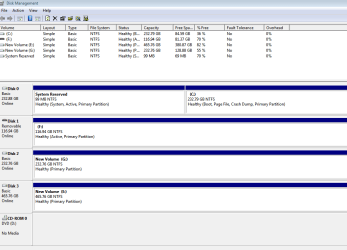
  • Disk Management.PNG
    Disk Management.PNG
    18.6 KB · Views: 0

My Computer My Computer

Computer type
PC/Desktop
Computer Manufacturer/Model Number
Dell
OS
Windows 7 Home 64bit
CPU
i5
Motherboard
?
Memory
8GB
Graphics Card(s)
Nvidia
Antivirus
Kaspersky
Browser
Chrome
Hi BrianAB,

Welcome to SevenForums.

How many external drives do you have? 3? That what is shows.

Are you trying to view the backup image on the drive? If so you can't do so through disk management.

Try accessing it through Computer
 

My Computer My Computer

Computer type
PC/Desktop
Computer Manufacturer/Model Number
HP Desktop & Compaq Laptop
OS
Win 10 x64, Linux Lite, Win 7 x64, BlackArch, & Kali
Hard Drives
Samsung 850 Pro 256Gb,
Hitachi HDD 1Tb,
Crucial MX SSD 250Gb
Segate 3Tb USB 3.0 Ext. Backup HDD
Internet Speed
150Mbps dn, 20Mbps up
Antivirus
Avast Free, Malwarebytes Anti-Exploit & Anti-Ransomware
Browser
Firefox, Chrome, Opera, & VPN
Hi,
I am trying to use a system image to back up the computer using a repair DVD.
I did this with Windows but the repair disk did not recognise the external hard drive containing the image.
I repeated this with Macrium on a second external with the same result, the disk did not recognise either external drive.
The third time I used Nova Backup, again the disk did not recognise the external drive.
There are two external drives and a USB stick, each containing a system restore image as shown in Disk Management.
I doubt that the problem is with three lots of backup software so I am hoping that you will be able to spot something wrong with the external drives, hence the Disk Management image.
 

My Computer My Computer

Computer type
PC/Desktop
Computer Manufacturer/Model Number
Dell
OS
Windows 7 Home 64bit
CPU
i5
Motherboard
?
Memory
8GB
Graphics Card(s)
Nvidia
Antivirus
Kaspersky
Browser
Chrome
Hi,
I am trying to use a system image to back up the computer using a repair DVD.
I did this with Windows but the repair disk did not recognize the external hard drive containing the image.

What did you use to create the Disk Image?
What is "a repair DVD"

I've used AOMEI Backupper free for years with no problem.

Macrium Reflect free is also recommended on SevenForums.
 

My Computer My Computer

Computer type
PC/Desktop
Computer Manufacturer/Model Number
HP Desktop & Compaq Laptop
OS
Win 10 x64, Linux Lite, Win 7 x64, BlackArch, & Kali
Hard Drives
Samsung 850 Pro 256Gb,
Hitachi HDD 1Tb,
Crucial MX SSD 250Gb
Segate 3Tb USB 3.0 Ext. Backup HDD
Internet Speed
150Mbps dn, 20Mbps up
Antivirus
Avast Free, Malwarebytes Anti-Exploit & Anti-Ransomware
Browser
Firefox, Chrome, Opera, & VPN
As I said, Windows, Macrium and Nova.
 

My Computer My Computer

Computer type
PC/Desktop
Computer Manufacturer/Model Number
Dell
OS
Windows 7 Home 64bit
CPU
i5
Motherboard
?
Memory
8GB
Graphics Card(s)
Nvidia
Antivirus
Kaspersky
Browser
Chrome
How are the external disks connected? Is it USB3 ?
 

My Computers My Computers

System One System Two

  • Computer type
    PC/Desktop
    OS
    7 X64
    CPU
    i5 8400
    Motherboard
    gigabyte b365m ds3h
    Memory
    2x8gb 3200mhz
    Hard Drives
    various
    PSU
    pure power 11 400w cm
    Case
    Coolermaster
    Cooling
    cryorig m9i
  • Computer type
    PC/Desktop
    OS
    7x64
    CPU
    g5400
    Motherboard
    ga b365m ds3h
    Memory
    8gb ddr4 2400
    PSU
    xfx pro 450w
Both
 

My Computer My Computer

Computer type
PC/Desktop
Computer Manufacturer/Model Number
Dell
OS
Windows 7 Home 64bit
CPU
i5
Motherboard
?
Memory
8GB
Graphics Card(s)
Nvidia
Antivirus
Kaspersky
Browser
Chrome
I mean that I have tried both.
 

My Computer My Computer

Computer type
PC/Desktop
Computer Manufacturer/Model Number
Dell
OS
Windows 7 Home 64bit
CPU
i5
Motherboard
?
Memory
8GB
Graphics Card(s)
Nvidia
Antivirus
Kaspersky
Browser
Chrome
Question: How are the external disks connected? Is it USB3 ?

Answer: I have tried both.

:confused:
 

My Computers My Computers

System One System Two

  • Computer type
    PC/Desktop
    OS
    7 X64
    CPU
    i5 8400
    Motherboard
    gigabyte b365m ds3h
    Memory
    2x8gb 3200mhz
    Hard Drives
    various
    PSU
    pure power 11 400w cm
    Case
    Coolermaster
    Cooling
    cryorig m9i
  • Computer type
    PC/Desktop
    OS
    7x64
    CPU
    g5400
    Motherboard
    ga b365m ds3h
    Memory
    8gb ddr4 2400
    PSU
    xfx pro 450w
I don't think there s anything wrong with your back up image discs, so the problem is most likely due to how you have created a Rescue Disc or USB. I can only speak for Macrium as it's the only one I use. On the Menu at the top of the Macrium program opening page there is an item for creating the "Rescue Media". This usually involves downloading a Windows Rescue Media that has all the necessary drivers etc included & this is represented by a PE number & the best one to use it PE 5. The download is a big file so it may take a while. Follow the Rescue Media instructions & either save it to a CD or USB.

The next very important step is to test that your rescue disc or USB actually works.
 

My Computer My Computer

Computer type
PC/Desktop
Computer Manufacturer/Model Number
Self built using existing case
OS
Windows 7 Home Premium 64 bit sp1
CPU
Intel i5 3570 3.4Ghz Ivy Bridge SKT 1155 quad core
Motherboard
Gigabyte Z77-HD3 SKT 1155 2xSata 3, 4x USB 3.0
Memory
G-Skill Rip Jaws 16Gb (8x2) DDR3 -1600 PC3 12800 CL 10 red
Graphics Card(s)
Gigabyte NVIDIA GT610 1Gb DDR3 810/1200 PCI-E 2.0 Silent
Sound Card
NVIDIA High Definition & Realtech High Definition Audio
Monitor(s) Displays
2 x Philips 226V4L 16:9 aspect ratio
Screen Resolution
1920 x 1080 HD
Hard Drives
Samsung 840 Pro 256gb SSD, SATA 3.
Hitachi Touro Portable 1tb, USB 3.0 HDD used for image b/ups.
PSU
Corsair VS450
Case
Codeng
Cooling
PSU fan & CPU fan
Keyboard
Logitech
Mouse
Logitech Wireless trackball M570
Internet Speed
Wireless 3G. 3mg down & 550kb up.
Antivirus
Bitdefender Internet Security 2020
Browser
Opera (Current Version) & Firefox
Other Info
MS Office 2013 Pro. Davis weather station software. MGE Nova 600 avr UPS.

My Computer My Computer

Computer type
PC/Desktop
Computer Manufacturer/Model Number
HP Desktop & Compaq Laptop
OS
Win 10 x64, Linux Lite, Win 7 x64, BlackArch, & Kali
Hard Drives
Samsung 850 Pro 256Gb,
Hitachi HDD 1Tb,
Crucial MX SSD 250Gb
Segate 3Tb USB 3.0 Ext. Backup HDD
Internet Speed
150Mbps dn, 20Mbps up
Antivirus
Avast Free, Malwarebytes Anti-Exploit & Anti-Ransomware
Browser
Firefox, Chrome, Opera, & VPN

My Computer My Computer

Computer type
PC/Desktop
Computer Manufacturer/Model Number
Self built using existing case
OS
Windows 7 Home Premium 64 bit sp1
CPU
Intel i5 3570 3.4Ghz Ivy Bridge SKT 1155 quad core
Motherboard
Gigabyte Z77-HD3 SKT 1155 2xSata 3, 4x USB 3.0
Memory
G-Skill Rip Jaws 16Gb (8x2) DDR3 -1600 PC3 12800 CL 10 red
Graphics Card(s)
Gigabyte NVIDIA GT610 1Gb DDR3 810/1200 PCI-E 2.0 Silent
Sound Card
NVIDIA High Definition & Realtech High Definition Audio
Monitor(s) Displays
2 x Philips 226V4L 16:9 aspect ratio
Screen Resolution
1920 x 1080 HD
Hard Drives
Samsung 840 Pro 256gb SSD, SATA 3.
Hitachi Touro Portable 1tb, USB 3.0 HDD used for image b/ups.
PSU
Corsair VS450
Case
Codeng
Cooling
PSU fan & CPU fan
Keyboard
Logitech
Mouse
Logitech Wireless trackball M570
Internet Speed
Wireless 3G. 3mg down & 550kb up.
Antivirus
Bitdefender Internet Security 2020
Browser
Opera (Current Version) & Firefox
Other Info
MS Office 2013 Pro. Davis weather station software. MGE Nova 600 avr UPS.
Back
Top