external hard disk has data but does not show when opened

Vacky

New member
Local time
2:30 PM
Messages
10
Hello Guys,

Need ur help to fix my external Hard disk issue.

I have Toshiba 300Gb hard disk. It was showing only short cut icon and was not showing any data. When opened it used to prompt following error,
There was a problem starting ~$WRN.FAT32

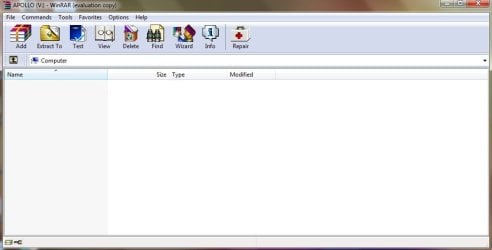
I opened path in winrar and deleted following files,
Apollo....ink (shortcut, size 702)
Thumbs.db
autorun.inf
desktop.ini
Recycle Bin

After that hard disk does not show anything in it.
I have tried "attrib -h -r -s /s /d v:\*.*" in run.

When i search some files from that hard disk in my computer, search result does show file from hard disk.
I can open that files too but its a luck for 4-5 sec and it crashes.

Thanks
 

Attachments
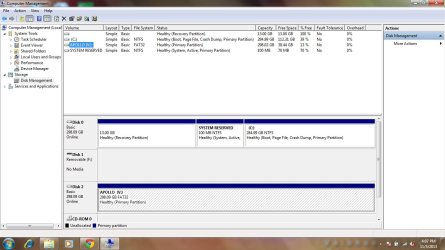
  • disk mgmt.jpg
    disk mgmt.jpg
    110.7 KB · Views: 8
  • rar.jpg
    rar.jpg
    31.6 KB · Views: 2

My Computer

Computer type
Laptop
Computer Manufacturer/Model Number
Acer
OS
Windows 7 home 32bit
CPU
i3
Memory
4gb
Vacky,

:info: Please click on the Windows 7 Start button and then on Control Panel
In Control Panel, select the Folder Options link.
Click on the View tab in the Folder Options window.

In the Advanced Settings area, locate the Hidden files and folders category.
Check: Show hidden files, folders, and drives
Uncheck: Hide protected operating system files (Recommended)
Click Apply and OK at the bottom of the Folder Options window.


:info: Disconnect the problem USB drive for now.


:info: Next, download UsbFix:
http://www.usbfix.net/
Press the green Download button
Save to the Desktop.

In the next step, a window requesting the connection of removable drives appears. Please connect the problem USB drive when requested!
Right-click the downloaded USBFix file and select: Run as Administrator
Press: Research
This option scans the connected drives, and reports its infected Files and Folders
When done, the program closes on its own, and a report appears.
(The report file is also found at C:\UsbFix.txt)
:ar: Please post the UsbFix.txt (Research) report in your reply.

:info: Once again, run USBFix as Administrator, but, this time, press: Listing
It creates a report of all the Folders and Files found at the root of every hard drive, partition, or removable drive connected.
:ar: Also post the UsbFix.txt (Listing) report in your reply.


Note 1: If USBFix does not run in normal Windows, please run in Safe Mode:
Restart your computer.
When the computer starts, tap the F8 key on the keyboard repeatedly until presented with the Advanced Boot Options menu
Using the arrow keys, select: Safe Mode
Press the Enter key on your keyboard to boot into the selected mode.

Note 2: If your AntiVirus program detects USB as malware, either let the AV program allow USBFix to run, or, temporarily disable your AntiVirus program:
Info - http://www.bleepingcomputer.com/forums/t/114351/how-to-temporarily-disable-your-anti-virus-firewall-and-anti-malware-programs/
When done with USBFix, re-enable your AV!


:info: Last, please download the Farbar Recovery Scan Tool
Download: http://www.bleepingcomputer.com/download/farbar-recovery-scan-tool/
Select the version that applies to your system.
Save it to your Desktop.

Double-click the downloaded file to run it.
When the tool opens click Yes to the disclaimer.
Press the Scan button.

The tool makes a log (FRST.txt) in the same directory from which the tool is run (Desktop).
:ar: Please provide the FRST.txt in your reply.

The first time the tool is run, it also makes another log: Addition.txt
:ar: Also post the Addition.txt in your reply.
 
Last edited:

My Computer

Computer type
PC/Desktop
Computer Manufacturer/Model Number
An ol' eMachines
OS
Windows 7 Home Premium
Internet Speed
Fine for me...I'm retired!
Thanks cottonball for detailed steps but I am getting page not found error when I try to download USBfix. May be site is down, will try again.
 

My Computer

Computer type
Laptop
Computer Manufacturer/Model Number
Acer
OS
Windows 7 home 32bit
CPU
i3
Memory
4gb
Hmmmmm, it worked fo me....

Download UsbFix from here:
http://www.infospyware.com/utiles/usbfix/
It is a Spanish language website, but the program is in English.
To download. press the button that says: Descagar (It means: Download)
 

My Computer

Computer type
PC/Desktop
Computer Manufacturer/Model Number
An ol' eMachines
OS
Windows 7 Home Premium
Internet Speed
Fine for me...I'm retired!
Hi,

I was still not able to download USBFix. My antivirus was deleting that file without even notifying. I disabled it and then it allowed me to download.

Attaching USB fix log files.

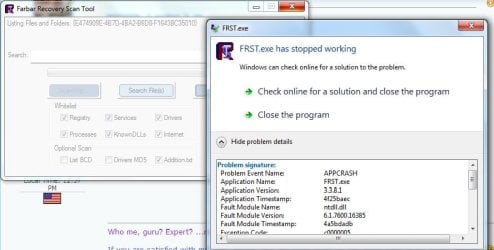
I have downloaded FRST.exe. First time, system crashed and blue screen appeared.
second and third time it stopped and gave error (attached screenshot)

Thanks
 

Attachments

My Computer

Computer type
Laptop
Computer Manufacturer/Model Number
Acer
OS
Windows 7 home 32bit
CPU
i3
Memory
4gb
Hi,

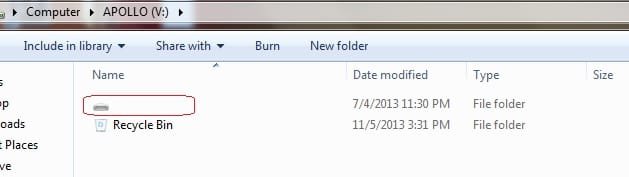
I am now able to see my folders in highlighted icon (screenshot attached). I think its hidden icon.

But is this fixed? or there can be more hidden issues?
 

Attachments

  • icon.jpg
    icon.jpg
    11.9 KB · Views: 52

My Computer

Computer type
Laptop
Computer Manufacturer/Model Number
Acer
OS
Windows 7 home 32bit
CPU
i3
Memory
4gb
message to cottonball:

Just breaking in for a moment.

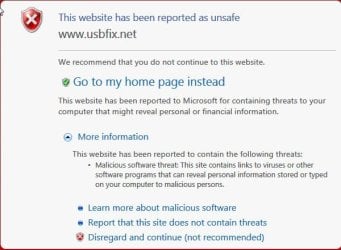
IE blocked navigation to www.usbfix.net with the following notification..

07-11-2013 01-03-10.jpg

Just curious to know what is kicking.:)
 

My Computer

OS
Windows 7 Home Premium 32 bit
Did you download FRST 32-bit, or 64-bit?

On the external HD, are you able to see anything there now?
If yes, please capture an image.


@jumanji,

It is a safe website, on a well known forum in France, SOSVirus.net.
Have used it many times.

Also provided the link for InfoSpyware. It is also safe.

Have no clue as to why the message appeared. Have never gotten any warning.


Need to be out for a while.

Hang in there, Vacky!!

Please delete the FRST download, and download it once again. If not, download it to a different computer, and use a USB pendrive to move it to the computer where the external drive V:\ is located.

See if that works.

We need to look at FRST to see what else might be in the system.
 

My Computer

Computer type
PC/Desktop
Computer Manufacturer/Model Number
An ol' eMachines
OS
Windows 7 Home Premium
Internet Speed
Fine for me...I'm retired!
Vacky,

For now, although the no name icon on the external HD (shown in Post #6 capture) contains your files, please do not open that icon/folder.

We need to get rid of the malware's loading points and any files associated with it!!

Any luck with FRST?

Another option is to run FRST in Safe Mode.


On a different subject, are you located outside of the USA?
Just want to know for time zone differences.
 

My Computer

Computer type
PC/Desktop
Computer Manufacturer/Model Number
An ol' eMachines
OS
Windows 7 Home Premium
Internet Speed
Fine for me...I'm retired!
Hi,

I downloaded FRST 32bit version. No luck with it.
Tried is safe mode, from other computer but same error.

I am located in India, so difference in time zone...
 

My Computer

Computer type
Laptop
Computer Manufacturer/Model Number
Acer
OS
Windows 7 home 32bit
CPU
i3
Memory
4gb
Thanks for the info.

Let's press on...

:info: Please click on Start, and in the search box above it, type: cmd
When the Command (cmd) entry appears on the list produced, right click it and select: Run as Administrator

When the Command Prompt opens, copy/paste (with the mouse) the following, and press: Enter

Code:
attrib -h -s -r -a /s /d [B][COLOR=red]V[/COLOR][/B]:\*.*
(Change the drive letter to the letter corresponding to the problem USB removable drive, if necessary.)


:info: Now, please run USBFix once again
Press: Deletion

When done, the program closes on its own, and a report appears.
The report file is also found at C:\UsbFix.txt
:ar: Please post the UsbFix.txt (Deletion) report in your reply.

Note: As before, if your AntiVirus program detects USB as malware, either let the AV program allow USBFix to run, or, temporarily disable your AntiVirus program.


:info: Please download RogueKiller:
http://tigzy.geekstogo.com/roguekiller.php
Scroll down the page and select the version that applies to the system.
Save to the Desktop.

After closing all windows and browsers, right-click the downloaded RogueKiller file and select: Run as Administrator
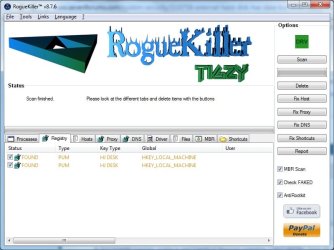
At the program console, wait for the Prescan to finish. (Under Status, it says: Prescan finished.)
Next, press: SCAN

When done, a report opens on the Desktop: RKreport.txt
:ar: Please provide the RKreport.txt (Mode: Scan) in your reply.
 

My Computer

Computer type
PC/Desktop
Computer Manufacturer/Model Number
An ol' eMachines
OS
Windows 7 Home Premium
Internet Speed
Fine for me...I'm retired!
Vacky,

:info: Please go to Start > All Programs > Accessories > Command Prompt
Right-click on the Command Prompt and select: Run As Administrator
At the blinking cursor of the Command Prompt, type in (or copy/paste with mouse) the following commands inside the code box, one at a time, and press Enter after each:

Code:
cd\
v:
dir /s /a

To copy the text contained/produced in the Command Prompt, click on the small command icon in the top left corner, and then choose:
Edit > Select All
Once again, Edit > Copy

Open Notepad, and paste the text to it.
:ar: Please post the text in your reply.

To close the Command Prompt, use the [X], or type in: exit


:info: Next, please run Malwarebytes Anti-Malware:
Download: Malwarebytes Anti-Malware Download
Save to the Desktop
Double-click the downloaded MBAM file to run it.

When the installation begins, follow the prompts in the setup process.
DO NOT make any changes to default settings and when the program has finished installing, make sure only the following options are checked:
>Update Malwarebytes’ Anti-Malware
>Launch Malwarebytes’ Anti-Malware
Uncheck:
>Enable free trial of Malwarebytes Anti-Malware PRO
Click on the Finish button.

If an update is found, the program automatically updates itself.
At the program console, on the Scanner tab, and select: Perform Full Scan

When the Select the Drives to scan prompt appears, make sure all drives (except: CD-Rom/DVD) are selected.
Next, click on the Scan button.

When the Malwarebytes scan is completed, click on: Show Results
When presented with a screen showing the malware detected, make sure everything is Checked, and click on: Remove Selected

When removal is completed, a report opens in Notepad.
:ar: Please copy/paste the entire contents of the MBAM report in your reply.

Note: If MBAM encounters a file that is difficult to remove, you are asked to reboot the computer so MBAM can proceed with the disinfection process. If asked to restart the computer, please do so immediately. Failure to reboot normally (not into safe mode) prevents MBAM from removing all the malware.
 

My Computer

Computer type
PC/Desktop
Computer Manufacturer/Model Number
An ol' eMachines
OS
Windows 7 Home Premium
Internet Speed
Fine for me...I'm retired!
CMD and MBAS reports attached. Found some 39 infected files.
thanks,
 

Attachments

My Computer

Computer type
Laptop
Computer Manufacturer/Model Number
Acer
OS
Windows 7 home 32bit
CPU
i3
Memory
4gb
No wonder you are infected!!

There are all sorts of crack and keygen entries in the MBAM report!!!

:warn: Keygens, cracks and serials violate copyright and ownership of software. They are used to get programs for free that one should pay for. It is known as software piracy, which is equivalent to stealing.

Note that companies of the legal software can track illegal copies, and make them stop working.
And, if by any chance, you are attending a school, and are using an illegal copy of a program, be aware that if the school finds out, you may get suspended or even expelled. Any school that knowingly allows students to use illegal software is implicated in the crime as well, and a legal software company has the right to pursue legal action against the school.

You need to remove any and all programs from your system for which a keygen, crack or serial was used, particularly if you wish to continue receiving support. Piracy is not supported here. :warn:
 

My Computer

Computer type
PC/Desktop
Computer Manufacturer/Model Number
An ol' eMachines
OS
Windows 7 Home Premium
Internet Speed
Fine for me...I'm retired!
Ok, So what do u suggest cottonball?

I dont even use all these softwares. It is a second hand laptop and he gave me some softwares and games in Hard disk to play.

Shall I get it formatted from service center? Will it remove all these issues?
And How do I clean my hard disk?

Thanks,
 

My Computer

Computer type
Laptop
Computer Manufacturer/Model Number
Acer
OS
Windows 7 home 32bit
CPU
i3
Memory
4gb
:info: These are the programs that were installed illegally, and must be uninstalled:

Adobe Creative Suite Web Premium
CyberLink PowerCinema 4.0
CyberLink PowerDVD
Macromedia Authorware 7
Photodex ProShow
ZONE_ALARM7
Cool_MP3_Splitter_v1
Sound Forge 6.0
Adobe Photoshop CS6 Full Version [English]
EditPlus3.0.rar
PDF.Password.Remover.v3.0.rar
Adobe Photoshop cs 2

:info: After uninstalling the above, run CKScanner:
Download - http://downloads.malwareremoval.com/CKScanner.exe
Important: - Save to your Desktop
Double-click CKScanner.exe, then, click: Search For Files
When a list appears, click: Save List To File
A message box verifies the file saved.
:ar: Double-click the CKFiles.txt on your Desktop, and copy/paste its contents in your reply.

:info: On the following:
Shall I get it formatted from service center?
Do you mean returning the computer to factory defaults, doing a clean install...?
Not sure what you mean by the service center.

:info: Also, there are some things I do not understand.
Thought that V:\ is the drive where you have your data stored.
The report provided shows /Installers/Drivers for an Acer 4820tg/Chipset_Intel_9.1.1...?

Why is that on the V:\ drive???
 

My Computer

Computer type
PC/Desktop
Computer Manufacturer/Model Number
An ol' eMachines
OS
Windows 7 Home Premium
Internet Speed
Fine for me...I'm retired!
Data not visible on hard disk

Hi,

As per your article, I've attached the 4 files named Research, Listing, FRST and Addition. Please help me making the data on my hard disk visible.

Your help is appreciated.
 

Attachments

My Computer

Computer type
Laptop
Computer Manufacturer/Model Number
Dell
OS
Windows 7 Professional 32bit
solution for shortcut error

Hey bro whatsup??if your hard drive is showing shorcuts and not showing data then download hfv in you computer run this app set a password select your drive which is infected click on sub files and folder and click on disinfect and then complete on delete virus believe me it realy work for shortcut virus
 

My Computer

Computer type
PC/Desktop
Computer Manufacturer/Model Number
asus
OS
windows 10pro 64bit
CPU
intel i5 2400
Motherboard
asus p8p67
Memory
corsair 8gb dominator
Graphics Card(s)
gtx 760 nvidia
Hard Drives
Seagate 1tb
Antivirus
windows defender
Browser
firefox
Back
Top