External Hard Drive (Clickfree) Having Problems Accessing

jeffh2111

New member
Local time
10:03 PM
Messages
3
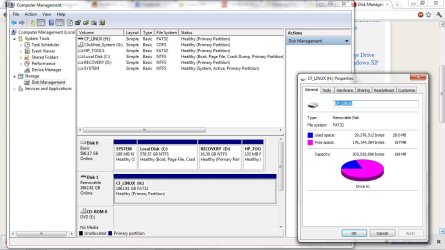
External Hard Drive 2TB (Clickfree) converted to LINUX_CF 196MB, Why??

Okay I have a problem with my 2TB Clickfree C6 Harddrive, When I first got the drive I just plugged it in and I could browse all the files much like a usb stick, I ended up installing the software that comes with it and updated it, Now it wants to act as a back up device and just back up all my files, my problem now is it has changed for some reason to - H: CF_LINUX and only 196MB where it used to say H: Removable Drive with 2TB .. I know this sounds very complicated, I'm thinking I can reformat the drive but I would lose all the files I had on the drive, which would be bad seeing is how I backed up everything I had then deleted off the computer, Hense the purpose of a External hard drive. If anyone knows what is the problem please help.

Okay basically, I want my drive to be set back to a Removable Drive with 2TB like i had it before
just confused why it is set to CF_LINUX only 196MB FAT32

and if anyone knows if the files have been deleted:cry:
 
Last edited:

My Computer

OS
Windows 7
Do not initiate or format the drive for any reason unless you can back up all the data on it.

Lesson learned: Do not install the "bloat-ware" that comes with these external drives. W7 can handle all of the functions in this redundant software. And if you were to be unhappy with Windows functionality, there are much better, stand alone programs that you could use instead.

  • Can you see your data on the drive when looking in Windows Explorer?
  • With the drive connected, could you post a screenshot of the Disk Management screen here?
  • Do you recall the software doing a backup during or after you installed it?
 

My Computer

Computer type
PC/Desktop
Computer Manufacturer/Model Number
Home Built - Jan 2013
OS
Windows 7 64 Bit Home Premium SP1
CPU
i7-3820
Motherboard
Asus P9X79-PRO - Bios 4608
Memory
GSkill F3-14900CL9Q - 16GB
Graphics Card(s)
EVGA GeForce GTX660 - Driver 352.86
Sound Card
On board Realtek ALC898
Monitor(s) Displays
Acer S271HL
Screen Resolution
1920 x 1080
Hard Drives
#1- Samsung 840 Pro Series
#2- Western Digital WD1002FAEX Sata3 Black
#3- Western Digital WD1002FAEX Sata3 Black
PSU
Corsair CMPSU-850TX-V2 - 850 watt (by Seasonic)
Case
Corsair Obsidian 550D
Cooling
Standard 3 120mm case fans, Cooler Master Hyper 212 EVO
Keyboard
MS KC-0405
Mouse
Intellimouse 5-button
Internet Speed
56 Mbits/Sec (on a good day)
Antivirus
Avast & Malwarebytes
Browser
Firefox
Other Info
Asus DVD - DRW-24B1ST 24X
Hey thanks,
As of now No I cannot see my 2TB drive with folders in Windows all I see is the Drive with 2 folders I also took a screen shot of that, Im starting to think maybe it partitioned its self, hope the screen shots help you understand my problem.

Thanks
-Jeff
 

Attachments

  • screenshotofdt.jpg
    screenshotofdt.jpg
    115.3 KB · Views: 81
  • screentshot2.jpg
    screentshot2.jpg
    92.4 KB · Views: 56

My Computer

OS
Windows 7
Uhg. That does not look good.

I can't be completely sure sitting here, but I'd say that the software you installed for that drive prepared the drive to do image backups of the system. It certainly looks like it reformatted the drive in which case you may have lost your data.

Let me put up the bat-signal to some other folks to see if anyone has some ideas to recover the data. Do not do anything further that may complicate or eliminate a recovery process. Hang tight.
 

My Computer

Computer type
PC/Desktop
Computer Manufacturer/Model Number
Home Built - Jan 2013
OS
Windows 7 64 Bit Home Premium SP1
CPU
i7-3820
Motherboard
Asus P9X79-PRO - Bios 4608
Memory
GSkill F3-14900CL9Q - 16GB
Graphics Card(s)
EVGA GeForce GTX660 - Driver 352.86
Sound Card
On board Realtek ALC898
Monitor(s) Displays
Acer S271HL
Screen Resolution
1920 x 1080
Hard Drives
#1- Samsung 840 Pro Series
#2- Western Digital WD1002FAEX Sata3 Black
#3- Western Digital WD1002FAEX Sata3 Black
PSU
Corsair CMPSU-850TX-V2 - 850 watt (by Seasonic)
Case
Corsair Obsidian 550D
Cooling
Standard 3 120mm case fans, Cooler Master Hyper 212 EVO
Keyboard
MS KC-0405
Mouse
Intellimouse 5-button
Internet Speed
56 Mbits/Sec (on a good day)
Antivirus
Avast & Malwarebytes
Browser
Firefox
Other Info
Asus DVD - DRW-24B1ST 24X
I found this in another thread. You could try it to see if you can recover the data:
Recuva - Features
 

My Computer

Computer type
PC/Desktop
Computer Manufacturer/Model Number
Home Built - Jan 2013
OS
Windows 7 64 Bit Home Premium SP1
CPU
i7-3820
Motherboard
Asus P9X79-PRO - Bios 4608
Memory
GSkill F3-14900CL9Q - 16GB
Graphics Card(s)
EVGA GeForce GTX660 - Driver 352.86
Sound Card
On board Realtek ALC898
Monitor(s) Displays
Acer S271HL
Screen Resolution
1920 x 1080
Hard Drives
#1- Samsung 840 Pro Series
#2- Western Digital WD1002FAEX Sata3 Black
#3- Western Digital WD1002FAEX Sata3 Black
PSU
Corsair CMPSU-850TX-V2 - 850 watt (by Seasonic)
Case
Corsair Obsidian 550D
Cooling
Standard 3 120mm case fans, Cooler Master Hyper 212 EVO
Keyboard
MS KC-0405
Mouse
Intellimouse 5-button
Internet Speed
56 Mbits/Sec (on a good day)
Antivirus
Avast & Malwarebytes
Browser
Firefox
Other Info
Asus DVD - DRW-24B1ST 24X
Okay thanks, Im checking this program out, see if it helps.

Is there going to be a way to set it back to I can use it like a usb stick and just browse all the files?
 

My Computer

OS
Windows 7
Yes, that is easy (easier).

Once you have recovered your files you will want to uninstall all the ClickFree software, perhaps do a System Restore to a date that was before you installed it, and then format the drive using Disk Management to be a normal, basic, NTFS volume.

Then you can use it like a normal disk drive.
 

My Computer

Computer type
PC/Desktop
Computer Manufacturer/Model Number
Home Built - Jan 2013
OS
Windows 7 64 Bit Home Premium SP1
CPU
i7-3820
Motherboard
Asus P9X79-PRO - Bios 4608
Memory
GSkill F3-14900CL9Q - 16GB
Graphics Card(s)
EVGA GeForce GTX660 - Driver 352.86
Sound Card
On board Realtek ALC898
Monitor(s) Displays
Acer S271HL
Screen Resolution
1920 x 1080
Hard Drives
#1- Samsung 840 Pro Series
#2- Western Digital WD1002FAEX Sata3 Black
#3- Western Digital WD1002FAEX Sata3 Black
PSU
Corsair CMPSU-850TX-V2 - 850 watt (by Seasonic)
Case
Corsair Obsidian 550D
Cooling
Standard 3 120mm case fans, Cooler Master Hyper 212 EVO
Keyboard
MS KC-0405
Mouse
Intellimouse 5-button
Internet Speed
56 Mbits/Sec (on a good day)
Antivirus
Avast & Malwarebytes
Browser
Firefox
Other Info
Asus DVD - DRW-24B1ST 24X
Back
Top