My External Hard Drive (My Book) was always Drive letter F.
I went to sleep and woke up to find Windows 7 Pro had updated and rebooted and I was welcomed by my login screen.
Consequently now my My Book external HDD now reads as Drive letter G.
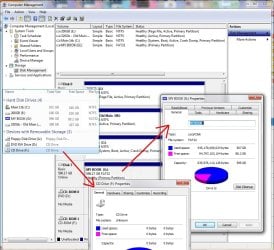
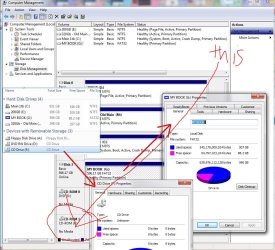
I went into Administrative Tools > Computer Management > Disk Management
Drive letter F is not available.
F is assigned to a drive that does not exist and never has. I am confused. I only have one CD drive and it says now that I have 2 even though the one addressed as F doesn't have any information. If I click on F it says "Insert Disk"
Attachments
HDDLetterChanged-WontChangeBack.jpg
132.5 KB
· Views: 3
My Computer
At a glance
Microsoft Windows 7 Professional Edition Serv...Intel(R) Core(TM)2 Quad Q9550 @2.83GHz (Xeon)...4095 MB (4 x 1024 MBytes DDR2 Dual Symmetric)Sapphire HD 7770 GHz Edition (shows Radeon R7...
Computer type
PC/Desktop
Computer Manufacturer/Model Number
HP-Pavilion-a6000-Desktop-PC
OS
Microsoft Windows 7 Professional Edition Service Pack 1 (build 7601), 64-bit
Sapphire HD 7770 GHz Edition (shows Radeon R7 200)
Sound Card
Realtek High Definition Audio Driver Version 6.0.1.6662
Monitor(s) Displays
HP w19b 18.6" 5:3 (SN: CNC703PN1G)
Screen Resolution
1440 x 900
Hard Drives
1080 GB total
C: (320Gb): WDC WD3200AAKS-75L9A0 ATA
D: (Optical Drive): ATAPI DVD A DH16A6S ATA Device
E: (1Tb): WDC WD10EARS-00S8B1 ATA
F: (Backup 2 Tb): Clikfree Backup Drive USB
PSU
GX750
Case
Black/Blue APEVIA X-Hermes
Cooling
2 Top , 1 back, 1 front fan all 180 mm & side 200mm
Keyboard
Logitech G110
Mouse
Logitech G500s
Internet Speed
High speed cable
Antivirus
Avast! Internet Security 2014.9.0.2021
Browser
Firefox 44 (x86 en-US)
Other Info
BIOS American Megatrends
Date:
09/10/09 10:25:18 Ver: 5.43
Update: The mysterious other CD Rom drive seems to be MagicJack.
I did some research but the following tech help did NOT work as you can see by the previous post picture that it doesn't not show it up in Disk Management:
Sapphire HD 7770 GHz Edition (shows Radeon R7 200)
Sound Card
Realtek High Definition Audio Driver Version 6.0.1.6662
Monitor(s) Displays
HP w19b 18.6" 5:3 (SN: CNC703PN1G)
Screen Resolution
1440 x 900
Hard Drives
1080 GB total
C: (320Gb): WDC WD3200AAKS-75L9A0 ATA
D: (Optical Drive): ATAPI DVD A DH16A6S ATA Device
E: (1Tb): WDC WD10EARS-00S8B1 ATA
F: (Backup 2 Tb): Clikfree Backup Drive USB
PSU
GX750
Case
Black/Blue APEVIA X-Hermes
Cooling
2 Top , 1 back, 1 front fan all 180 mm & side 200mm
Keyboard
Logitech G110
Mouse
Logitech G500s
Internet Speed
High speed cable
Antivirus
Avast! Internet Security 2014.9.0.2021
Browser
Firefox 44 (x86 en-US)
Other Info
BIOS American Megatrends
Date:
09/10/09 10:25:18 Ver: 5.43
you cant right click on the disk in disk management and change letter and path for the magicjack drive? change f to something else then change your g drive to f same way.
My Computer
At a glance
10 Pro x64Ryzen 9 3900X64GB(4x16GB) DDR4EVGA 1080ti FTW3
I have had it for about 3 weeks and I had rebooted before. This time however I had fallen asleep watching videos and it rebooted on its own. Don't know why the MagicJack decided to be F instead. I guess the external My Book drive loaded last so it got the G letter? I don't know how it all works. All I can figure it try unplugging MagicJack and rebooting without it so that the external drive can be back to F but ... I don't know how to prevent that from happening again if that works.
Right now I am on my way out the door to the mechanics but I will try that when I get back.
My Computer
At a glance
Microsoft Windows 7 Professional Edition Serv...Intel(R) Core(TM)2 Quad Q9550 @2.83GHz (Xeon)...4095 MB (4 x 1024 MBytes DDR2 Dual Symmetric)Sapphire HD 7770 GHz Edition (shows Radeon R7...
Computer type
PC/Desktop
Computer Manufacturer/Model Number
HP-Pavilion-a6000-Desktop-PC
OS
Microsoft Windows 7 Professional Edition Service Pack 1 (build 7601), 64-bit
Sapphire HD 7770 GHz Edition (shows Radeon R7 200)
Sound Card
Realtek High Definition Audio Driver Version 6.0.1.6662
Monitor(s) Displays
HP w19b 18.6" 5:3 (SN: CNC703PN1G)
Screen Resolution
1440 x 900
Hard Drives
1080 GB total
C: (320Gb): WDC WD3200AAKS-75L9A0 ATA
D: (Optical Drive): ATAPI DVD A DH16A6S ATA Device
E: (1Tb): WDC WD10EARS-00S8B1 ATA
F: (Backup 2 Tb): Clikfree Backup Drive USB
PSU
GX750
Case
Black/Blue APEVIA X-Hermes
Cooling
2 Top , 1 back, 1 front fan all 180 mm & side 200mm
Keyboard
Logitech G110
Mouse
Logitech G500s
Internet Speed
High speed cable
Antivirus
Avast! Internet Security 2014.9.0.2021
Browser
Firefox 44 (x86 en-US)
Other Info
BIOS American Megatrends
Date:
09/10/09 10:25:18 Ver: 5.43
you cant right click on the disk in disk management and change letter and path for the magicjack drive? change f to something else then change your g drive to f same way.
Sapphire HD 7770 GHz Edition (shows Radeon R7 200)
Sound Card
Realtek High Definition Audio Driver Version 6.0.1.6662
Monitor(s) Displays
HP w19b 18.6" 5:3 (SN: CNC703PN1G)
Screen Resolution
1440 x 900
Hard Drives
1080 GB total
C: (320Gb): WDC WD3200AAKS-75L9A0 ATA
D: (Optical Drive): ATAPI DVD A DH16A6S ATA Device
E: (1Tb): WDC WD10EARS-00S8B1 ATA
F: (Backup 2 Tb): Clikfree Backup Drive USB
PSU
GX750
Case
Black/Blue APEVIA X-Hermes
Cooling
2 Top , 1 back, 1 front fan all 180 mm & side 200mm
Keyboard
Logitech G110
Mouse
Logitech G500s
Internet Speed
High speed cable
Antivirus
Avast! Internet Security 2014.9.0.2021
Browser
Firefox 44 (x86 en-US)
Other Info
BIOS American Megatrends
Date:
09/10/09 10:25:18 Ver: 5.43
AH how come I didn't see that? I must be blind. Doing that now. I must have been focusing on just the top part that says:
200GB (E:)
320Gb - Old Main (M:)
Main1tb (C:)
MY BOOK (G:)
and that was all .. no F: ... so that is why I thought it wasn't there in Computer Management under Disk Management.
Anyway doing it now and have changed the HDD that was M to O and my MagicJack now to M. Will it stay at that or change? Are you familiar with MagicJack yourself?
The only reason my 320 Gb HDD was lettered as M is because that is the way my friend did it when he made a copy of my Windows to my new HDD (the 1 Tb). The 320Gb has no files on it so it didn't matter about shortcuts when changing the drive letter there. So changing that to O enabled me to change Magic Jack to M and now I should be able to change MY BOOK to F.
Yes thank you so much! As soon as I changed it MyBook auto run came up and I also tested out one of the shortcuts to my video list on MyBook and it came up! Yay!! So I know all the shortcuts to F should work now!
Thanks for your help!!!!
My Computer
At a glance
Microsoft Windows 7 Professional Edition Serv...Intel(R) Core(TM)2 Quad Q9550 @2.83GHz (Xeon)...4095 MB (4 x 1024 MBytes DDR2 Dual Symmetric)Sapphire HD 7770 GHz Edition (shows Radeon R7...
Computer type
PC/Desktop
Computer Manufacturer/Model Number
HP-Pavilion-a6000-Desktop-PC
OS
Microsoft Windows 7 Professional Edition Service Pack 1 (build 7601), 64-bit
Sapphire HD 7770 GHz Edition (shows Radeon R7 200)
Sound Card
Realtek High Definition Audio Driver Version 6.0.1.6662
Monitor(s) Displays
HP w19b 18.6" 5:3 (SN: CNC703PN1G)
Screen Resolution
1440 x 900
Hard Drives
1080 GB total
C: (320Gb): WDC WD3200AAKS-75L9A0 ATA
D: (Optical Drive): ATAPI DVD A DH16A6S ATA Device
E: (1Tb): WDC WD10EARS-00S8B1 ATA
F: (Backup 2 Tb): Clikfree Backup Drive USB
PSU
GX750
Case
Black/Blue APEVIA X-Hermes
Cooling
2 Top , 1 back, 1 front fan all 180 mm & side 200mm
Keyboard
Logitech G110
Mouse
Logitech G500s
Internet Speed
High speed cable
Antivirus
Avast! Internet Security 2014.9.0.2021
Browser
Firefox 44 (x86 en-US)
Other Info
BIOS American Megatrends
Date:
09/10/09 10:25:18 Ver: 5.43



 I must have been focusing on just the top part that says:

